

Semantic search has changed how modern applications understand user queries by focusing on meaning instead of exact keywords. In this guide, you’ll learn how to build scalable semantic search systems using Pinecone, a fully managed vector database designed for high-performance similarity search. We’ll explore how vector embeddings power intent-based search and why they outperform traditional keyword methods. You’ll also see how Pinecone enables real-time, low-latency search across massive datasets without complex infrastructure management. This guide is designed for developers and product teams who want a clear architectural understanding without getting lost in code. We’ll cover common use cases like AI search, chatbots, and RAG applications. By the end, you’ll know how to design a production-ready semantic search solution that scales with your data and user demand.
Introduction: Why Semantic Search Is the Backbone of Modern AI-Driven Search Systems
Search has moved beyond simple keyword matching. Today, users expect systems to understand intent, context, and meaning—whether they’re searching legal documents, product catalogs, or support content. This is where semantic search comes in.
Unlike traditional search that matches exact words, semantic search:
- Understands synonyms and intent
- Uses vector embeddings to capture meaning
- Delivers more relevant, human-like results
At Bnxt.ai, we see semantic search as the foundation of modern AI applications—powering recommendation engines, chatbots, and knowledge systems. With LLMs and Retrieval-Augmented Generation (RAG) becoming mainstream, developers need fast, scalable vector databases. Pinecone makes this possible by enabling real-time similarity search across massive datasets.
Understanding the Foundations of Semantic Search Technology
Understanding the foundations of semantic search helps businesses build intelligent, intent-driven applications that deliver accurate results at scale. By leveraging vector embeddings and similarity search, organizations can create production-ready AI systems faster and more efficiently. Partnering with a semantic search development company or an experienced AI solutions agency ensures you get expert architecture design, faster deployment, and long-term optimization.
What Is Semantic Search and How Does It Work?
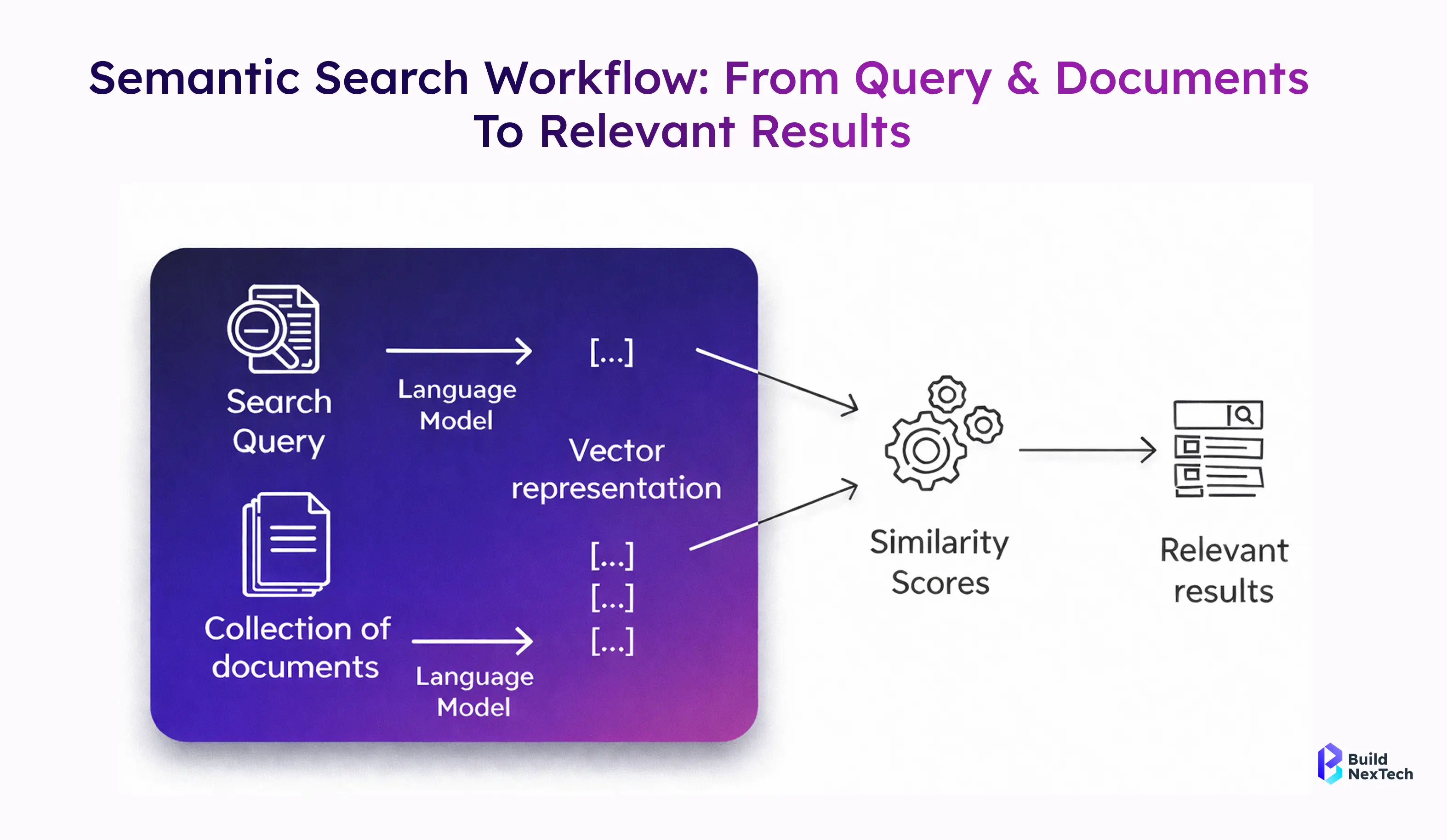
Semantic search is an information retrieval approach that focuses on understanding the meaning behind a search query rather than matching exact words. Instead of relying on string similarity or regular expressions, semantic search represents content and queries as vectors in a shared vector space.
- Text is converted into vector embeddings using an embedding model
- Vectors capture semantics, word senses, and contextual relationships
- Similarity search (often cosine similarity) retrieves the most relevant results
For example, a search query like “contract termination clauses” can retrieve relevant legal documents even if those exact words do not appear. By using OpenAI embeddings such as text-embedding-ada, Voyage Embeddings, or Ollama models, semantic search systems achieve far higher accuracy than traditional Information Retrieval Systems.
In practice, semantic search powers face search AI, enterprise search AI, and modern knowledge management platforms used by data science teams and customer service teams alike.
Why Semantic Search Is Essential for Modern Digital Applications
Modern applications demand search experiences that are fast, relevant, and adaptive. Keyword-based search fails when dealing with unstructured data like PDFs, emails, or customer feedback. Semantic search solves this by understanding intent and context at scale.
- Improves relevance across enterprise AI search platforms
- Enables multi-lingual and intent-based search experiences
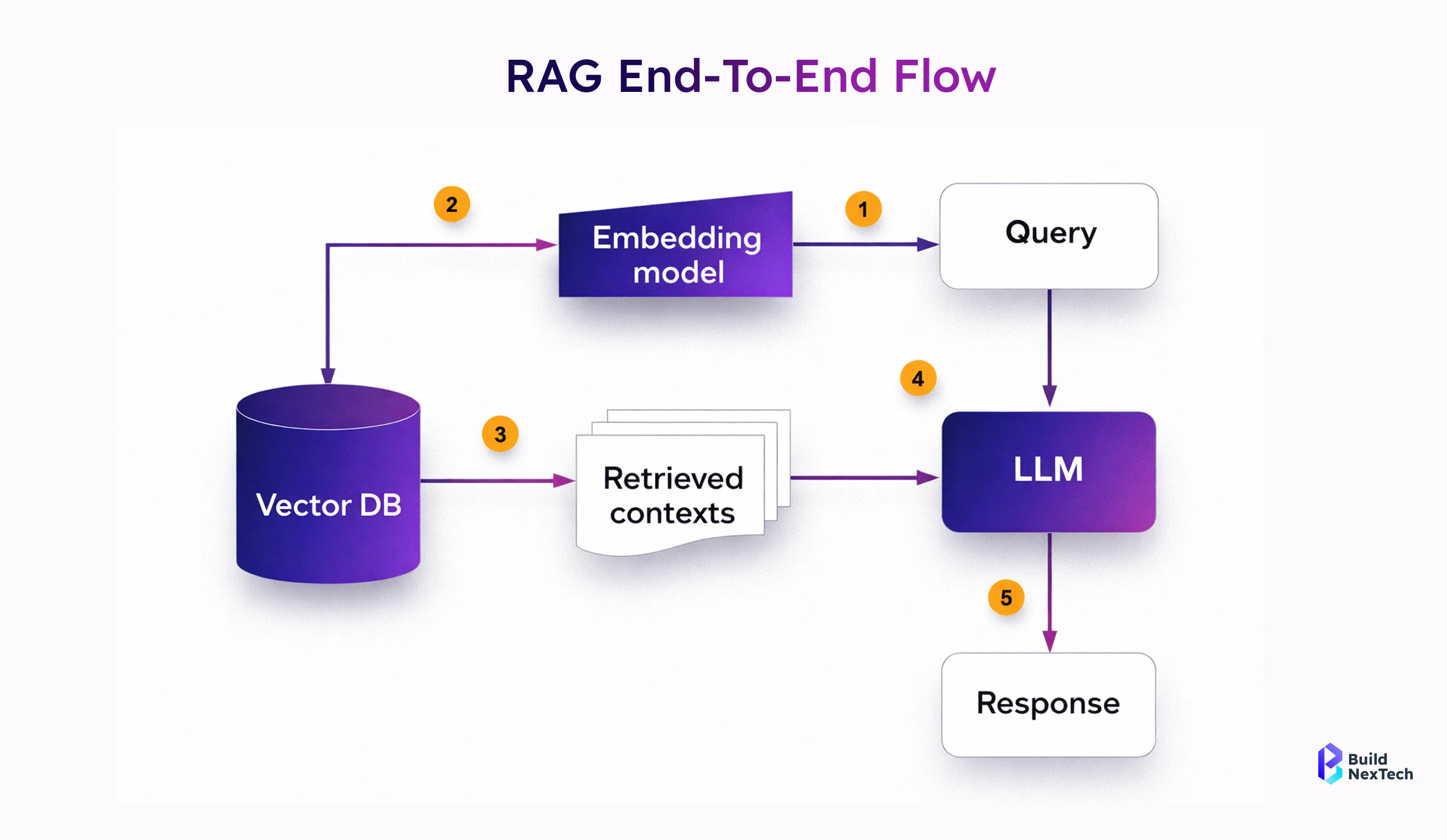
- Supports RAG applications and LLM-powered workflows
Industries such as finance, healthcare, and legal services increasingly rely on semantic retrieval to analyze landmark U.S. cases, machine learning in finance models, and regulatory documentation. According to recent enterprise AI search trends, organisations using vector search report higher engagement and lower query latencies.
Semantic search is no longer optional—it is a core capability for search applications, recommendation systems, and AI-powered decision-making tools.
Introduction to Pinecone as a High-Performance Vector Database
Pinecone is a high-performance vector database built to handle large-scale similarity search with low latency and high accuracy. It removes the complexity of managing vector infrastructure, making it easier to deploy production-ready AI applications. Working with a vector database consulting firm, an AI development partner, or a machine learning services provider helps you implement Pinecone effectively and optimize performance from day one.
What Is Pinecone and Why Is It Built for Vector Search?
Pinecone is a cloud-native vector database designed specifically for storing, indexing, and querying vector embeddings at scale. Unlike traditional databases, Pinecone is optimised for high-dimensional data and Approximate Nearest Neighbour (ANN) search.
- Purpose-built vector index with dense index support
- Uses algorithms like Hierarchical Navigable Small World (HNSW)
- Designed for low search latency and high availability
Compared to alternatives such as FAISS, Chroma, Weaviate, or Elasticsearch AI, Pinecone removes infrastructure complexity. Developers do not need to manage log-structured merge trees or shard vector stores manually. Pinecone pricing is usage-based, making it attractive for both startups and enterprise AI search deployments.
Pinecone AI continues to evolve, with ongoing pinecone research and frequent pinecone news highlighting advancements in scalability and performance.
Setting Up Your Pinecone Environment for Semantic Search Development
Getting started with Pinecone is straightforward and developer-friendly. You can integrate it into an existing Python environment or Node version 20 setup within minutes.
- Create an index with defined dimensions and a similarity metric (cosine)
- Secure access using an API key
- Choose regions close to users to minimise query latencies
Most developers use the Pinecone Python SDK alongside tools like LangChain, Flask REST APIs, and Next.js frontends. Pinecone also integrates smoothly with CI/CD pipelines using CircleCI, unit tests, and deployment platforms like Heroku.
A well-configured environment ensures efficient vector data ingestion, fast similarity search, and reliable index stats monitoring for production workloads.
Integrating the Pinecone API for Efficient Vector Search Operations
Understanding the Pinecone API and Its Core Capabilities
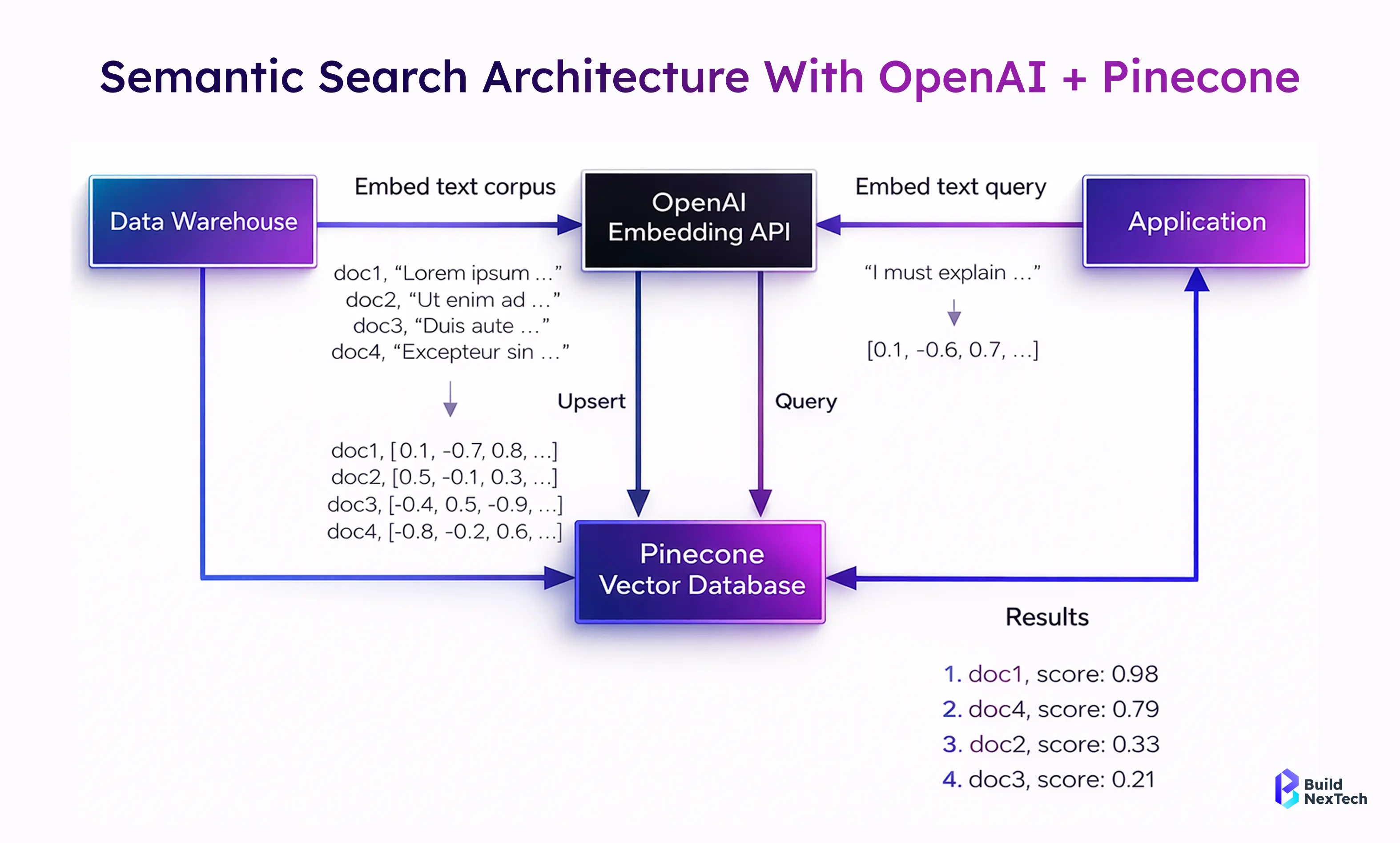
The Pinecone API is a REST API that enables developers to manage vector indexes, upsert vector embeddings, and execute similarity search queries efficiently. It abstracts complex ANN logic behind simple API requests.
- Create, delete, and describe vector indexes
- Upsert vector data with metadata for filtering
- Perform similarity search using cosine or dot product
Unlike traditional search APIs, the Pinecone API is optimised for vector search workloads. It supports metadata filtering, namespaces, and dense vector indexing—features critical for enterprise search AI and RAG company use cases.
Integrating the Pinecone API for Efficient Vector Search Operations
Pinecone provides a developer-friendly API that makes it easy to integrate vector search capabilities into modern applications. With official SDKs for Python, JavaScript, and Node.js, developers can quickly build scalable semantic search services without managing complex infrastructure. In this section, we’ll walk through a practical Python-based implementation that exposes Pinecone operations as REST APIs using FastAPI.
Step 1: Setting Up Pinecone Credentials
Start by creating a project in the Pinecone Console and generating your API key and environment. Store these securely in a .env file:
PINECONE_KEY=your_api_key_here
PINECONE_ENVIRONMENT=your_environment_here

Install the required dependencies:
pinecone-client~=2.2.2
python-dotenv~=1.0.0
fastapi~=0.97.0
uvicorn~=0.22.0
Step 2: Creating Pinecone Operations in Python
Create a reusable class to manage index creation, vector upserts, queries, and stats:
import pinecone, os, json
from dotenv import load_dotenv

class PineconeOperations:
    def __init__(self):
        load_dotenv()
        pinecone.init(
            api_key=os.getenv("PINECONE_KEY"),
            environment=os.getenv("PINECONE_ENVIRONMENT")
        )
        self.index = None
You can then add methods to:
- Create and connect to a vector index
- Upsert vector embeddings
- Query vectors using cosine or Euclidean similarity
- Fetch index statistics
This abstraction keeps your vector logic clean and reusable.
Step 3: Exposing Pinecone as REST APIs with FastAPI
FastAPI allows you to expose Pinecone operations as HTTP endpoints:
from fastapi import FastAPI
from pineconeops import PineconeOperations

app = FastAPI()
pc = PineconeOperations()

@app.post("/vectors")
def upsert_vectors(data):
    return pc.upsert(data)

Run the service using:
uvicorn main:app --reload
Step 4: Testing via Swagger UI
FastAPI automatically generates Swagger UI, allowing you to:
- Insert vectors
- Run similarity searches
- Monitor index stats
Building a Semantic Search Application Step by Step: From Data Preparation to Intelligent Search Results
Instead of focusing on theory, let’s build a working semantic search pipeline using Pinecone, exactly the way developers use it in real projects. This walkthrough shows how to create an index, insert data, run semantic search, and improve relevance step by step.
Step 1: Get Started with Pinecone
You can work with Pinecone in multiple ways depending on your workflow:
- Manual (SDK-based) – Python, JavaScript, Java, Go, C#
- AI-assisted – Cursor, Claude Code
- No-code / automation – n8n workflows
For this guide, we’ll use the Python SDK, which is the most common for backend and RAG applications.
1.1 Sign Up and Get API Access
- Go to app.pinecone.io and create an account
- Choose a plan:
- Starter (Free) – good for learning and small projects
- Standard Trial – 21 days with higher limits for scale testing
- Copy your API key from the Pinecone Console
You’ll use this key to authenticate all API requests.
Step 2: Install the Pinecone SDK
Install the SDK in your Python environment:
pip install pineconeThis SDK provides everything needed to create indexes, upsert data, and run semantic search.
Step 3: Create a Vector Index
Pinecone supports dense indexes for semantic search and sparse indexes for keyword search. Here we create a dense index with an integrated embedding model, so Pinecone handles embeddings automatically.
from pinecone import Pinecone

pc = Pinecone(api_key="YOUR_API_KEY")

index_name = "quickstart-py"
if not pc.has_index(index_name):
    pc.create_index_for_model(
        name=index_name,
        cloud="aws",
        region="us-east-1",
        embed={
            "model": "llama-text-embed-v2",
            "field_map": {"text": "chunk_text"}
        }
    )
This setup removes the need to manage embedding models yourself.
Step 4: Upsert Text Data
Prepare your dataset as simple records containing:
- an ID
- text content
- optional metadata (like category)
dense_index = pc.Index(index_name)
dense_index.upsert_records("example-namespace", records)
Pinecone converts text into vectors automatically and stores them efficiently.
To verify ingestion:
stats = dense_index.describe_index_stats()
print(stats)
Step 5: Perform Semantic Search
Now query the index using plain text—no vector math required.
query = "Famous historical structures and monuments"

results = dense_index.search(
    namespace="example-namespace",
    query={
        "top_k": 10,
        "inputs": {"text": query}
    }
)
This returns semantically similar records, ranked by relevance.
Step 6: Improve Results with Reranking
To boost accuracy, rerank results using a specialized reranker model:
reranked_results = dense_index.search(
    namespace="example-namespace",
    query={
        "top_k": 10,
        "inputs": {"text": query}
    },
    rerank={
        "model": "bge-reranker-v2-m3",
        "top_n": 10,
        "rank_fields": ["chunk_text"]
    }
)
Reranking significantly improves result quality, especially for enterprise and knowledge-base search.
Step 7: Optimize for Production
To further enhance search quality:
- Use metadata filters (category, date, source)
- Apply hybrid search (keyword + semantic)
- Experiment with chunking strategies
- Use import instead of upsert for very large datasets
Step 8: Clean Up Resources
When finished, delete the index to avoid unnecessary usage:
pc.delete_index(index_name)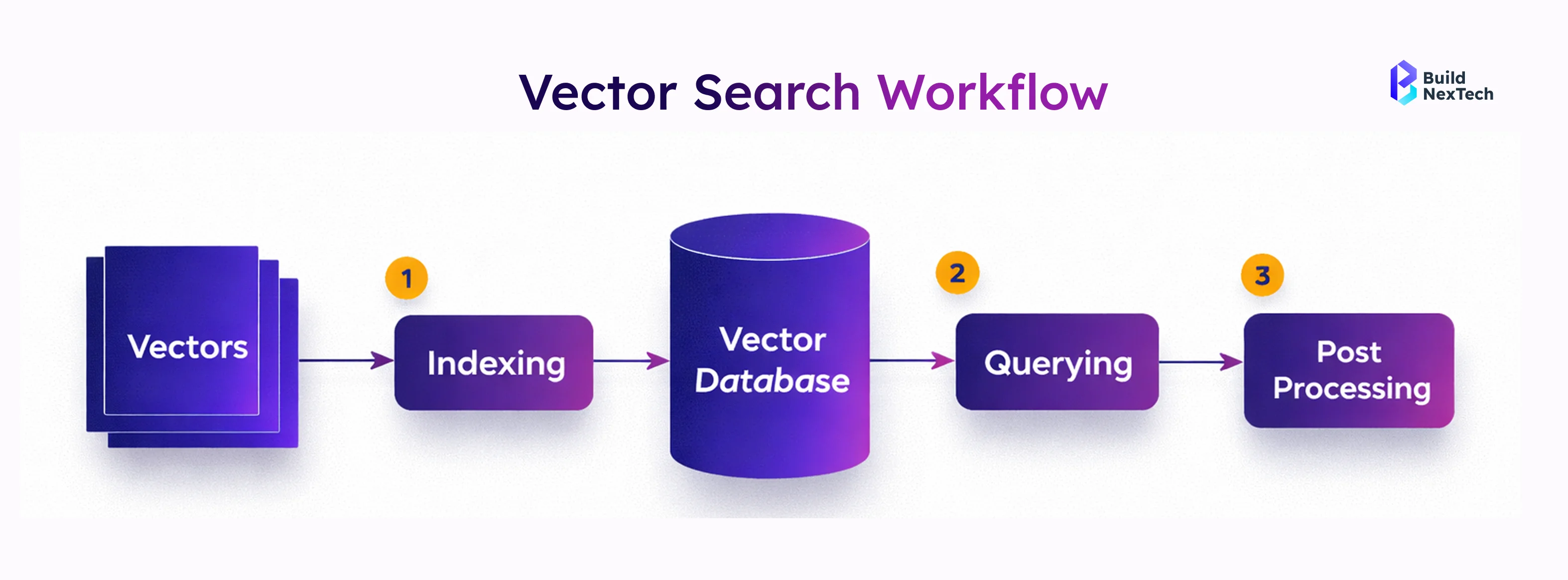
Leveraging Quantum Machine Learning to Shape the Future of Search
Quantum machine learning has the potential to transform the future of search by enabling faster and more efficient processing of complex, high-dimensional data. As research advances, quantum-based algorithms may significantly improve vector search performance, similarity calculations, and large-scale semantic retrieval. While still emerging, quantum machine learning represents a promising frontier for building next-generation, AI-powered search systems.
What Is Quantum Machine Learning and Why It Matters for Search?
Quantum machine learning explores how quantum computing can accelerate machine learning tasks. While still emerging, research shows potential for faster optimization and search over large vector spaces.
- Uses quantum states to represent complex data
- May improve similarity search performance
- Relevant to machine learning vs deep learning discussions
Although practical adoption is limited today, quantum approaches could eventually transform vector search and semantic retrieval, particularly for large-scale enterprise systems.
Future Perspectives: Quantum Machine Learning and the Evolution of Semantic Search
Looking ahead, quantum machine learning may enhance vector search efficiency, especially for high-dimensional data and complex similarity calculations. Industries such as finance, logistics, and scientific research are actively exploring these models.
- Potential acceleration of ANN algorithms
- Improved relevance modeling for enterprise search
- New paradigms for semantic retrieval
While classical systems like Pinecone remain dominant today, staying informed about quantum advancements is essential for future-ready AI architectures.
Conclusion: Building Intelligent, Future-Ready Search Experiences with Pinecone
Semantic search is no longer a feature—it is a requirement for modern AI-powered applications. By combining vector embeddings, Pinecone’s scalable vector database, and cloud-native APIs, developers can build intelligent search systems that understand users, context, and intent.
At Bnxt.ai, we help organizations design and deploy semantic search, RAG applications, and enterprise AI search solutions that scale securely and efficiently. Pinecone’s performance, flexibility, and ecosystem make it an ideal foundation for these systems.
Whether you are building a knowledge base, recommendation engine, or next-generation search application, Pinecone enables you to move from keywords to meaning—today and into the future.
People Also Ask

How does semantic search improve user experience compared to traditional search systems?
Semantic search understands user intent and context instead of relying on exact keywords. This results in more relevant answers, fewer failed searches, and a smoother experience for end users.
How does the Pinecone API differ from traditional keyword-based search APIs?
The Pinecone API is built for vector similarity search, not keyword matching. It supports high-dimensional embeddings, low-latency ANN search, and metadata filtering for scalable semantic retrieval.
Can Pinecone be integrated with other AI services like Azure AI Search?
Yes, Pinecone integrates smoothly with Azure AI Search, OpenAI, and LangChain. It is often used in hybrid systems combining keyword search with vector-based semantic search.
What are the best practices for optimizing vector search performance and scalability?
Use high-quality embeddings, effective chunking strategies, and metadata filters. Choosing the right index type and region also helps reduce search latency at scale.
Is quantum machine learning applicable to real-world semantic search today?
Currently, quantum machine learning is mostly experimental. While promising for future optimization of large vector searches, practical semantic search today relies on classical vector databases like Pinecone.


.webp)
.webp)
.webp)

.webp)
.webp)



