


There has been a sudden evolution of modern ReactJS web development Services in the past ten years. With the emergence of interactive web applications created by developers, they need tools to build fast, scalable, and dynamic user interfaces. React JS- one of the popular JavaScript libraries, has been the foundation of thousands of websites, dashboards, SaaS, single-page applications, and even mobile apps using React Native JS.
Are you ready to take your web development using ReactJS to the next level? Partner with BuildNextech to create scalable, high-performance React applications that bring your ideas to life. Our website development services are designed to deliver intuitive, future-ready digital experiences, while our custom web development services ensure every solution is tailored to your unique business goals, performance needs, and growth plans.
Introduction to ReactJS
ReactJS has rapidly become one of the most visited web development tools of the modern world. It helps a developer to develop a fast, dynamic, and interactive user interface easily. React is based on reusable components and a great ecosystem. This simplifies the creation of complicated web applications. It also makes the code easy to maintain and develop.
What Is ReactJS?
React is a free, open-source JavaScript library developed by Facebook. It assists in the development of user interfaces, particularly speedy single-page applications (SPAs).
React takes a component-based approach, i.e., the UI is divided into small reusable units known as React components. This allows development to be quicker, cleaner, and simpler, and it is also easier to scale.
React is famous since it provides:
- Lightweight UI Visualization via virtual DOM.
- An extensive ecosystem and open source community.
- Top-notch React JS front-end development tools.
- React Native in developing mobile applications.
- Web applications, SPAs, and dashboards Support.
- JSX, arrow functions/ES6+, modular code.
You are also free to use React in conjunction with Next.js, Tailwind CSS, Redux Toolkit, or React Server Components, depending on the needs of your project.
How React Works Under the Hood
React requires an intelligent rendering system that runs on:
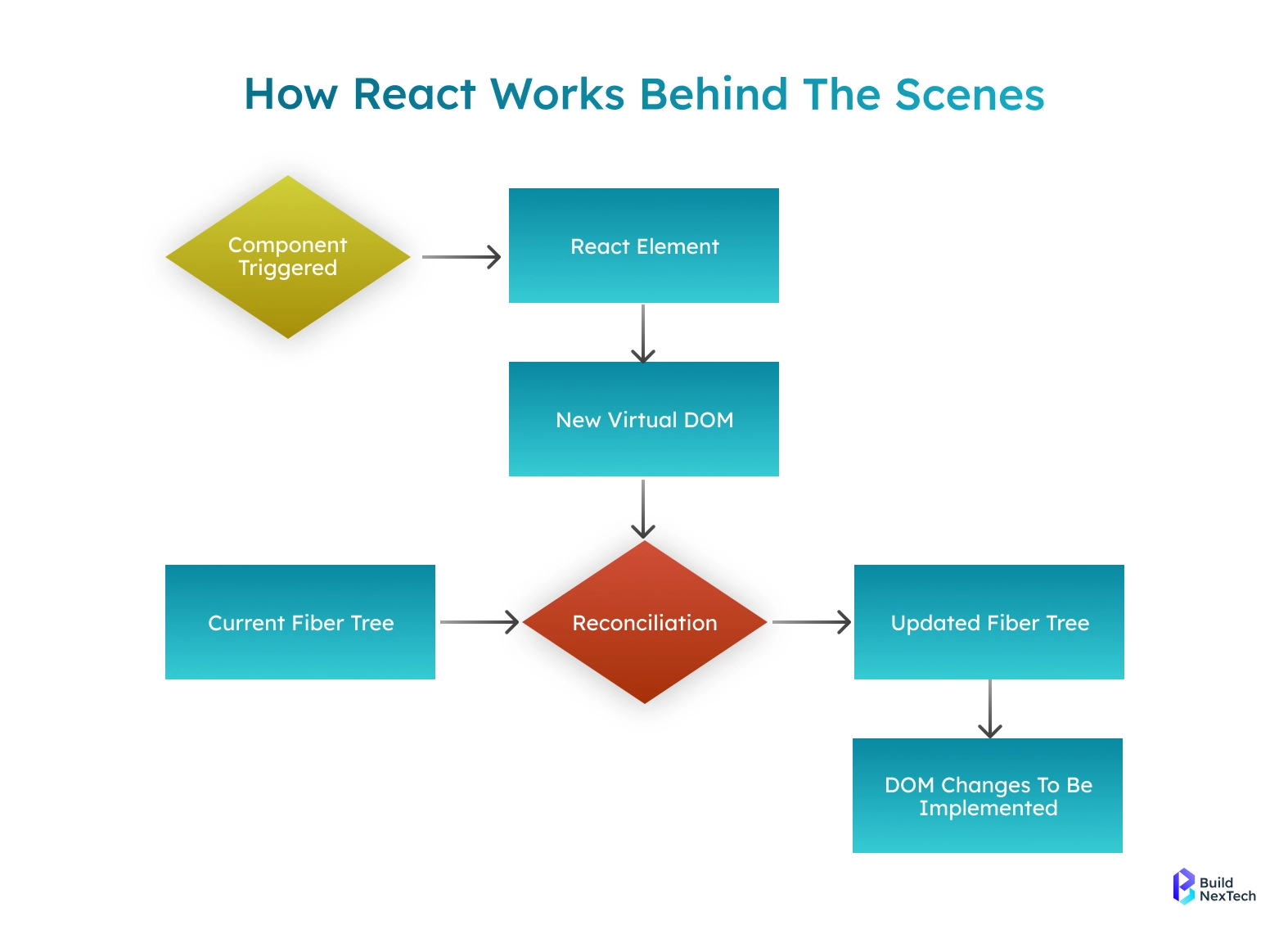
- Virtual DOM
- A lean depiction of the real DOM.
- React only changes what needs to be changed in the UI, and it is therefore blazingly fast in contrast to using traditional DOM manipulation.
- React Fiber Architecture
The implementation of React explored in Nel RORE is React Fiber, which handles the rendering and scheduling of React. It enhances the application performance and makes it less jumpy on the UI.
- JSX Elements
A syntax that allows writing HTML-style code in JavaScript.
Example:
const title = <h1>Hello from JSX!</h1>;- Web APIs
React supplies the Web APIs that render the elements to the actual DOM internally.
Getting Started With React JS
The first step in the development of ReactJS is the creation of the project environment. React JS installation. A React application can be installed and initialised in many different ways, including beginner-friendly installations and state-of-the-art toolchains in a professional project.

Installing React Using CRA, Vite, and Modern Toolchains
It is possible to install React JS in various ways depending on the requirements and level of expertise. We shall discuss the most widespread methods:
- React Using create react application (CRA)
The easiest to follow for a beginner who aims to know the basics of React. CRA is pre-configured with Babel, Webpack, the support of JSX, and a development server.
Steps:
Steps:
1. Install using Node Package Manager (npm):
npx create-react-app my-react-app2. Move inside the project directory:
cd my-react-app3. Start the development server:
npm start- localhost:3000 displays your main React UI, defined in src/App.js, where you customize text, buttons, and components.
- CRA auto-handles setup (Webpack, Babel, dev server) so you only focus on editing React components and styles (App.js, App.css).
- Install Vite React JS (Modern + Fast):
Next.js is good for professional developers and projects that need high performance. Vite is a modern build tool that provides lightning-fast project initialisation and hot module replacement (HMR).
Steps:
npm create vite@latest my-vite-react -- --template react
cd my-vite-react
npm install
npm run dev
Why Vite?
- Faster development builds than CRA
- Modern toolchain with support for ES modules
- Great for scalable and complex React applications
- Modern Toolchains: Next.js, Remix, Parcel, Turbopack
Recommended for advanced projects that require optimised performance, SEO-friendly pages, and server-side rendering.
Key Features:
- Server-Side Rendering (SSR) and Static Site Generation (SSG)
- File-based routing for cleaner project structure
- Built-in API routes for backend integration
- Enhanced performance and scalability
These toolchains are perfect for production-grade web apps, enterprise projects, and SEO-heavy websites.
Creating and Running Your First React Application
So, we will start by creating a basic ReactJS application in order to observe it.
Step 1: VS Code opens the project
Visual Studio Code should be opened with the project (my-react-app) folder open.
Alternate View the /src folder, aka React components.
Step 2: Client - Initiate the server of development
npm startThis will open your app on the browser at http://localhost:3000, and it will be hot-reloading.
Step 3: Edit App.js
Erase the existing code, and put in place the following:
function App() {
  return (
    <div>
      <h1>My First React JS Version Web App</h1>
      ReactJS: This is how much fun and powerful one can learn!
      1. react js learn
    </div>
  );
}
export default App;
export default App;
Save the file - the browser will restart immediately, reflecting the changes.
This shows the rapid development cycle of React and component-based changes to the UI.
Core Concepts Every React JS Developer Should Know
It is essential to familiarize oneself with the fundamental concepts of ReactJS to become proficient in it. They are based on the principles of developing dynamic, scalable, and maintainable web applications.
Understanding Types of React Components
One of the components is a fundamental unit of a React application. It is a class or a functional and returns a form of coding called JavaScript, as it is a syntax extension where you can write HTML code within JavaScript. Components made your application simpler to maintain and distribute (i.e., to scale) by splitting the UI into reusable self-focused fragments.
Components may be rendered, reused, and nested in other components, and allow a modular approach to the construction of user interfaces.
function Welcome() {
 return <h2>Welcome to React Components!</h2>;
}
Types of Components (Functional & Class)
React has two primary components, namely:
- Functional Component
- Written in the form of a JavaScript function.
- Lightweight and easy to read
- Bazaaris React Hooks of state and side-effects.
- Class Component
- Written as ES6 classes
- Has a render method that returns JSX.
- Learning syntax is rarely practised in modern React.
const Hello = () => <p>Hello from Functional Component</p>;


class HelloClass extends React.Component {
 render() {
   return <p>Hello from Class Component</p>;
 }
}
Hint: Functional components are often used today as they are easier and completely compatible with Hooks, such that they enable cleaner and more effective state management.
Using Props to Pass Data
Props (an abbreviation of properties) are a way to transfer data between a child component and a parent element. They are immutable and can work to ensure the data flows in your application are predictable.
function Greeting({ name }) {
 return <h3>Hello, {name}</h3>;
}
<Greeting name="ABC" />
Why props are useful:
- Facilitate reusability and dynamism.
- Assistance in adopting scalable UI designs.
- It is reusable in React JS grid layouts and forms, and other user interface reusable blocks.
With the appropriateness of props, you can make flexible interfaces such that the same component may show different data without code rewrites.
React Hooks and State Management Essentials
State and lifecycle management are also some of the important features of building dynamic React applications. Hooks in React JS provided a more modern approach to dealing with them in functional components, and are simpler to write, read, and maintain.
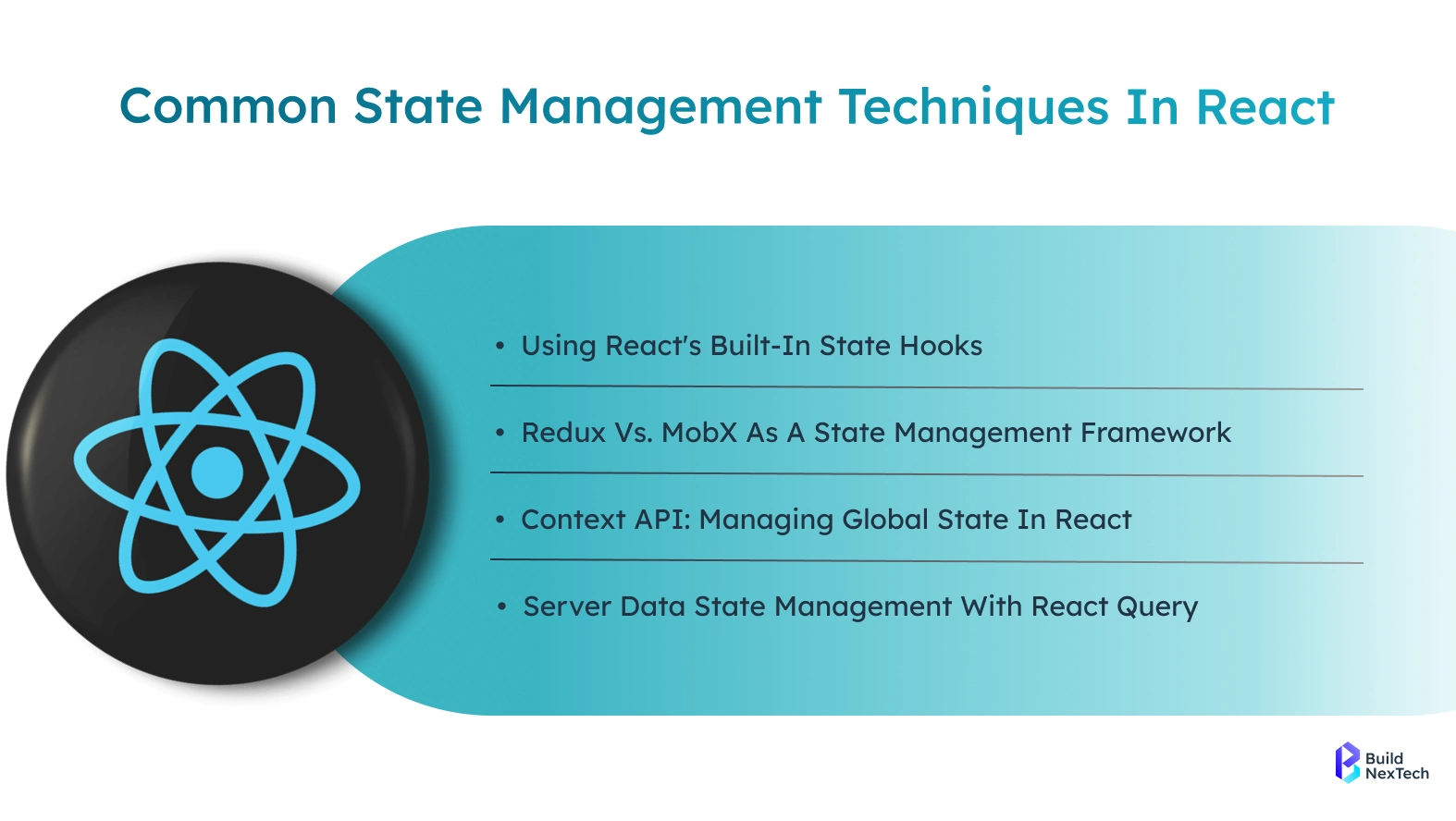
Hooks in React Native are particular functions that allow functional components to access state, life-cycle events, and additional React abilities by not defining class functionality. They have minimally substituted previous class practices, like:
- componentDidMount
- componentDidUpdate
- componentWillUnmount
Hooks are also popular in React Native as well as React JS, and thus are necessary in modern web and mobile projects. They allow the developers to compose more reusable and modular code, which enhances the scalability of large applications.
Key Hooks: useState, useEffect, and More
React offers multiple hooks for state and side effects that are managed effectively.
- useState - ands state to functional components.
- useEffect React Hooks– Handles side effects like data fetching or subscriptions
- Other essential hooks:
- useRef - Store DOM element ideas or render persistently.
- useMemo Memoise costly computations.
- useCallback - Memoise works in order to optimise the performance.
- useReducer - Handle complicated state code.
- useTransition - Process transitions to make the UI nicer.
- useDeferredValue - Save updates in order to optimize in terms of performance.
These hooks are critical in developing scalability and performant Reacts.
useEffect(() => { console.log("Component Loaded");}, []);
useEffect(() => {
 console.log("Component Loaded");
}, []);
When to Use the Context API for Global State
In a bigger application, Context API in React JS can be used to create a straightforward approach to managing global state in many components, without prop-drilling. Common use cases include:
- User authentication
- Theme management
- Language selection
- Login/session state
Example:
const ThemeContext = createContext();
React Redux, Redux Toolkit, or Zustand are used in larger and more complicated apps. These capabilities manage the state of apps. They also enhance performance and predict the state changes.
Navigation, Debugging & Developer Tools
One must know navigation to be a good React developer. You must also be able to learn how to debug. Also, you are expected to be familiar with the use of developer tools. These abilities can help you create robust single-page applications (SPAs), troubleshoot problems quickly, and gain insight into real-world projects.
Implementing Navigation with React Router
The standard library of routing in a React application is React Router. It enables you to make multiple page navigation in SPAs without the need to refresh the browser.
Installation:
npm install react-router-dom
Basic routing example:
import { BrowserRouter, Routes, Route } from "react-router-dom";
import Home from "./Home";
import About from "./About";
function App() {
 return (
   <BrowserRouter>
     <Routes>
       <Route path="/" element={<Home />} />
       <Route path="/about" element={<About />} />
     </Routes>
   </BrowserRouter>
 );
}
Why React Router matters:
- Permits pure URL navigation.
- Allows nested routes and dynamic parameters.
- The building blocks of the modern SPAs and dashboards.
Debugging Tools for React JS Apps Using DevTools
React requires effective debugging. The following are just some of the important tools and techniques:
- React Developer Tools – Inspect component hierarchy, props, and state
- Chrome DevTools – Monitor console logs, inspect elements, and debug JavaScript
- Network Tab – Track API requests and responses for fetch or REST API calls
Example: Testing a simple API request
fetch("https://api.example.com/data")
 .then(res => res.json())
 .then(console.log)
 .catch(err => console.error(err));
These tools help you identify and fix bugs quickly, understand component behavior, and optimize performance.
Helpful GitHub Repositories for Learning React
Real-world projects increase the speed of learning. The following are some of the beginner open source React repositories and advanced ones:
- React Js GitHub – Source code and documentation
- Awesome React – Curated list of libraries, tutorials, and tools
- Redux Toolkit Repo – Modern state management patterns
- React Router Repo – Routing examples and documentation.
Hello world in React - Learn React JS using an open-source application to learn the basic components, structures, hooks, and style patterns.
The repositories studied will assist you in learning about the best practices, component design, and other features.
React vs Next js - Choosing the Right Framework
Two of the widely used development tools to create a modern web application are React.js and Next.js. React is a library that allows constructing UI components. Next.js is a React-based framework. It introduces such functionality as server-side rendering, static site generation, and native routing. Knowing the differences between them will enable you to select an appropriate tool to use in your project.
When to Use Each Framework
Use React JS Web App when:
- Creating dashboards or administration boards.
- Creating a To-Do List or Task Management software.
- Development of the product listing pages.
- Social media interfaces cloning.
- Tailwind CSS or CSS Modules, or any styling library.
- You need to be able to render clients fast and without server-side overhead.
Use Next.js when:
- SEO is relevant in the case of marketing or content-intensive sites.
- You require a rapid response with server-side processing.
- Desire in-built API trajectories to integrate the backend.
- ReactJS performance on platforms such as Vercel.
- Creating e-commerce, blogs, or landing pages using SSG or SSR.
- The selection of an appropriate framework is based on the project requirements, performance requirements, and strategy of the deployment.
Conclusion
React JS is still leading the front-end development front because of its reusable components, excellent community, fast virtual DOM, and flexible Hooks system. React can be used to create complete web applications, experiment with React Native, or design a big SPA. React provides the resources required in the web development process that are fast and scalable.
With its component-based architecture and strong ecosystem, React enables developers to build maintainable, high-performance applications while reducing development time. Its ability to efficiently manage state and render updates makes it a preferred choice for modern, user-centric interfaces.
Are you willing to transform your concepts into effective React apps? Partner with BuildNextech to leverage expert React JS development, modern UI/UX design, and scalable solutions tailored to your business needs. As a trusted web development agency, we deliver end-to-end web development service solutions that help you build powerful, reliable, and future-ready web applications with the right technology partner by your side.
People Also Ask

Is ReactJS suitable for beginners with no coding experience?
Yes, beginners can learn React JS, but starting with basic HTML, CSS, and JavaScript will make learning easier and more effective.
Do I need to learn JavaScript deeply before starting ReactJS?
A deep mastery isn’t required, but you should understand core JavaScript concepts like functions, arrays, objects, and ES6 features.
How long does it take to learn ReactJS for real-world projects?
You can learn React basics in 1–2 months, while real-world project readiness usually takes around 3 months with regular practice.
Is ReactJS still in demand in 2025 for front-end development jobs?
Yes, React JS is still in high demand in 2025 and remains a top choice for front-end development roles.
Can I use ReactJS to build mobile apps?
Yes, with React Native, you can build cross-platform mobile apps for iOS and Android using React concepts.


.webp)
.webp)
.webp)

.webp)
.webp)



