


It is a powerful frontend technology used to develop scalable and high-performance single-page application SPAs. It is a Google-maintained tool and a complete development environment that contains components, modules, routing, services, and a dependency injection system. There is excellent support provided for TypeScript development. It facilitates the development of a reliable application. There are some pros and cons associated with the technology.
It provides the opinionated architecture that emphasizes consistency and best practices and therefore suits complex applications better. Attributes such as effective change detection, modular development, and lazy loading help Angular applications stay fast and responsive even as the application scales up. As a result, Angular is the framework of choice for teams working on complex and data-driven web applications that demand high levels of performance and maintainability.
In this guide, you’ll learn:
- How Angular components and modules work together
- How Angular handles state updates and performance
- How lazy loading modules improve speed
- Best practices for enterprise-scale Angular applications
Supercharge Your Angular Apps with Components
Angular components are the parts that make up every Angular application. Each Angular component is like an unit that handles a specific part of what the user sees and interacts with. It has its template and its own logic. When we use Angular components in an application it helps to break down the application into smaller parts. This makes it easier to build user interfaces in Angular. Angular components are really useful, for doing this in a way.
This component-based architecture encourages a division of labor and promotes the use of reusable UI components. The components talk to each other via inputs, outputs, and services, making the data flow flexible yet organized. As the application scale increases, this makes it easier to deal with the complexity while keeping the performance factors in check.
Benefits of Angular components:
- Clear separation of concerns
- Improved reusability
- Easier testing and debugging
- Better long-term scalability
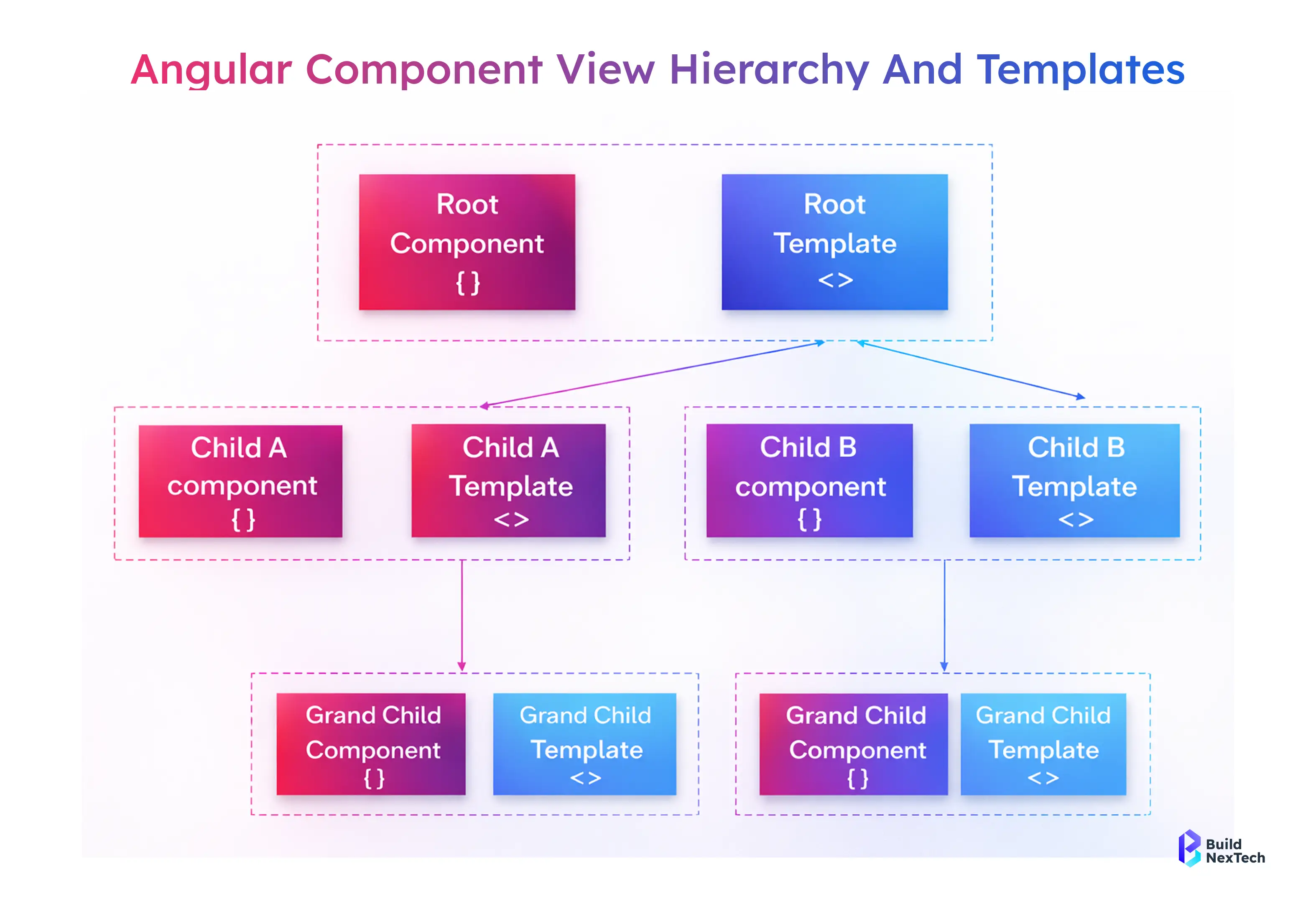
The image illustrates Angular’s component view hierarchy, showing how a root component uses its template to host child components, which can further contain their own templates and nested (grandchild) components. It demonstrates how Angular organizes the UI in a hierarchical structure using components and templates.
Components Demystified: Anatomy and Lifecycle Hooks
An Angular component comprises a TypeScript class, an HTML template, and optional styles. These are combined to establish a component’s functionality, organizational structure, and looks. Angular provides many hooks. These hooks help perform actions during certain phases of a component’s life cycle. These phases include initialization, changes, and cleanup.
With the latest version of Angular, there is a concept known as Signals in Angular. This enhances reactivity and provides a predictable and efficient method of updating the state. Signals help improve performance. It eliminates unnecessary changes. It works on streams and messages. There is a Signals
Key component elements:
- @Component decorator for metadata
- TypeScript class for logic
- HTML template for rendering
- CSS for scoped styling
Common lifecycle hooks:
- ngOnInit() – Component initialization
- ngOnChanges() – Detect input changes
- ngOnDestroy() – Cleanup resources
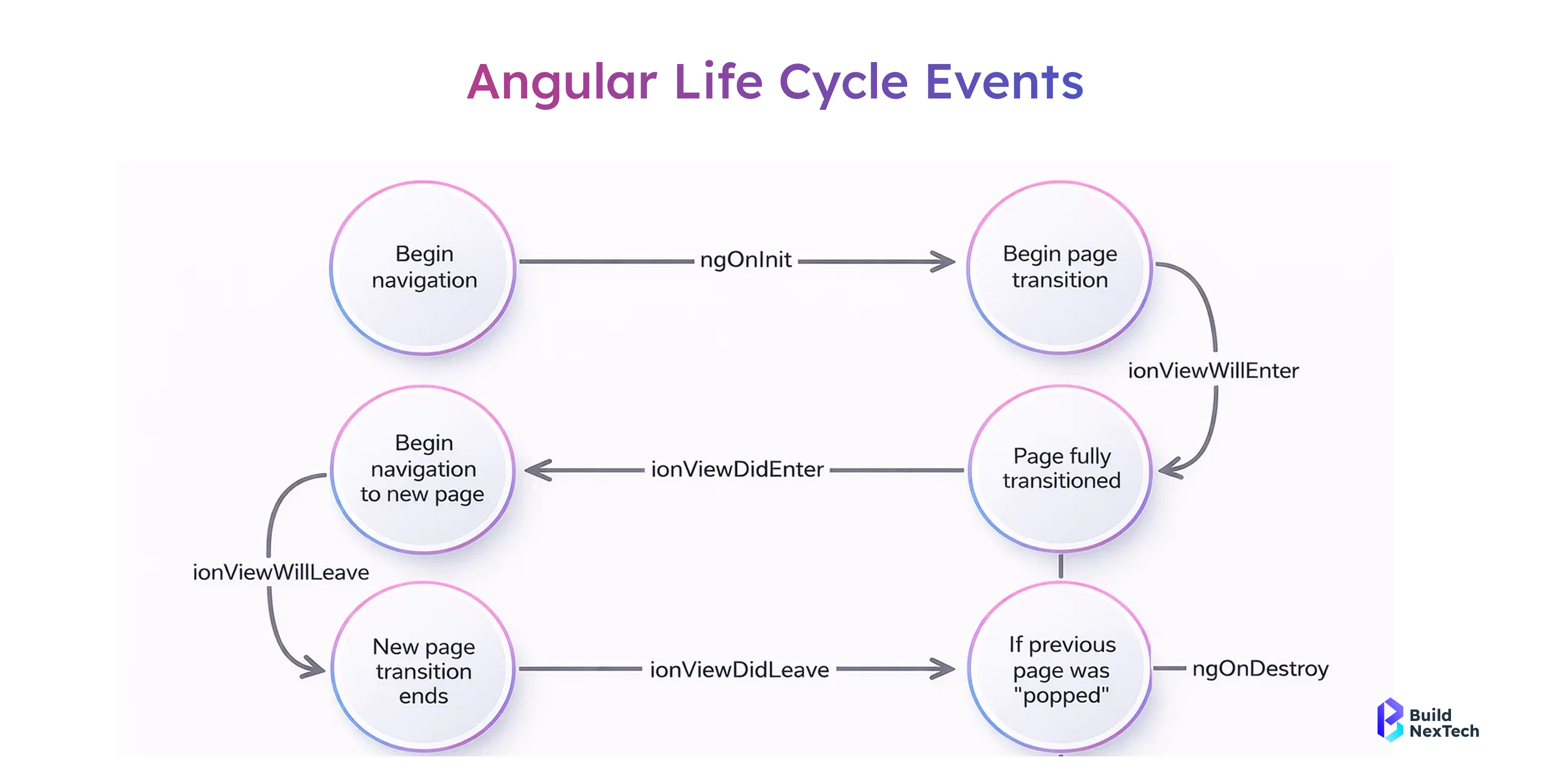
The image shows the Angular (Ionic) page component lifecycle flow, illustrating how a page moves through different lifecycle events during navigation. It explains what happens when a page is initialized, enters the view, becomes fully active, and later leaves or is destroyed. The diagram highlights hooks like ngOnInit, ionViewWillEnter, ionViewDidEnter, ionViewWillLeave, ionViewDidLeave, and ngOnDestroy, helping developers understand when to load data, handle transitions, and clean up resources during page navigation.
Step-by-Step: Creating Your First Angular Component
Angular CLI makes component creation fast and standardized, following best practices automatically.
Steps to create a component:
- Run ng generate component component-name
- Generates TypeScript, HTML, CSS, and test files
- Registers the component inside the module
- Encourages modular and reusable design
Modular Magic: Organizing Your Angular Projects
The role of modules in an application developed using Angular is critical as they aid in dividing and governing the application into well-defined units. By providing a method or a way to encapsulate components, services, directives, and pipes together in a module, they help the developer stay organized as the size increases.
Using Angular modules helps large applications. They organize code well and separate concerns. This also improves performance.
Why Angular modules are important:
- Clean project structure by logically grouping related functionality
- Improved team collaboration, allowing multiple developers to work on separate modules simultaneously
- Support for lazy loading, enabling modules to load only when needed
- Better performance management by reducing initial bundle size and optimizing resource usage
- Enhanced reusability, as modules can be shared across different parts of the application
Modules Made Easy: Organize, Reuse, and Scale
Depending on their purpose in the application, an Angular application uses different types of modules. There is a further consideration in order to keep facilities separate and distinct from each other so that Angular applications could be maintainable and scalable when requirements start increasing. Organizing code into purpose-driven modules reduces complexity and provides consistency in a development pattern across the project.
Feature-based modularization is useful in large apps. Angular supports clear separation of concerns. It also allows performance improvements like lazy loading.
Common module types:
- App.Module: Root module of the Angular application responsible for bootstrapping the main component and importing all necessary dependencies.
- Feature modules: house key features or enterprise logic that enables the codebase to scale with a much-reduced maintenance burden and provide additional functionality.
- Shared model: Store reusable components, directives, and pipes that can be used across multiple feature modules.
- Core modules include singleton services and global functionalities that should only be loaded once in an application.
Lazy Loading Explained: Boost App Speed Instantly
Lazying loading is an optimization trick in Angular, and it is a great help to developers to create fast and efficient web applications. In this way, Angular will load only the modules that are needed, and it will reduce the loading size of the application to a great extent.
It also supports deferred loading, which makes sure that the non-critical features or components are loaded only after the users navigate to the respective pages.
Benefits of lazy loading:
- Faster Initial Page Loading: Only necessary modules are loaded first, which enables users to load their content faster.
- Improved Core Web Vitals: It enhances the scores for Largest Contentful Paint (LCP) and Time to Interactive (TTI) to improve the SEO result
- SOURCE:Lazy Loading | Knowledge Center
- Less Memory Usage: The loading of modules is done on demand, eliminating any unnecessary memory use.
- Better User Experience: A hassle-free flow without waiting attracts users.
Angular CLI: The Developer’s Secret Weapon
The Angular CLI (Command Line Interface) is a very useful tool for simplifying Angular development from setup to deployment. This tool alleviates endless repetitive tasks and also provides best-practice implementation while ensuring a consistent structure for projects. Moreover, its seamless implementation with npm, which is a package manager for Node.js and Angular projects, makes it very helpful for Angular development.
Developers generally use Visual Studio Code, or VS Code, while building applications using the Angular framework, thanks to its support and features of TypeScript. The utilization of the above tools in conjunction with the Angular CLI increases the overall productivity of the developers.
Why Angular CLI is essential:
- Easy setup and initialization of projects and applications helps developers by allowing them to "quickly scaffold applications, components, services, and modules
- Follows the best practices: It creates boilerplate code that adheres to Angular guidelines.
- Seamless npm integration: Helps in efficient management of packages and their dependencies.
- Increases productivity in VS Code: It integrates perfectly with extension packs for Angular development in VS Code.
- Facilitates testing and deployment: The CLI commands simplify unit testing, functional testing, and production builds
- SOURCE:Angular CLI • Overview • Angular
Installing Angular CLI and Initial Setup
Setting up Angular is straightforward, even for beginners, and can be done in just a few steps. With the right tools and configuration, you can have a fully functional Angular project ready in minutes.
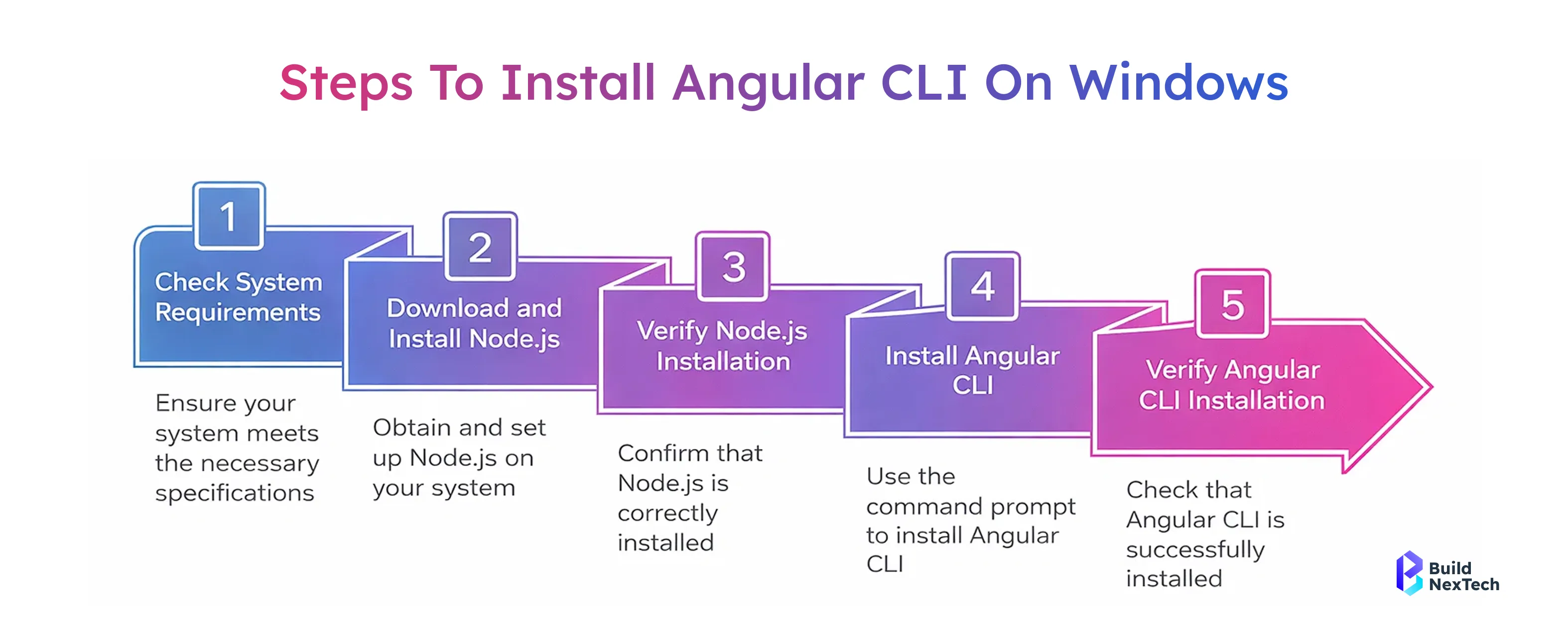
Steps to Install Angular CLI and Create a Project:
- Install Node.js and npm: Angular requires Node.js and npm package manager. Download the latest version from the official Node.js website and install it on your system.
- Install Angular CLI globally: Open your terminal and run:
npm install -g @angular/cli
This command installs the Angular CLI globally, allowing you to create and manage Angular projects efficiently. - Create a new Angular project: Use the CLI to initialize a project:
ng new app-name
During setup, you can enable TypeScript type checking and include Type Declaration files for better code safety and maintainability. - Start the development server: Navigate to your project folder and run:
ng serve
Your app will be available at http://localhost:4200, and any changes in your code will automatically reload the application.
NPM Angular CLI: Managing Packages Efficiently
Angular uses a lot of npm as a package manager to manage dependencies, install libraries, and ensure the same build on different development and production environments. Using it efficiently is crucial for maintaining a stable and performant Angular project. Moreover, Angular bases its strong typing, better IDE support in VSCode, and reduced runtime errors on using Type Declaration files, thus making code quality and developer productivity greater.
Best practices for npm usage:
- Keep the dependencies updated: Run npm update regularly to keep both Angular packages and third-party libraries up-to-date when new versions are released; this includes performance improvements and security fixes.
- SOURCE:Angular Security Best Practices - Security Compass
- Use only the needed packages: Not to make bundle size excessively huge and to avoid name conflicts.
- Locking versions for production stability: This involves using a package-lock.json or version constraints to ensure consistent builds across all environments.
- Using Type Declaration files enables better type safety and provides full code completion in Visual Studio Code.
Lazy Loading Like a Pro: Enhancing Web Performance
- The concept of lazy loading is a key part of performance optimization strategies in Angular, especially when it comes to handling bigger and enterprise-level projects. The idea is that instead of loading everything all at one time, lazy loads and deferred loads help to load only what is needed by users. This cuts down the initial bundle size substantially.
- Adopting the concept of lazy loading from the very beginning of the application architecture design helps the developers achieve better Scalability values, optimized SEO factors, as well as optimized performance.
- Why lazy loading matters:
- Quicker initial page load times, as it involves less JavaScript being loaded initially
- Better application performance, particularly in feature-heavy Angular-based apps.
- Optimal use of resources via deferred loading of non-critical modules
- Improving scalability for business applications involving various feature modules
- Improved user experience through fast navigation and smooth rendering
What is Lazy Loading and Why It Matters
Lazy loading in Angular optimization loads the code of features or components only when the user accesses a particular route. It does not require the user to load the whole application but loads the necessary modules on demand. Therefore, it enhances the initial load time of the page, decreases the overall bandwidth, as well as the size of the application.
Lazy Loading is very important for scalability. It also ensures a smooth user experience in complex Angular applications with many features.
Ideal use cases:
- Admin dashboards with multiple independent sections
- Enterprise applications containing feature-heavy modules
- Role-based systems where users access different parts of the application
- Large single-page web applications that require fast initial rendering
- Applications with growth-focused architectures and long-term scalability needs
Implementing Lazy Loading in Angular Applications
Setting up lazy loading of modules with the help of the loadChildren property in Angular is pretty easy. The process of setting routes to lazy-load feature modules really allows Angular to load only that code when the user navigates to a specific part of the application. This helps with improving the time it takes for the initial load, reduces memory usage, and can definitely help in optimizing application performance in general.
Also, proper lazy loading enables more effective scalability and maintainability; thus, it's one of the key best practices for enterprise-scale and big Angular applications.
Implementation overview:
- Create a feature module to encapsulate related components, services, and routing logic
- Configure lazy routes using the loadChildren property in the Angular router
- Remove eager imports of feature modules from the root module to avoid unnecessary loading
- Measure performance improvements using browser dev tools and Angular performance metrics
Routing Mastery in Angular
Angular routing enables seamless navigation in single-page web applications without page reloads. It is essential for creating smooth and fast user experiences.
Benefits of Angular routing:
- Clean URLs
- Faster navigation
- Route guards and resolvers
- Improved SPA behavior
Configuring Angular Routes for Clean Navigation
Routes define how users navigate through the application.
Routing best practices:
- Use meaningful route names
- Apply guards for security
- Keep routing modular
Linking Modules and Components Efficiently
Efficient routing ensures components load correctly and modules remain loosely coupled.
Key tips:
- Avoid circular dependencies
- Use shared modules carefully
- Keep routing logic simple
Angular vs React: Choosing the Right Frontend Framework
Angular and React are both popular and powerful frontend technologies. The main difference is that Angular is a full framework. React is a library focused only on the UI layer. Angular has built-in solutions for almost everything. It has a clear architectural framework. This framework includes the features mentioned above. It helps developers create scalable applications smoothly.
Advantages of Angular:
- Routing and Forms Inbuilt: It possesses powerful routing and form handling modules right out of the box, hence reducing the need for third-party libraries.
- Strong Conventions: Angular enforces a structured way of developing, which leads to consistency across codebases and makes code easier to maintain within teams.
- TypeScript by Default: Built-in TypeScript support ensures strong typing, better tooling, and fewer runtime errors.
- Ideal for large applications: In Angular, the modular architecture together with lazy loading and with crystal-clear patterns goes perfect for big, long-term projects.
Angular has features like lazy loading, good rendering strategies, efficient state updates, and strong tools in VS Code. These make Angular a solid choice for building high-performance frontend apps.
Related:React-vs-Angular
Key Differences Between Angular and React
Understanding the differences between Angular and React helps the development teams choose the right solution in view of project size, complexity, and long-term goals. While both are powerful frontend technologies, they follow different philosophies and offer distinct development experiences.
Comparison Highlights:
- Angular – Full Featured Framework: Out of the box solutions for routing, forms, HTTP services, dependency injection.
- React - UI Library: It majorly deals with designing user interfaces; many other features are implemented through libraries.
- Angular Opinionated form: Forces strong conventions and consistent architecture. The objective is to make it easier to handle heavy codebases.
- React – Flexible Ecosystem: The whole concept of choosing between one or the other tool and library belongs to the developers, hence giving them more flexibility in the project setup.
It would, therefore, depend on your project needs, team experience, and scalability requirements. Angular typically suits best for big, enterprise-level applications. React was more for lightweight projects that required heavy UI customizations.
When to Choose Angular for Enterprise Apps
Angular is widely used in the development of enterprise-level applications owing to its structured approach, inherent properties, and long-term support. It is also a major component of the MEAN stack, as it integrates well with MongoDB, Express.js, Angular, and Node.js.
Angular's clear framework and strong support for TypeScript help with complex applications. It also has features like lazy loading, deferred loading, and efficient state updates. These features suit enterprise-level apps that need stability and good performance.
Best Use Cases for Angular
- Enterprise Dashboards: Suitable when you have an attribute-rich dashboard and functionality needs like routing and role authorization.
- Financial Systems: Because data types are robust and architecture is predictable, the possibility of errors is minimized within secure, transaction-based applications.
- Scalable Long-Term Projects: Angular’s modular architecture and conventions facilitate large-scale and changeful projects.
Best Practices for Angular Development
It is necessary to follow the best practices of Angular in order to develop applications, which are always maintainable, scalable, and performant even after the application has grown in size and complexity. This ensures not only rapid application development but also efficient code in an Angular project.
Using best practices like modular design, lazy loading components, good state update methods, and optimal rendering can improve app performance.
Why Angular Best Practices Are Important:
- Cleaner Architecture: It promotes a modularity and reusability of components, and easier separation of concerns.
- Improved Performance: Techniques like lazy loading and deferred loading help in reducing initial loading times and also improve Core Web Vitals.
- Simplified Onboarding: The code follows a set of standards and a project structure, which makes it easier for a new person to learn.
Reusable Components and Modular Design
Reusable components are one of the strong cores of the component-based architecture of Angular. Developers design components that can be reused across many features. This reduces code duplication and increases consistency. As a result, development speeds up. It also makes modular design applications easier to scale and maintain over time.
Angular promotes reuse with clear data flow and separation of concerns, with well-defined boundaries for components. Reusable components, combined with lazy loading and shared modules, contribute to better performance and cleaner architecture.
Writing Reusable Angular Components:
Reusable Components and Modular Design
Reusable components are one of the strong cores of the component-based architecture of Angular. Developers design components that can be reused across many features. This reduces code duplication and increases consistency. As a result, development speeds up. It also makes modular design applications easier to scale and maintain over time.
Angular promotes reuse with clear data flow and separation of concerns, with well-defined boundaries for components. Reusable components, combined with lazy loading and shared modules, contribute to better performance and cleaner architecture.
Writing Reusable Angular Components:
- Input @Input() and Output @Output(): This decorator will explicitly enable clear and controlled data communication between parent and child components.
- Well Shared Modules: Put commonly used components, pipes, and directives into shared modules that can easily be reused.
- Keep Your Components UI-Focused: Refrain from embedding business logic within components; relegate this to services for better maintainability.
Conclusion: Building Scalable and Maintainable Angular Applications
The Angular platform is a full and mature environment for building modern and scalable web applications. With such powerful tools as Angular CLI, seamless integration with VS Code, and high-performance capabilities such as lazy loading and deferred loading, it allows developers to create fast and reliable web applications.
Because of its robust architecture patterns, native support for TypeScript, and modular structure, Angular is highly suitable for large-scale business applications. Best practices say to work with shared components. Using the npm package manager helps manage dependencies well. These steps make it possible to build scalable, high-performance Angular applications.
People Also Ask

How does Angular structure frontend applications?
Angular structures frontend applications using components, modules, services, and dependency injection. This architecture improves how code is organized. It also helps reuse code and makes large web applications easier to maintain over time.
What is the difference between Angular and AngularJS?
Angular (version 2+) is a complete rewrite of AngularJS using TypeScript. It offers better performance, modern tools, improved security, and supports mobile-first and enterprise applications.
How does Angular improve scalability and maintainability?
Angular improves scalability through its modular architecture, lazy loading, reusable components, and strict design patterns, making large codebases easier to manage and extend over time.
What are the main features of Angular?
Key Angular features include component-based architecture, modules, Angular CLI, routing, lazy loading, dependency injection, and reactive programming with RxJS. These features help build modern frontend apps efficiently.
How do components and modules interact in a large Angular application, and why is this separation important?
Components handle the UI and user interaction, while modules organize related components, services, and dependencies. This separation improves scalability, enables lazy loading, reduces bundle size, and makes large Angular applications easier to maintain and test.


.webp)
.webp)
.webp)

.webp)
.webp)



