

Modern digital businesses require database platforms that can handle constant growth, global users, and unpredictable workloads without compromising performance or availability. As applications become more data-driven, the need for highly resilient, scalable, and fault-tolerant database architecture has never been more critical.
At BuildNexTech, we help organizations design cloud-native database strategies using AWS Aurora to ensure high availability, strong replication, and seamless scalability. This blog explores how Amazon Aurora enables modern applications to operate reliably in production while supporting long-term business growth.
✨ Key Insights from This Article:
🗄️ How AWS Aurora ensures high availability and fault tolerance through shared storage, Multi-AZ design, and automated failover
🌍 How Aurora replication and Global Database architecture enable disaster recovery and low-latency access across regions
⚙️ Key differences between Aurora MySQL and Aurora PostgreSQL for selecting the right engine based on workload needs
📈 How Aurora scales seamlessly using automatic storage growth, read replicas, and Aurora Serverless v2
🔐 Best practices for running Aurora in production, including backups, monitoring, AWS integrations, and cost optimization
Introduction: Building Modern Applications on a Resilient Database Foundation
Modern organizations depend on a resilient database for all of their mission-critical applications. In an increasingly digital world with users from all over the globe, even a small amount of downtime can result in lost time and money, as well as decreased user trust in your product or service. Amazon Aurora, which has been built on AWS, has created cloud native databases with a focus on scalability, performance, and highly fault-tolerant availability that can accommodate almost any unpredictable workload across multiple industries through a combination of a shared storage architecture, distributed copies of data, and intelligent clusters.
For this reason, businesses leveraging Amazon cloud services must ensure that any database that they use will have high availability and a guarantee of no data loss through strong replication capabilities and quick failover processes. Amazon Aurora allows businesses to build a resilient database that is also an optimized platform for the growth of modern applications.
Why High Availability, Replication, and Scalability Matter
The features of modern Cloud Native Apps help ensure the databases that support these applications have the capacity to grow and provide reliable service at all times while delivering optimal Application Performance. Amazon Aurora natively supports these critical features; therefore, companies can utilize Amazon Aurora's operational efficiencies to ensure the continued protection of their most valuable Business Resources.
- High Availability: Enables companies to maintain continuous access to their applications despite failures caused by an infrastructure outage, hardware failure, or other unforeseen issues.
- Replication: Keeps a consistent copy of each database across all three Availability Zones (AZ) and AWS regions so that an application has redundancy in case of failure.
- Scalability: Allows companies to provide access to growing user bases without having to shut down access to existing users. This level of scalability enables businesses to increase the number of users on their systems without having to allocate additional physical resources.
- Automated Orchestration: Amazon Aurora uses a distributed storage architecture combined with intelligent clusters and a fast failover mechanism, allowing Amazon to significantly reduce operational costs and prevent operational disruption due to failure.
- Cost Effectiveness: Aurora implements cost-effective pricing models, plus optimizing the use of resources will enable businesses to minimize operational costs, thus allowing businesses to continue delivering a high-performance Database without the concerns of downtime, data loss, or increased resource requirements due to growth.
Introducing AWS Aurora as a Cloud-Native Relational Database
As a result of separating compute instances from shared Amazon Aurora Storage, the Amazon RDS can support Rapid, scalable High Available, and rapidly recover for Modern Applications. As such, Aurora is different from traditional RDS Engines, which are combined all in one unit and do not separate Compute from Storage.
- The Aurora MySQL Database is designed to work with Existing MySQL Databases and Applications, allowing users to easily migrate to the Aurora Database.
- The Aurora PostgreSQL Database offers More Advanced SQL Transactional Capabilities and Analytic Capabilities needed to support complex workloads.
- The AWS Service integration of Aurora enables users to leverage resources such as Amazon CloudWatch for performance analysis and Reporting.
- Aurora allows users to monitor the Performance of their databases and gives users insights on Global CPU/Memory Metrics, as well as overall Resource Usage.
This set of unique capabilities of the Aurora Database allows companies to have a reliable, High-Performance Scalable Database that enables Teams to develop Innovative Applications while Maintaining Operational Efficiency and Data Reliability.
The Foundation of Resilience: AWS Aurora High Availability Architecture
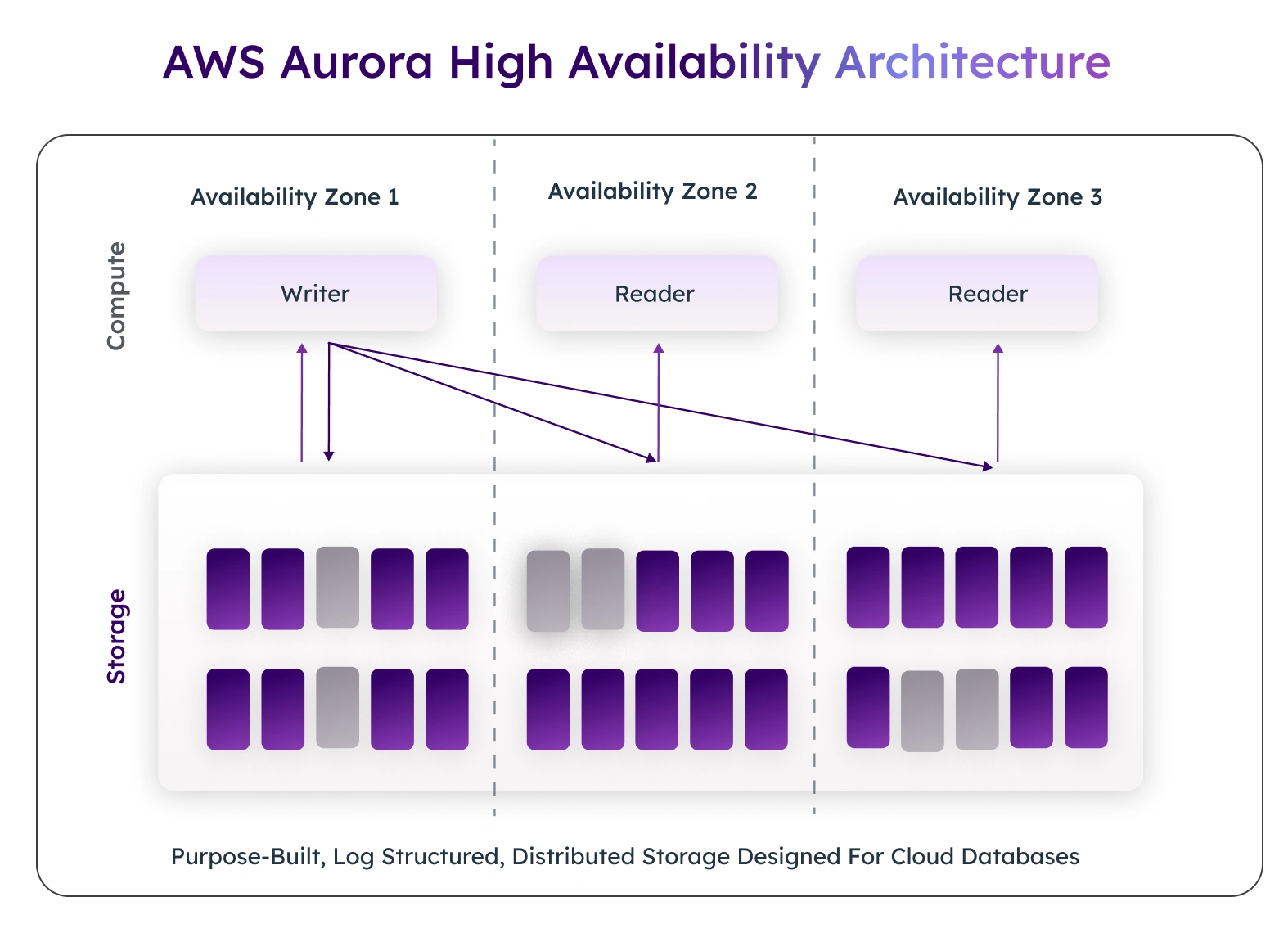
Amazon Aurora's shared storage architecture provides high durability (high availability), as it keeps multiple copies of your data and uses intelligent management of database instances to create a reliable platform with excellent fault tolerance. Aurora also minimizes the impact of any infrastructure failures through limited downtime.
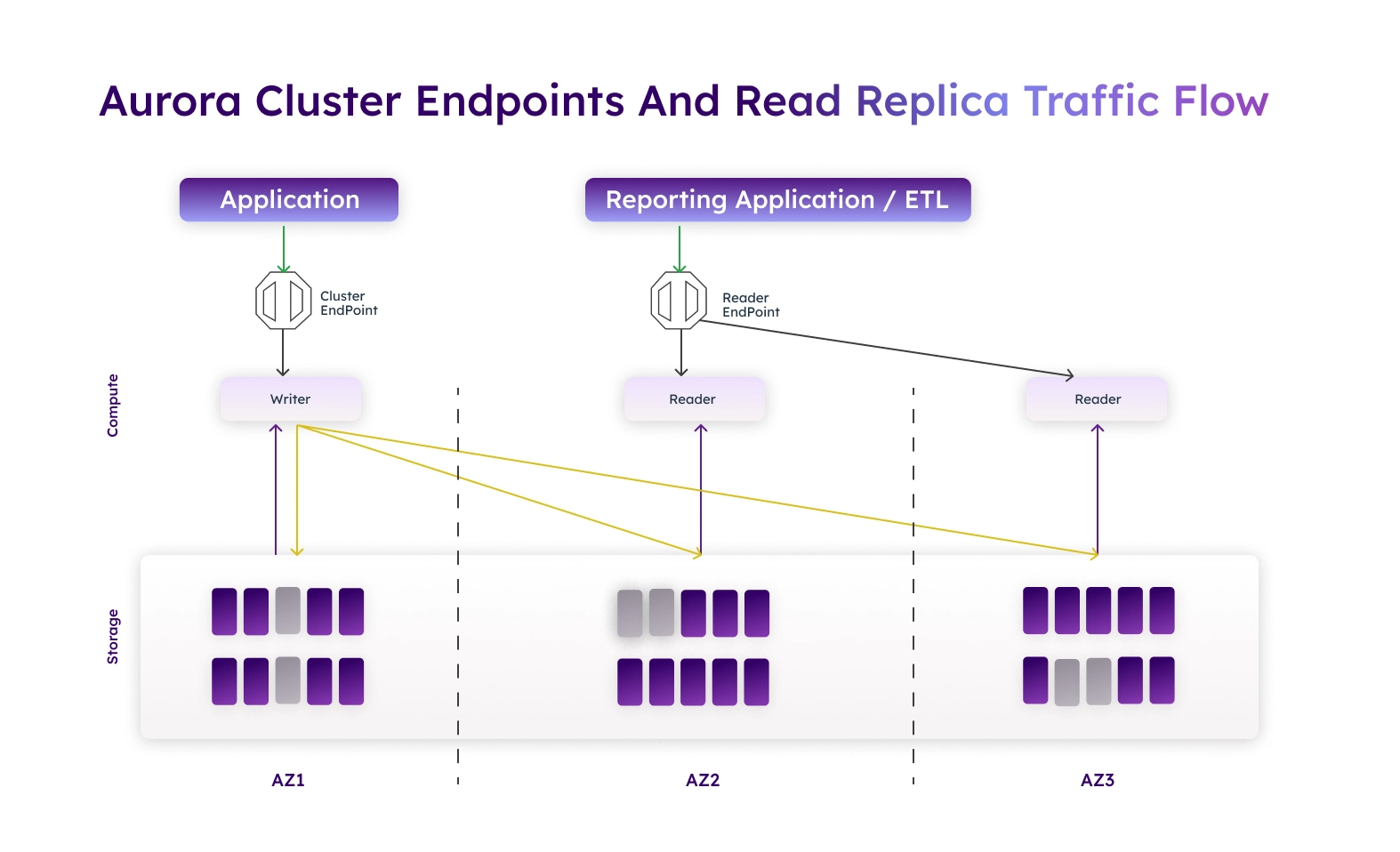
- Durable copies of your data: Aurora maintains six durable copies of your data (called Storage Volume) across three Availability Zones (AZs). This helps prevent loss of service due to hardware failures.
- DB Cluster Composition: Each Aurora cluster consists of one primary writer DB instance and optional read DB instances to help spread load evenly across multiple DB instances.
- Automatic Failover: If a primary writer DB instance fails, an Aurora Replica can be promoted to become a writer DB instance in a matter of seconds, thus minimizing downtime and disruption to your services.
- Fault Tolerance: Aurora's shared storage architecture ensures that your application(s) will remain consistently available and accessible by all users even during times of failure.
To understand how this high-availability architecture works in practice, connect with BuildNexTech for expert guidance on designing and operating resilient AWS Aurora databases.
Shared Storage, Multi-AZ Design, and Automated Failover
Multi-AZ DB clusters allow Amazon Aurora to have high levels of availability when node-level issues occur, helping businesses ensure their mission-critical systems stay up and running with minimal interruption.
- Multi-AZ protection allows the Amazon Aurora service to avoid the impact of a single node failure through the use of multiple Availability Zones.
- Read/write traffic distribution allows Aurora usage to minimize operational burden on businesses and to protect their production workloads, as all read traffic goes through Aurora Replicas on separate cluster endpoints and all write traffic goes through the primary writer cluster endpoint.
- Automatic failover capabilities, including switchover, reboot, and failover, keep the database operational without requiring manual intervention.
- Creating operational efficiencies through a reduction in time spent managing daily operations also helps reduce the number of disruptions to the production environment caused by maintenance or unanticipated issues in the infrastructure.
As a result of the Multi-AZ DB cluster design, businesses can be assured that their AWS Aurora databases can be run in production with full confidence since they know that their applications, users, and workloads will always be able to access them 24 hours a day, 7 days a week, even during maintenance windows or unexpected failures in their infrastructure.
Replication and Global Availability with AWS Aurora
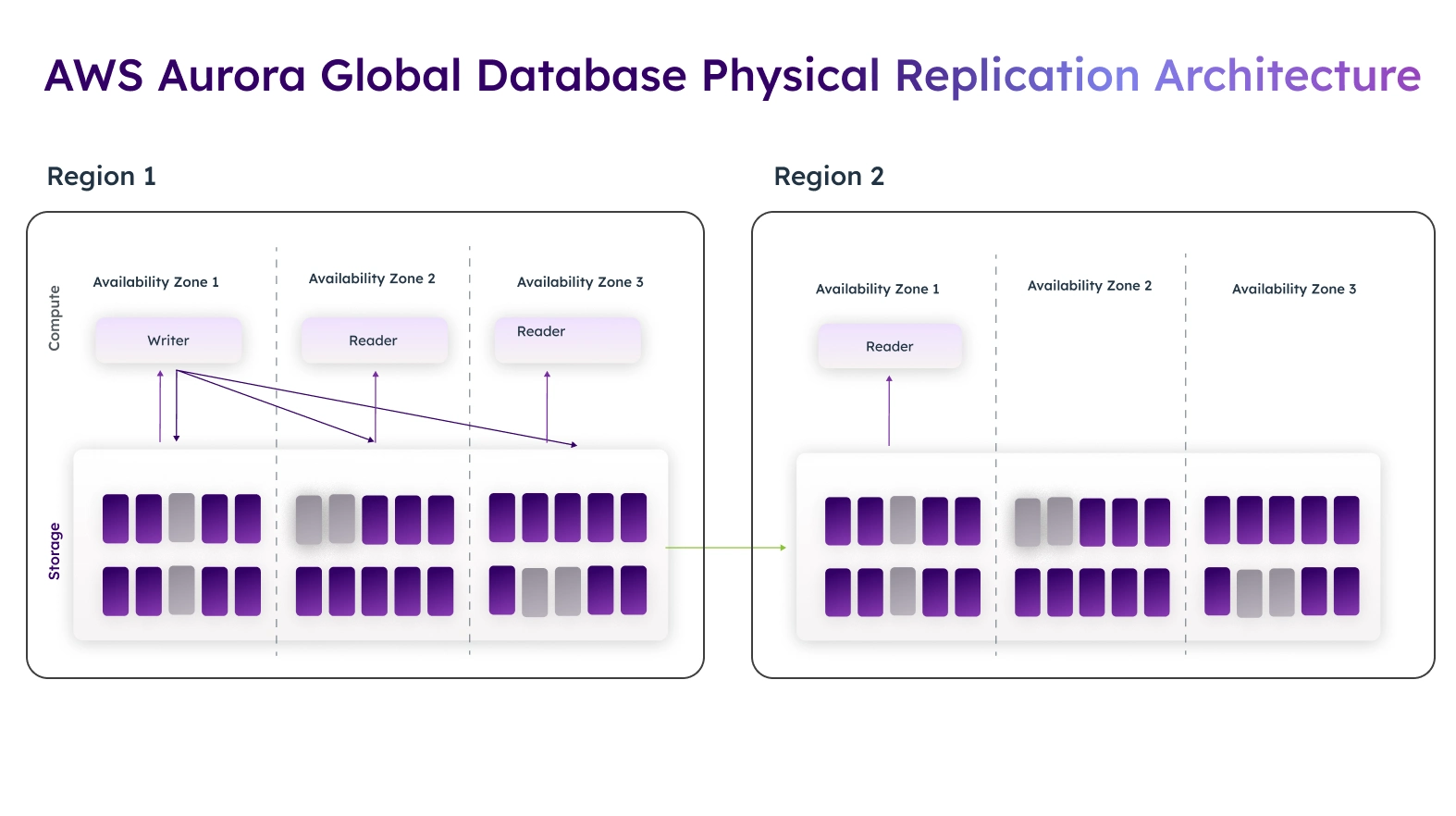
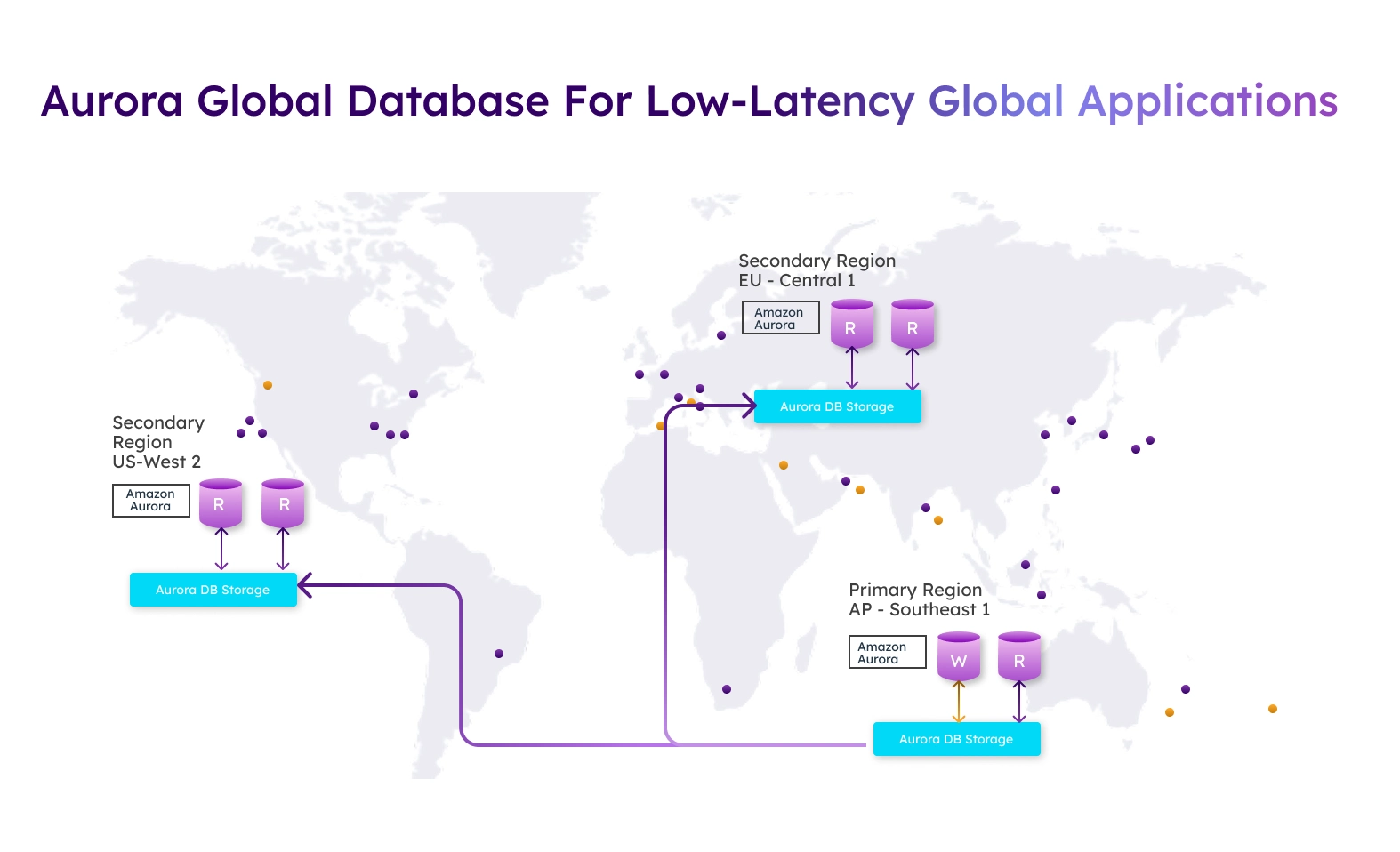
Amazon Aurora's replication capabilities allow for both local and global architectures. Data is replicated over multiple AWS Regions in the Aurora Global Database model via cross-region disaster recovery methods. Aurora Global Database architecture uses global clusters for read instances physically closer to customers and reduces query response time. The use of Binary Log Replication, Write Forwarding, and Read-Only Aurora Read Replicas further enhances both the global consistency and scalability capabilities of the Aurora Global Database.
Read Scaling, Disaster Recovery, and Global Database Capabilities
Disaster Recovery, Global Database and Read Scaling Capabilities: Each Database Cluster supports up to 15 Read Replica nodes that assist in load balancing query traffic from multiple Read Replica nodes to lessen the burden on the Primary Node. Additionally, for Disaster Recovery, fast replication, automatic failover, and low latency endpoint are employed.
The Aurora Global Database uses Continuous Replication technology to replicate data nearly continuously. Data is replicated in near real time and can be recovered in almost no time for transactions that were replicated and stored on multiple databases located in different regions.
Aurora MySQL vs Aurora PostgreSQL: Engine Choices
Amazon Aurora’s replication and disaster recovery technologies empower organisations to scale their read operations while protecting their data across multiple geographic locations. This guarantees that applications will continue to perform efficiently and effectively, regardless of their geographic location or workload levels.
- Read Scaling – Each Aurora database cluster may have 15 read replicas, which distribute query traffic and decrease the workload on the Primary Node.
- Disaster Recovery – Aurora leverages fast replication, automated failover, and low-latency copies to provide continuity of services.
- Global Availability – Aurora Global Database provides continuous replication across all AWS regions, providing for disaster recovery in seconds.
- Transaction Preservation – Aurora guarantees that all transactions will stay consistent and intact, even in the event of a disaster and subsequent recovery.
Companies that use these technologies with Aurora AWS can offer global applications while maintaining minimal downtime, thus ensuring the protection of critical workloads and providing a seamless user experience.
Scalability Without Limits: How AWS Aurora Handles Growth
Amazon Aurora allows unlimited scaling and enables databases to automatically grow to accommodate increasing workloads without requiring any manual action from the user. The separation of compute and storage capabilities in Amazon Aurora enables applications to stay at optimal performance levels during temporary spikes in traffic, as well as throughout the longer-term growth of traffic patterns.
- Automatic storage scaling enables automatic storage expansion to 128 TB per database instance so that users no longer need to perform manual capacity planning on their own.
- Computational Scaling is where users increase their computational capabilities by simply adding more instances of their databases; however, the use of Aurora Serverless also allows the user to dynamically create additional instances of their existing databases on-demand, based on incoming connections, requests, and dynamic CPU usage.
- Seamless Growth refers to the automatic ability to grow the number of user connections and/or workloads a user has without any downtime.
With all of these advancements in technology, the use of the Database on Amazon Web Services enables companies to create a better, cost-effective, or improved way to manage their database resources while maintaining high efficiency well into the future.
Storage and Compute Scaling with Aurora Serverless
Aurora Serverless v2 enhances database scalability by providing precise, demand-based resource management. This ensures applications remain responsive while optimizing costs for variable workloads.
- ACU-based capacity management: Scales compute resources in fine-grained increments to match actual workload demand.
- Dynamic scaling: Serverless clusters can scale up, pause, and resume automatically based on database activity, reducing idle resource costs.
- Elimination of cooldown delays: Provides instant capacity adjustments to handle bursty workloads without manual intervention.
- Support for variable workloads: Ensures consistent performance for applications with unpredictable traffic patterns.
By leveraging Aurora Serverless v2, businesses using the Aurora AWS database can achieve efficient scaling, maintain high application availability, and reduce operational costs, even under fluctuating workload demands.
Operational Excellence: Running Aurora in Production
Operational excellence depends on automation and observability. Amazon Aurora supports continuous backup, snapshots, and point-in-time recovery with a configurable backup retention period.
Enhanced Monitoring, Performance Insights, and Amazon CloudWatch logs provide visibility into database performance, metrics, and events.
Backups, Recovery, Monitoring, and AWS Integrations
Operational excellence in Amazon Aurora ensures reliable performance, secure access, and streamlined management of production environments. By leveraging AWS tools, businesses can maintain high availability while reducing operational complexity.
- Connection management: Amazon RDS Proxy and Aurora RDS Proxy pool database connections, improving scalability and security.
- Reduced overhead: RDS Proxy minimizes connection overhead during scaling events, ensuring efficient resource utilization.
- AWS integrations: Works seamlessly with AWS Backup, Amazon Simple Storage Service (S3), and Amazon EC2 to strengthen disaster recovery, governance, and compliance access.
- Enhanced monitoring: Supports tracking of CPU utilization, memory, and metrics to maintain optimal database performance.
By implementing these practices, BuildNexTech ensures that Aurora AWS databases operate efficiently, securely, and with minimal disruption, allowing teams to focus on building high-performance applications.
Use Cases and Best Practices for AWS Aurora
E-commerce platforms depend on High availability and fast query responses for millions of users. Financial systems rely on Replication, disaster recovery, and secure access. SaaS platforms benefit from elastic clusters, Serverless scaling, and predictable costs.
Best practices include using read-only Aurora Replicas, optimizing database connections, tuning SQL, and monitoring performance continuously.
Architecture Patterns, Performance, and Cost Optimization
AWS Aurora architectures provide businesses with resilient, high-performance database solutions that can grow alongside application demands. By combining advanced scaling features with best practices in query and resource optimization, organizations can achieve both reliability and cost efficiency.
- Resilient architectures: Use Multi-AZ DB cluster designs, read clusters, and Aurora Global Database replication to ensure high availability and fault tolerance.
- Scalability solutions: Aurora Auto Scaling, Limitless Database, and Aurora PostgreSQL Limitless Database support future growth and unpredictable workloads.
- Performance optimization: Fine-tune queries, tables, indexes, and resource utilization for long-term database performance.
- Cost management: Efficient architectures reduce operational costs while maintaining high availability and application performance.
By adopting these best practices, businesses using Aurora AWS database can ensure scalable, resilient, and cost-effective production environments, allowing teams to focus on innovation rather than database maintenance.
Conclusion: AWS Aurora as the Backbone of Cloud-Native Databases
Amazon Aurora unifies availability, Replication, scalability, and enterprise-grade performance into a single managed database platform. Built on AWS, Aurora supports modern applications, global users, and complex workload demands with minimal operational time.
At BuildNexTech, we design and optimize Aurora DB clusters for secure, scalable, and cost-efficient production environment deployments. From Amazon Aurora adoption to global architectures, Aurora remains the backbone of modern cloud-native databases.
People Also Ask

Is AWS Aurora suitable for small or early-stage applications, or only for large enterprises?
AWS Aurora is suitable for both small applications and large enterprises, as it supports right-sized instances and serverless scaling for cost-efficient growth.
How does AWS Aurora pricing compare to traditional self-managed databases on EC2?
Aurora typically reduces operational costs by eliminating infrastructure management overhead, though instance and I/O costs may be higher than basic EC2 setups.
Can AWS Aurora be migrated from an existing on-premise database without downtime?
Yes, AWS Aurora supports near-zero-downtime migrations using AWS Database Migration Service with continuous replication.
Does AWS Aurora support compliance and security standards required by regulated industries?
Yes, Aurora supports encryption, IAM integration, auditing, and compliance standards such as SOC, ISO, PCI DSS, and HIPAA.
What are the common limitations or scenarios where AWS Aurora may not be the best choice?
Aurora may not be ideal for highly specialized databases, ultra-low-latency single-node workloads, or environments requiring full OS-level control.


.webp)
.webp)
.webp)

.webp)
.webp)



