

.webp)
A company came to us nine months into juggling five disconnected apps for one lead-routing process: A form tool, a CRM, a billing platform, a support inbox, and a calendar. What started as one Slack alert had grown into eleven automated workflows nobody could fully explain, and they wanted the best AI tools for workflow automation, built on real artificial intelligence that could reason.
That company is not unusual. Gartner expects task-specific AI agents in 40% of enterprise apps by 2026, up from under 5% in 2025. Most enterprise teams evaluating AI Automation Tools face the same choice: Platforms built for a pre-agentic world, or a newer generation built to reason over unstructured input. This guide compares the tools worth evaluating.
What Is AI Workflow Automation?
AI workflow automation combines rule-based execution with artificial intelligence software that helps businesses read, analyze, and act on unstructured input. That is the line separating it from a plain robotic process automation platform, which stops the moment a step needs judgment. As AI for process automation and AI for business automation converge, the reasoning layer decides whether a workflow scales or breaks.
Most platforms rely on a consistent set of building blocks:
- Natural language processing to read tickets, emails, and free-text fields.
- Machine learning models that improve routing decisions over time.
- Data transformation to reshape payloads between systems.
- Connections to existing integration platforms, including any data integration platform or cloud integration platform.
Teams often delay this because it looks like a multi-month migration. Most rollouts start alongside the automation tools a team already runs, ahead of comparing any agentic AI vendor.
.webp)
How We Compared These AI Workflow Automation Tools
We scored every AI automation platform against six criteria that decide whether a workflow scales or breaks:
- Ease of use and setup time.
- Agentic capability and natural language processing depth.
- Integration depth, including API integration and API support.
- Human-in-the-loop controls and audit logs.
- Security, compliance, and error handling.
- Pricing model, including credit model options.
No single tool wins on all six, worth remembering before any demo. Most comparisons chase the best AI agents by feature count alone, but integration breadth solves discovery, not judgement calls. The platform with the biggest app library is often stitched into the most brittle automation in the building. 2026's real differentiator is reasoning depth, not app marketplace size.
Best AI Workflow Automation Tools for 2026
Seven platforms show up on every credible shortlist this year, from no-code builders to AI-native agent platforms. Each brings distinct strengths for different team profiles, and "best for" matters more than any feature checklist.
Zapier: Best for Non-Technical Teams
Zapier remains the default entry point for teams without an engineer on the automation ticket, built for speed rather than depth of reasoning. It's a first stop for marketing teams building marketing automation workflows like lead-nurture sequences, while finance uses similar templates for invoice automation software and business process automation tools.
- Library of more than 8,000 apps with a drag-and-drop interface.
- Zapier Agents, Chatbots, Canvas, and MCP support for reasoning tasks.
- Ready-made workflow templates and a template library section.
- Webhook support and API integration for custom triggers.
The value is speed to first automation, not depth of judgment-call handling, which is where it earns its place for straightforward, high-volume tasks.
Make: Best for Visual, Multi-Step Workflows
Make trades Zapier's simplicity for a canvas-based builder with real branching logic, suited to teams running multi-step workflows across five or six apps. The value here is visual clarity: Complex logic stays readable even as a workflow grows past what a simple trigger-action pair can handle.
- A visual Scenario Builder for multi-step, multi-app workflows.
- Maia, its natural language processing assistant, turns a plain-English brief into a working scenario.
- Built-in error handling and error retries on failed steps.
- Reusable workflows that cut rebuild time on similar processes.
Teams that already think in flowcharts get more value from Make than from a flatter, linear builder.
n8n: Best for Developers and Self-Hosting
n8n remains the best-known n8n workflow automation open-source project, self-hostable and extendable with custom JavaScript or Python where visual nodes run out. Its value is control: Teams keep data in-house and shape the workflow runtime exactly to their infrastructure rather than adapting to a vendor's constraints.
- Custom nodes and native AI nodes for retrieval-augmented generation.
- Git-based version control for workflow versioning.
- Full workflow runtime logs for debugging in production.
- Strong API support for teams building around existing services.
Teams with an engineer willing to own deployment get the most value from n8n's flexibility and self-hostable platform model.
Power Automate: Best for Microsoft Ecosystems
Microsoft Power Automate is the natural default for organisations already standardised on Microsoft 365 and Azure, positioning itself as both a low-code automation platform and enterprise process automation software. Its value comes from near-zero-friction adoption inside a stack teams already trust and manage.
- Deep native integration with Microsoft's stack and legacy RPA capabilities.
- A low-code builder for teams that occasionally need custom logic.
- Strong audit logs for regulated Microsoft environments.
It is a sound operational choice for governance-first teams rather than a best-in-class AI-first pick, and that trade-off usually pays off inside a Microsoft-centric enterprise.
UiPath: Best for Enterprise RPA
UiPath still leads on complex, multi-system automation involving legacy mainframes, regulated data, and change-control processes lighter tools were never built to survive. Its value is depth: It holds up where governance and auditability matter more than setup speed, and where a single missed exception carries real regulatory weight.
- Deep audit logs and governance controls for enterprise teams.
- Robust error handling across long-running, multi-step processes.
- Strong fit for teams closer to an enterprise iPaaS requirement than a lightweight builder.
Teams choosing UiPath trade setup time for governance, and for regulated industries, that trade almost always pays off.
Gumloop: Best for AI-Native Agent Building
Gumloop gives teams built-in access to multiple models, OpenAI, Anthropic, Gemini, DeepSeek, without locking a workflow into one vendor's reasoning engine. Its value is model flexibility: Teams route different tasks to whichever model handles them best, inside one canvas.
- Data enrichment nodes that pull context before a decision runs.
- SOC 2 Type II and GDPR coverage, with detailed audit logs.
- Multi-agent orchestration built for AI-native workflows from the ground up.
The learning curve runs steeper than chat-based competitors, but teams that already understand agent orchestration get real value from Gumloop's depth.
Lindy: Best for Agentic Business Process Automation
Lindy has shifted from a visual workflow builder into something closer to a proactive AI chatbot assistant, operated mostly through iMessage or SMS rather than a dashboard. Its value is delegation: Less building, more asking, for teams that want an assistant rather than a canvas.
- Inbox triage, calendar management, and meeting prep with real text interpretation.
- Light on classic project management tools, heavier on assistant-style delegation.
Teams wanting a traditional multi-app workflow builder will find Lindy a poor fit, but teams wanting to delegate get exactly what they ask for.
Comparison Table: AI Workflow Automation Tools at a Glance
The table below is not a ranking. Learning curve and reasoning depth vary as much as raw AI-powered integration counts, so match "key strength" against whatever is actually blocking your team.
Feature checklists like this one show what workflow automation software can do, not what your team specifically needs. The real question is how many judgment calls still need a human after rollout, since that number decides whether a workflow genuinely scales.
How to Choose the Right AI Workflow Automation Tool for Your Team
Choosing the right AI workflow automation tool comes down to a short, repeatable process rather than another product demo. Four steps settle most evaluations:
- Map the process. Mark every step where a decision currently requires human judgment, not just data movement.
- Match technical comfort to the builder. No-code for speed, low-code or self-hosted for control.
- Weigh oversight against compliance. Check human-in-the-loop requirements against your industry's regulatory needs.
- Test integration depth against real systems. Prioritise the systems you must connect, not the platform with the longest app list.
Interface changes are frequent across this category, so the workflow management screen you evaluate today may look different in six months. Teams juggling several iPaaS solutions often default to whichever platform integrates fastest, so weigh integration depth against actual project management needs before committing.
How BuildNexTech Helps You Automate AI Workflows at Scale
BuildNexTech's orchestration layer sits alongside, or above, the point tools compared here once a workflow hits its reasoning ceiling. It reads unstructured context a ticket, a clause, an email thread- makes the judgment call a trained employee would make, then hands the action to whatever execution layer exists.
Most teams do not need to rip out existing automation tools. They need a reasoning layer handling the fraction of workflows that keep breaking rules-based logic. Model routing across providers, handled contextually, makes that range possible without a rebuild for every vertical.
What a BuildNexTech Workflow Automation Implementation Looks Like
- Day 1 to 3: Map the process to find where judgment calls break the existing automation.
- Day 4 to 7: Integrate with the no-code or RPA layer already running, via API integration, not a rebuild.
- Week 2 onward: Deploy the reasoning layer on the highest-volume exception first, human reviewer in the loop.
- Ongoing: Observability tracks every decision, feeding iteration back into the workflow.
Conclusion
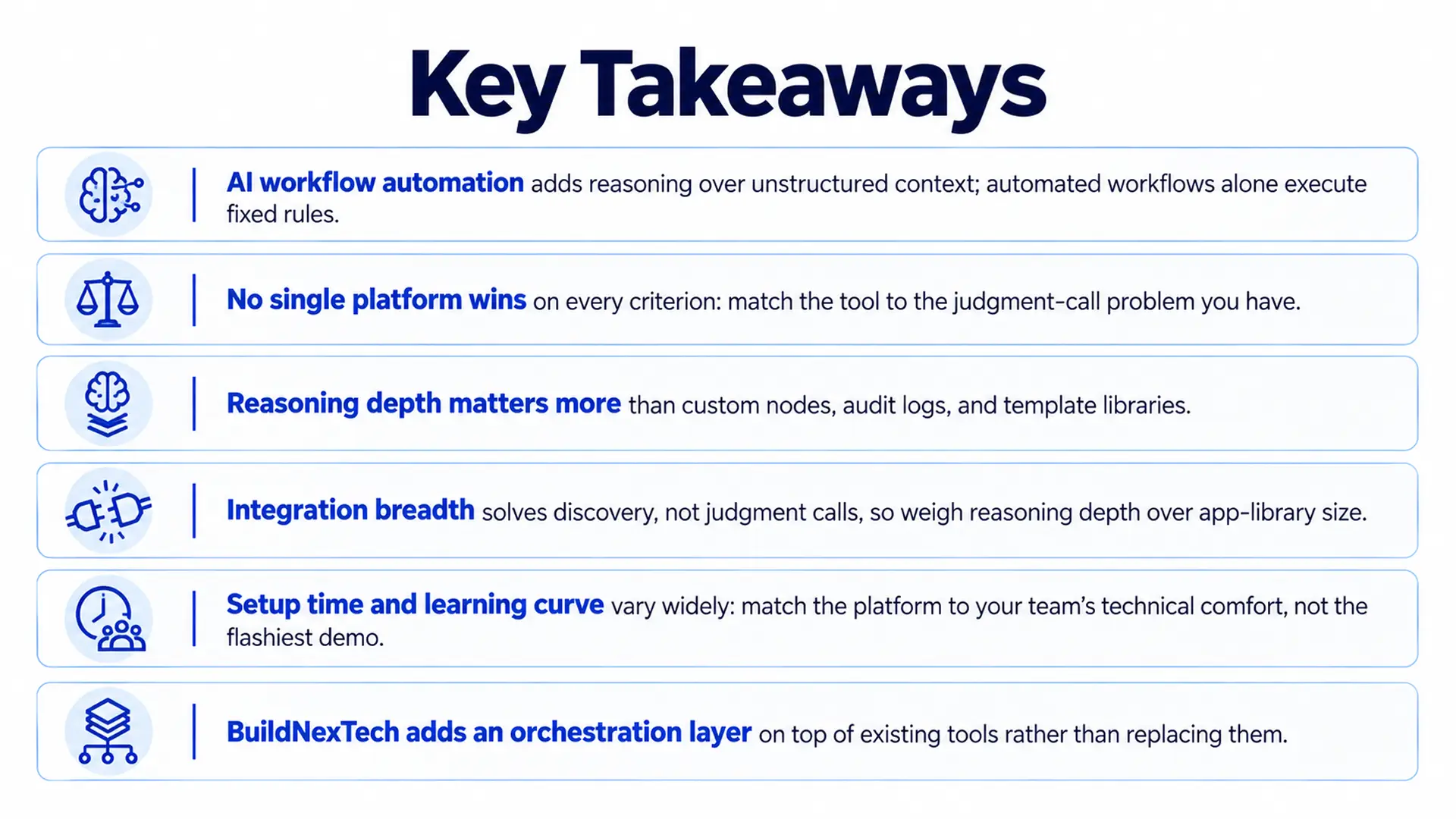
Tool choice comes down to three things: Technical comfort, how much oversight the process requires, and which systems must stay connected. Feature count answers none of that, nor does app-library size, however long the list of workflow automation tools a vendor claims to support.
The best AI workflow automation tools for 2026 are not the ones with the longest integration list. They know when to stop following a rule and start making a judgment call, and that distinction is what actually separates automation from automation that only pretends to think.
People Also Ask

What is the real timeframe to recoup on an AI automation tool?
Simple workflows (email routing, data entry, Slack notifications) refer to those workflows where time savings are usually realized within 30-60 days. Complex enterprise deployments are likely to break even with ROI within 4-6 months of adoption, and edge cases are resolved.
How will your current workflows change under a new automation supplier?
You rebuild them. Most of the platforms do not support competitor import natively. Plan 2-4 weeks to migrate, test, and validate the key workflow. This is what makes switching costs a reality - the license fee is not always the most significant expenditure in the case of changing platforms.
What is the impact of enterprise security and compliance requirements on tool selection?
Significantly. Teams in healthcare must have HIPAA-compliant settings. The field of finance and legal typically requires SOC 2 Type II certification, AES-256 encryption, SAML SSO, and formal data processing contracts. Signing: Do not sign without documentation of compliance, and make sure that it is specific to your situation and not to the platform itself.
Are you required to have a dedicated developer to support automation pipelines in the long term?
With no-code tools, such as Zapier or Kissflow, someone must own it, but it does not have to be necessarily so. Budget developer time in the case of n8n or Power Automate Premium, or any other application that requires custom API integrations. Debt of automation accumulates: processes cease to work when upstream applications change APIs, and no one notices that something is amiss until one process suddenly ceases.
How do you deal with the failure of automation in the production process when the production is not in downtime?
Examples of good platforms are retry logic, receiving notifications of errors through Slack or email, and fallback paths. The best approach is to ensure all the workflows are designed with a defined failure condition - what happens to the work in case of automation failure? Manual fallback queues do not allow the disappearance of tasks. The monitoring and alerting should be set up before the workflow is made live and not after the first instance of business-critical processes


.webp)
.webp)
.webp)

.webp)
.webp)



