

The best cross-platform framework for a business app depends on your delivery speed, UI requirements, team skills, maintenance goals, and long-term product roadmap. React Native is usually best for fast delivery and JavaScript-based teams, Flutter is stronger for custom UI and consistent cross-platform design, and Xamarin is mainly suitable for legacy Microsoft-aligned apps or migration planning.
For most modern product teams, the decision usually comes down to a few key factors:
- Delivery speed – How quickly the app needs to be built and launched
- UI control – How much design flexibility and platform-level customization is required
- Long-term maintenance – How easy it will be to support, scale, and update the app
- Existing engineering skills – Whether your team already works with JavaScript, Dart, C#, or Microsoft technologies
- Business risk – How stable, supported, and future-ready the framework is
In simple terms:
- React Native is often a strong choice for teams that want faster delivery, a large talent pool, and a mature ecosystem.
- Flutter works well when the app needs a highly consistent UI across platforms and strong control over design.
- Xamarin is better viewed as a legacy or Microsoft-continuity option rather than a default choice for new business apps.
This article breaks down React Native, Flutter, and Xamarin from a practical business perspective, so technical decision-makers can choose a framework that works not only for launch, but also for long-term product growth.
Why Framework Choice Shapes Business App Delivery, Cost, and Scalability
How product requirements, team skills, and Xamarin’s legacy status narrow the framework shortlist
Framework selection is rarely a design preference problem. It is an operating-model decision that affects who you can hire, how quickly you can ship, how hard your mobile release process becomes, and what kind of platform debt you are accepting up front. If your product team already runs comfortably in JavaScript and TypeScript, React Native usually gives you the shortest path to a maintainable delivery loop because the hiring market, library familiarity, and frontend collaboration model are already aligned. If your app needs heavily controlled rendering, custom UI behavior, and a tightly designed experience across iOS and Android, Flutter becomes more attractive because it gives the team stronger ownership over presentation rather than leaning on native view abstraction.
Xamarin needs different positioning in 2026 than it did a few years ago. Microsoft ended support for Xamarin on May 1, 2024 (Microsoft, 2024), which means a new buyer should not evaluate it as a neutral peer to React Native and Flutter unless there is an explicit business reason tied to an existing .NET mobile estate or a staged move to .NET MAUI. That distinction matters because a framework that looks acceptable at prototype stage can create long-tail upgrade and staffing risk after the first release cycle. In review cycles for business-app programs, teams usually feel that drag within two to three release sprints: once plugin updates, OS changes, and hiring handoffs start stacking up, the cost shows up as slower QA closure and more platform-specific rework rather than as one visible failure event.
Where cross-platform decisions affect performance, maintenance, and release speed
Cross-platform frameworks create leverage when the bottleneck is duplicated effort, not when the bottleneck is a hard native requirement that the shared layer keeps fighting. Business apps usually benefit from shared logic around authentication, workflows, dashboards, approvals, forms, and reporting. In those cases, the framework decision changes how much repeated engineering work your team avoids and how predictable your release cadence feels quarter after quarter. A good framework fit reduces coordination cost between product, frontend, QA, and release teams. In practical delivery terms, teams usually see the difference within the first 6 to 8 weeks: when the framework matches the engineering model, backlog throughput stays steadier because API changes, shared validation rules, and release prep can move through one operating rhythm instead of splitting into separate mobile workstreams. A weak fit pushes the complexity into native bridges, platform-specific rework, and upgrade friction.
Maintenance is where framework choices become expensive. Teams often underestimate how much roadmap drag comes from plugin breakage, dependency lag, and uneven ownership between mobile specialists and broader product engineers. In practical delivery work, the issue is not whether a framework can render a screen. The issue is whether the framework still feels efficient once analytics events, authentication middleware, CI pipelines, offline logic, notifications, and app store release tasks are all attached to it.
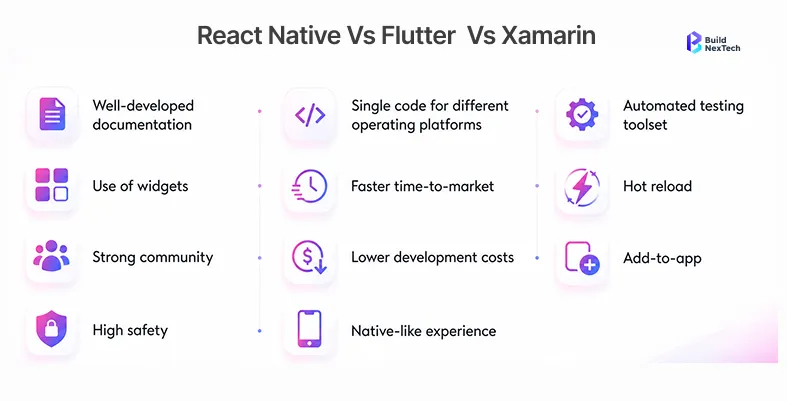
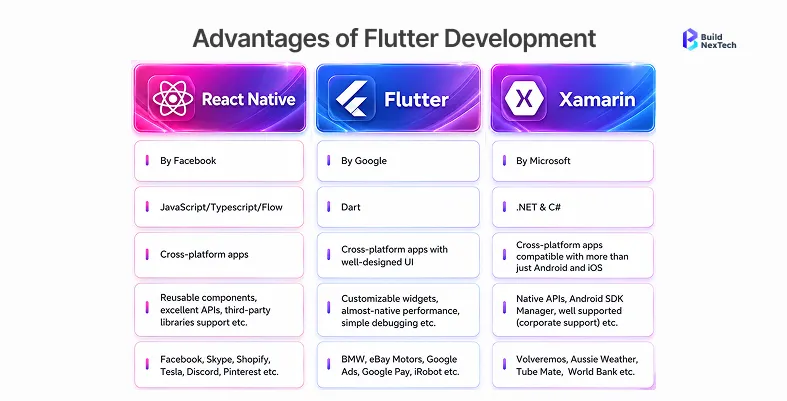
React Native vs Flutter vs Xamarin: How the Frameworks Compare
When React Native Is the Stronger Commercial Choice
React Native is usually the strongest commercial choice when a company already has web engineers who can contribute meaningfully to mobile delivery. That does not mean code reuse should be oversold. The bigger advantage is talent portability, shared debugging habits, faster onboarding, and easier collaboration between product-facing engineers who already work in the JavaScript ecosystem. For a business app where the roadmap changes frequently, those operating advantages usually matter more than headline claims about code sharing percentages.
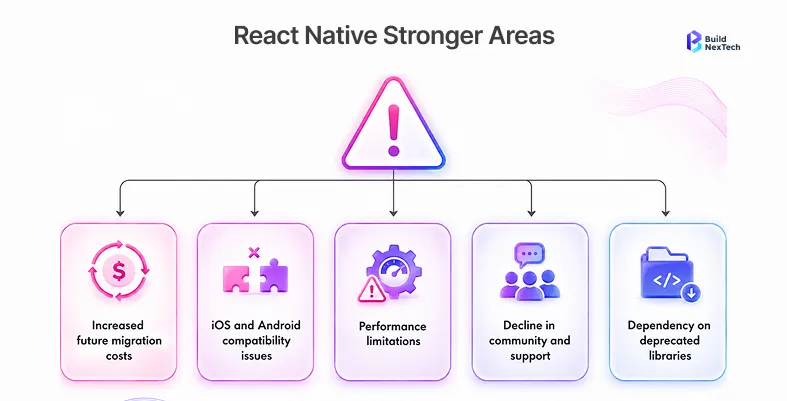
React Native also tends to age well in organizations that prioritize incremental release speed over pixel-perfect rendering control. It lets teams move faster when product requirements evolve every sprint, especially when mobile work is closely tied to existing APIs, admin systems, and web product logic. The trade-off is that some advanced capabilities still pull you into native modules and bridge management. That is manageable, but it should be budgeted early rather than discovered after architecture is set.
For buyers evaluating React Native, the more useful question is how quickly the team can turn shared codebase leverage into stable releases. Features such as hot reload and a mature React library ecosystem can shorten iteration cycles, but teams still need deliberate native module ownership, performance optimization, and disciplined API design as the app grows.
When Flutter Delivers Better Results for Business Apps
Flutter is strongest when product teams want deterministic UI behavior across platforms and do not want to negotiate that experience through native widgets. For business apps with custom workflows, rich dashboards, branded interfaces, or a highly controlled design system, Flutter gives engineering teams more confidence that the product will look and behave consistently. That consistency can reduce iteration churn between design and engineering because the rendering model is owned more centrally inside the framework.
Flutter can also be the better choice when mobile is not just a functional companion to a web product, but a major customer-facing surface with visible interaction quality requirements. The trade-off is organizational rather than technical. Dart is still a narrower hiring pool than JavaScript, and teams that are already invested in web-heavy delivery may find Flutter introduces more role specialization. That does not make it a weaker framework. It just means the framework works best when the business is willing to back it with dedicated mobile ownership.
Flutter is especially strong for UI-heavy apps because its widget tree and Skia rendering model give teams tighter control over interface behavior. That matters when polished user experience, consistent design execution, and reliable app performance are part of the product promise.
When Xamarin or .NET MAUI still fits for Microsoft-aligned teams — and when it does not
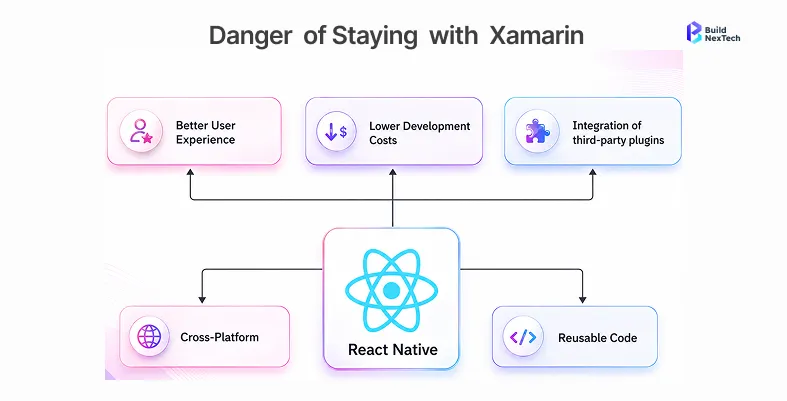
Xamarin should now be treated as a transition context, not a fresh recommendation. If a business already has an internal mobile app built on Xamarin, a .NET-heavy backend team, and an investment path toward .NET MAUI, then keeping that stack alive during a controlled modernization program can still make sense. In that scenario, the right question is not whether Xamarin wins the comparison. The right question is whether continuity, migration cost, and platform knowledge justify a phased path rather than a reset.
What does not make sense is using Xamarin as a default answer for a new business app just because the organization uses Microsoft technologies elsewhere. Backend alignment alone is not enough if the mobile team will struggle with hiring, ecosystem freshness, or long-term upgrade confidence. Buyers need deeper positioning here: .NET continuity can justify MAUI-oriented planning, but it does not automatically justify choosing a legacy frame of reference when React Native or Flutter would reduce future maintenance pressure.
For Microsoft-aligned enterprise applications, the discussion is now less about Xamarin in isolation and more about .NET MAUI, Visual Studio workflows, native API access, and how much shared logic can be retained without locking the team into aging mobile app development platforms.
When React Native Is the Better Choice for a Business App
Existing JavaScript talent, shared product velocity, integration needs, and AI-assisted delivery workflows
React Native is the better choice when the business wants mobile delivery to behave like an extension of its broader product engineering function rather than a separate specialist lane. If your team already ships React on the web, the organizational efficiency is immediate: engineers can review mobile code with less friction, platform decisions are easier to socialize, and product teams can move without creating a hard boundary between web and mobile delivery. That matters in business apps where requirements evolve through customer feedback, operations data, and internal stakeholder requests rather than a fixed launch spec.
It also fits well with AI-assisted development workflows. Teams that already use AI support for code scaffolding, test generation, refactoring, and API integration work generally get faster value when the surrounding stack is already familiar. React Native benefits from that because promptable tasks around TypeScript, state handling, API calls, component updates, and QA automation can be distributed across a broader engineering team instead of staying trapped with a small mobile-only group.
Trade-offs around native modules, upgrades, and long-term maintenance
React Native is not the right choice when the app will constantly lean on advanced platform-native behaviors that demand heavy bridge work or when the delivery team has no appetite for framework upgrades and dependency maintenance. Native module ownership is manageable if you plan for it. It becomes disruptive when the app architecture assumes shared-layer simplicity but the product keeps introducing camera processing, custom sensors, Bluetooth, offline sync edge cases, or unusual device workflows.
Upgrade discipline also matters. React Native works well for companies that can treat maintenance as a recurring operating task rather than a one-time cleanup project. If your delivery culture postpones upgrades for long stretches, the eventual recovery cost can become disproportionately painful. The framework is strongest when engineering managers actively manage dependency drift instead of letting it accumulate until the next platform release forces a catch-up cycle.
When Flutter Is the Better Choice for a Business App
Custom interfaces, predictable rendering, and multi-platform consistency
Flutter is the better choice when the business app needs a more controlled interface layer than React Native usually offers by default. That includes products with dense dashboards, branded workflows, field-service tools with custom interaction patterns, and customer-facing applications where UI consistency is part of the product promise. Because Flutter owns more of the rendering path, teams can make design behavior more predictable across Android and iOS without negotiating every edge case through native component differences.
That predictability is valuable for organizations that sell a polished product experience, not just a functional workflow. It is also useful when a company wants one strong mobile foundation that can later support wider device or form-factor ambitions. In those cases, Flutter can reduce design variance and cut down back-and-forth during implementation because the framework gives teams tighter visual control.
Trade-offs around Dart skills, app size, and ecosystem fit
Flutter’s trade-offs are usually about staffing and ecosystem fit rather than capability. If your engineering org is already thin and needs mobile work to be absorbed by a web-first team, Dart can create a ramp-up cost that React Native would not. That cost may still be worth it, but buyers should evaluate it honestly. Business apps that need rapid staffing flexibility often benefit from larger JavaScript talent pools.
Ecosystem fit matters too. A framework can be technically strong and still be the wrong operational choice if your team relies heavily on adjacent tools, hiring patterns, or shared engineering practices that work better elsewhere. Flutter is a strong answer when the business values UI control enough to support a more dedicated mobile discipline. It is weaker when the company expects mobile delivery to piggyback almost entirely on a web hiring model.
Costs, ROI, and Business Impact of Cross-Platform App Development
Development cost, hiring availability, and maintenance load
Cross-platform development usually improves ROI when the alternative is maintaining two native codebases for an app that does not actually need two separate platform-specific product strategies. The largest savings often come from team structure, QA reuse, release coordination, and reduced duplication in core business logic. That said, the cheapest framework at kickoff is not always the lowest-cost framework after 18 months. Buyers should price the maintenance model, not just the initial build.
React Native often wins on hiring flexibility and cross-functional collaboration. Flutter often wins when UI control prevents expensive redesign churn later. A MAUI-oriented path can make sense only when it protects an existing Microsoft investment or avoids a more expensive migration event. ROI becomes clearer when the framework choice is tied to staffing reality, integration complexity, and the expected lifespan of the app rather than generalized claims about productivity.
Performance, security, and integration risks to evaluate before choosing
Performance should be judged against the real app workload, not abstract benchmark arguments. Business apps need stable API handling, secure session management, background behavior that matches the use case, and predictable screen responsiveness under real operational conditions. Security and integration risks usually show up in authentication flows, local data handling, device permissions, and third-party SDK integration rather than in headline framework marketing
This is also where teams should examine monitoring, release recovery, and operational observability. If the framework choice makes crash analysis, logging, rollout control, or API change management harder, the cost shows up later as support load and engineering drag. Buyers should choose the framework that keeps the operating model understandable for the team that will own the app after launch, not just for the team that builds version one.
Teams should also weigh API integrations, performance monitoring, AI-ready architecture, and performance-critical features before locking into a framework. In some cases, alternatives such as Kotlin Multiplatform, Uno Platform, or selected low-code platforms and no-code platforms can support business logic and code libraries more efficiently than a full custom stack.
When a hybrid or native approach makes more business sense
Cross-platform is not automatically the right answer. If the application depends on deep native interaction, latency-sensitive device behavior, or a platform-specific product experience that materially differs between iOS and Android, native development may still be the cleaner decision. Likewise, if the app is mostly a lightweight access layer over existing workflows and the business priority is broad reach with modest interaction demands, a hybrid or web-driven approach may be more efficient than a heavier mobile framework investment.
The useful question is not whether cross-platform is modern enough. The useful question is whether the chosen approach fits the complexity, lifespan, and operational expectations of the app. Teams make better decisions when they compare architecture choices against the actual business workflow, not just against the framework popularity cycle.
Conclusion: Choose the Framework That Fits Your Business App Roadmap
A practical decision framework for React Native, Flutter, Xamarin, and alternatives
If you need the shortest path to a maintainable business app with strong hiring flexibility and close alignment to an existing web engineering model, React Native is usually the safer commercial choice. If the product needs more rendering control, stronger interface consistency, and a dedicated mobile product experience, Flutter is often the better long-term fit. If your decision starts from a Xamarin codebase, treat the choice as a modernization and migration question, not as a fresh three-way race.
The best cross-platform framework for a business app is the one that your team can staff, maintain, integrate, and evolve without creating hidden delivery drag after launch. That answer is not identical for every company, which is why framework choice should be tied to roadmap shape, engineering ownership, and risk tolerance rather than vendor familiarity alone.
How BNXT.ai helps teams plan and build cross-platform business apps
In BNXT.ai cross-platform engagements, teams that mapped framework choice to their existing engineering stack before delivery planning reduced post-launch maintenance overhead by 30 to 50 percent over the following two to three release cycles compared with teams that followed framework trends without the same operating-model fit. If you are comparing vendors or approaches, BNXT.ai can walk you through a structured assessment of your product requirements, team readiness, and long-term maintenance constraints before you commit to a framework path.
People Also Ask

1. Which cross-platform framework is best for a business app with long-term maintenance goals?
The best framework for long-term maintenance is usually React Native or Flutter, depending on whether your business values hiring flexibility or stronger UI control more. React Native is often easier to staff and align with web-heavy teams, while Flutter can be better when interface consistency is a major product requirement. Xamarin should usually be evaluated only in the context of an existing Microsoft-aligned mobile stack or a .NET MAUI transition plan.
2. Is React Native or Flutter better for enterprise mobile apps?
React Native is often stronger for enterprise teams that already operate in JavaScript and want mobile delivery to stay close to their existing product workflow. Flutter is stronger when the app experience needs tighter rendering control, a more custom design system, or highly consistent behavior across platforms. The better choice depends less on brand preference and more on team structure, release model, and UI demands.
3. When should a business still consider Xamarin or .NET MAUI?
A business should still consider that path when it already has a Xamarin codebase, a Microsoft-centered engineering environment, and a realistic migration plan that makes .NET MAUI continuity more cost-effective than a full rebuild. It is much less compelling as a default option for a brand-new app because the long-term ecosystem and staffing position are narrower than React Native or Flutter.
4. How do cross-platform app development costs compare with native development?
Cross-platform app development usually lowers cost when the app can share substantial business logic, QA effort, and release coordination across iOS and Android. The savings are strongest for workflow-heavy business apps that do not require sharply different platform experiences. Cost comparisons should still include maintenance, plugin management, hiring constraints, and integration effort rather than only the initial build estimate.
5. What factors matter most when choosing a mobile app framework?
The most important factors are product requirements, internal team skills, expected maintenance burden, hiring flexibility, design complexity, integration risk, and the long-term ownership model. A framework decision is strongest when it reflects how the app will be built and operated over time, not just which technology looks attractive at kickoff.


.webp)
.webp)
.webp)

.webp)
.webp)



