

Claude AI is Anthropic's assistant, built on a large language model (LLM) and strongest at careful reasoning, clear writing, and long documents. Is Claude better than ChatGPT? Like the Claude vs. ChatGPT and Google Gemini vs. ChatGPT debates, it depends on the job, so prompting skill decides most of the gain. Here are 15 techniques, each with a paste-ready example you can try today.
15 Advanced Claude Tips to Get Sharper Results
The first ten tips need only a few extra lines of typing. The last five add context, tools, and agents.
1. Pick the Right Plan and Model
The right model and plan decide quality and cost. Match them to the job.
- Claude Opus 4.7 was an earlier release; check the model picker.
- Compare each Claude subscription and the Claude models on your tasks.
- Check Claude usage and current Claude pricing.
Example: Which one fits you?
- Tagging 500 support emails? Haiku 5.5.
- Weekly status report? Sonnet 5.5.
- Auditing a 200-file refactor? Opus 5.5.
- Hardest research or analysis task? Fable 5.1.
- Several chats a week? Pro. Hitting limits daily? Max.
2. Use Role, Task, and Format
A short prompt with four clear parts beats a long, vague one. Claude stops guessing what you want, so you rewrite less.
Weak: Write a product update.
Strong: You are a B2B SaaS product marketer. Summarise this release
for customer success managers in five bullets, each under 20 words.
3. Structure Prompts with XML Tags
XML tags separate your instructions from your material. That keeps long, mixed prompts from being misread.
- Anthropic's prompt engineering guidance recommends the pattern.
- Use one tag per job, such as context, task, and output format.
<context>Q3 churn export, 4,200 rows, pasted below.</context>
<task>Find the three biggest drivers of churn.</task>
<constraints>Use only the data provided. Flag any guesses.</constraints>
<output_format>A table, then a three-sentence summary.</output_format>
4. Match Your Voice with Samples
Adjectives like 'professional' mean little without evidence. Samples carry far more signal.
- Paste at least 150 words of your own writing.
- Ask Claude to match tone, sentence length, and vocabulary.
- Save the result as a custom style.
Below are three of my past LinkedIn posts. Match their tone and
sentence length, then draft a post announcing our new report.
5. Outline Before Long-Form Drafts
Long drafts drift when requested in one go. A short outline catches structure problems early.
- Ask for headings only, then approve or reshape them.
- Draft one section at a time.
Step 1: Outline a 2,000-word guide to vendor onboarding. Headings only.
Step 2 (after approval): Draft section 2 only, 300 words.
6. Edit in Targeted Passes
'Make it better' invites Claude to rewrite everything, including what you liked. Precision keeps the good parts safe.
- Name the exact paragraph, word, or phrase to change.
Replace the phrase 'a number of' in paragraph two with the actual
figure. Keep every other paragraph unchanged.
7. Lock the Output Format Without Prefill
Prefilling Claude's reply used to lock the format, but Claude 4.6 and later models reject it with a 400 error, including the current Opus 5.5, Sonnet 5.5, and Haiku 5.5. Only earlier models accept it.
- State the exact format in your system prompt, with a short sample.
- Use structured outputs, or the output_config.format setting, where supported.
- A fixed format prevents malformed data in JSON pipelines.
- API calls need an Anthropic API key; keep it out of shared code.
System: Reply with valid JSON only: {"summary": string, "risk": "low" or "high"}. No preamble.
Chat: Answer as: Verdict, then one sentence.
8. Put Documents Before Questions
Order changes accuracy on long inputs. Put the material first and your question last.
- Ask for quotes before analysis, so invented details are easier to catch.
- Good context management: Hundreds of pages fit the context window, but only relevant ones should.
<document>[paste 60-page supplier contract]</document>
Quote every termination clause, then list buyer risks.
9. Use Extended Thinking
Extended thinking gives Claude room to reason before answering. You switch it on with a toggle.
- Use it for debugging, planning, and multi-factor decisions.
- Skip it for quick rewrites, as responses run slower.
(Extended thinking on) Our nightly export fails every third night.
Logs and cron config attached. Rank likely causes by probability.
10. Let Claude Interview You
Claude fills gaps with guesses when context is thin. Make it ask before it answers.
- Cap the questions, for example, at five.
- Follow up with a confidence rating, because Claude rarely volunteers its own uncertainty.
Ask me up to five clarifying questions before you start.
Afterwards, rate your confidence in each recommendation from
one to ten.
11. Use Projects for Context
An ops lead pasted the same brand guide into forty new chats a month. Claude Projects ended that habit.
- Upload files, such as brand guides saved as Markdown files.
- Add project instructions once.
Project instructions: You are our brand editor. Follow the attached
style guide. Use British English. Never use exclamation marks.
12. Turn Outputs into Artifacts
Claude Artifacts open code, documents and small apps in a side panel. You can see, test and edit them as you go.
- Edit them by conversation, and save a finished page as a local HTML file.
- Ask for diagrams in Mermaid syntax, so they stay editable as text.
- Claude Design handles early prototypes.
Draw our onboarding flow in Mermaid syntax. Then build a one-page
checklist I can save as a local HTML file.
13. Connect Claude to Your Tools with MCP
The Model Context Protocol (MCP) lets Claude work on real data instead of pasted excerpts. Our guide to integrating Claude into enterprise applications goes deeper.
- Tools: Google Drive, Slack, a GitHub repo, Google Docs, plus command-line options like the gws CLI.
- MCP Support is built into Claude's apps.
- Catch: Every connected tool adds context overhead. Enable only what the task needs.
- Safety: Read the SQL command before approving any database action.
Find the latest pricing deck in Drive, then draft a Google Docs
summary of what changed since Q2.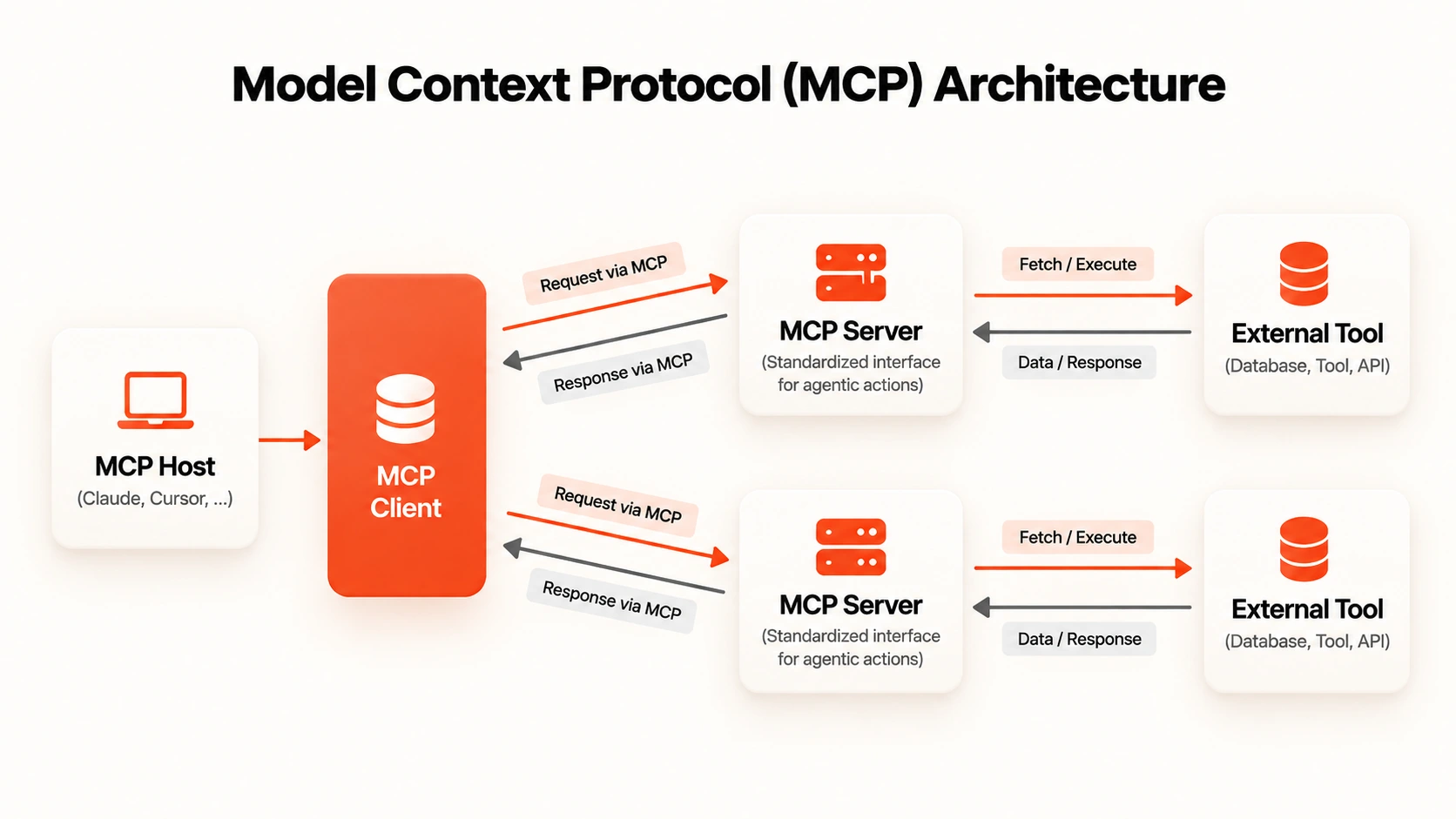
14. Master Claude Code Tips: CLAUDE.md, Plan Mode and Hooks
AI tooling is mainstream: 84% of respondents in the 2025 Stack Overflow Developer Survey use or plan to use it. The Claude Code AI coding tool lives in your terminal, acting as a coding AI assistant. It makes AI-First Development practical.
- Terminal Integration: Run it in your terminal panel inside your editor.
- Multi-file Operations: It reads a large codebase and edits several files in one task.
- Claude.md files: Stack, conventions, and test commands, read at the start of every session.
- Plan Mode: Review the approach before any file changes. Use it for code review too.
- Hooks System: Run scripts automatically, such as Auto-Format on Save after every edit.
- Session management: One task per session keeps Claude Code sessions clean.
- Quality gate: Ask for unit tests, then review, because Production-Ready code needs a human check.
- Extras: Claude Code on the web runs tasks from a browser. Point it at a GitHub repo and auto-generate docs.
CLAUDE.md: Stack: Next.js, TypeScript, Postgres. Test: npm test.
Never edit /migrations.
Plan Mode prompt: Propose how to add rate limiting. No file changes yet.
Hook: after each edit, run prettier --write on the changed file.
15. Delegate Tasks to Chrome and Cowork
Agents act on your behalf, so scope matters more than speed. Start small, with a human reviewing.
- Claude in Chrome extension: The Claude extension for browser tasks such as filling forms.
- Chrome DevTools MCP: Lets Claude inspect and debug live pages.
- Firecrawl CLI: Turns web pages into clean text for analysis.
- Claude Cowork: Now part of Claude itself, rolling out first to Pro and Max.
- Guardrails: Web pages can hide instructions, one of the online attacks agents face, so review every output.
What are AI agents? Software that plans and acts on a task with limited supervision; both tools point to AI agents. An agent with a clear boundary is a colleague. Without one, it is an intern with admin rights.
Chrome: Put pricing from these five competitor pages into a table.
Do not submit any forms.
Cowork: Rename the 60 invoices here as vendor-date-amount.
How BuildNexTech Autonomous AI Orchestration Extends Claude Across Your Team
A 400-location US retail chain had capable people using AI assistants one ticket at a time, and the queue still grew. Once agents handed work to each other, 64% of IT tickets were auto-resolved. Gartner expects task-specific AI agents in 40% of enterprise apps by 2026, so the gap is team-level: a Team OS of shared prompts, Projects, and CLAUDE.md files.
BNXT.ai builds multi-agent orchestration across Claude and other models, with low-code agent building. Director Mode lets a planning agent delegate to specialists, Managed Agent Memory keeps state, and a security solution logs every decision, as a security service your risk team can audit. Top AI consulting companies such as Accenture and Infosys suit organisation-wide programmes; we suit teams who own the build.
Orchestrating Claude Agents with BuildNexTech
Expect roughly one week to a first working agent, depending on how many tools it touches. The plan below keeps a human reviewer in the loop.
- Day 1 to 3: Discovery, mapping where work crosses tools.
- Day 4 to 7: Integration with Claude, MCP connectors, and your existing stack.
- Week 2 onward: Deployment on the highest-volume workflow.
- Ongoing: Monitoring that logs every agent decision.
It fits engineering and ops teams with Claude in daily use and workflows spanning several tools, where model routing matters. If that sounds like your team, let's talk.
Conclusion
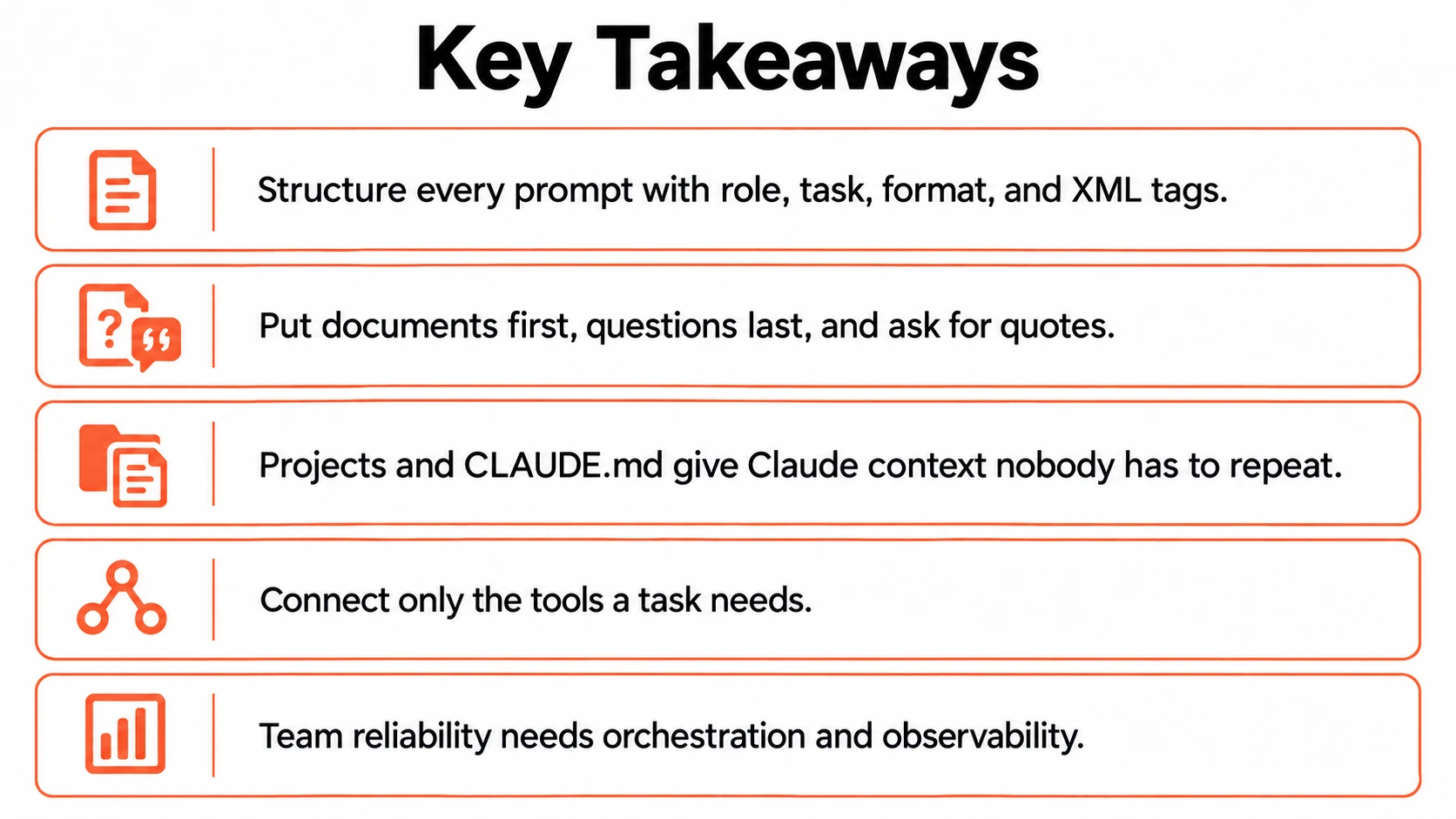
Learning to use Claude well in 2026 is mostly learning to be specific. Structure your prompts, give Claude persistent context, and connect only the tools that matter. The same model then starts behaving like a different product.
Teams that do this stop debating which assistant is smartest and start measuring the hours they save, since habits matter more than the model. The harder question comes next: Once five people prompt brilliantly, whose version becomes the standard, and who checks the output before it reaches a customer?
People Also Ask

How much does Claude Code cost?
Claude Code pricing depends on how you access it. It is included with paid Claude plans, or billed by usage through the API. Confirm current rates on Anthropic's pricing page.
How to install Claude Code on Windows?
Install Claude Code CLI using Anthropic's official installer or npm with Node.js, then run Claude in your project folder. Check Anthropic's setup docs for current Windows steps.
What is an LLM, and what does LLM mean?
LLM means a large language model. How does an LLM work? It learns patterns from huge text datasets, then predicts likely next words, which lets it write and summarise.
How do I get an Anthropic API key for the Claude API?
Create an account in the Claude Platform, add billing, then generate a key under API keys. Store it in an environment variable and never commit it to a GitHub repo.
Is there a Claude Desktop app?
Claude Desktop is available for Mac and Windows, and it supports connectors for local tools and files. Download it from Anthropic's site and sign in with your account.


.webp)
.webp)
.webp)

.webp)
.webp)



