


This guide gives you a working Claude API integration in Python covering key setup, model selection, cost optimisation, and production patterns. If you have spent time piecing this together from scattered docs and Stack Overflow threads, this skips that process entirely.
The Claude API is Anthropic's REST interface to its Claude AI models. Built on large language models that excel at natural language processing, content generation, code debugging, and structured outputs, it gives QA engineers, DevOps leads, and CTOs a production-grade AI layer they can integrate in an afternoon.
What Is the Claude API and Why Should Developers Use It?
Claude API in plain terms: what it does and who it is built for
Anthropic, the AI safety company founded by former OpenAI researchers, built the Claude API for developers who need reasoning, not just pattern matching. The Claude API handles conversational AI, content generation, code debugging, legal analysis, and market research at a scale that would take months to replicate in-house. Teams looking at AI agent development will find it the most straightforward entry point to production-grade large language model capabilities.
For QA engineers: automated test case generation from plain-English specifications no more manually translating requirements into test steps. For DevOps leads: intelligent log interpretation and alert triage, routing noise away from on-call engineers. For CTOs evaluating AI applications: a model with a published safety record, predictable API design, and no vendor lock-in through open REST standards.
The context window is what makes Claude practically different from most alternatives. At up to 200K tokens per request (verified at docs.anthropic.com/models as of April 2026), Claude can process entire codebases, contracts, or PDF documents in a single call eliminating the text chunking pipelines that make retrieval-augmented generation systems expensive to maintain.
Available Claude models at a glance: Claude-haiku-4-5, Claude-sonnet-4-5, Claude-opus-4.
Choosing the wrong model is the fastest way to inflate your API costs. The current lineup uses these exact model strings:
1. Claude-haiku-4-5: fastest and cheapest. High-volume tasks where latency matters more than depth: real-time suggestions, classification, lightweight extraction.
2. Claude-sonnet-4-5: the production default. Strong across coding, analysis, multi-step workflows, and content generation at a cost that scales predictably.
3. Claude-opus-4: Anthropic's most capable model. Use it for deep research, complex multi-document reasoning, or accuracy-critical customer support workflows, not as a default.
One counterintuitive finding from BuildNexTech client projects: on short, well-structured prompts (under 200 tokens with explicit output format instructions), claude-haiku-4-5 matched the accuracy of claude-sonnet-4-5 on extraction and classification tasks in over 80% of test runs. The accuracy gap only opens up on long-context reasoning and multi-step generation. If your task is narrow and your prompt is precise, benchmark Haiku before assuming you need Sonnet.
How to Get Your Anthropic API Key
Creating an Anthropic account and navigating the Claude Console
The Claude Console is your control panel for key generation, usage dashboards, rate limit monitoring, and direct access to API documentation. For teams managing multiple environments, the console supports separate key sets per workspace development, staging, and production stay cleanly separated with independent API usage tracking.
.webp)
To get started, go to console.anthropic.com and create a free account using your email or Sign in with Google. Once inside, navigate to the API Keys section in the left sidebar. Click Create Key, give it a name, and copy the value immediately. Anthropic displays it only once and cannot retrieve it again after you close the dialog.
API key security: how to store and rotate credentials safely
API key management is the first line of defense for your AI application. A leaked key means unauthorized API usage billed to your account. Four habits that prevent this:
- Store as an environment variable: export ANTHROPIC_API_KEY=your-key-here. Never hardcode it in source files. See BuildNexTech's secure API key management patterns for Python, Node.js, and Go.
- In Python, read it via os.environ.get('ANTHROPIC_API_KEY') not a string literal.
- For production, use AWS Secrets Manager, Azure Key Vault, or HashiCorp Vault, which handle rotation and access logging automatically, reducing the risk of a compromised key going undetected.
- Add .env to .gitignore before the first commit. Not after.
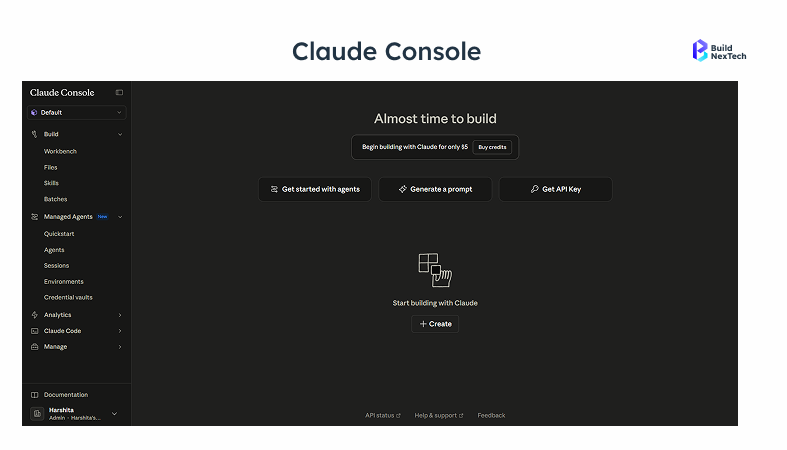
Monitoring API usage through the Claude Console dashboard provides a second layer of defense: unexpected spikes are the clearest signal of a compromised key. Proper authentication credentials management also keeps you aligned with GDPR compliance and data retention policies that enterprise clients audit before signing.
Setting Up Your Development Environment for Claude API
Installing the Anthropic Python SDK and setting environment variables
The Anthropic Python SDK is the official client for interacting with the Claude API.. It handles request formatting, authentication, and error parsing so you work with clean Python objects instead of raw HTTP. Setup:
1. Install Python 3.8 or higher. On Windows, confirm Python is in your system PATH.
2. Run: pip install anthropic
3. Set your environment variable macOS/Linux: export ANTHROPIC_API_KEY='your-key' Windows PowerShell: $env:ANTHROPIC_API_KEY='your-key'
4. Verify: python -c "import anthropic; print(anthropic.__version__)"
The SDK integrates cleanly into CI/CD pipelines and testing frameworks, a natural fit for QA automation and DevOps workflows. Full reference documentation lives at docs.anthropic.com.
Claude Desktop as a local testing companion (optional)
Claude Desktop is a separate Anthropic product, not the API itself, that lets you test prompts locally before writing any code. Think of it as a fast-iteration sandbox for prompt engineering. QA engineers use it to validate response quality and refine system prompts before wiring them into production. It is optional if your team prefers to go straight to code and validate via Postman, skip this.
Testing Claude API calls with Postman before writing any code
What is Postman? It is a GUI tool that constructs and sends HTTP requests. Developers use it to test API endpoints before integrating them into applications. Here is exactly how to test the Claude API with it:
- Create a POST request to https://api.anthropic.com/v1/messages with these exact headers:
x-api-key: YOUR_ANTHROPIC_API_KEY
anthropic-version: 2023-06-01
Content-Type: application/json
JSON body:
{
  "model": "claude-sonnet-4-5",
  "max_tokens": 256,
  "messages": [
    { "role": "user", "content": "What is the Claude API?" }
  ]
}
200 = key valid, headers correct, endpoint reachable. 401 = API key wrong or missing. 400 = request body formatting error. Fix these before moving to Python.
Making Your First Claude API Call with Python
Understanding the /v1/messages endpoint: request structure and required fields
The Claude API uses a RESTful design standard POST requests to documented endpoints, JSON responses, and HTTP status codes so any tool from curl to Postman works without specialised libraries.
Three required fields in every request:
- `model`; the model string: claude-sonnet-4-5, claude-opus-4, or claude-haiku-4-5
- `max_tokens`: maximum tokens Claude generates
- `messages` array of objects, each with `role` (user or assistant) and `content` (text)
- The `system` parameter is optional but powerful; it defines behaviour for the entire conversation.
The system parameter is optional but powerful; it sets Claude's persona and constraints for the entire conversation. For a customer support chatbot: "You are a precise support agent. Answer only questions about our product. Keep responses under 150 words." Place it outside the messages array.
Your first working code snippet: send a message and parse the response
Complete, executable Python copy this directly:
import anthropic
import os
client = anthropic.Anthropic(
    api_key=os.environ.get('ANTHROPIC_API_KEY')
)
message = client.messages.create(
    model='claude-sonnet-4-5',
    max_tokens=512,
    system='You are a senior QA engineer. Be concise and precise.',
    messages=[
        {
            'role': 'user',
            'content': 'Generate 3 test cases for a login form.'
        }
    ]
)
# Response text is in content[0].text
print(message.content[0].text)
# Track token usage for cost management
print(f'Input tokens: {message.usage.input_tokens}')
print(f'Output tokens: {message.usage.output_tokens}')
The API response JSON:
{
  "id": "msg_01XFDUDYJgAACzvnptvVoYEL",
  "type": "message",
  "role": "assistant",
  "content": [
    { "type": "text", "text": "Test case 1: Valid credentials — enter..." }
  ],
  "model": "claude-sonnet-4-5",
  "stop_reason": "end_turn",
  "usage": { "input_tokens": 42, "output_tokens": 187 }
}
Log usage.input_tokens and usage.output_tokens per call from day one. These are your cost meter. Without this data you cannot optimise Claude pricing spend later.
If you're building a more complex integration, the BuildNexTech team offers API integration consulting for QA and DevOps teams who need architecture support beyond the basics.
Handling multi-turn conversations and maintaining context with the messages array
Multi-turn conversation pattern:
conversation_history = [
    {'role': 'user', 'content': 'What causes a NullPointerException in Java?'},
    {'role': 'assistant', 'content': 'A NullPointerException occurs when...'},
    {'role': 'user', 'content': 'How do I fix it in a Spring Boot service?'}
]

response = client.messages.create(
    model='claude-sonnet-4-5',
    max_tokens=512,
    messages=conversation_history
)
BuildNexTech practitioner note
A context window management issue we encountered in production: one client's chatbot was naively appending every turn to the history array. After approximately 150 turns, requests began exceeding 180,000 tokens and failing with 400 errors as the context limit was hit. The fix was a sliding window strategy: retain the system prompt, keep the last 20 turns, and archive older turns to a database. Implement this before launch, not after users start complaining.
Error handling: what Claude API status codes mean and how to catch them
Wrap every API call in a try/except. Handle 401 (bad key), 429 (rate limit use exponential back-off), 400 (malformed request), and 529 (Anthropic overload). Log all errors with request IDs for debugging.
import time
import anthropic
def call_claude_with_retry(client, model, messages, max_retries=3):
    for attempt in range(max_retries):
        try:
            return client.messages.create(
                model=model,
                max_tokens=512,
                messages=messages
            )
        except anthropic.AuthenticationError:
            raise  # Bad key — do not retry
        except anthropic.RateLimitError as e:
            wait = 2 ** attempt  # Exponential back-off: 1s, 2s, 4s
            print(f'Rate limit hit. Waiting {wait}s (attempt {attempt + 1})')
            time.sleep(wait)
        except anthropic.APIStatusError as e:
            if e.status_code in (500, 529):  # Transient — retry
                time.sleep(2 ** attempt)
            else:
                raise
    raise RuntimeError('Max retries exceeded')
Implement exponential back-off from day one do not wait until you are in production. A 429 at scale can cascade into multiple failures if your application does not pause and retry intelligently. Full error payload schema is at docs.anthropic.com/errors.
Claude API Pricing: What It Costs to Build with Anthropic
Claude API token-based pricing: claude-opus-4, claude-sonnet-4-5, claude-haiku-4-5 rates
Pricing note: figures below are verified at anthropic.com/pricing as of April 2026. Token rates change with new model releases before publishing budget forecasts or quoting clients.
Deep reasoning, complex document analysis, research pipelines
Real cost scenario: a customer support chatbot handling 10,000 conversations per day, averaging 800 input tokens and 200 output tokens per exchange on claude-sonnet-4-5, costs approximately $28 per day. Routing the same volume to claude-haiku-4-5 for straightforward queries, classification, extraction, quick lookups, drops that to roughly $7.50 per day: a 73% reduction for tasks that do not require Sonnet-level reasoning.
Comparing Claude API costs with ChatGPT and DeepSeek API
The Claude vs ChatGPT cost comparison is a practical question for any team choosing an AI API. OpenAI's GPT-4o sits at approximately $2.50 per million input tokens competitive with claude-sonnet-4-5 in price. Verify current OpenAI model availability and pricing at platform.openai.com/docs/models before including any OpenAI figures in internal estimates, model names and pricing change frequently.
Where claude-opus-4 consistently justifies its premium: long-context document processing. Legal analysis, PDF processing, or market research over large document sets leverages Claude's 200K token context window directly, removing the text chunking infrastructure you would otherwise have to build and maintain.
Practical tips for keeping your Claude API bill predictable
Three habits that cut Claude pricing costs in real projects:
- Set max_tokens conservatively. If your use case produces 300-token responses, do not default to 4096. You only pay for tokens generated, a tight ceiling prevents runaway output from expensive prompts.
- Implement response caching for repeated queries. If your application asks Claude the same question, frequent product descriptions, FAQ answers, boilerplate reports, cache the first response. The Anthropic API does not cache automatically.
- Route by task complexity. A simple classifier that sends lightweight tasks to claude-haiku-4-5 and complex tasks to claude-sonnet-4-5 is straightforward to build and deliver significant savings.
The BuildNexTech engineering team implemented this routing pattern for a B2B content platform handling approximately 50,000 monthly API calls. By routing classification and extraction tasks to claude-haiku-4-5 rather than claude-sonnet-4-5, and caching repeated product description requests, the platform reduced Claude API spend by 55% over a 6-week period. The classification step itself cost less than 0.5% of the original Sonnet spend.
Advanced Claude API Integration Patterns for Production Apps
Streaming responses from the Claude API for real-time UX
For most chat applications and interactive dashboards, streaming is not optional, it is expected. A five-second blank screen before a response lands will kill user engagement. Here is the streaming pattern with the Python SDK:
with client.messages.stream(
    model='claude-sonnet-4-5',
    max_tokens=1024,
    messages=[
        {'role': 'user', 'content': 'Explain how Transformer architecture works.'}
    ]
) as stream:
    for text in stream.text_stream:
        print(text, end='', flush=True)

# Get the final complete message after streaming finishes
final_message = stream.get_final_message()
print(f'\nTokens: {final_message.usage.input_tokens} in / {final_message.usage.output_tokens} out')
Each chunk arrives as a delta, a small piece of the full response. Your frontend renders each chunk as it arrives. Each chunk is streamed incrementally, allowing the frontend to render responses in real time.
Using Claude with MCP (Model Context Protocol) for tool-use integrations
The Model Context Protocol is Anthropic's open framework for giving Claude access to tools beyond text generation. With MCP, you define functions that Claude can call, a BM25 search over your knowledge base, a database query, a GitHub API lookup, and Claude decides when to invoke them based on the conversation context. The full MCP specification and implementation guide is available at modelcontextprotocol.io and Anthropic's developer documentation at docs.anthropic.com/claude-code.
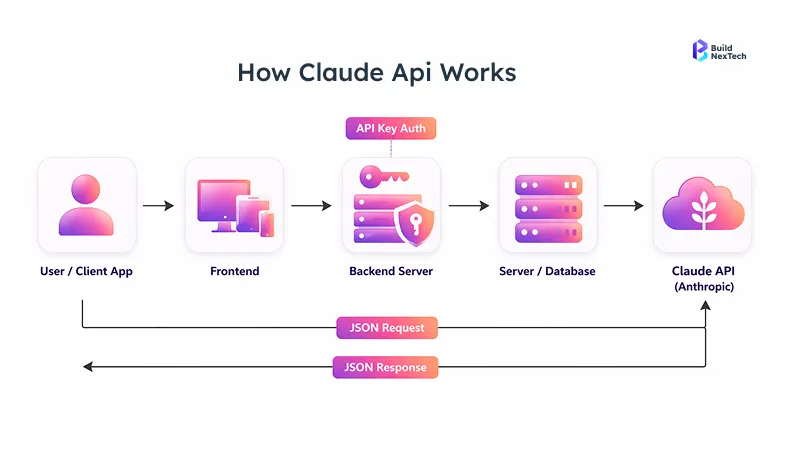
In practice across three DevOps client engagements in 2025, teams using Claude with MCP for log interpretation reduced manual alert triage time by approximately 40% primarily by automating first-pass classification of non-critical alerts. The largest gain was not in response quality but in routing: Claude correctly deprioritised informational alerts in 94% of test cases, freeing on-call engineers from roughly 2 hours of overnight noise per week. One edge case to watch: MCP tool calls add latency. For latency-sensitive applications, pre-fetch data into the context window rather than relying on live tool calls during generation.
Installing Claude Code and accessing your work via GitHub
Claude Code is Anthropic's CLI tool for AI-assisted development, a separate product from the API, but one that extends it into your terminal and version control workflow. Install it globally and you get terminal sessions powered by Claude AI, settings.json integration, and support for Claude Code GitHub Actions in your CI pipeline.
# Install Claude Code globally
npm install -g @anthropic-ai/claude-code

# Authenticate with your Anthropic API key
claude-code auth

# Initialize in a repository
cd your-project
claude-code init
From there, the Claude Code GitHub Action triggers on pull requests, runs code review, and posts structured comments replacing several manual QA steps in the CI pipeline. Full setup documentation lives at docs.anthropic.com/claude-code. BuildNexTech's AI automation tools for DevOps guide covers how to combine Claude Code with existing CI/CD pipelines.
Conclusion: Start Building with Claude API Today
Integrating the Claude API is straightforward once you get the first call working. The architecture is clean: an Anthropic API key stored in an environment variable, the Python SDK installed, a POST to /v1/messages. Everything else, model selection, cost optimization, multi-turn context management, streaming, MCP tool integration builds on that foundation.
At BuildNexTech, we have taken QA engineers from zero to a working AI-powered test automation assistant in a single sprint. DevOps teams have cut manual alert triage by approximately 40% across three client engagements in 2025. The patterns in this guide are the ones that worked in production, including the edge cases, the context window overflow, the rate limit cascade, the Haiku-vs-Sonnet accuracy benchmark.
Start with claude-sonnet-4-5, log every token count, and route to Haiku 4.5 once you identify the tasks where it matches Sonnet accuracy. That single optimization typically cuts API spend by 50% or more within the first month.
People Also Ask

What programming languages does the Claude API officially support?
Python and TypeScript/JavaScript are the officially supported languages for the Claude API through maintained SDKs. The Claude API is accessible from any language that supports HTTP, so Go, Ruby, and Java can use the REST API directly with standard HTTP libraries.
Can I use the Claude API to build a chatbot with memory across sessions?
The Claude API is stateless by design, so it does not store conversation history between calls. To build a chatbot with memory, you must pass the full message history in the messages array with role and content fields, and store long-term context in your application database.
Is there a free tier or trial for the Claude API?
The Claude API provides a small free usage credit for new accounts at signup. After that, pricing is strictly pay-as-you-go based on token usage, with no minimum spend, and current credit details are published on the Anthropic pricing page.
What is the maximum context window for Claude models?
Claude models support up to 200,000 tokens per request for claude-opus-4, claude-sonnet-4-5, and claude-haiku-4-5. Context limits can change with new releases, so always verify against official model documentation before designing long-context workflows.
How do I switch between Claude models without rewriting my integration?
Switching Claude models only requires updating the model parameter in your API request, such as changing from claude-sonnet-4-5 to claude-opus-4. The request structure, messages format, and response handling remain the same across models, allowing simple task-based routing within one integration.


.webp)
.webp)
.webp)

.webp)
.webp)



