

A logistics company came to us after a customer, not their own security team, spotted the problem: A storage bucket had sat open to the public internet for four months. Someone had clicked "public" during a rushed cloud deployment and never checked again.
That is how most cloud security breaches happen: Quietly, through a setting nobody reviewed. The same pattern shows up again and again across industries, from fintech to healthcare to logistics: Teams assume their cloud service providers handle every one of the cyber risks end to end, when the Cloud Security Risks that matter most sit on the customer's side of the line. This guide covers ten practices any team can start applying this week.
What Is Cloud Security?
Cloud security is the set of practices, tools, and policies that protect your data, applications, and accounts once they live on someone else's infrastructure.
It spans every layer of cloud computing:
- Identity: Who can log in, what proof they need, and how fast access gets revoked.
- Data: How it's stored, which data is sensitive, and whether encryption covers it end to end.
- Network: How systems talk to each other, and whether that traffic gets verified before it's trusted.
- Workloads: The applications and containers actually running, and whether each one still needs its current access.
Why Cloud Security Matters
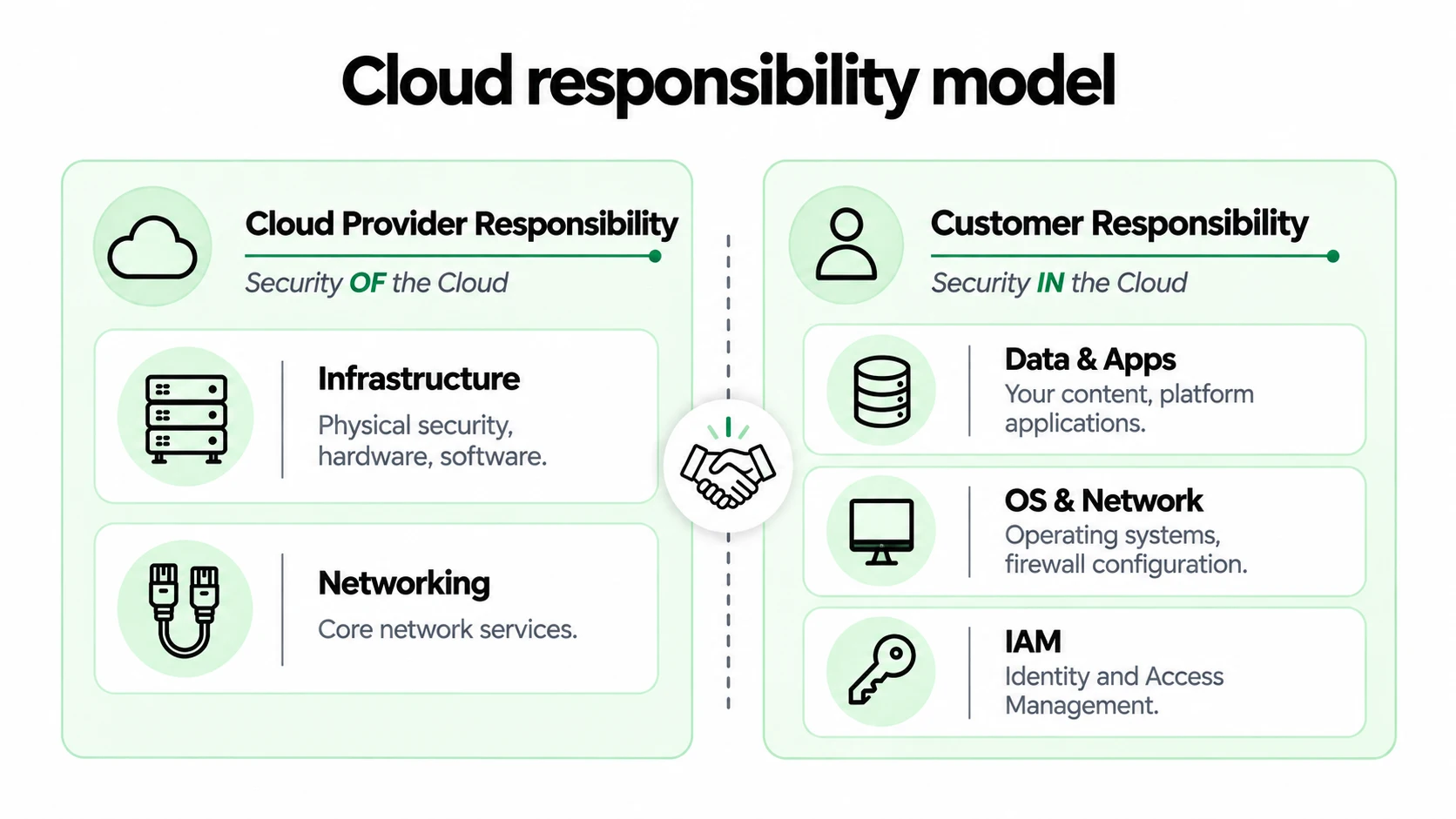
Here is the uncomfortable part: Your cloud provider isn't responsible for your next breach. You are. Providers secure the data centres and hardware, but what you configure inside that infrastructure is on you, a split known as the shared responsibility model.
- Certifications like SOC 2 and ISO 27001 confirm a provider's controls, not your settings.
- Compliance frameworks (HIPAA, PCI DSS, GDPR) hold your business liable regardless of who hosts the data.
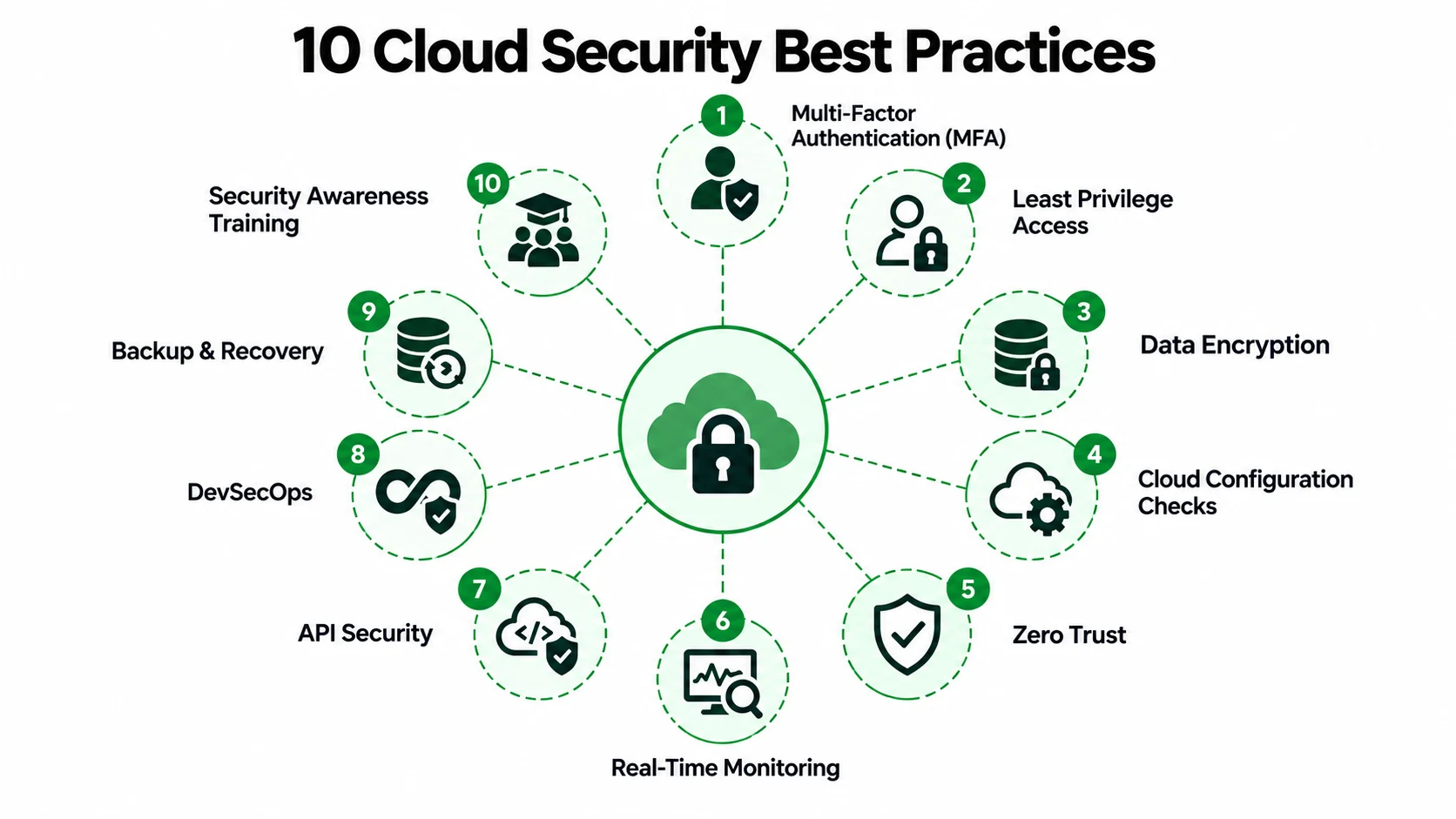
10 Cloud Security Best Practices to Follow in 2026
None of these ten require a security team of twenty people. They are the practical steps that close the gaps attackers actually exploit, in the order most teams should tackle them.
1. Turn On Multi-Factor Authentication (MFA)
A password alone is no longer enough. Attackers automate credential stuffing at a scale no human can match, and social engineering tricks people into handing over credentials directly, no exploit required. Multi-factor authentication is the single highest-leverage move on this list, and attackers know it, since accounts without it get targeted first:
- Microsoft's own research found MFA-enabled accounts are more than 99.9% less likely to be compromised, even with a stolen password.
- Pair it with a password manager so weak, reused passwords stop being the fallback.
- Enforce it everywhere, not just admin consoles, since most teams roll this out across cloud-based security platforms in a single afternoon.
2. Give People Only the Access They Actually Need
The principle of least privilege sounds academic until you translate it: Don't hand out master keys when someone only needs to open one door. Most insider-related incidents, malicious or accidental, trace back to permissions nobody revoked in time, usually because offboarding skipped a step:
- Review admin-level access on a set schedule, not whenever someone happens to remember.
- Default new accounts to the minimum access they need, expanding only on real need.
- Remove access the day someone changes teams, not the week after, since open permissions are the easiest gap to miss.
3. Encrypt Your Data
Data needs protecting in two states, and most teams only think hard about one of them until something goes wrong and the gap becomes obvious:
- At rest, meaning stored on disk, where the encryption algorithms built into most cloud storage services on AWS, Azure, and Google Cloud are often on by default but rarely confirmed.
- In transit, meaning moving between systems, where a database encrypted at rest is no protection if the connection sending it is plain text.
- Sorted through data classification before either, since customer records need far more protection than internal logs, and the right encryption methodologies depend on knowing which is which.
4. Check Your Cloud Settings Regularly (Avoid Misconfigurations)
A retail client came to us after a security researcher, not a hacker, flagged an exposed database holding 40,000 customer order histories. A test environment had been cloned into production during a rushed sprint, and nobody tightened the settings afterwards. That is misconfiguration in a nutshell, not malice:
- Cloud security posture management tools and other cloud security scanners, both examples of cloud-native tools, scan continuously for exposed storage and drifted permissions.
- Defining infrastructure through code, such as Azure Infrastructure as Code, makes settings repeatable instead of clicked together by hand.
- Most tools take only a few hours to connect and start flagging real issues.
5. Don't Automatically Trust Any Device or User (Zero Trust)
Zero trust flips the old security model on its head, and cloud security zero trust adoption keeps climbing for exactly that reason. The old approach assumed anyone already inside the network perimeter, including anyone on VPN connections to the corporate network, could be trusted by default, a habit that's aging badly:
- Zero trust assumes nothing and verifies every request regardless of where it originates.
- This matters more as remote work and contractor access blur what "inside the network" even means.
- A Zero Trust Architecture is not a single product you buy and switch on, but a decision touching identity, network segmentation, and device posture together, and treating it as one tool is the most common mistake we see.
6. Watch Your Cloud Activity in Real Time
Continuous monitoring catches what a one-time settings review misses entirely, but only if the raw signal turns into something a human can act on quickly, not days later:
- Flow logs and access logs are the raw material, useless on their own without cloud security tools turning them into alerts.
- Rules-based alerting catches known patterns, the kind every vendor already writes detection rules for, and this is where solid IT security monitoring earns its keep.
- What most guides skip is the pattern nobody has written a rule for yet, the weak signal that looks fine on its own but wrong in context, where network threat detection and response tools, or a managed threat detection and response team, earn their place.
7. Secure the Connections Between Your Apps (APIs)
An API is simply a defined way for two pieces of software to talk to each other, and it's become a common attack point in any cloud stack. The reason is almost always the same, and it's rarely a sophisticated one:
- Teams lock down the front door and forget the side entrance exists at all.
- Every endpoint needs authentication, rate limiting, and input validation- the core of any API security programme, not just the ones a customer can see directly.
- Cloud-native firewalls and web application firewalls catch a surprising share of this traffic before it ever reaches your code, which is exactly what cloud network security is meant to do.
8. Build Security Checks Into How You Develop Software
DevSecOps means catching problems before launch, not patching them after a customer finds one, and it works best built into how a software development team already works, not bolted on at the end:
- Vulnerability scanning and vulnerability assessments run inside the pipeline on every commit, flagging known issues before production, with a Vulnerability Management process tracking each finding through to a fix.
- Container images need the same scrutiny as application code, checked with container security scanning tools before they ship, with runtime protections and Kubernetes security audits covering whatever orchestration platform runs them.
- Cloud workload security and cloud native security both depend on catching a misconfigured cluster before it's as exploitable as a misconfigured storage bucket.
9. Back Up Your Data and Have a Recovery Plan
Backups and incident response get treated as two unrelated topics in most guides, which is a mistake that only surfaces once it's too late to fix:
- A backup and disaster recovery plan without a tested restore process is a false sense of security, and one that has never been restored is a guess, not a guarantee.
- Test your restore process on a schedule, not just once when the system is first built.
- Know exactly who does what in the first hour after an incident is confirmed, since that hour decides whether the story ends in a quiet fix or a headline.
10. Train Your Team to Spot Threats
Human error remains the single biggest cause of breaches across every industry BuildNexTech has worked in, and most of it starts with social engineering rather than a technical exploit:
- Annual compliance videos rarely change behaviour, mostly because nobody remembers them a week later.
- Short, recurring security training that mimics a real phishing attempt does far more, since people learn by nearly falling for something, not by watching a slide deck.
- Pair it with clear guidelines on what to do when something looks off, so the goal isn't a perfect employee, just one who pauses before clicking on the wrong thing.
Quick Reference: Common Risks and the Practice That Fixes Them
How BuildNexTech Helps You Strengthen Cloud Security
Most teams already know the ten practices above. What they lack is the in-house time to implement them all, which is where BuildNexTech's cloud computing security services come in. We build cloud security services around your stack, not a fixed bundle of cloud security products. We start by assessing your setup against the shared responsibility model and relevant compliance frameworks.
We deploy cloud security solutions and cloud data security solutions built for your stack, then keep watching afterwards so security and resilience hold the posture a cyber defense agency recommends for critical infrastructure. For one logistics client, that meant closing misconfiguration gaps within two weeks of onboarding.
What a BuildNexTech Cloud Security Engagement Looks Like
- Week 1: Assess your setup against the ten practices above and flag the highest-risk gaps.
- Week 2: Fix what we find, starting with the highest-risk items first.
- Week 3: Set up ongoing monitoring so new risks get caught early.
- Week 4: Review findings together and agree on next steps, whether that's ongoing monitoring or a clean handoff.
Conclusion
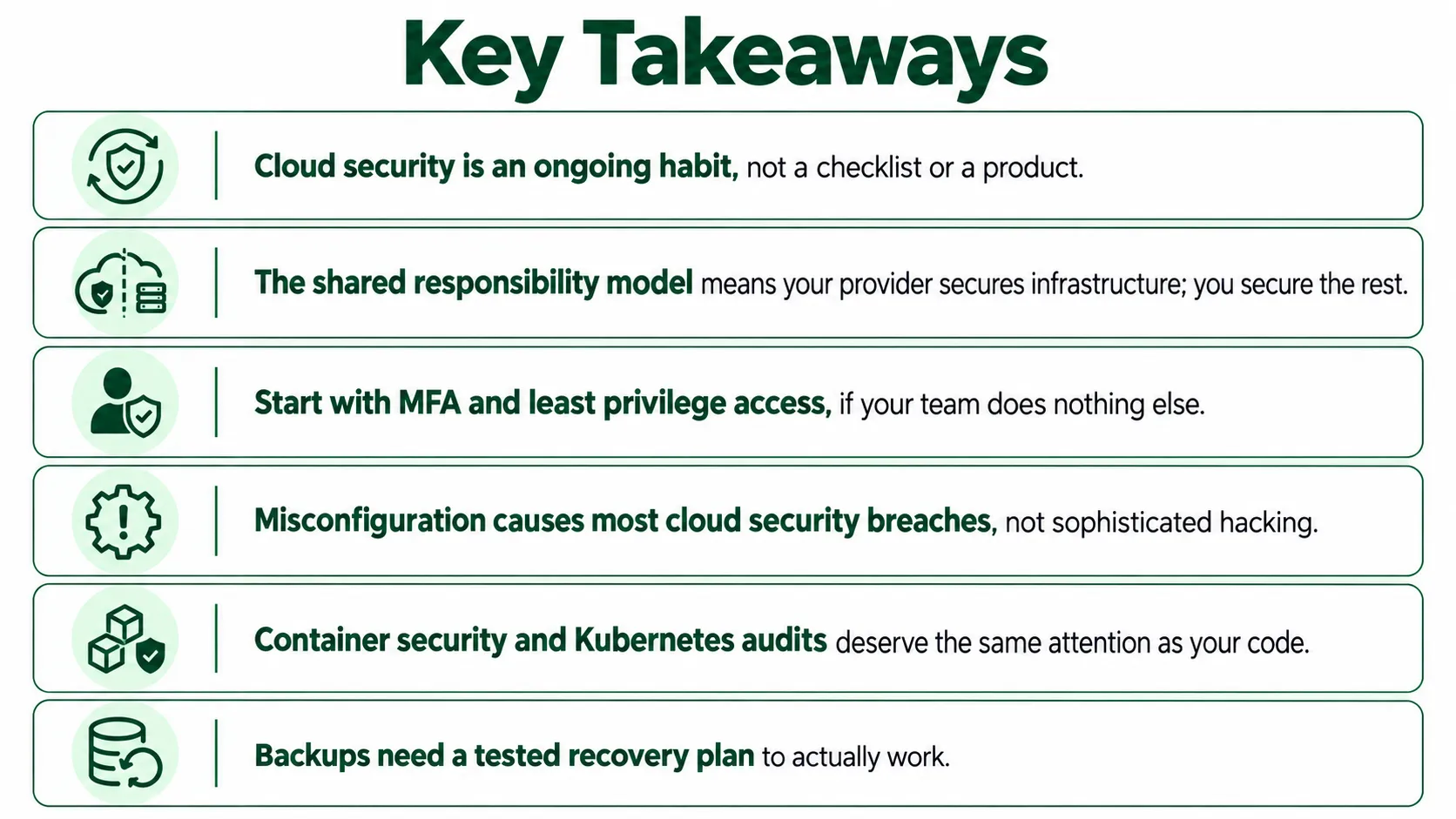
Ten practices, and not one of them requires a dedicated security team to pull off. Turning on MFA takes an afternoon. Reviewing who has access takes a checklist. What actually separates a company from a headline is whether anyone keeps doing this work after the first pass, quietly, week after week.
Teams that get this right tend to say the same thing once the dust settles: the hard part was never the technology; it was finding the hours to keep watching it. The real test of your cloud security isn't the audit you pass once. It's whether anyone looked this month.
People Also Ask

In what way does cloud security differ from network security?
Unauthorized access, data breaches, DDoS attacks, and misconfigurations are the most common risks.
How do cloud providers secure data?
Cloud providers like Microsoft, Google, and AWS offer firewall services, encryption, and monitoring. Customers must enforce access management. They must also enforce shared responsibility policies.
Why is access management critical for cloud security?
Access management prevents unauthorized access to sensitive information and ensures users only access what’s required.
What tools help improve cloud security?
What tools help improve cloud security? Key tools include CSPM platforms, CNAPP, Web Application Firewalls, Microsoft Defender for Cloud, and vulnerability assessment tools.
How does ISO 27001 support cloud security?
ISO 27001 sets rules for managing information security. It helps organizations follow compliance rules and protect sensitive data.


.webp)
.webp)
.webp)

.webp)
.webp)



