

Picking the right content management system is one of those decisions that looks straightforward until you are living with the consequences. The wrong choice creates slow pages, blocked developers, limited SEO control, and a content team fighting their own tools. This guide breaks down the real differences between headless and traditional CMS so you can make a confident decision based on your business needs, not just trends.
Why CMS Architecture Is a Critical Business Decision
Most teams treat CMS selection as a technology decision. It is also a business decision. The platform you choose affects how quickly you can publish, how well your content ranks, how much your developers enjoy their work, and, ultimately, how much value your digital presence delivers to the organisation.
Impact on Scalability, SEO, Customer Experience, and ROI
Your CMS is not just a publishing tool. It directly shapes how fast your pages load, how well they rank, and how smoothly your team operates. CMS scalability determines whether your platform holds up under traffic spikes or buckles during a major campaign. SEO is tied to page speed, rendering method, and structured data control, all of which vary significantly between a traditional content management system and an api-first cms.
Customer experience depends on how consistently content reaches users across the web, mobile, and other channels. When you factor in developer productivity, plugin licensing, WordPress hosting costs, and infrastructure overhead, the CMS ROI conversation becomes very real very fast. At BuildNexTech, we help teams audit these gaps before they become expensive problems.
Key Decision-Makers: CTOs, CEOs, Marketers, and QA Leaders
This decision rarely belongs to one person. CTOs weigh cms integration complexity and long-term technical fit. CEOs focus on time to market and return on investment. Marketers want fast publishing workflows and reliable SEO tools. QA leaders need stable, testable environments across deployment cycles. A thorough cms comparison addresses all of these dimensions, not just the development side of the equation.
Traditional CMS vs Headless CMS: Strategic Differences
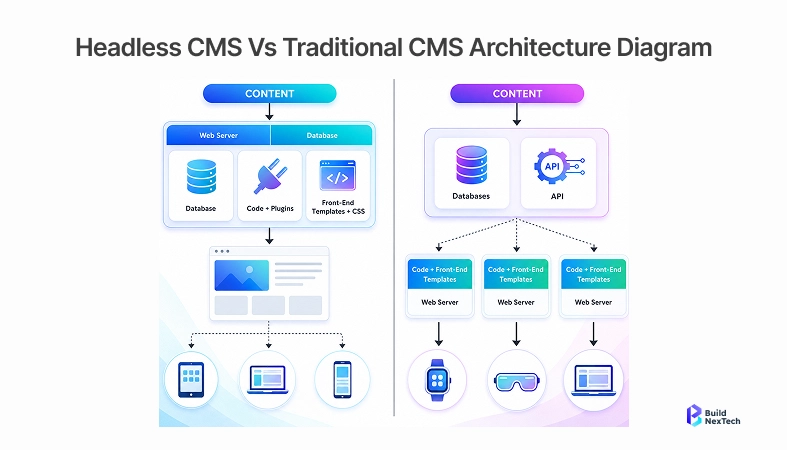
The core difference between these two approaches comes down to how content is stored, managed, and delivered. Traditional CMS bundles everything together. Headless CMS separates the content layer from the presentation layer entirely. Understanding what that means in practice is what makes the decision clearer.
Traditional CMS: Strengths, Limitations, and Ideal Use Cases
A traditional content management system tightly couples the backend and frontend in a single platform. WordPress, Drupal, and Adobe CMS are the most widely recognized cms examples of this model. They come pre-loaded with WordPress plugins, visual editors, and themes that make content publishing accessible for non-technical teams without any developer involvement.
This setup works well for blogs, small business websites, and marketing pages that do not require complex delivery or custom frontend architecture. Content management system software is ready out of the box, WordPress pricing is manageable at a smaller scale, and the time to launch is short. The limitations surface when you need to scale. Heavy traffic, cross-platform delivery, or custom user experiences quickly push traditional CMS beyond what it was originally designed to handle.
Headless CMS: Architecture, Advantages, and Trade-Offs
A headless CMS decouples the content backend from the presentation layer. Content is delivered through APIs, typically REST or GraphQL, to any frontend framework the development team chooses: Next.js, React, Vue, or a native mobile SDK. This is the foundation of headless cms architecture. Content becomes a portable resource that can feed any channel simultaneously without rebuilding the content layer.

The headless cms benefits are significant for teams building at scale. Omnichannel content delivery becomes straightforward because the same API serves the website, mobile app, and any new channel your business adds. Performance improves through the use of a static site generator or content delivery network. Headless cms seo is also stronger because developers have full control over rendering and structured data. The trade-off is real complexity. Headless requires skilled cms for developers, deliberate editorial workflow configuration, and more upfront investment in setup.
Strategic Comparison: Flexibility, Speed, Control, and Growth Potential
Traditional CMS wins on speed to launch and accessibility for non-technical users. Headless CMS wins on flexibility, performance, and long-term scalability. As a digital experience platform for enterprise teams, an api-first cms gives engineers the freedom to build exactly what the business needs without fighting platform constraints. For organizations investing in a composable architecture or planning rapid multi-channel expansion, the strategic case for headless is strong and defensible.
The table below gives a clear side-by-side snapshot of how headless and traditional CMS differ across the features that matter most to your business and technical teams.
Real-World CMS Performance: Which Model Delivers Better Results?
Features on a product page tell one story. Real-world performance tells another. Here is how traditional and headless CMS actually compare when businesses push them to their limits.
Performance, Scalability, and Omnichannel Delivery
Traditional CMS platforms serve dynamically rendered pages by default, meaning every page request triggers a database query and template rendering cycle. Under normal traffic, this works fine. Under heavy load from a product launch or viral content, it requires significant caching, CDN configuration, and server scaling. Headless CMS platforms paired with a static site generator or edge deployment eliminate much of this overhead, delivering pre-rendered content in milliseconds through a content delivery network.
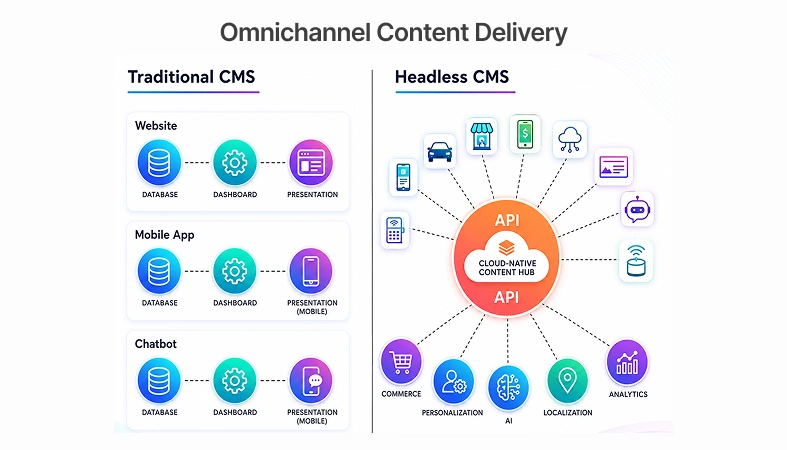
Companies like Spotify (https://www.geeksforgeeks.org/system-design/design-spotify-premium-system-design/) and Nike (https://changemanagementinsight.com/nike-digital-transformation-case-study/)have adopted decoupled cms architectures specifically to serve content across multiple platforms from a single source. For businesses targeting omnichannel content delivery across web, mobile, IoT, and beyond, headless is the more practical and scalable foundation. Traditional CMS simply was not designed with these scenarios in mind.
In BuildNexTech's CMS implementation engagements, teams migrating from WordPress to a headless architecture consistently report a 40 to 60 percent reduction in frontend deployment time within the first two quarters. The primary driver is decoupled release cycles rather than raw performance gains. When frontend deployments no longer wait on CMS release windows, teams ship faster without changing their underlying infrastructure.
SEO, Personalization, QA Workflows, and Operational Efficiency
Traditional CMS platforms like WordPress have a mature ecosystem of SEO plugins, with Yoast and RankMath giving marketers direct control over metadata, sitemaps, and structured data without developer involvement. For content-driven teams where marketers own SEO day to day, this is a genuine advantage. Headless cms seo requires more upfront engineering investment but gives developers complete control over rendering behavior and technical optimization, which matters significantly for performance-sensitive verticals.
For QA engineers, headless environments introduce API contract testing, frontend component testing, and end-to-end testing across a decoupled stack. DevOps leads benefit from independent frontend deployments and cleaner CI/CD pipelines where content updates and code releases are no longer coupled together. Traditional CMS setups are simpler to test initially, but often create release bottlenecks that slow the entire team as the product matures.
Cost, Security, Compliance, and Long-Term Maintenance
WordPress is open source with a low barrier to entry, but WordPress hosting, premium plugins, and ongoing WordPress development costs scale quickly for enterprise-grade sites. Adobe CMS carries substantial licensing and implementation costs. Headless platforms like Contentful cms and Sanity CMS use tiered SaaS pricing, while Strapi as a headless cms open source option, offers cost control through self-managed infrastructure.
On security, headless CMS holds a structural advantage. Separating the content API from the public-facing frontend reduces the attack surface and removes the exposed admin panel, which is a common vulnerability in traditional web content management systems. For organizations with strict compliance requirements, this architectural separation simplifies access control, audit logging, and data governance management.
Choosing the Right CMS for Your Business
There is no universally correct answer here. The right CMS depends on your team size, technical capacity, content strategy, and where you expect to be in 18 months. The following scenarios help clarify which direction makes sense.
When Traditional CMS Is the Best Fit
Traditional CMS is the right fit when your team is small, your content strategy centers on a single website, and your audience engages primarily through one web channel. The availability of cms tools, themes, and a broad developer market makes it cost-effective and fast to launch. WordPress, powering over 43% of the web reflects a genuine product-market fit for straightforward content management needs across a wide range of organizations and industries.
When Headless CMS Is the Smarter Investment
Headless becomes the smarter investment when you are scaling beyond a single website. Enterprises building ecommerce platforms, mobile applications, or personalized digital portals need the architectural flexibility that headless provides. If your engineering team has the technical capacity and your roadmap includes multi-channel delivery or a content marketing platform with deep third-party integrations, headless delivers compounding value over time that a traditional CMS cannot match.
Actionable Migration Paths: Partial Decoupling vs Full Headless Transition
CMS migration does not have to be a full replacement. Partial decoupling, which means keeping WordPress as the content backend while connecting a modern frontend through its REST API, is a practical first step. It preserves existing workflows while unlocking significant frontend performance improvements. A full headless transition to platforms like Contentful, Strapi, or Sanity CMS delivers the complete range of headless cms benefits but requires deliberate planning: content modeling, data migration, editorial workflow redesign, and team training. Partnering with an experienced cms development company reduces risk significantly at both stages.

Top CMS Platforms to Evaluate in 2026
Choosing a CMS platform is easier when you know what each option is genuinely good at. Here is a clear breakdown of the leading platforms across both categories.
Best Traditional CMS Platforms for Business Needs
WordPress remains the dominant traditional content management system globally, backed by an unmatched plugin ecosystem and a large pool of available WordPress developers. It is the default starting point for most small to mid-sized businesses and content-focused websites. Adobe CMS serves enterprise teams that need deep integration with marketing tools and robust enterprise content management software at scale. Drupal offers developer flexibility with strong built-in security and is a preferred choice in government and higher education environments where compliance and access control are priorities.
Best Headless CMS Platforms for Scalability and Flexibility
Contentful CMS leads for enterprise teams, combining strong API support with a polished editorial interface that keeps content teams productive without sacrificing developer flexibility. Strapi is the top open-source headless cms choice for development teams that want full control over their infrastructure without vendor lock-in. Sanity CMS stands out for real-time collaborative editing and a highly flexible content model, making it popular with teams building sophisticated digital experiences. All three rank among the best headless cms platforms with active development communities and clear enterprise roadmaps.
Platform Comparison: Pricing, Setup, Integrations, and CMS Development Services
WordPress has the lowest barrier to entry, but scales in complexity and cost. Contentful and Sanity use usage-based SaaS pricing that grows with your team. Strapi is free to self-host with infrastructure costs managed internally. Setup time differs considerably: a WordPress site can go live within hours, while a headless implementation typically requires several weeks of cms development services to properly configure the content model, build the frontend, and validate integrations.
CMS integration with CRMs, analytics platforms, and cms portal systems is consistently cleaner in headless environments where all communication happens through well-defined APIs. Working with a specialist cms development company ensures the architecture is built with scalability and maintainability in mind from the start, not retrofitted later when problems emerge.
Here is a quick reference of the leading CMS platforms evaluated across ease of use, cost, market share, and security so you can shortlist the right fit before diving deeper.
Pricing as of April 2026 verify directly with vendors. Market share data sourced from W3Techs. Ease-of-use ratings based on aggregated user reviews from G2 and Capterra.
Conclusion: Make the Right CMS Investment
The headless vs traditional debate does not have one correct answer. It has a correct answer for your situation. What matters is matching the platform to your actual requirements, not to industry hype or the path of least resistance.
Future-Proofing with Composable CMS, AI, and Enterprise Content Management
Content management is moving toward composable architecture, where technology stacks are assembled from best-of-breed components that communicate through APIs rather than locked into a single monolithic platform. AI is accelerating this shift, enabling automated content tagging, intelligent personalization, and smarter cms marketing workflows inside enterprise content management systems built for open integration. Organizations that invest in this direction now will be far better positioned as new channels and customer touchpoints continue to emerge.
Final Decision Framework for Selecting the Right Platform
Three questions cut through the noise. What are your content delivery needs today and in 18 months? Does your team have the technical capacity to implement and maintain a headless setup? And: is your current CMS creating friction in three or more of these areas deployment speed, SEO control, cross-channel delivery, or developer experience? If yes, the case for headless is already made by your own workflow. Answering these honestly, rather than chasing what competitors are doing, leads to the right platform decision for your organization every time.
Next Steps: Assess Your Current CMS and Plan Your Strategic Roadmap
Start by auditing where your current CMS is creating friction: slow deployments, SEO limitations, developer workarounds, or blocked omnichannel delivery. Map those gaps to the platform that closes them. BuildNexTech specializes in guiding organizations through this process, from CMS evaluation and content modeling to full implementation and ongoing cms development services. The goal is a platform that works for your business, not one you are constantly working around.
People Also Ask

How Does a Headless CMS Handle Editorial Workflows Compared to WordPress?
Headless CMS platforms like Contentful and Strapi support custom roles and approval processes, but require deliberate configuration rather than working out of the box — unlike WordPress, which provides built-in user roles and a visual editorial workflow on day one. Teams migrating from WordPress should plan specifically for editorial workflow setup as part of the transition process.
Can a Traditional CMS Be Partially Decoupled Without a Full Migration?
Yes. WordPress exposes a REST API and supports GraphQL through plugins, making it usable as a headless content backend connected to a modern frontend framework. This decoupled cms approach is a practical middle ground that improves frontend performance without disrupting existing content or editorial workflows.
What Compliance Risks Apply to Cloud-Based Headless CMS Platforms?
Cloud headless CMS platforms store content on managed infrastructure, which raises data residency concerns under GDPR and similar regulations. Verify the vendor's data processing agreements and regional hosting options before committing. Self-hosted platforms like Strapi give full data control but shift infrastructure responsibility to your internal team.
How Do QA Workflows Differ Between Headless and Traditional CMS?
Traditional CMS testing is simpler because everything runs as a single system. Headless requires testing the content API and frontend independently, plus end-to-end coverage across the full stack. The scope is broader, but isolation improves. A frontend bug does not affect the content layer, and releases can be staged and validated separately.
Which CMS Type Handles A/B Testing and Personalization at Scale Better?
Headless CMS handles both significantly better. Personalization and A/B testing logic can be applied at the frontend or edge layer without touching the CMS itself. Traditional CMS relies on plugins for this functionality, which typically limits scope, reduces flexibility, and adds measurable performance overhead.


.webp)
.webp)
.webp)

.webp)
.webp)



