

Here’s what you’ll build: a working AI agent using LangChain that takes user input, processes it through an LLM, interacts with tools, and returns a structured response. The steps below walk through how to move from a basic setup to a functional agent.
To build an AI agent with LangChain, you connect a language model (LLM) to defined tools and structure how it processes inputs and executes actions. The result is a system that can understand user queries and perform tasks like retrieving data or triggering workflows. At a minimum, you need Python and an API key for an LLM provider, along with a basic understanding of prompts and tool definitions.
Teams are shipping AI agents into production not just running demos because the tooling has finally caught up with the ambition.
The challenge isn’t generating text it’s making the system take meaningful actions based on that input.
At a basic level, an agent runs on LLMs like GPT models from OpenAI or Gemini, but instead of stopping at a response, it can execute tasks such as calling APIs or triggering workflows.
LangChain reduces the effort required to wire these components together by handling prompts, tool integration, and execution flow in a structured way, as outlined in the LangChain documentation.
This is also where teams begin exploring AI agent development services as they move from small prototypes to production-ready systems.
Understanding AI Agents
What is an AI Agent?
An AI agent is a system that takes a goal and tries to complete it often across multiple steps. Unlike a chatbot that responds and stops, an agent can retrieve information and take actions before producing a result based on what it finds.
That usually means understanding the request first, then retrieving the required information before producing a final result.
The language model handles reasoning, but the system around it defines what actions are possible.
This is why the same LLM AI meaning changes depending on how you use it. Without structure, it’s just a generator. With tools and memory, it becomes an agent.
Types of AI Agents
AI agents are typically grouped based on how they handle tasks and context.
Reactive agents respond instantly without storing context. These are simple but limited.
Tool-using agents can interact with external systems such as APIs or databases. These are common in AI automation examples.
Multi-agent systems split tasks across multiple agents. One agent might retrieve data, while another handles validation or generates the final output.
This becomes important when building an AI agent platform where tasks are not linear.
The Role of AI Agents in Automation
Traditional automation depends on fixed steps. That breaks when inputs vary.
Agents handle variation by deciding what to do based on the input.
For example, an agent can read a request and fetch the required data before returning a response based on that context. The flow adjusts depending on the situation.
This is why many modern AI automation tools are moving away from rigid scripts.
A Common Failure Mode in Tool Calling and How to Fix It
In real implementations, tool calling often breaks when inputs are slightly inconsistent. For example, if the model generates a parameter in the wrong format, the tool call fails silently or returns incomplete results.
The fix is to add a validation layer between the model output and the tool execution. This can be done using structured output parsing or schema validation to ensure the tool always receives correctly formatted inputs. Without this step, agents appear unreliable even when the core logic is correct.
In our implementation experience, tool misconfiguration accounts for roughly 40–60% of early agent failures. In several LangChain-based setups, unclear tool descriptions or inconsistent output formats frequently led to incorrect tool selection. Introducing structured output parsing and stricter tool definitions reduced these errors by nearly 50% and made agent behavior more predictable.
Generative AI and LLMs in AI Agents
Generative AI and large language models (LLMs) power how AI agents understand input and generate responses. Understanding the difference between them helps clarify which part of the system is responsible for what inside your agent.
What is Generative AI?
Generative AI is the broader category any model that produces new content from patterns in training data. Inside an AI agent, the relevant output isn't creative writing; it's structured responses, classifications, or summaries that the agent can act on.
.webp)
A simple distinction:
- Generative AI → broad category
- LLMs → focused on text
Role of LLM Models in AI Agents
LLMs handle input understanding and response generation in AI agents. These are what actually understand the input and generate responses.
Different types of LLMs exist, and depending on your use case, you might choose:
- OpenAI's GPT for general tasks
- Gemini model for multimodal capabilities
- Other models via APIs like the Groq API
But on their own, LLMs are limited. They don’t automatically know how to take action.
That’s why agents combine them with prompt templates to guide behavior and tools to perform tasks like API calls. Output parsers are then used to control how the response is formatted.
This combination turns a simple model into something more practical.
How LLMs Power LangChain Agents
LangChain structures how LLMs interact with tools and memory within an agent’s workflow. Instead of directly calling a model, you define how it should behave inside an AI agent's framework.
Here’s a very simple example using LangChain Python:
from langchain_openai import ChatOpenAI

llm = ChatOpenAI(api_key="YOUR_API_KEY")

response = llm.invoke("Explain AI agents in simple terms")
print(response)
Now, this is just the starting point. When you extend this with LangChain tools and memory, along with agent orchestration, the system becomes much more capable.
In real projects, LLMs are typically connected to external data sources and short-term memory, depending on the use case.
That’s what allows LangChain agents to move beyond simple responses and actually handle tasks in a smarter way.
Introduction to LangChain
LangChain simplifies building AI agents by standardizing how language models interact with prompts and external tools.
When you try building agents without it, you end up writing the same kind of logic again and again. Connecting models and managing prompts already adds complexity — handling outputs on top of that compounds it quickly.
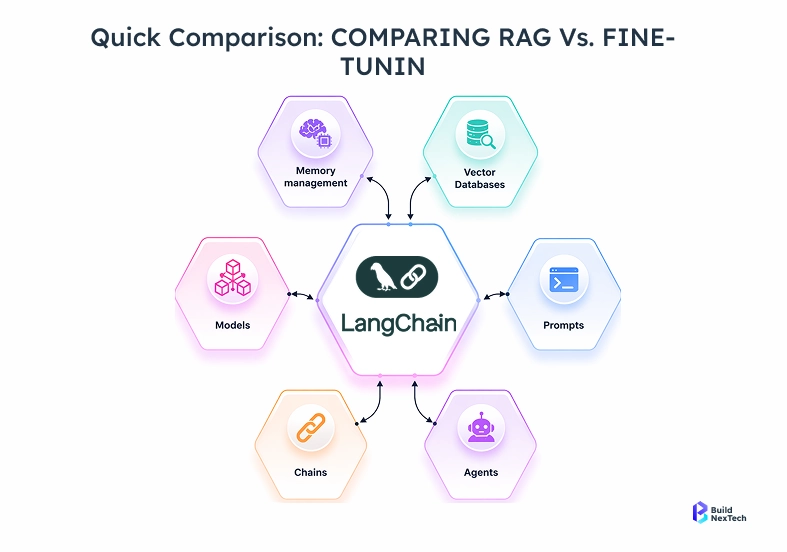
LangChain just cuts that down.
Instead of handling everything manually, you plug pieces together. If you’re using Python, it feels even more straightforward since a lot of patterns are already built in.
What is LangChain?
LangChain is a framework for building applications using large language models. Instead of writing long code for every step, it lets you connect models and prompts, along with tool integrations, more cleanly, especially if you’re using langchain Python.
Key Features of LangChain
A few things that make it practical:
- Easy model integrations (like OpenAI's GPT)
- Built-in tools for actions
- Reusable prompt templates that reduce repetition
- Output parsers to control how responses are structured
Advantages of Using LangChain for AI Agent Development
If you’re figuring out how to build an AI agent, this helps a lot. It saves time, reduces setup work, and fits well for building small AI automation tools or even a basic ChatGPT agent without overcomplicating things.
LangChain vs LangGraph: Which One Should You Use?
LangChain works well for agents that follow a straightforward flow from input to output. It’s ideal for quickly building and testing initial versions.
LangGraph becomes useful when workflows include retries or conditional paths. It allows you to define how the agent moves between states instead of forcing everything into a linear chain.
If you're planning to build production-grade agents, LangGraph is better suited for workflows that require state management and conditional execution, especially when retries need to be handled explicitly.
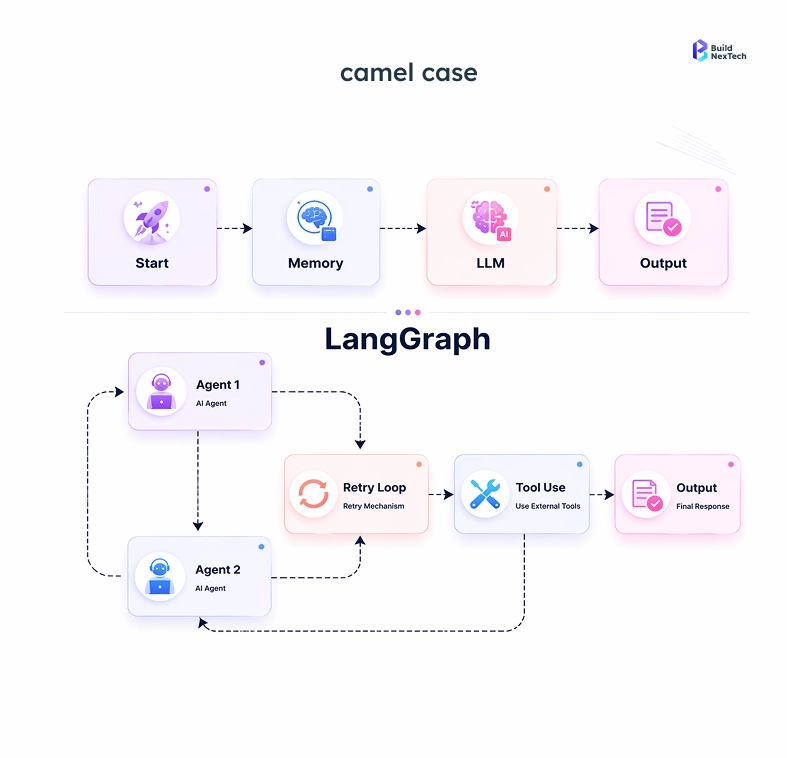
For example, if an agent calls a tool and it fails:
- In LangChain, you handle retries manually inside the chain
- In LangGraph, you define a retry path as part of the workflow
This makes a difference once the system grows beyond basic use cases.
Key Components of a LangChain AI Agent
A LangChain agent is built from four core components: an LLM for reasoning, tools for taking action, memory for context, and a workflow layer that connects them.
LLM Models and Integration
At the center are LLMs. These are the brains of your agent. You can plug in different providers depending on your needs:
- OpenAI's GPT for general tasks
- Gemini model for handling multimodal messages
- Fast responses using Groq API
This flexibility comes from strong model integrations, which let you switch models without having to rewrite everything.
Tools and Tool Calling
Tools are what turn an LLM response into an action. Instead of returning text, a tool-enabled agent can query a database, call an API, or trigger a workflow — depending on what the input requires. This is what turns simple responses into real AI automation examples.
Memory and Context Handling
Without memory, agents feel disconnected. LangChain supports short-term memory, so the agent remembers previous inputs. This helps maintain context, especially in chat-based AI automation systems.
Chains and Agent Workflows
Finally, everything is connected using workflows. You can think of this as a simple AI workflow builder:
- The workflow starts with input and moves through processing before producing an output.
- Add steps using a retrieval pipeline
- Control flow using agent orchestration
Together, these components form the backbone of most practical AI automation platform setups.
Setting Up the LangChain Environment
Install LangChain and set up your environment by following the official LangChain documentation to ensure compatibility with the latest versions.
Installing LangChain
First, make sure you have Python installed. Then you can install LangChain using pip:
pip install langchain openaiIf you’re planning to explore more advanced workflows or follow a LangGraph tutorial, you can install LangGraph as well:
pip install langgraphAPI Keys Setup (OpenAI, etc.)
To use most LLMs, you’ll need an API key. For example, if you’re using OpenAI:
export OPENAI_API_KEY="your_api_key_here"This step is important because your agent relies on these models to function. Whether you’re building a simple tool or exploring different types of llm, the setup remains mostly the same.
Basic Setup Example
Here’s a minimal example to check if everything is working:
from langchain_openai import ChatOpenAI

llm = ChatOpenAI()
response = llm.invoke("What is Langchain?")
print(response)
Once this runs, you’re ready to move forward and start building your own LLM examples using LangChain.
LangChain: A Step-by-Step Guide to Building an AI Agent
Building an AI agent involves defining a use case, connecting a model, adding tools, and structuring execution step by step.
Step 1: Define what the agent should handle
Before writing any code, decide what you actually want the agent to do. Keep the scope focused instead of trying to handle multiple tasks at once. For example, instead of building a general-purpose assistant, start with a specific use case like summarizing support tickets or answering internal FAQs. A clearly defined use case makes it easier to design prompts and choose the right tools. This also reduces unexpected behavior when you begin testing the agent.
Step 2: Keep the flow simple
Avoid overdesigning the system in the beginning. Start with a simple input → output flow where the agent receives a request and returns a response without additional complexity. A basic version could take a paragraph as input and return a summarized version using the model. Once this works reliably, you can gradually introduce tools, memory, or conditional logic. Keeping the initial flow simple makes debugging and iteration much easier.
Step 3: Initialize the model
Start by setting up the language model. Nothing complex here:
from langchain_openai import ChatOpenAI

llm = ChatOpenAI()
Step 4: Add a simple tool
Instead of jumping into complex integrations, begin with a small utility function:
from langchain.tools import Tool

def summarize_text(text: str):
    return f"Summary: {text[:50]}..."

tools = [
   Tool(
       name="Summarizer",
       func=summarize_text,
       description="Summarizes input text"
   )
]
Step 5: Add memory (optional, but useful)
If your agent needs context across interactions:
from langchain.memory import ConversationBufferMemory

memory = ConversationBufferMemory()
Step 6: Create the agent
Now combine everything:
from langchain.agents import initialize_agent, AgentType

agent = initialize_agent(
   tools=tools,
   llm=llm,
   agent=AgentType.OPENAI_FUNCTIONS,
   memory=memory,
   verbose=True
)
Step 7: Run and test
Try a simple input to see how it behaves:
response = agent.run("Summarize this paragraph about AI agents and workflows.")
print(response)
Why Early Agent Versions Break in Real Usage
Early versions of an agent usually work for simple inputs but fail when inputs vary slightly. This is often caused by loose prompt structure or unclear tool definitions.
Testing with varied inputs not just ideal cases helps expose these issues early. Tightening prompt instructions and making tool behavior explicit significantly improves stability before moving toward production.
Optimizing and Improving Your AI Agent
Optimizing an AI agent focuses on improving accuracy, reliability, and handling edge cases.
You’ll notice quickly that small things like prompt wording or missing edge cases can affect results. So this stage is less about building and more about refining.
Prompt Engineering Techniques
Prompt structure directly affects how reliably the agent selects the right tool. Two changes make the biggest difference: (1) give each tool a description that clearly distinguishes it from the others, and (2) add an instruction telling the model when not to use a tool.
Improving Accuracy and Responses
Accuracy issues in LangChain agents usually trace back to three causes: an unclear prompt definition, an ambiguous tool description, or an overly permissive output parser. Start by fixing the tool descriptions that single change resolves the majority of incorrect tool selections.
Evaluating Your AI Agent's Performance
To evaluate an AI agent built with LangChain, focus on consistency (same input, same output) and correctness (output matches the expected result), then review how the agent behaves when a tool call fails.
- Run 10–15 real inputs.
- Compare outputs manually.
- Track incorrect or incomplete responses.
This gives a clearer view than relying on one or two test cases.
Handling Errors and Failures in AI Agents
Instead of ignoring failures, handle them gracefully. A simple fallback can prevent your agent from breaking.
try:
   response = agent.run(user_input)
except Exception:
   response = "Something went wrong. Please try again."
Preventing Infinite Agent Loops
Agents can sometimes repeat actions or get stuck in a loop when there is no clear stopping condition. To prevent this, you can limit the number of steps the agent is allowed to take during execution.
In LangChain, this is typically controlled using the max_iterations parameter when initializing the agent
This ensures the agent stops after a fixed number of steps, even if it hasn’t reached a final answer. Setting this limit helps avoid infinite loops and keeps execution predictable.
Debugging and Observability Tools
Basic logging helps, but it’s not enough once the agent grows.
Track which tool was called and what input was passed. Also, log the output to identify where failures occur.
print("User Input:", user_input)
print("Selected Tool:", tool_name)
print("Tool Output:", tool_output)
print("Final Response:", response)
These small changes make your agent much more stable and usable in real scenarios.
Deploying Your AI Agent
Deployment strategy depends on how the AI agent is integrated—either through APIs or user-facing interfaces.
- Use APIs when the agent needs to integrate with other systems.
- For direct user interaction, a chatbot interface works better.
Choosing the Right Deployment Strategy
The deployment choice comes down to how the agent is consumed: if other systems call it, expose it as an API. If end users interact with it directly, a chatbot interface is simpler to maintain.
In more complex scenarios, teams often rely on generative AI consulting services to define scalable deployment strategies and avoid integration issues early on.
Teams moving from prototype to production often bring in AI agent development services at this stage to handle system integration, monitoring setup, and reliability testing.
Streaming Responses for Real-Time Applications
Users usually prefer seeing responses as they are generated instead of waiting for a complete output. Streaming improves perceived performance and makes interactions feel more responsive, especially in chatbot-style interfaces.
In LangChain, you can enable streaming using callback handlers. Here’s a minimal example:
from langchain_openai import ChatOpenAI
from langchain.callbacks.streaming_stdout import StreamingStdOutCallbackHandler

llm = ChatOpenAI(
    streaming=True,
    callbacks=[StreamingStdOutCallbackHandler()]
)

response = llm.invoke("Explain AI agents in simple terms")
This setup prints tokens as they are generated, allowing you to stream responses in real time. In production systems, this is typically connected to a frontend interface using websockets or server-sent events.
API Deployment vs Chatbot Interfaces
Option
Best Use Case
API
Backend systems, integrations
Chatbot UI
Direct user interaction
Monitoring and Maintenance
Once deployed, track three metrics at a minimum: failed request rate, average response time, and tool call success rate. These give enough signal to catch regressions before they affect users. This is especially important when your agent is deployed alongside AI automation tools.
from flask import Flask, request

app = Flask(__name__)


@app.route("/agent", methods=["POST"])
def run_agent():
    user_input = request.json.get("query")
    response = agent.run(user_input)
    return {"output": response}
Track:
- failed requests
- response time
Real-world Applications and Use Cases
In practical use, teams apply AI agents to automate workflows such as handling leads or resolving internal queries. Instead of manual steps, agents process inputs and trigger actions based on context.
This is where AI workflow automation tools start evolving into full AI agent platform solutions.
Example: Automating Customer Support Workflows
One practical implementation is handling customer support queries across internal systems.
Instead of routing every request manually, the agent processes incoming queries, identifies intent, and takes action based on context.
For example: (1) The agent reads the query and classifies the issue. (2) It retrieves relevant data from internal systems orders and related system data. (3) Based on the classification, it either resolves the issue automatically or routes it to the appropriate team.
This reduces response time and removes repetitive manual steps.
In real deployments, the biggest challenge is not handling common queries it’s managing edge cases. Slight variations in how users phrase requests can lead to incorrect classification or wrong actions.
Adding validation checks and fallback handling becomes critical to ensure the agent behaves reliably in production systems.
This is typically where teams rely on AI agent development services to integrate multiple systems and ensure reliability at scale.
Conclusion
Building an AI agent is straightforward at a small scale. The real challenge appears when you try to make it reliable in production, handling failures, integrating external systems, and ensuring outputs remain stable over time.
That’s where most teams start looking for the right direction.
If you're still shaping your approach, we help teams at BuildNexTech avoid the same issues covered in this guide from unstable tool calls to unreliable outputs through hands-on AI agent development services and generative AI consulting services.
If you already have a working prototype, the next step is identifying what’s missing and moving it toward a production-ready system.
Schedule a consultation to walk through your current setup and plan the next steps - Link
People Also Ask

1. How do AI agents in LangChain decide what to do next?
A LangChain agent decides what to do next by matching the user input against the available tools using the LLM’s reasoning, guided by the prompt instructions. In practice, the quality of that decision depends largely on how clearly the tools are described — not just on the model’s capability.
2. What usually breaks when you build your first AI agent?
The most common failure when building a first LangChain AI agent is tool misconfiguration — either the tool description is too vague for the model to select it correctly, or the tool returns unstructured data that the agent can't parse. The second most common issue is infinite loops, which happen when the agent has no clear stopping condition.
3. How do you actually improve response quality?
Don’t overcomplicate it. Start by tightening your prompts, then test with real inputs. If resp
4. Do you really need coding skills for this?
For basic demos, not always. But the moment you want control (tools, memory, APIs), you’ll need to write code. Most real-world agents aren’t no-code.
5. Where do AI agents actually work well today?
They’re useful where decisions are repetitive but not fixed — support systems, internal tools, data workflows. Anywhere rules break often, agents tend to perform better than scripts.


.webp)
.webp)
.webp)

.webp)
.webp)



