

Building production-ready Claude agent workflows requires five core components: reasoning, orchestration, memory, tool connectivity, and observability. Claude provides the reasoning engine and structured outputs, while Claude Code, MCP, and orchestration systems manage execution, external integrations, and state persistence for scalable AI Engineering and automation workflows.
AI agents have matured in a short amount of time from a basic chat interface into ready-to-use systems capable of managing software engineering, automation, business operations, and stand-alone workflows.
What "production-ready" means for Claude agent workflows
Moving from Prototype Agents to Real-World Systems
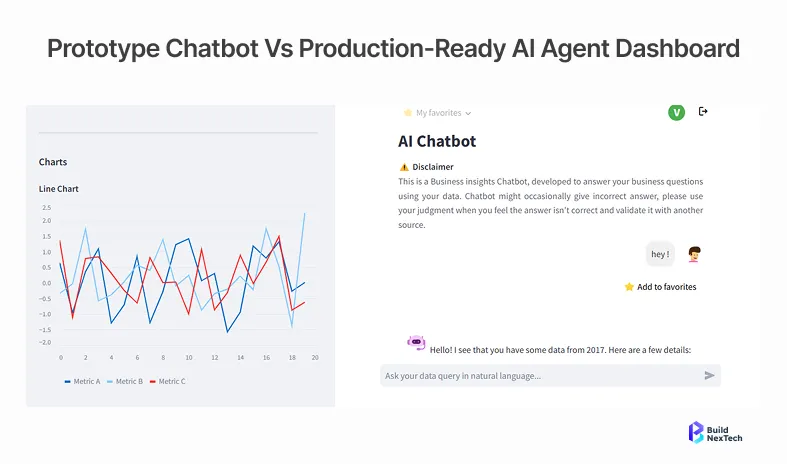
Most Claude agents begin their journey as a simple demo, a few empty lines, and a nice opening. This quickly leads to a harsh reality. Tools break silently. Infinite loops begin without reason. Memories disappear from one session to the next. Costs explode. In order to move from a prototype agent to a working, robust system, what separates a great agent is less its intelligence and more engineering. There are a couple of significant differences between the prototype and the production-ready phases.
The Claude ecosystem: How the API, CLI, and MCP work together
Claude API - the agent's reasoning core
Reasoning takes place in the Claude API. All plans, decisions, and calls to invoke tools pass through it. Agent workflows are built using the Messages API and tool_use blocks: structured calls that enable Claude to call the tools that you have defined and provide structured results. The API also provides for extended thinking and prompt caching, which can be important if your agents are processing lengthy, multi-step tasks.
The key skills that agents will need are:
- Structured input/output schemas, tool use (function calling)
- Long task history window - up to 200K tokens
- Streaming responses for real-time agent feedback
- Cache frequently used contexts to minimise latency and cost if you need to use them a second time
Claude Code CLI - agentic coding from the terminal
Anthropic's terminal-based agent for software engineering tasks. It reads your codebase, writes and runs code, manages files, and executes shell commands completely without the need for human intervention. It's incredibly useful in two ways for agent development: writing the agent itself and running your agent in iteration loops, without a UI.
# Install Claude Code CLI
npm install -g @anthropic-ai/claude-code

# Run Claude Code in your project directory
claude
# Run a specific task non-interactively
claude -p "Add error handling to the agentic loop in agent.py."
Other MCP integrations include GitHub PRs, Slack threads, Linear tasks, Jira tickets, Snowflake, BigQuery, Databricks, Google Drive, and more via sub-agents-mcp patterns.
MCP (Model Context Protocol) - connecting Claude to external tools and data
What is MCP? MCP (Model Context Protocol) is Anthropic’s standardized protocol for connecting Claude agents to external tools, APIs, databases, and enterprise systems through a unified interface. MCP provides you with a single protocol, rather than constructing build-to-service wrappers for each service. Claude agents are connected to MCP servers, which expose tools, such as GitHub, Slack, databases, Jira, Docker Desktop, and custom internal systems.
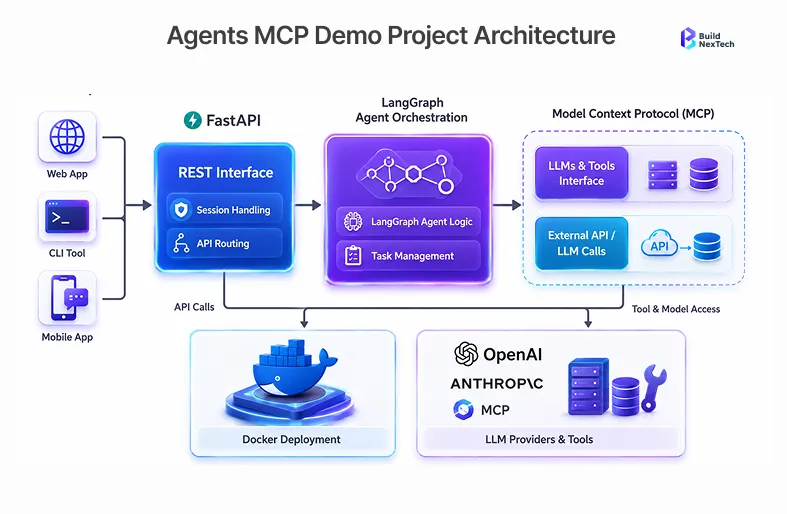
# Example: Connecting to an MCP server in Python
import anthropic

client = anthropic.Anthropic()

# Claude will automatically discover and use tools from the MCP server
response = client.beta.messages.create(
    model="claude-sonnet-4-20250514",
    max_tokens=4096,
    tools=[{
        "type": "mcp",
        "server_url": "http://localhost:3000",
        "server_name": "github-mcp"
    }],
    messages=[{"role": "user", "content": "Create a PR for the latest changes"}]
)
Use complex multi-agent team pattern – LangGraph or CrewAI for faster iteration and then to native for stabilisation.
Claude vs LangChain, AutoGen, and LlamaIndex - when to use each
Agent architecture: how it all fits together
What is an orchestration layer? The orchestration layer coordinates planning, tool execution, memory retrieval, state management, and communication between agents inside a production AI workflow.
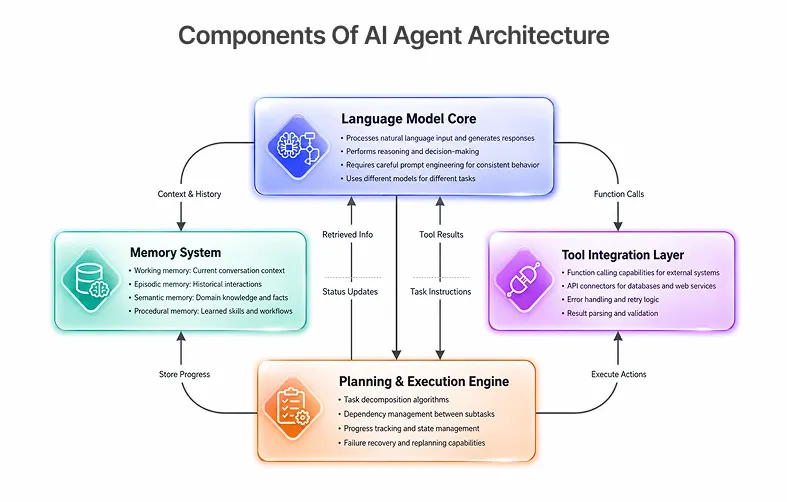
Planner, executor, memory, and tool layer
What are agent guardrails? Agent guardrails are safety and control mechanisms that prevent autonomous AI systems from executing unsafe actions, entering recursive loops, exceeding token budgets, or interacting with external systems without validation.
Component
It can be a task-executor, a requirement analyzer, a codebase-analyzer or a quality fixer agent; it's always a 4-layer pattern.
Choosing an orchestration pattern (single-agent, multi-agent, event-driven)
How do multi-agent systems work? Multi-agent systems distribute tasks across specialized AI agents that collaborate through shared context, orchestration logic, and coordinated execution pipelines.
Multi-agent orchestration with Claude enables the creation of hub-team patterns: an agent orchestrator distributes the work to specialist sub-agents, such as requirement-analyzer, technical-designer, and quality-fixer, all of which have their own tools and context. Production multi-agent systems, such as AI-generated apps and pipelines, are based on this architecture.
Step-by-step: building your first Claude agent workflow
Step 1 - Set up the Claude API and environment
import anthropic
import os

client = anthropic.Anthropic(api_key=os.environ["ANTHROPIC_API_KEY"])

# Verify connection
response = client.messages.create(
    model="claude-sonnet-4-20250514",
    max_tokens=100,
    messages=[{"role": "user", "content": "Hello"}]
)
print(response.content[0].text)
Step 2 - Define your tools and connect via MCP
Tools are how your Claude agent takes action in the world. A name and a description are required for each tool, as is an input schema of a type. Use the description to determine when and how to invoke the tool - write them as you would a documentation for a new developer.
Good tool design principles:
- Do one thing at a time (single responsibility)
- Return structured JSON, not prose
- Return error state in the return schema
- Create tools using verbs: create_ticket, search_codebase, send_slack_message
tools = [
    {
        "name": "search_github",
        "description": "Search GitHub repositories for code, issues, or pull requests. Use when the user asks about code in a specific repo.",
        "input_schema": {
            "type": "object",
            "properties": {
                "query": {"type": "string", "description": "Search query"},
                "repo": {"type": "string", "description": "Repository in owner/repo format"},
                "type": {"type": "string", "enum": ["code", "issues", "pulls"]}
            },
            "required": ["query", "repo", "type"]
        }
    }
]
Step 3 - Build the agentic loop (plan → act → observe)
The agentic loop is the engine of every Claude agent. Claude gets a goal, thinks of an action (tool call or final answer), runs the action, sees what happens, and repeats the step until the goal is achieved.
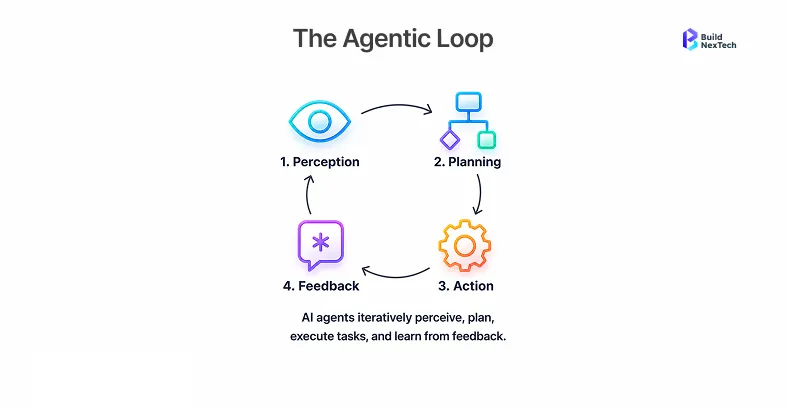
def run_agent(user_message: str, tools: list) -> str:
    messages = [{"role": "user", "content": user_message}]

    while True:
        response = client.messages.create(
            model="claude-sonnet-4-20250514",
            max_tokens=4096,
            tools=tools,
            messages=messages
        )

        # If Claude is done, return the final answer
        if response.stop_reason == "end_turn":
            return response.content[0].text

        # Process tool calls
        tool_results = []
        for block in response.content:
            if block.type == "tool_use":
                result = execute_tool(block.name, block.input)
                tool_results.append({
                    "type": "tool_result",
                    "tool_use_id": block.id,
                    "content": str(result)
                })

        # Add Claude's response and tool results to history
        messages.append({"role": "assistant", "content": response.content})
        messages.append({"role": "user", "content": tool_results})
Step 4 - Add memory and state persistence.
If there is no memory, then each agent run will be run from scratch. The production agents need to possess short-term memory (during the session) and long-term memory (between sessions).
Step 5 - Run and iterate using Claude Code CLI
After your agent skeleton is executed, Claude Code CLI will be your fastest iteration tool. You don't need to switch to an editor to describe changes - Claude Code rewrites the code, runs the tests, and confirms the fix all in your repo context.
# Open Claude Code in your agent project
cd my-agent-project
claude
Outline the changes you want to make:
# Describe what you want to change
> Add a step budget of 20 to the agentic loop to prevent infinite loops
> Add OpenTelemetry TRACEPARENT headers to every tool call for distributed tracing
> Write TDD tests for the memory retrieval function using pytest
Claude Code follows your conventions and understands your existing architecture, and produces code that fits - not boilerplate code.
Real-world example: a document processing agent in action
Imagine an agent that will process incoming design documents, generate API schemas, create Jira tickets, and open GitHub PRs - all autonomously and end-to-end - a full-stack workflow.
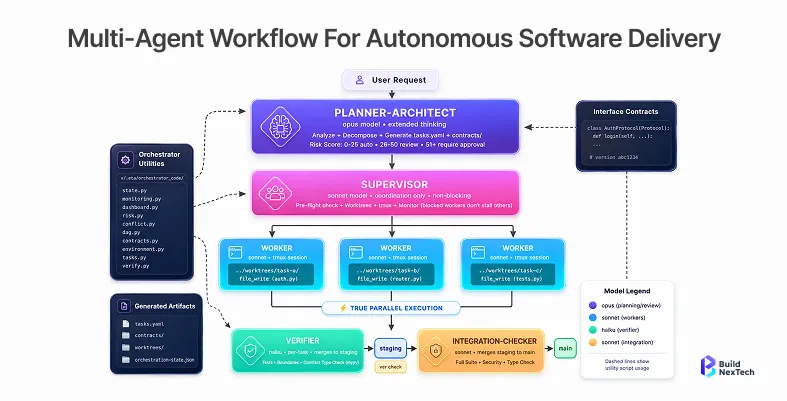
An agent fleet consists of the following:
- The design doc is read by the requirement analyzer, and its structured requirements are extracted via MCP
- A technical designer creates API endpoints and a UI Spec from the requirements
- Your rule-advisor rules are checked for quality, and gaps are flagged by the quality-fixer
- Jira tickets and GitHub PRs are created by MCP connectors via the task-executor
- Human-in-the-loop checkpoint fires before any PR is merged - the agent writes a summary of the PR and waits for it to be approved in Slack.
This is the essence of parallel specialist execution: each sub-agent is focused, observable, and replaceable.
State, memory, and production hardening
In BNXT.ai production agent deployments, teams that implemented step budgets, approval gates, and OpenTelemetry tracing during initial architecture design reduced post-deployment agent failure investigations by more than half compared to teams that added observability retroactively.
Short-term context vs. long-term memory design:
Your message array is your short-term memory - what Claude is able to see in the context window. This builds up rapidly for extended periods of time. The trick is progressive summarisation: if the size of your message history goes over a limit (e.g., 80K tokens), replace the oldest N messages with a shorter digest of them and keep doing this. This helps to maintain the freshness of Claude's thinking while providing important context.
Memory retrieval strategies: vector, episodic, and summary:
Long-term memory needs an intentional design. Exploit vector retrieval (Retrieval Augmented Generation) for semantic queries - bring in relevant past tasks or knowledge at the beginning of a new session. Take advantage of episodic storage to record all agent run traces, which you can then re-replay, debug, and enhance. Apply a summaryGuardrails, approval gates, memory to reduce the completed stages to a small memory state to pass to the next stage of an agent pipeline.
Guardrails, approval gates, and loop prevention:
Production Claude agents want hard limits. If they are not there, a tool call that gets configured wrong or an unexpected API response could escalate into a costly disaster.
- Step budgets: Maximum number of steps (e.g., 20 steps). If the agent has not completed, state the result thus far and stop.
- Action tiers: Identify if any tools are read-only, read and write, or destructive. Make sure that any destructive operation (such as deleting records, merging PRs, sending emails) is confirmed by the user.
- Prompt injection defence: Sanitise all external sources of content (web pages, e-mail, documents) before they enter into Claude's context. Avoid passing user-controlled strings and external HTML to the system prompt.
- Token budgets: Set max_tokens budgets per step and per session. Alert when approaching limits.
Tracing, evals, and token budget management:
Observability is a requirement for all production agents. Send a TRACEPARENT header on every tool call and API call to instrument an agentic loop. This provides you with a complete distributed trace of user requests to output from your entire fleet of agents.
Don't use a pass/fail unit test as the only measure of success for evals. Create LLM-as-judge evaluators: feed in some agent traces to a second call to the Claude model and check the result against correctness, the efficiency of using tools, and following your CLAUDE.md rules. Automate this in CI using GitHub Actions, with the idea that each agent change will be tested before it gets merged into the master branch.
Conclusion: Ship reliable agentic AI systems faster with BNXT.ai
Developing a production-ready Claude agent workflow isn't merely the quest for a smarter prompt; it's the application of software development lifecycle discipline to AI Engineering. Each pattern included in this guide is included to make your agents trustworthy enough to run without supervision, from MCP-connected tool layers to stateful memory design, from step budgets to OpenTelemetry traces.
At BNXT.ai, our expertise is in helping bring the idea of a Claude agent from concept to production - from building multi-agent systems to agentic AI engineering pipelines and autonomous agent fleets. In a recent engagement, a real estate operations team running a multi-agent workflow for lead qualification, property matching, and booking automation saw sales team productivity increase by 44% within two months of deployment - the direct result of building with the same four-layer architecture, step budgets, and observability patterns covered in this guide. Ready to ship?
People Also Ask

How do you scale Claude agents without hitting rate limits?
Scale Claude agents without hitting rate limits by using Anthropic's Batches API for bulk, non-time-sensitive tasks and implementing exponential backoff with jitter on 429 responses for real-time workloads. Distribute load across multiple API keys with a distributed agent orchestrator, and cache repeated prompt prefixes using prompt caching to reduce both latency and token consumption.
What is the difference between MCP and a standard REST API integration?
REST API wrappers are bespoke - you write a custom tool schema for every endpoint. MCP is a standardised protocol: Claude discovers tools from an MCP server automatically, and the same server can be reused across multiple agents and projects. MCP also handles authentication, schema versioning, and error contracts consistently, which matters at scale.
How do you test Claude agents before deploying to production?
Use a three-layer testing strategy: unit tests for individual tool functions (pytest or Jest), integration tests that run the full agentic loop against a mocked tool layer, and LLM-as-judge evals that score real agent traces on quality dimensions. Follow TDD principles - write the eval harness before writing the agent. Run all three layers in CI via GitHub Actions on every PR.
How does prompt caching reduce latency and cost in Claude agents?
Prompt caching lets Claude reuse the computed KV cache from a previous API call when the same prefix appears again. For agents with a long, stable system prompt - your CLAUDE.md rules, tool schemas, and context - caching that prefix significantly reduces both time-to-first-token and input token costs. Enable it by marking your system prompt with cache_control: {"type": "ephemeral"} in the API request. For current pricing and cache discount rates, refer to the Anthropic pricing page.
How do you monitor and troubleshoot failures in production Claude agent workflows?
Monitor production Claude agent workflows by implementing end-to-end observability across every agent action, tool call, and API request. Use OpenTelemetry tracing with TRACEPARENT headers, structured logging, and centralized dashboards to track execution paths, latency, token usage, and error rates. Store agent traces and tool outputs in an episodic memory store so failed runs can be replayed and debugged.


.webp)
.webp)
.webp)

.webp)
.webp)



