


Modern enterprises are moving beyond experimental AI projects and adopting AI-driven systems that improve operational efficiency, automate repetitive tasks, and support faster decision-making. From customer support automation to software engineering workflows, AI is becoming a core part of modern enterprise infrastructure.
Among the leading enterprise AI platforms, Claude API has gained attention for its long context capabilities, strong reasoning performance, and enterprise-focused security architecture. Organizations are increasingly integrating the Anthropic API into internal tools, workflow orchestration systems, and knowledge retrieval platforms to support production-scale AI operations .
For CTOs, QA engineers, and DevOps teams, successful Claude API integration requires more than a basic API connection. Teams must plan for:
- API security and compliance requirements
- Workflow orchestration and automation pipelines
- Prompt engineering and response consistency
- Observability, logging, and rate-limit management
- Cost optimization and Claude pricing considerations
- Production reliability and scalability
This guide explains how enterprises can integrate Claude API into real-world applications while building secure, scalable, and maintainable AI-powered workflows for production environments.
Why Enterprises Are Choosing the Claude API for AI-Powered Applications
Enterprise generative AI adoption has accelerated as organizations look for ways to automate repetitive processes, improve productivity, and support data-driven operations. AI for enterprise is no longer limited to chatbots. Today, enterprises use AI-powered automation for documentation indexing, workflow orchestration, browser automation, AI-generated apps, and internal knowledge systems. According to McKinsey’s 2024 State of AI report, 65% of organizations were regularly using generative AI in at least one business function. McKinsey’s 2025 AI survey showed adoption increasing further, with 88% of respondents reporting regular AI usage in at least one business function.
The Growing Role of Enterprise Generative AI and AI-Powered Automation
Enterprise generative AI is reshaping how teams handle documentation, compliance monitoring, customer support, and engineering workflows. AI-powered automation drives productivity gains across industries, from healthcare to financial services to software development. Organizations increasingly rely on AI workflow automation to reduce manual effort, speed up decision cycles, and maintain operational consistency at scale. The shift from isolated AI experiments to production-grade AI-powered systems marks a clear turning point in enterprise technology strategy.
Claude vs ChatGPT for Enterprise AI Integration and Scalability
When evaluating Claude vs ChatGPT for enterprise AI integration, engineering teams often highlight Claude's stronger performance on long-document reasoning, its larger context window, and its safety-focused architecture. Claude’s current model family, including Claude Opus 4.7, Claude Sonnet 4.6, and Claude Haiku 4.5, supports enterprise use cases ranging from complex reasoning and agentic coding to high-volume automation workflows. Teams working with retrieval-augmented generation, multi-turn conversations, and complex compliance tasks frequently report that the Claude API delivers more consistent and controllable outputs than competing platforms. For enterprises building scalable and secure AI-powered systems, this consistency is a decisive advantage.
Understanding the Claude API and Anthropic Platform
The Anthropic API gives developers access to Claude models through several core interfaces. The Messages API handles multi-turn conversations, the Files API manages document uploads, the Message Batches API processes large-scale async workloads, and the Admin API manages user access and configuration. Together, these APIs allow enterprises to build secure, scalable AI-powered systems that integrate directly with existing infrastructure.
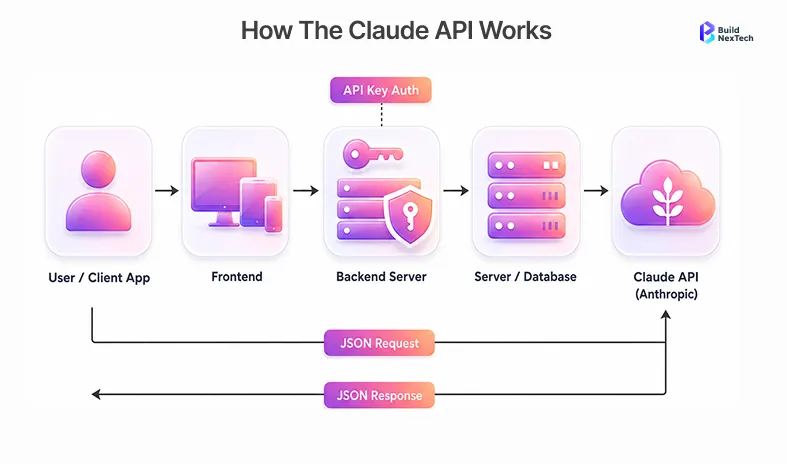
What the Anthropic API Offers for Enterprise AI Solutions
The Anthropic API supports enterprise AI solutions through capabilities including PDF processing, prompt caching, Model Context Protocol (MCP) integration, and multimodal support. Enterprises can integrate the Claude Platform directly through the Anthropic Console, or deploy through Amazon Bedrock API, Google Vertex AI, or Microsoft Foundry for centralized governance and cloud-native workflows. Organizations using legacy ERP systems can connect the Claude API through middleware layers and enterprise integration platforms without disrupting existing infrastructure. The platform also supports corporate proxy configurations, network allowlisting, and LLM Gateway implementations that meet enterprise security standards.
Claude API Features: Models, Context Window, and Multimodal Support
Claude API provides access to a powerful model family, with Claude 4 models including Claude Opus 4.7 for deep reasoning tasks and Claude Sonnet 4.6 for balanced speed and performance. Claude Opus 4.7 and Claude Sonnet 4.6 support up to a 1M-token context window, while Claude Haiku 4.5 supports a 200k-token context window, making model selection important for large-document analysis, enterprise search, and codebase review workflows. Multimodal support enables AI-powered systems to handle text, PDFs, and images together. Claude Code SDK and Claude Agents SDK further accelerate API development, while MCP clients enable seamless tool integration across enterprise platforms such as GitHub PRs, Jira tickets, and Slack threads.
Claude Pricing, Token Usage, and Enterprise ROI Considerations
Claude pricing is based on token consumption, which varies by model and context window usage. For enterprise applications, teams must analyze usage patterns carefully because long-context AI models can increase operational costs if not optimized. Prompt caching is one of the most effective techniques for reducing costs on repeated enterprise queries since it avoids redundant token processing. Organizations can also reduce spend through structured prompt engineering techniques, optimized retrieval pipelines, and batched processing via the Message Batches API. When planned well, the Claude API delivers strong enterprise ROI through reduced headcount for repetitive tasks and faster software delivery cycles.
The table below compares the latest Claude API model pricing tiers, including input, output, and prompt caching costs. This breakdown helps CTOs, DevOps teams, and enterprise architects evaluate the right Claude model based on performance, scalability, and operational cost requirements.
Anthropic prompt caching pricing uses 1.25x base input pricing for 5-minute cache writes, 2x pricing for 1-hour cache writes, and 0.1x pricing for cache reads.
Planning Your Claude API Integration Strategy
Before starting API integration, enterprises should define clear business objectives. Successful enterprise AI solutions focus on measurable use cases such as AI task automation, customer support optimization, compliance monitoring, internal documentation search, and workflow automation. A well-structured integration plan prevents scope creep and ensures the AI-powered system remains aligned with business goals throughout deployment.
Identifying Enterprise AI Use Cases and Workflow Automation Opportunities
The most productive enterprise AI use cases tend to cluster around repetitive, high-volume processes. AI task automation targets workflows like ticket classification, report generation, documentation summarization, and code review assistance. AI workflow automation tools work particularly well in DevOps pipelines where the Claude API can analyze failed CI/CD test logs and automatically generate root cause summaries, reducing manual debugging time. Teams at companies like Frugal Testing have demonstrated how intelligent test orchestration and AI-powered automation strategies measurably improve QA operations and software delivery speed at scale.
Integrating RAG with Claude API for Enterprise Knowledge Retrieval
Retrieval-augmented generation (RAG) is one of the most powerful patterns for enterprise generative AI. In a RAG architecture, the Claude API connects with enterprise databases, documentation indexes, Feature Store systems, or vector databases to retrieve relevant context before generating responses. Techniques such as text chunking, BM25 search, and Agentic Search improve retrieval accuracy while reducing hallucinations. For example, an enterprise using RAG with the Claude API can enable employees to query internal policy documents, legal contracts, or technical runbooks through a natural language interface, receiving precise and sourced answers rather than generic responses. This pattern is especially effective for internal knowledge systems and enterprise compliance workflows.
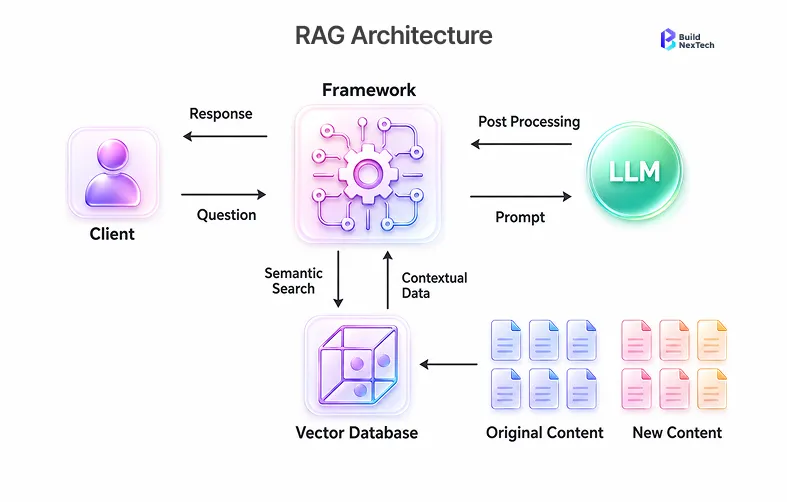
In BuildNextTech enterprise Claude API integrations, teams implementing retrieval-augmented generation with prompt caching typically achieve 40–60% token cost reductions within the first month compared to full-document prompting approaches. Production deployments also commonly reduce response latency by 2–3 seconds per query because the model processes only highly relevant contextual chunks instead of entire document sets.
Choosing the Right API Integration Platform, Architecture, and Development Best Practices
Enterprises must choose an API integration platform that aligns with their cloud strategy and governance requirements. Some organizations deploy Claude Platform directly through the Anthropic Console, while others prefer Amazon Bedrock, Vertex AI API, or enterprise integration platforms for centralized policy enforcement. Development teams should treat API development with the same rigor as core application code. This means implementing authentication and API keys management, configuring network security and observability, establishing rate limits and workflow orchestration standards, and integrating the Claude API deployments into existing DevOps pipelines. A strong API development strategy ensures Claude-powered applications remain scalable, secure, and maintainable across production environments.
Step-by-Step Claude API Integration Workflow for Enterprises
Most enterprise AI integrations stall not because of technical complexity, but because teams skip the planning stages and jump straight into code. Following a repeatable integration workflow prevents rework, reduces security gaps, and ensures the final deployment meets both engineering and business requirements.
Step 1: Define the Business Workflow
Start by mapping the specific business process Claude API will improve. Identify inputs, expected outputs, decision points, and handoff steps. A support team might define the workflow as: inbound ticket received, Claude summarizes and classifies, agent reviews, response sent. Defining this upfront determines which Claude model, context size, and prompt structure will work best.
Step 2: Choose the Right Claude Model
Match the model to the task complexity and volume. Use Claude Opus 4.7 for multi-step reasoning, legal analysis, or complex agent orchestration. Use Claude Sonnet 4.6 for balanced enterprise workloads where speed and accuracy both matter. Use Claude Haiku 4.5 for high-volume, low-latency tasks like classification, tagging, and routing. Choosing the wrong model either overspends on unnecessary capability or underperforms on complex workflows.
Step 3: Connect Enterprise Data Sources
Integrate the Claude API with the relevant enterprise data layer. For document-heavy workflows, configure a RAG pipeline that retrieves context from vector databases, Feature Store systems, or documentation indexes before each API call. For transactional workflows, connect Claude to internal APIs, Jira, Slack, or GitHub using MCP clients or Claude Agents SDK. Data source integration directly determines the accuracy and relevance of Claude's outputs in production.
Step 4: Add Security, Logging, and Rate Limits
Before going live, implement the full observability and security stack. Store Anthropic API keys in a dedicated secret manager, never in code. Add input validation and content filtering to block prompt injection attempts. Configure centralized logging and API request tracing so engineering teams can debug failures quickly. Set rate limits and alerting thresholds to prevent unexpected cost spikes during traffic surges.
Step 5: Test Outputs Before Production Deployment
Run structured evaluation cycles before routing real workloads through the integration. Use Gen AI Evaluation frameworks to benchmark outputs against a representative sample of production inputs. Test edge cases, adversarial prompts, and high-context inputs to verify resilience. Validate that retry mechanisms, fallback models, and error handlers all trigger correctly under simulated failure conditions. Only after passing these checks should the integration move to production.
Setting Up Claude API for Production Environments
Production-ready Claude API deployments require more than a working API call. They demand secure credential management, a properly configured development environment, and observability tooling that gives engineering teams full visibility into system behavior under real workloads.
How to Generate and Securely Manage an Anthropic API Key
The first step in any Claude API deployment is generating an Anthropic API key through the Anthropic Console. API keys must never be stored in source code repositories or committed to version control. Instead, enterprises should use dedicated secret management solutions such as AWS Secrets Manager, Azure Key Vault, or Google Cloud Secret Manager to protect credentials. AWS credentials, GCP credentials, and Azure Cost Management configurations should all follow the principle of least privilege, granting API access only to services and roles that require it. Rotating API keys on a defined schedule and alerting on unusual usage patterns are additional best practices for production security.
Configuring the Claude Code SDK and Development Environment
Teams using Claude Code SDK can set up their development environments quickly using the SDK libraries and API guides available through Anthropic's documentation. The Claude Console provides a prompt testing interface, usage analytics, and model access management that accelerates iteration during development. Claude Code SDK also integrates with Agent Development Kit tools and the Claude Agents SDK, enabling agentic coding assistant workflows that automate repetitive engineering tasks. For teams building multi-agent systems, the distributed agent orchestrator pattern allows multiple Claude-powered agents to coordinate on complex workflows such as documentation indexing, code review, and automated compliance checks.
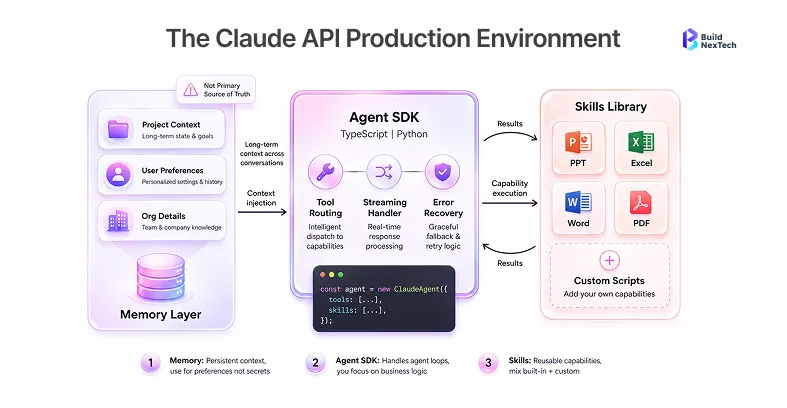
Managing Rate Limits, Logging, and Observability in Production
Production environments require robust observability and reliability controls. Enterprises should implement centralized logging, API request tracing, session management, and usage analytics to maintain visibility into Claude API behavior at scale. Rate limiting protection prevents unexpected cost spikes and ensures system stability during peak usage. Workflow orchestration dashboards help DevOps leads monitor pipeline health and identify bottlenecks in AI task automation flows. Organizations deploying the Claude API in distributed systems often use Managed Agents and Agent Studio tools alongside event-driven architectures to maintain scalability and operational control.
Building Scalable Claude API Workflows
Efficient API design is critical for enterprise-scale Claude deployments. Poorly optimized workflows lead to high token costs, slow response times, and fragile pipelines that break under production load. Scalable workflows require both technical resilience and thoughtful prompt design.
Implementing Efficient API Calls with Zero-Shot and Few-Shot Prompting
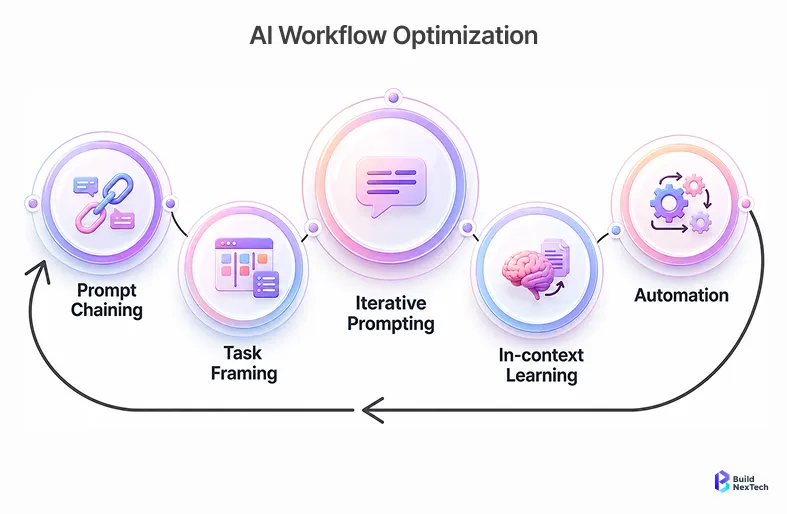
Zero-shot prompting allows the Claude API to complete tasks based solely on clear instructions, without requiring example inputs. This approach works well for structured tasks like ticket classification, content summarization, and compliance checks. Few-shot prompting, by contrast, includes a small number of input-output examples in the prompt to guide Claude toward more specific output formats, making it ideal for domain-specific enterprise tasks. For example, a QA automation team can use a few short prompts to teach Claude how to classify test failure severity based on historical examples, improving consistency across automated reports without retraining any model.
Building Resilient API Pipelines: Retries, Fallbacks, Error Handling, and Workflow Optimization
Production-ready Claude API pipelines must handle failure gracefully. Enterprises should implement retry mechanisms with exponential backoff to manage transient API errors, fallback AI models for continuity during model degradations, timeout handling for long-running inference calls, and structured API responses with consistent schemas that downstream systems can parse reliably. Queue-based orchestration through event-driven architectures adds an additional layer of workflow optimization, ensuring tasks are processed in order even when upstream components experience delays. Error monitoring with alerting closes the loop by giving DevOps teams real-time visibility when pipeline components degrade.
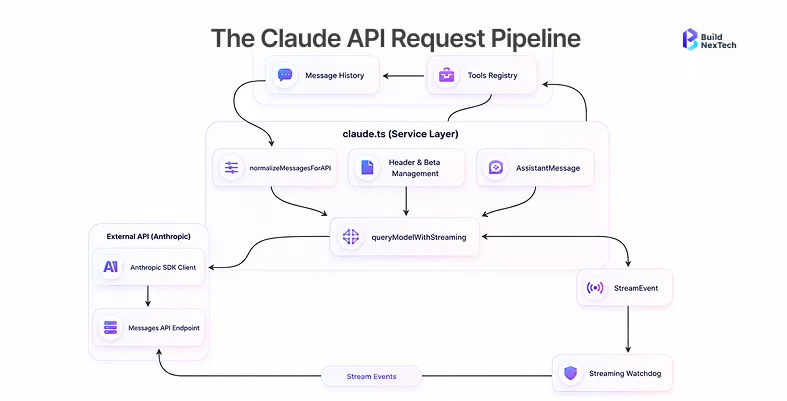
Designing AI Workflow Automation and Enterprise Task Automation Pipelines
End-to-end AI workflow automation pipelines connect the Claude API with enterprise tools like GitHub, Jira, Slack, and internal ticketing systems. Claude Agents SDK and MCP-compatible orchestration tools can coordinate multiple Claude-powered agents across complex enterprise processes such as documentation indexing, AI-powered compliance checks, and automated software engineering assistance. Browser automation using Claude Computer Use further extends automation coverage to repetitive desktop workflows that lack programmatic APIs. For enterprises deploying the Claude Cowork project workflows, these pipelines dramatically reduce the time engineers spend on manual coordination tasks.
Prompt Engineering Best Practices for Enterprise AI
Prompt engineering is one of the highest-leverage skills in enterprise AI deployment. Weak prompts produce inconsistent, unreliable, or unsafe outputs, while well-engineered prompts unlock Claude's full reasoning capability. Building a strong prompting discipline across engineering teams pays dividends at every stage of the AI deployment lifecycle.
Prompt Engineering Fundamentals: Structure, Roles, and Context for Enterprise AI
Effective enterprise prompts follow a clear structure. They begin with a system prompt that defines Claude's role and behavioral constraints, followed by structured instructions that specify the task, business context, output formatting rules, and compliance constraints. Assigning Claude a specific role, such as "You are a senior compliance analyst reviewing enterprise contracts," significantly improves response quality by anchoring reasoning to a relevant domain perspective. System prompts should also encode guardrails that prevent outputs violating data governance or regulatory policies. Well-structured prompts reduce hallucinations, improve consistency, and make AI prompt engineering a repeatable organizational capability rather than an individual skill.
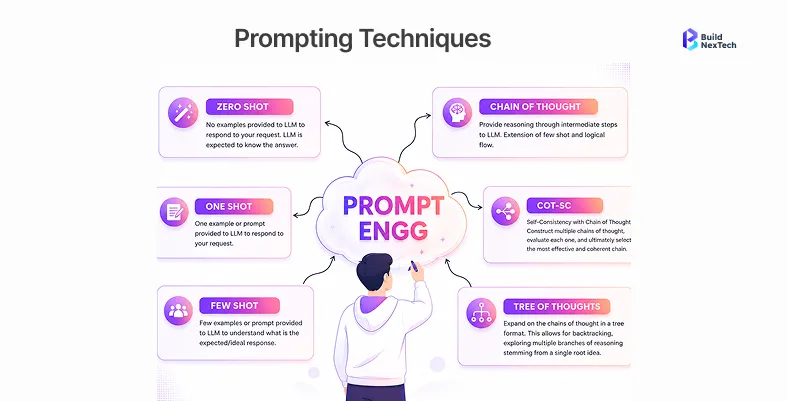
Chain of Thought, Zero-Shot, and Advanced Prompting Techniques for Business Workflows
Chain of thought prompting asks Claude to reason through a problem step by step before delivering a final answer. This technique is especially valuable for enterprise workflows involving financial analysis, documentation review, legal summarization, or troubleshooting support, where intermediate reasoning steps matter as much as the final output. For example, an enterprise AI platform processing Jira tickets can use chain of thought prompting to classify issue severity, summarize developer discussions, and recommend next actions, all within a single structured prompt. Combining chain of thought prompting with zero-shot prompting techniques gives engineering teams a flexible prompting toolkit that covers both structured classification tasks and open-ended reasoning workflows.
Prompt Optimization: Testing, Iteration, and Consistency at Enterprise Scale
Prompt optimization is an ongoing engineering discipline, not a one-time task. Teams should use Gen AI Evaluation frameworks to benchmark prompt outputs across diverse input samples, track performance regressions when prompt structures change, and maintain a library of validated prompt templates for common enterprise use cases. Prompt caching reduces token costs and improves response latency for frequently repeated queries, making it a critical optimization technique for high-volume enterprise deployments. Iterative testing against real production inputs, combined with structured review processes, ensures prompts remain accurate and consistent as business requirements evolve. At BuildNexTech, prompt optimization forms a core part of every enterprise AI integration engagement, helping clients achieve reliable outputs across regulatory and operational workflows.
API Security and Compliance for Enterprise Applications
API security is a critical concern for any enterprise adopting generative AI. AI-powered systems introduce a distinct set of security risks that traditional API security tools are not designed to address. Enterprises must build layered defenses that cover both conventional API threats and AI-specific attack vectors.
API Security Best Practices: Prompt Injection, Jailbreaks, and Enterprise AI Threat Coverage
AI-powered systems face unique threats, including prompt injection attacks, where malicious inputs attempt to override system prompt instructions, indirect prompt injection through external data sources, and jailbreak attempts that try to extract sensitive information or bypass safety constraints. Enterprises must implement input validation and content filtering to sanitize inputs before they reach the Claude API. Role-based access controls, network allowlisting, gVisor sandboxing, and secure API gateways form the foundation of a defense-in-depth security architecture. Security teams should also monitor AI-generated outputs continuously to detect data leakage, policy violations, and anomalous usage patterns that may indicate active exploitation attempts. Threat monitoring systems that alert on unusual prompt patterns add a proactive layer of protection to enterprise Claude deployments.
Data Governance, HIPAA, GDPR, and Enterprise Compliance Frameworks
Organizations operating in regulated industries must establish strict controls over how the Claude API handles sensitive data. Compliance frameworks, including GDPR, HIPAA, and enterprise-specific governance standards, require clear policies on data retention, audit logging, and AI-generated content review. Enterprises should ensure that Claude API deployments do not store sensitive user data beyond what is necessary for the immediate task, and that all API interactions are logged in tamper-evident audit systems. Cloud providers, including Google Vertex AI, Amazon Bedrock, and Microsoft Foundry, provide enterprise-grade governance capabilities, including data residency controls and access logging, that support compliance during AI integration projects. Legal and compliance teams should review AI output policies before production deployment, particularly in healthcare, financial services, and legal sectors.
Real-World Enterprise Use Cases of Claude API
Claude-powered applications are already delivering measurable business value across industries. Enterprises are deploying the Claude API for a wide range of AI business automation use cases, and the results are informing the next generation of enterprise AI platform strategies.
AI Business Automation for Support, Operations, and Internal Knowledge Systems
For example, a support team can connect Claude API with Zendesk and an internal knowledge base to summarize support tickets, suggest replies, and automatically route complex issues to the right department. This reduces average handle time and frees agents to focus on high-value interactions. QA teams can integrate Claude API with CI/CD logs to classify failed test cases and generate root-cause summaries for engineers, cutting manual debugging time significantly. Development teams also use Claude Code and agentic coding assistant tools to review GitHub PRs, generate technical documentation, and accelerate debugging workflows. PDF processing capabilities allow enterprises to extract structured data from contracts, invoices, and compliance documents at scale, while browser automation through Claude Computer Use handles repetitive desktop workflows that lack programmatic APIs.
Measuring ROI and Performance of Enterprise AI Tools
Measuring ROI is essential for sustaining enterprise AI investment. Teams typically track operational cost reductions, faster workflow completion rates, improved support resolution time, lower manual effort per task, increased developer productivity, and better customer satisfaction scores. In BuildNexTech enterprise Claude API deployments for customer support workflows, teams commonly report 30–50% reductions in average handle time within the first quarter after deployment. These improvements typically come from automated ticket summarization, AI-assisted response generation, and intelligent issue routing integrated with internal knowledge systems. Tracking these outcomes against a pre-deployment baseline ensures AI ROI claims are grounded in real operational data rather than estimates.
Conclusion: Building Secure Enterprise AI Applications with Claude API
Integrating the Claude API into enterprise applications requires more than simple API connectivity. Organizations must invest in architecture planning, API security, prompt engineering, observability, workflow automation, and compliance to achieve reliable and scalable production deployments. As enterprise generative AI adoption continues to accelerate, businesses that build secure AI-powered systems today will hold a significant competitive advantage in operational efficiency, software delivery speed, and customer experience quality.
Key Takeaways for Successful Enterprise API Integration
Successful Claude API integration rests on a handful of foundational practices. Start with clearly defined business use cases before writing a single line of integration code. Secure API keys through dedicated secret management platforms from day one. Build resilience into every pipeline with retries, fallbacks, and structured error handling. Invest in prompt engineering as an ongoing discipline, not a one-time setup task. Address AI-specific security threats, including prompt injection and jailbreaks, explicitly in your threat model. And measure ROI against a real baseline to sustain executive support for enterprise AI investment over time.
How BuildNexTech Helps Enterprises Deploy Scalable, Secure Claude API Solutions
BuildNexTech helps enterprises design and deploy production-grade Claude API solutions tailored for real operational environments. From API integration services and workflow automation to enterprise AI platform strategy and DevOps optimization, BuildNexTech supports engineering teams building scalable, secure, and future-ready AI-powered applications. As AI models continue evolving across platforms like Claude Platform, Amazon Bedrock, Google Vertex AI, and Microsoft Foundry, enterprises that partner with experienced integration specialists will be better positioned to adapt quickly, maintain compliance, and capture the full value of enterprise generative AI.
People Also Ask

How can enterprises reduce Claude API costs when handling high-volume AI workloads?
Enterprises can reduce the Claude API costs by using prompt caching, limiting unnecessary context length, and routing simple tasks to smaller AI models instead of premium models like Claude Opus 4.7. Many teams also use retrieval-augmented generation (RAG) so the model only receives relevant data instead of entire documents. Monitoring token usage and optimizing prompts regularly can significantly lower operational costs.
What are the biggest challenges QA teams face when testing Claude API integrations?
QA teams often struggle with inconsistent AI outputs, prompt sensitivity, latency variations, and validating non-deterministic responses. Unlike traditional APIs, AI responses may change slightly even for the same input. Teams usually solve this by creating benchmark datasets, structured evaluation criteria, response scoring systems, and fallback validation workflows for production testing.
Can Claude API be deployed in hybrid or private enterprise environments?
Yes. Many enterprises integrate the Claude API into hybrid environments where sensitive systems remain inside private infrastructure while AI processing happens through secure cloud APIs. Organizations commonly use LLM gateways, corporate proxies, network allowlisting, and cloud platforms like Amazon Bedrock or Google Vertex AI to maintain security, governance, and compliance requirements.
How does prompt versioning improve enterprise AI application stability?
Prompt versioning helps teams track changes made to prompts across environments and deployments. This improves stability because developers can compare prompt performance, roll back problematic updates, and maintain consistency across AI-powered systems. Many enterprises store prompts in Git repositories and treat them like production code with reviews, testing, and release management processes.
What metrics should enterprises monitor after deploying Claude API into production?
Enterprises should monitor token consumption, API latency, error rates, hallucination frequency, workflow completion time, response quality, and user satisfaction. Engineering teams also track retry rates, failed requests, and prompt performance to identify bottlenecks. Business teams often focus on ROI metrics such as reduced manual effort, faster support resolution, and productivity improvements from AI automation.


.webp)
.webp)
.webp)

.webp)
.webp)



