
.png)

Modern software development depends on safe, reliable, and automated deployment strategies that reduce downtime and protect the user experience. Blue-green deployments and canary deployments are two of the most widely adopted approaches in DevOps and CI/CD environments because they help teams release updates with confidence while monitoring performance metrics and rollback behavior in real time.
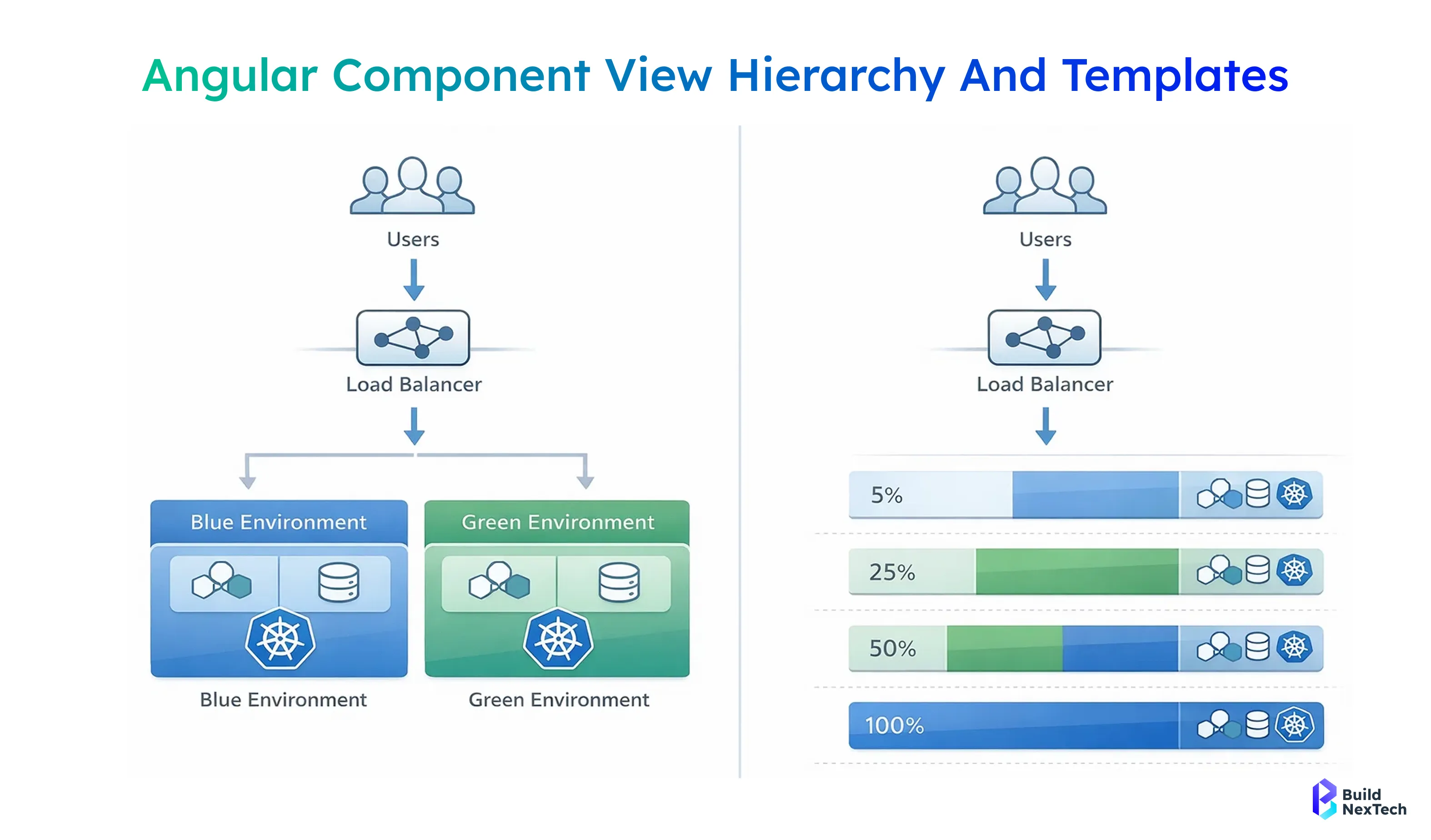
1. Blue-green deployments create two mirrored production environments and allow instant traffic switching through a load balancer or routing controls.
2. Canary deployments gradually roll out changes to a small percentage of users to observe performance, error rates, and user feedback before full release.
3. Both strategies help engineering teams reduce deployment risk, improve uptime, and support progressive delivery across Kubernetes, microservices, and cloud platforms.
4. These deployment strategies are widely supported by automation and traffic-management tools such as Argo Rollouts, Flagger, Spinnaker, and various CI/CD pipelines.
5. Choosing the right strategy depends on application architecture, resource availability, deployment frequency, risk tolerance, and overall DevOps process maturity.
Together, these strategies give startups and research-driven engineering teams the flexibility to balance innovation speed with application reliability, ensuring that production environments remain stable while new features and updates are introduced safely.
What Blue-Green Deployment Strategy Means in Software Delivery
Blue-green deployments create two mirrored production environments — one active and one idle — to reduce downtime and improve application availability during software deployment. Teams run the blue/green environment pair in parallel, route user traffic through a load balancer, and switch traffic to the new environment only after quality assurance checks, smoke testing, and monitoring validation. At BuildNexTech, we often see startups choose this strategy when reliability, rollback capabilities, and user experience are mission-critical.
- Two identical application environments run side-by-side with the same infrastructure and configuration
- Traffic switching happens through routing, ingress control, or a load balancer to minimize downtime
- Rollback is instant because teams switch traffic back to the previous environment if error rates increase
- Works best with stateless applications, mirrored production environments, and stable deployment pipelines
- Supports CI/CD, continuous delivery, and DevOps practices without disrupting production environments
Blue-green deployments help engineering teams maintain uptime, manage application nodes and application stacks safely, and keep response times consistent, especially in Kubernetes clusters and container orchestration platforms.
How Blue-Green Deployment Works in Real-World Applications
In real-world production environments, a blue environment serves live user traffic while the green environment runs the upgraded application version. Teams test performance metrics, response times, and monitoring dashboards before switching traffic. Routing tools such as Traefik Proxy, Istio VirtualService, routers, and ingress controllers handle traffic management and user load percentage distribution.
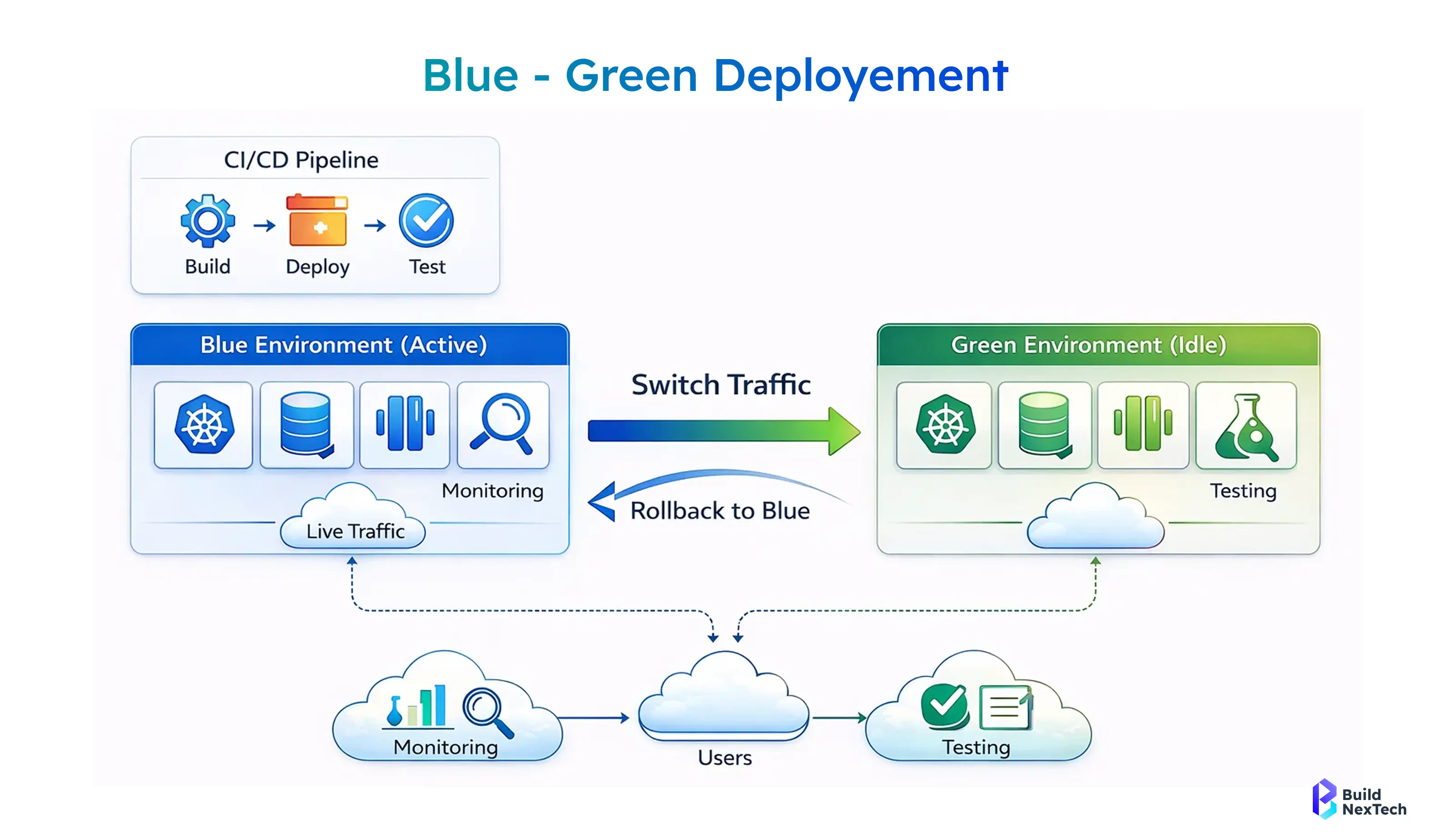
- The new version is deployed to the green environment while the blue environment remains live
- Monitoring systems and automated deployment tools validate stability and performance metrics
- Traffic routing gradually moves users to the upgraded application environment
- If a problem occurs, teams instantly revert traffic back to the blue environment
- Tools like Octopus Deploy, Codefresh, Jenkins, Harness, Microtica, and GitOps pipelines help automate the deployment process
This approach reduces risk compared to big-bang deployment or recreate deployment models, enabling engineering leaders to focus on application reliability and disaster recovery readiness.
Benefits of Using Blue-Green Deployment for Zero-Downtime Releases
Blue-green deployments enable zero-downtime releases, making them valuable for progressive delivery and continuous delivery pipelines. Because the full environment already runs before switching traffic, user traffic moves seamlessly between environments, improving uptime and performance consistency.
- Eliminates unexpected downtime during release management cycles
- Provides strong rollback plan options for rapid recovery and risk mitigation
- Improves user experience through stable routing and traffic rerouting workflows
- Enables automated monitoring thresholds with tools like Prometheus and Grafana
- Supports quality assurance validation before exposing changes to real users
For startups scaling fast, this strategy helps maintain application availability, ensure production nodes stay stable, and support consistent DevOps and CI/CD execution without affecting user behavior.
When Blue-Green Deployment May Not Be the Right Strategy
Despite its strengths, blue-green deployment requires duplicated infrastructure and higher resource provisioning. In scenarios involving database synchronization, stateful services, or complex service dependencies, teams may struggle to maintain mirrored environments.
- Requires duplicate infrastructure resources and increased operational cost
- Database synchronization and schema changes may introduce deployment risks
- Sticky sessions and session-based authentication can complicate routing
- Not ideal for applications without stateless designs or sufficient resource availability
- Small teams may find canary release or incremental deployment more practical
When budgets are limited or application characteristics are highly dynamic, founders may find incremental strategies like canary deployments, feature flags, or shadow deployment more efficient.
What Canary Deployment Strategy Means in Progressive Delivery
Canary deployments gradually release new software versions to a small percentage of users before rolling out the update to everyone. This progressive delivery approach allows teams to observe performance metrics, collect user feedback, and manage risk in production environments.
- A small canary deployment group receives the new version first
- Monitoring tools analyze error rates, performance metrics, and user experience
- Teams adjust rollout speed based on automated monitoring thresholds
- Supports service meshes, feature toggles, and feature flags
- Aligns with DevOps, continuous integration, and deployment automation practices
At BuildNexTech, founders implementing microservices often choose canary strategies to validate releases safely while gaining real-time user feedback and behavioral insights.
How Canary Releases Work in Microservices and Cloud Platforms
In microservices and cloud environments, canary releases work through incremental deployment across pods, ReplicaSets, and Kubernetes clusters. Tools like Argo Rollouts, Flagger, Spinnaker, and Statsig help automate canary release steps while monitoring user traffic impact.
- Traffic management gradually increases user load percentage for the new version
- Monitoring tools track key performance metrics and error behavior
- Traffic routing and ingress control automate controlled rollout progression
- Rollback happens quickly if performance degradation or problem signals appear
- Works well in cloud platforms like AWS, Azure, and Google Cloud
This model enhances release confidence and enables engineering leaders to treat production environments as data-driven feedback systems.
Advantages of Canary Deployments for Risk-Controlled Releases
Canary deployments reduce deployment risk by validating application behavior under real-world user traffic. Instead of releasing updates to everyone at once, teams assess real-user metrics before scaling rollout.
- Enables faster feedback collection through real-user monitoring
- Reduces risk through gradual user exposure to new features
- Supports A/B testing, experimental features, and user segmentation
- Improves release frequency while keeping rollback low-risk
- Ideal for microservices, modern APIs, and scalable cloud deployment pipelines
Canary deployment fits engineering cultures that prioritize experimentation, continuous improvement, and adaptive DevOps practices.
Challenges Teams Should Consider Before Implementing Canary Releases
While powerful, canary deployment requires structured monitoring, careful configuration management, and greater process maturity than traditional releases. Teams must prepare operationally to avoid inconsistencies.
- Requires strong monitoring systems and performance insights
- Needs automated rollback capabilities and response-time analysis
- Complex with interdependent services and database migrations
- Can increase release management overhead without proper tools
- Requires disciplined engineering culture and CI/CD maturity
Founders should evaluate team readiness and deployment automation capabilities before fully adopting progressive delivery workflows.
Comparing Blue-Green vs Canary Deployment for Different Use Cases
Choosing between blue-green and canary deployments depends on application environment, architecture, resource availability, and user traffic patterns. Both deployment strategies support production reliability, but they differ in approach and operational complexity.
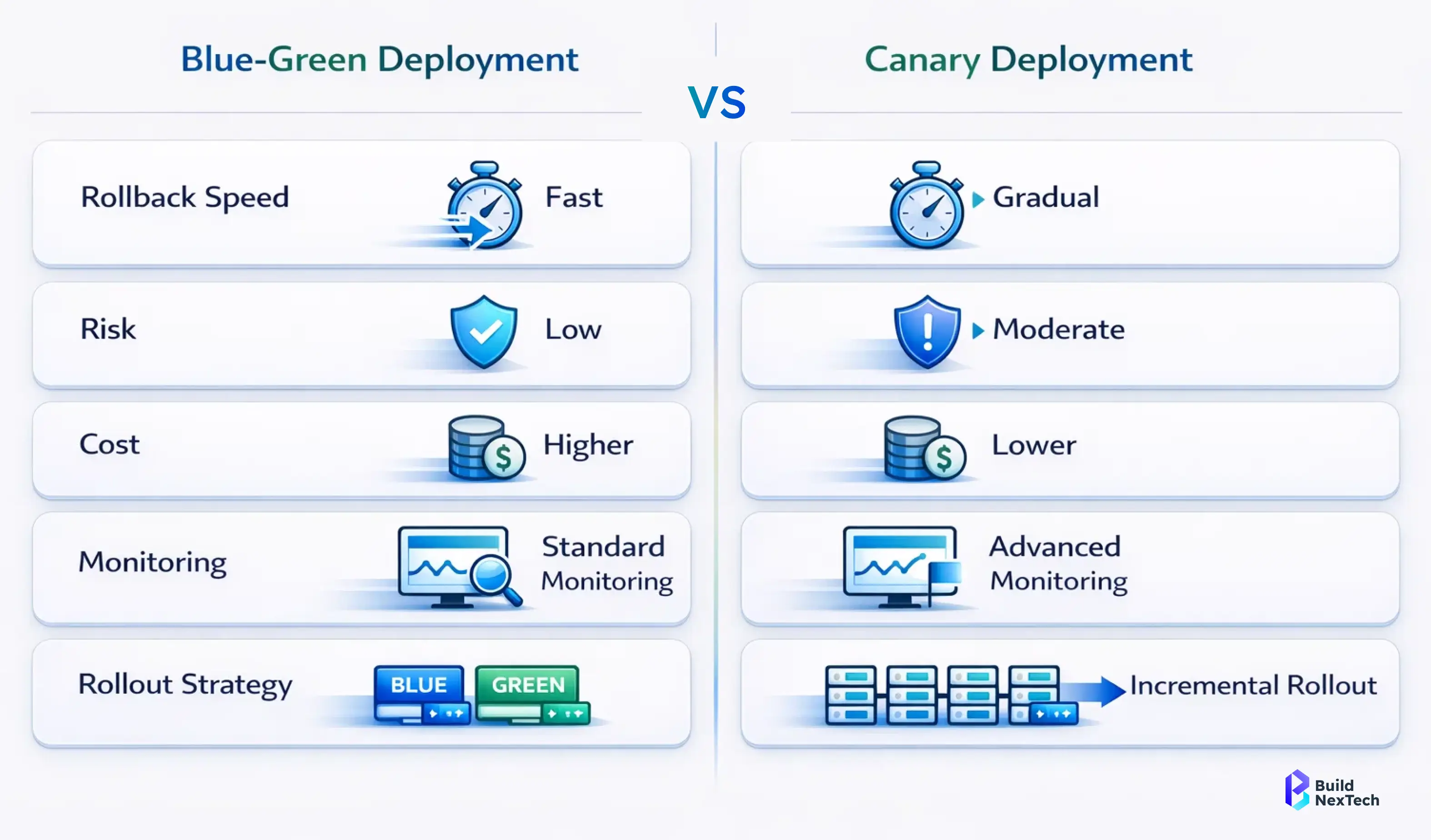
- Blue-green deployments work best for zero-downtime and instant rollback
- Canary deployments suit incremental rollout and user feedback validation
- Blue/green release needs mirrored infrastructure; canary needs monitoring depth
- Canary is ideal for microservices and feature experimentation
- Selection depends on application criticality and release cycle behavior
Startup leaders should align strategy selection with business risk tolerance, deployment frequency, and infrastructure maturity.
Which Deployment Strategy Works Better for Microservices Architecture
In microservices ecosystems, canary deployment typically works better because it supports incremental rollout across independent services while monitoring behavior in production.
- Canary releases enable service-level rollout without affecting entire systems
- Blue-green deployment can be costly across many microservices
- Canary supports rolling updates across application nodes and pods
- Monitoring tools help validate API management and service dependencies
- Works effectively with service meshes and traffic management tools
However, blue-green may still be beneficial for specific high-risk services requiring complete rollback safety.
Choosing the Right Strategy for Kubernetes and Docker Environments
Kubernetes, Docker, and container orchestration platforms support both deployment strategies, but implementation considerations vary. In stateless applications, teams often mix strategies depending on release objectives.
- Blue-green deployments rely on cluster-level environment duplication
- Canary releases use ReplicaSets, rolling deployments, and progressive rollout
- Istio, Argo Rollouts, and Flagger support automated routing logic
- Kubernetes ingress and routing mechanisms enable traffic switching
- Docker environments benefit from simple environment replication patterns
Teams should also assess CI/CD tooling, automation readiness, and continuous delivery maturity before finalizing strategy adoption.
Deployment Strategy Selection Checklist for Engineering Teams
Engineering leaders need a structured decision framework when selecting deployment strategies. This ensures alignment between technical constraints and business expectations.
- What level of risk mitigation and rollback speed is required?
- How critical is uptime and user experience during deployment?
- Are resources available for mirrored environments or incremental rollout?
- Do monitoring tools support automated performance and error analysis?
- How mature is the current CI/CD and deployment pipeline?
This checklist helps teams make strategy decisions confidently, especially during scale-up phases.
How Cloud Platforms Support Blue-Green and Canary Deployments
Major cloud platforms such as Amazon Web Services, Azure, and Google Cloud natively support both blue-green and canary deployments through infrastructure automation, traffic routing, and CI/CD integrations.
- AWS CodeDeploy, CloudFormation, and Terraform support traffic switching
- Azure deployment tools enable canary rollout and mirrored environments
- Google Cloud integrates progressive delivery with service meshes and A/B testing
- Platform ecosystems include Argo Rollouts, Spinnaker, and Microtica integrations
- Cloud pricing and resource provisioning influence strategy selection
For startups optimizing AWS EC2 pricing or resource usage, cost-efficiency often informs strategy decisions.
Deployment Support in AWS, Azure, and Google Cloud Platforms
Each cloud platform offers deployment automation, rollback capabilities, and monitoring tools to support resilient software deployment operations.
- AWS supports blue-green release and canary rollout with CodeDeploy and routing controls
- Azure enables traffic rerouting and incremental deployment with DevOps services
- Google Cloud integrates monitoring, service routing, and progressive delivery workflows
- Built-in dashboards assist monitoring response times and error rates
- Cloud ecosystems integrate third-party feature management systems
These capabilities strengthen continuous delivery pipelines for cloud-native engineering teams.
Example Scenarios from Real-World Cloud Implementations
Real-world startups use these deployment models to improve release reliability and user confidence. For example, a fintech team may adopt canary rollout to validate transaction performance, while an AI analytics platform may rely on blue-green for instant rollback during critical software deployment cycles.
- SaaS platforms use canary releases for feature experimentation and user feedback
- E-commerce teams apply blue-green for stable seasonal deployment cycles
- Research environments test shadow deployment before production rollout
- Microservices platforms use service-level canary strategies
- Government or regulated systems prefer rollback-centric blue-green models
These scenarios highlight why deployment strategies should align with application characteristics and operational environments.
Best Practices for Implementing Safe and Scalable Deployment Strategies
Successful deployment automation depends on strong monitoring, rollback discipline, and performance validation. Engineering teams should prioritize automated controls and structured deployment process design.
- Use automated monitoring thresholds with Prometheus, Grafana, or Statsig
- Maintain rollback plan documentation and disaster recovery workflows
- Validate key performance metrics and user experience metrics during rollout
- Align deployments with CI/CD and continuous integration pipelines
- Ensure configuration management tools maintain environment consistency
These practices help engineering teams deliver stable releases without compromising innovation speed.
Monitoring, Rollback, and Performance Testing Recommendations
Monitoring is the backbone of safe deployment strategies. Teams should analyze response times, error behavior, and traffic routing performance before allowing full rollout.
- Monitor error rates, latency trends, and user behavior patterns
- Validate rollback capabilities before executing deployment pipelines
- Use smoke testing and load testing in pre-production environments
- Automate monitoring feedback loops into release management workflows
- Integrate observability dashboards with deployment triggers
Strong monitoring discipline ensures issues are detected early and resolved before impacting users.
Security and Compliance Considerations During Deployment
Security and compliance remain essential throughout deployment automation workflows. Teams should secure application environments, API management layers, and configuration policies.
- Protect routing and traffic switching controls from unauthorized modification
- Validate service dependencies and access control policies
- Encrypt production nodes and application stacks
- Follow compliance standards relevant to industry regulations
- Include deployment logs in forensic and audit trails
Secure deployment pipelines support application reliability and long-term platform trust.
Team Readiness and Process Maturity for Deployment Automation
Deployment strategy success depends on team readiness, skills, and operational maturity. Tools alone do not guarantee safe software development outcomes.
- Ensure engineering teams understand DevOps practices and automation workflows
- Train teams on risk mitigation and release control mindset
- Standardize deployment documentation and communication workflows
- Align release frequency with organizational readiness
- Encourage collaboration between development, QA, and operations teams
This cultural alignment helps organizations scale deployments confidently.
Conclusion - Choosing the Right Deployment Strategy for Your Engineering Team
Blue-green deployments excel in zero-downtime production environments, while canary deployments enable risk-controlled progressive delivery for teams that want safer, incremental rollouts. The right choice depends on your application architecture, deployment frequency, infrastructure maturity, and business risk tolerance. At BuildNexTech, we support startups and research-driven engineering teams through professional deployment services, CI/CD implementation support, and cloud-ready web development services designed to improve application reliability and scalability.
Our team helps organizations move beyond experimentation toward scalable deployment automation, DevOps-driven release pipelines, and microservices-ready delivery workflows that reduce downtime and improve user experience. The goal is not to select one strategy permanently - but to build a flexible deployment mindset that evolves with your product, infrastructure, and long-term growth roadmap.
People Also Ask

Is Blue-Green deployment the secret behind zero-downtime releases used by big tech companies?
Absolutely - Canary deployments expose changes to a small user group first, helping teams spot performance issues and error spikes before a full rollout.
Can Canary deployments actually help detect bugs before users notice them?
Deployment strategies are critical for startups — they reduce outages, prevent bad releases, and improve customer trust during rapid product growth.
Do startups really need deployment strategies, or is it only for enterprise teams?
Node Package Manager is the default package manager for installing libraries and tools. Developers use it to manage project dependencies.
Can a deployment failure really cost a company millions?
Yes - downtime impacts revenue, user trust, and brand credibility. That’s why modern teams adopt progressive delivery and rollback-ready pipelines.
Is switching from manual deployments to DevOps automation worth it?
Definitely - automated pipelines reduce human error, improve release frequency, and make rollback faster during critical production incidents.


.webp)
.webp)
.webp)

.webp)
.webp)



