

Low-code needs some technical grounding - not full dev skills, but enough to write a condition or hook into an API without getting stuck. A lot of dev teams use them. Business analysts who've spent years around systems do too. No-code is something else. Pick a template, drag some blocks, publish. It works fine until the workflow gets complicated, and that tends to happen earlier than the person who picked the tool was expecting.
Nobody's really calling this a technical decision anymore. It's operations. Get the platform right and your team stops sitting in dev queues. Get it wrong and you're finding out the hard way around month nine - usually when the business has moved on and the tool hasn't.
Low-Code vs No-Code: What Every Business Must Understand Before Picking a Platform
Low-code and no-code platforms are helping businesses build applications faster without relying entirely on traditional software development. While both reduce development time and improve productivity, they serve different purposes. Understanding the difference between low-code and no-code is essential before choosing a platform that fits your business goals, technical needs, and long-term scalability.
The Core Difference Between Low-Code and No-Code Platforms
The table below compares low-code and no-code platforms across 20 dimensions - from learning curve and scalability to AI integration and compliance readiness. Use it as a first-pass filter before evaluating specific platforms.
Real Business Scenarios: When to Go Low-Code and When No-Code Wins
Pick the platform that fits the problem. Don't pick it because it looked good in a demo
No-code wins when the task is repeatable, logic is straightforward, and the team building it has no developer background. Onboarding forms, landing pages, simple CRM workflows, and internal dashboards all fit this profile. A marketing manager building a customer feedback portal does not need a developer.
Low-code wins when the application must connect to legacy databases, handle conditional logic across many variables, or meet compliance standards requiring audit trails and access controls. A compliance team building a document approval workflow with role-based permissions needs low-code platform capabilities, not a drag-and-drop form builder.
The wrong choice doesn't break immediately. It breaks at month six, when you're rebuilding. A no-code app that outgrows its platform requires a full rebuild. A low-code project assigned to a team without technical support stalls at the integration stage.
No-Code App Builders in 2026: How Non-Technical Teams Are Shipping Real Products
Three years ago, 'build an app without a developer' was mostly hype. In 2026, operations teams and founders are actually doing it - not as experiments, but as shipped products. Modern no-code app builders now support workflows, integrations, automation, AI features, and customer-facing applications that previously required full engineering teams. The biggest shift is not just the technology itself, but how non-technical teams are now solving business problems directly instead of waiting months in development queues.
No-Code Development Platforms Market Overview:
• According to The Business Research Company, the no-code development platforms market reached $35.61 billion in 2025
• Expected to grow to $102.57 billion in 2030 at a CAGR of 22.7%
• According to The Business Research Company, North America was the largest region in 2025, while Asia-Pacific was the fastest-growing region.

Choosing the Right No-Code Builder: Website, App, or Workflow - They Are Not the Same
The no-code market has expanded into distinct categories. Treating all no-code app builders as interchangeable leads to poor tool selection.
No-code website builders focus on front-end design and publishing. They suit marketing sites, landing pages, and content platforms. Webflow, Framer, and similar tools fall into this category. They offer strong design control but limited back-end logic.
No-code app builders support data storage, user authentication, and business logic. Glide, Adalo, and Bubble fall into this space. These tools are appropriate for internal tools, customer portals, and lightweight SaaS products.
No-code workflow automation platforms connect applications and automate processes. Zapier, Make, and n8n handle this. These tools move data between systems without code and are not designed for building user-facing applications.
6 Types of Apps Non-Technical Teams Are Launching With No-Code Platforms Right Now
Non-technical teams across industries are using no-code app development to reduce dependency on developer queues. Common application types include:
• Client intake and onboarding forms connected to CRM and email systems
• Internal operations dashboards pulling data from spreadsheets or databases
• Customer feedback portals with automated routing and notification logic
• Employee request management tools for HR, IT, and procurement teams
• Simple inventory tracking apps for small warehouses and retail operations
• Event registration and payment systems with automated confirmation workflows
Each of these can ship in days using a no-code builder, without developer involvement. The constraint is always the same: when logic becomes complex or integrations go beyond standard connectors, the no-code ceiling appears.
Low-Code Development Platforms in 2026: How to Choose One Without Regretting It in 12 Months
Choosing a low-code platform in 2026 feels easy in the beginning because almost every vendor promises the same things faster delivery, AI-powered development, easy integrations, and fewer engineering bottlenecks. The real challenge usually appears 6 to 12 months later, when teams realize the platform they picked cannot scale with their workflows, security requirements, or customization needs.
Gartner projects that low-code application platforms will account for more than 65% of all application development activity by 2024 - a trend that has only accelerated into 2026. According to Forrester research cited by OutSystems, teams using low-code platforms deliver applications up to 10x faster than traditional development approaches.
The strongest low-code platforms are not just helping teams build apps faster anymore. They are becoming full operational systems that support workflow automation, internal tools, customer portals, AI-assisted development, and enterprise integrations from a single environment. In 2026, businesses are adopting low-code platforms not because they want to avoid coding entirely, but because they want development cycles that move at business speed.
A good platform should reduce dependency on repetitive engineering work without limiting flexibility later. That balance matters more than most companies expect. Some tools work perfectly for simple dashboards or approval flows but become difficult once the organization needs advanced APIs, custom logic, multi-region deployment, or governance controls.
Startups vs Enterprises: The Low-Code Platform Features That Actually Matter for Each
Startups and enterprises use low-code application development for different reasons and need different features.
Startups need speed and flexibility. The priority is shipping a working product quickly, validating it with users, and iterating. Platform selection should favor ease of front-end customization, affordable pricing tiers, and API connectivity to third-party tools. Startups cannot afford to build bespoke infrastructure, so the low-code for startups conversation is about time-to-market more than architectural sophistication.
Enterprises need governance and scalability. The priority is role-based access control, audit logging, SSO integration, and compliance support for regulated environments. An enterprise low-code platform that lacks proper access management creates security exposure at scale.
The table below compares which low-code platform features matter most at the startup stage versus the enterprise scale-use it to shortlist platforms that match your current growth stage and compliance requirements.
Scaling Low-Code Application Development Without Breaking Security or Governance
Low-code platforms scale well when governance is built in from the start. The most common failure pattern is teams that build quickly in the early stages and then discover there is no access control, no audit trail, and no process for managing platform updates.
Governance needs to cover three things: who can build, what they can connect to, and how changes get reviewed before going live. Skip any of those and you end up with a growing pile of ungoverned apps that nobody can audit.
Software scalability under load is a separate concern. Low-code platforms vary significantly in how they handle concurrent users, large data volumes, and peak traffic. Evaluating platform performance documentation and conducting load testing before broad deployment avoids costly surprises at scale.
No-Code Workflow Automation: The Fastest Way to Eliminate Bottlenecks and Reduce Operating Costs
Two hours a day on a manual task equals more than 500 hours a year per employee.
No-code automation tools address this by connecting applications and executing logic without manual intervention. Approval routing, data synchronization, notification triggers, and report generation are all candidates for no-code workflow automation.
As a worked example: a mid-sized operations team running 300 manual handoffs per month across three systems. Each handoff takes four to eight minutes of human time - automating that sequence with a no-code integration tool reduces the monthly labor cost immediately, without requiring custom code.

Low-Code Workflow Automation: When More Control Is Needed
No-code automation tools handle linear, predictable workflows well. When conditions become complex, exceptions need custom handling, or the process must integrate with legacy systems and internal APIs, low-code workflow automation is the appropriate path.
Low-code automation platforms allow teams to write conditional logic, build custom error-handling flows, and connect to systems that do not have pre-built connectors. This flexibility is necessary for finance, healthcare, and operations teams where edge cases are not rare but routine.
A claims processing workflow that routes differently based on claim type, value, and customer tier cannot be built reliably with drag-and-drop logic blocks. It requires structured conditional logic that low-code tools support.
Connecting an Entire Stack With No-Code Integration Tools
Modern businesses run on dozens of tools. CRM, ERP, HRIS, support platforms, billing systems, and communication tools all generate and consume data. Keeping them synchronized manually is expensive and error-prone.
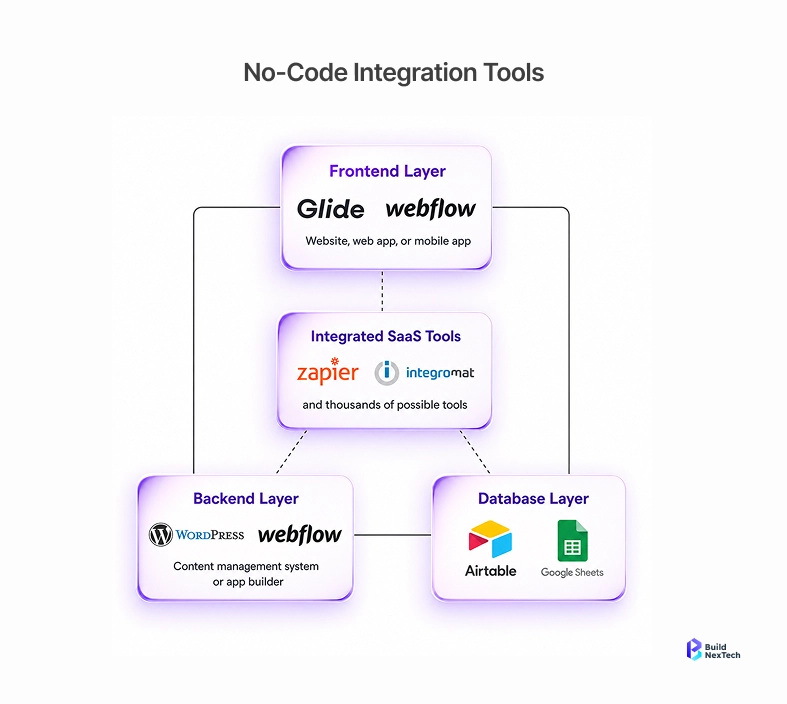
No-code integration tools create automated data flows between systems without developer involvement. Trigger-action logic handles the most common patterns: a new deal in the CRM triggers an invoice in the billing system, a support ticket closure updates a project tracker, a form submission adds a contact to email and Slack simultaneously.
Process automation at this layer reduces manual data entry, eliminates duplicate records, and ensures that operational teams have current information without chasing it across systems.
Low-Code AI Development in 2026: Why the Gap Between Technical and Non-Technical Teams Is Closing Fast
AI-powered development tools have changed the productivity gap between developers and business users. Tasks that previously required Python scripting or machine learning expertise are now accessible through structured interfaces.
Low-code AI development platforms allow technically capable teams to build AI features, automate predictions, and integrate language models into applications without building AI infrastructure from scratch. Citizen development has expanded to include AI-assisted workflows.
AI-Powered No-Code Tools in 2026: What Is Production-Ready vs Still Overhyped
The AI no-code category has grown faster than quality can keep pace with. Separating production-ready tools from marketing noise requires a structured evaluation.
Test these tools on your actual data, not the vendor's demo set. Most AI builders look great on curated inputs. The gaps show up when your data is messy - which it always is.
Generative AI in Low-Code Platforms: Real Wins Businesses Are Seeing Right Now
Generative AI in low-code platforms is producing measurable gains in specific areas. Code suggestion tools reduce the time developers spend writing boilerplate logic. Prompt-to-workflow generators let technical leads prototype automation sequences in minutes rather than hours.
Document processing is one of the clearest wins. Low-code platforms with generative AI integration can extract structured data from unstructured documents, classify content, and route records automatically. Legal, finance, and procurement teams are using this pattern to reduce manual document review cycles.
AI citizen development has extended into approval workflows. Platforms now support natural language rule definitions that generate conditional logic automatically. A procurement manager can describe an approval rule in plain language, and the platform generates the workflow structure. A developer then reviews and publishes it. This model combines speed with oversight.
How BNXT.ai Helps Businesses Choose and Scale the Right Low-Code or No-Code Strategy
Most platform rebuilds happen because the selection process was skipped or rushed. BNXT.ai works with businesses to assess operational needs, map them to platform capabilities, and design implementation plans that match current scale and future growth.
In BNXT.ai's platform selection engagements, the most common failure pattern is teams choosing a no-code tool for a workflow that requires conditional logic across more than three variables-the ceiling appears at month four and forces a full rebuild.
For businesses evaluating no-code app development, BNXT.ai identifies where drag-and-drop builders create sustainable efficiency and where the ceiling will appear. For teams considering low-code development platforms, the focus shifts to governance structure, API connectivity, and long-term maintenance planning.
Digital workflows built without a scalability plan fail at an identifiable point. BNXT.ai designs automation architectures that account for data volume growth, user expansion, and regulatory change. This applies across no-code automation tools, low-code workflow automation, and AI-assisted development environments.
Conclusion: Choosing the Right Path Before the Cost of the Wrong One Appears
The tools are mature. The real bottleneck now is deciding which one belongs in your stack - and building it so it doesn't become a problem 12 months from now. A no-code tool that outgrows its ceiling requires a full rebuild. A low-code platform deployed without governance creates compliance exposure. Both scenarios are avoidable.
Low-code and no-code development have matured into credible options for businesses at every stage. The distinction between them is no longer about technical sophistication alone. It is about fit: the right platform for the right problem, deployed with the right structure.
Workflow automation, digital workflow design, and AI-enabled citizen development are all accessible in 2026. The bottleneck is not tool availability. It is the absence of a structured selection and implementation process.
BNXT.ai provides that structure. From no-code app development consulting and process automation platform design to enterprise low-code implementation and low-code AI integration consulting, BNXT.ai guides businesses through every phase of the platform lifecycle.
People Also Ask

Q1: Can a business switch from a no-code platform to low-code later without losing its work?
Switching from a no-code platform to a low-code environment typically requires rebuilding the application rather than migrating it, which means businesses usually cannot transfer existing work cleanly between platforms because most no-code tools use proprietary data structures
Q2: Is low-code development secure enough for regulated industries like healthcare or finance?
Low-code development platforms can meet the security requirements of regulated industries when the platform is evaluated correctly. Key requirements include role-based access control, field-level encryption, audit logging, SSO support, and data residency options.
Q3: Does a business still need a developer if it uses a no-code platform?
For basic tools, onboarding flows, and internal dashboards-yes, business users can operate independently. You'll still want a developer on standby for anything that touches external APIs or custom security rules.
Q4: What happens to an app if the no-code platform shuts down or changes pricing?
If a no-code platform shuts down or changes pricing significantly, businesses face a migration challenge because most no-code platforms offer limited portability and restricted export flexibility.
Q5: How do low-code and no-code tools handle software scalability under high traffic?
Software scalability under high traffic depends on the platform's underlying infrastructure, not the low-code or no-code label. Most enterprise-grade low-code platforms are hosted on the cloud. infrastructure with auto-scaling capabilities, which handles traffic spikes without manual intervention.


.webp)
.webp)
.webp)

.webp)
.webp)



