

Kubernetes has rapidly become the container orchestration platform for modern cloud-native applications, powering everything from small apps to global distributed systems. With its ability to manage Pods, Deployments, Services, Ingress, Namespaces, K8s volumes, and Worker Nodes, Kubernetes enables organizations to run scalable, resilient microservices architecture with ease. However, security challenges also grow as Kubernetes adoption increases across the CNCF ecosystem.
In 2024, industry reports revealed that over 80% of Kubernetes clusters had at least one security misconfiguration, increasing exposure to attacks, risks, vulnerabilities, and supply chain threats. In a platform where everything is API-driven—from the kube-apiserver to Controller Manager, Scheduler, and Kubelet—security must be integrated at every layer.
This comprehensive guide provides a practical 12-step approach to strengthening Kubernetes security across the Control Plane, Worker Nodes, Container Runtime, and workloads. Whether you’re a platform engineer, DevOps specialist, security architect, or someone preparing for certifications like CKAD, KodeKloud, or working with GitOps tools like Plural and Terraform, this guide will help you protect your Kubernetes environment end-to-end.
Understanding Kubernetes Architecture
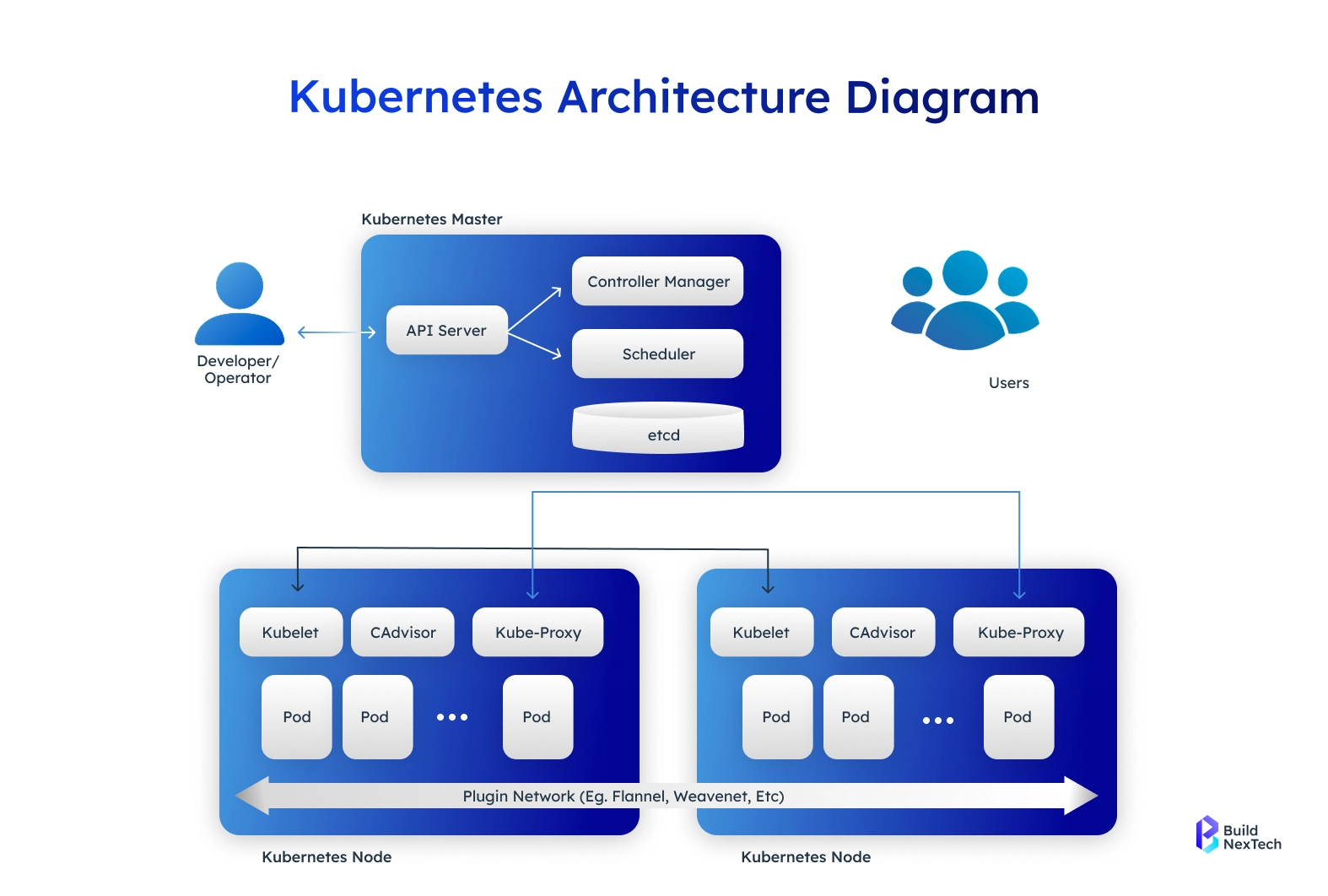
Before implementing security best practices, it’s important to understand the key Kubernetes components that make up the architecture.
Key Components of Kubernetes
A standard Kubernetes cluster includes:
- Pods – the smallest deployable units containing one or more containers.
- Worker Nodes – where workloads run, managed by the Kubelet, Kube Proxy, and Container Runtime Interface (CRI).
- Control Plane – includes the kube-apiserver, Scheduler, Controller Manager, and etcd.
- Services – expose workloads to internal/external traffic and enable load balancing.
- Kubernetes Secrets, ConfigMaps, Persistent Volumes, StatefulSet, and Deployments for application management.
The Control Plane manages everything—from scheduling Pods via kube-scheduler to storing cluster state in etcd, forwarding API requests, and syncing cluster state.
The Importance of Security in Kubernetes
1. Exposed Dashboards
Kubernetes dashboards often run with high privileges.
If exposed publicly without authentication, attackers can directly view, modify, or delete workloads, pods, and secrets.
2. Weak RBAC Privileges
Improperly configured Role-Based Access Control lets users or services access more than they should.
This leads to privilege escalation, where a low-privilege user can gain cluster-admin access.
3. Unprotected Container Images
Images stored in public registries or lacking vulnerability scans may contain malware, outdated libraries, or misconfigurations.
Attackers can inject malicious layers or exploit known CVEs.
You can also leverage tools like Falco and Trivy to scan images in your build phases:
trivy image -severity HIGH, CRITICAL
my registry.azurecr.io/myapp:v1.0
4. Misconfigured NetworkPolicies
Without proper NetworkPolicies, all pods can talk to each other by default.
This allows lateral movement—once attackers breach one pod, they can spread across the cluster.
5. Unsecured API Servers
The Kubernetes API server is the brain of the cluster.
If left open to the internet or using weak certificates, attackers can remotely control workloads, nodes, and cluster configuration.
6. Risky YAML Manifests
YAML files with dangerous settings—like privileged containers, hostPath mounts, or host networking—create opportunities for container escape and host takeover.
7. Poor Container Runtime Configuration (Docker, containerd, CRI-O)
Incorrect runtime settings such as running as root, enabling unsafe syscalls, or exposing runtime sockets can let attackers break out of containers.
Case Studies (Cryptominer Attacks)
Real-world attacks show that cryptomining gangs compromise clusters by:
- Exploiting unauthenticated kubelet ports
- Abusing insecure Ingress Controllers
- Deploying miners via unscanned Alpine-based images with vulnerabilities
- Once inside, they consume CPU, escalate privileges, and spread across nodes.
A secure architecture reduces the attack surface, limits damage during breaches, and protects your microservices, data, and workloads.
A Practical 12-Step Guide to Securing Kubernetes Architecture
Step 1: Assessing Your Current Security Posture
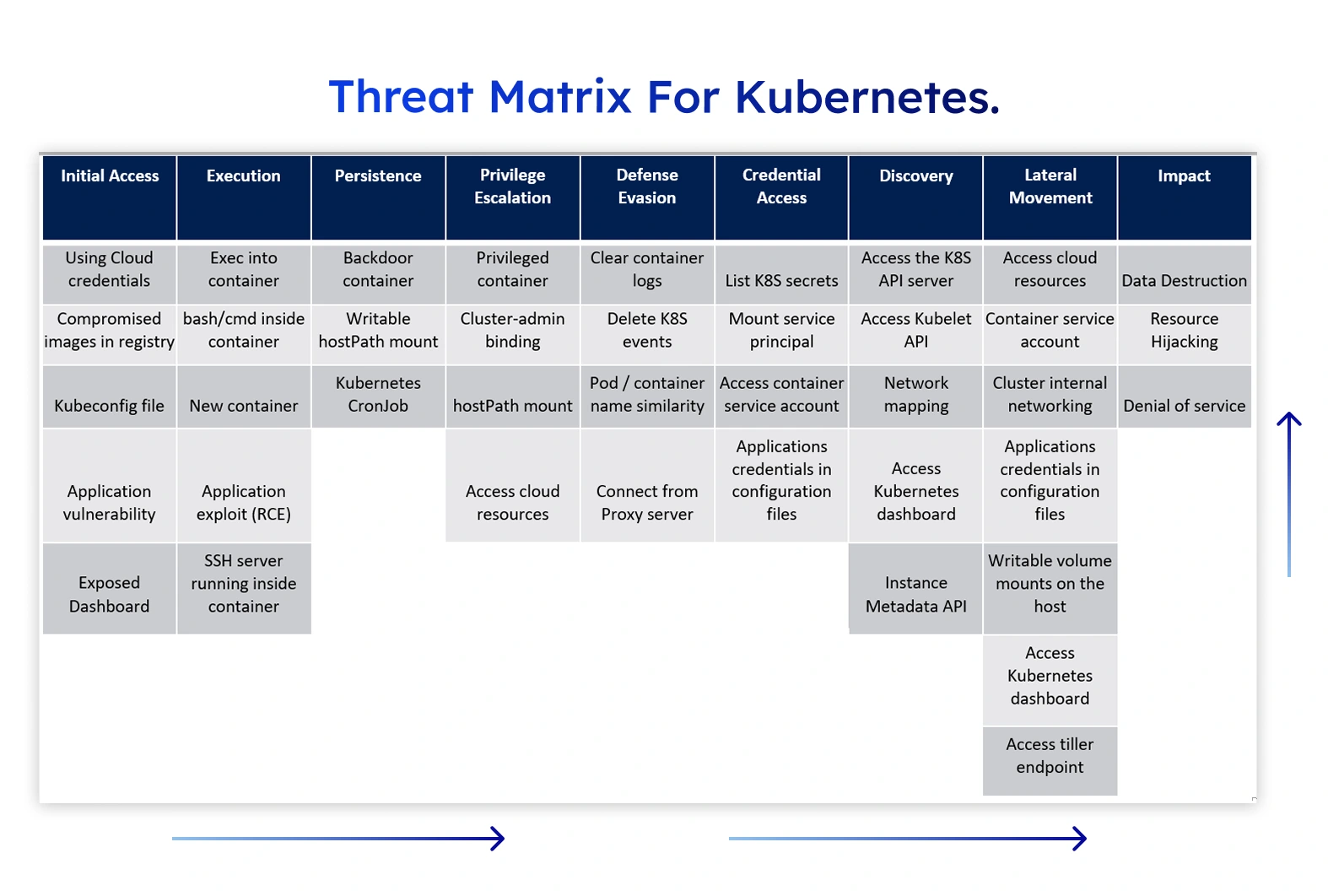
Start by evaluating your existing security measures. Use kube-bench, Kube-hunter, KubeSec, KubeAudit, and the Docker CIS Benchmarks to detect configuration weaknesses.Use MITRE ATT&CK and STRIDE to map threats across Pods, networks, images, and control-plane components.
Conducting a Security Audit
- Scan your Kubernetes clusters using security tools.
- Evaluate authentication, authorization, and kube-apiserver settings.
- Verify secure Container Runtime configurations.
Step 2: Implementing Role-Based Access Control (RBAC)
RBAC ensures that users and workloads have only the necessary permissions. Kubernetes RBAC controls who can interact with which resources. It is stricter and more granular than traditional access controls.
Configuring RBAC Rules
- Limit RBAC privileges.
- Use least-privilege roles.
- Avoid granting cluster-admin unless absolutely required.
- Audit permissions regularly.
Step 3: Network Policies for Secure Communication
Kubernetes NetworkPolicies restrict traffic between Pods, Namespaces, and Services.
Implementing Network Policies
Use tools such as:
- Calico
- Cilium
- Flannel
Define egress-only connections, firewall-style restrictions, and enforce Pod-level traffic controls. This reduces lateral movement inside the cluster.
Step 4: Securing Container Images
Best Practices for Image Security
- Use trusted and verified container images.
- Avoid unmaintained Linux images like old Alpine Linux builds.
- Scan images using:
- Clair
- Trivy
- Kube-hunter
- Prefer minimal base OS images.
Enforcing Image Policies
Use an Admission controller to restrict untrusted images. Tools like OPA Gatekeeper, Kyverno, and built-in PSA checks help enforce security policies.
Step 5: Monitoring and Logging
Why Monitoring Matters
Monitoring and logging are critical for maintaining a secure Kubernetes environment. They provide continuous visibility into cluster behavior and help detect intrusions, misconfigurations, resource abuse, and abnormal workload patterns at an early stage. Without proper monitoring, security incidents may go unnoticed until they cause outages or data breaches. Logs and metrics also support incident response, root-cause analysis, compliance audits, and capacity planning, making them essential for both security and reliability.
Setting Up Logging and Monitoring
A robust setup combines multiple tools, each addressing a specific layer of observability:
- Prometheus & Alertmanager collect and evaluate metrics, triggering alerts when thresholds or anomalies are detected.
- Fluentd, Elasticsearch, or Loki aggregate and store logs for searching and forensic analysis.
- CoreDNS monitoring helps identify DNS failures or suspicious resolution patterns that may indicate attacks or misconfigurations.
What to Monitor
Focus on security-critical signals, including:
- API server usage to detect unauthorized or unusual access
- Kubelet logs for node-level issues
- Node health and resource usage
- Container runtime activity
- Network traffic to identify suspicious communication patterns
Step 6: Enforcing Pod Security Standards (PSS)
Understanding PSS
The Pod Security Standards classify Pods into:
- Privileged
- Baseline
- Restricted
Implementing PSS
Use Pod Security Admission, Seccomp, AppArmor, and SELinux to enforce secure Pod behavior. Restrict privileged containers and disallow hostNetworking unless necessary.
Step 7: Securing Secrets and Sensitive Data
Best Practices
- Avoid plain-text secrets in ConfigMaps.
- Use encrypted secrets with:
- Vault
- Sealed Secrets
- SOPS
- Enable encryption at rest in the kube-apiserver.
Step 8: Hardening the Kubernetes API Server & Control Plane
Control Plane Security Best Practices
- Restrict access to API servers using firewall rules.
- Enforce Transport Layer Security with strong cipher suites.
- Keep etcd isolated and encrypted.
- Limit direct access to the Controller Manager, Scheduler, and Kubelet ports.
Authentication and Authorization Enhancements
- Use OIDC providers such as Keycloak or Okta.
- Rotate digital certificates with cert-manager.
- Enable audit logging for sensitive operations.
Step 9: Workload Isolation with Namespaces and Quotas
Namespace Strategy
Use Namespaces to sandbox:
- teams,
- environments,
- services,
- edge device workloads,
- multi-tenant applications.
Namespaces alone do not enforce access control. RBAC defines who can do what inside a namespace.
Below is an example of a namespace-scoped Role that grants controlled access to developers working on a specific application (app1).
apiVersion: rbac.authorization.k8s.io/v1
kind: Role
metadata:
  name: app1-developer
  namespace: app1
rules:
  # Allow full management of deployments and replicasets
  - apiGroups: ["apps"]
    resources: ["deployments", "replicasets"]
    verbs: ["get", "list", "watch", "create", "update", "patch", "delete"]


  # Allow full control over pods, services, and configmaps
  - apiGroups: [""]
    resources: ["pods", "services", "configmaps"]
    verbs: ["get", "list", "watch", "create", "update", "patch", "delete"]


  # Read-only access to ingress (preventing security risks)
  - apiGroups: ["networking.k8s.io"]
    resources: ["ingresses"]
    verbs: ["get", "list", "watch"]


# Remove any wildcard (`*`) permissions that grant unrestricted access
Once applied, this Role limits developers to managing only application-related resources inside the specified namespace. They can deploy, update, and troubleshoot workloads without gaining control over cluster-critical components. Read-only access to ingress resources prevents accidental exposure or routing misconfigurations.
Resource Quotas and Limits
Set resource limits to prevent DoS attacks from runaway Pods.
Use:
- LimitRanges
- ResourceQuotas to ensure fair resource distribution.
Step 10: Implementing Zero Trust Networking
Zero Trust Principles
- Never trust traffic by default.
- Validate identities continuously.
- Enforce mutual TLS between services.
How to Implement Zero Trust
Use:
- Istio
- Linkerd
- mTLS
- Certificate Authority for workload identity.
Replace IP-based policies with identity-based controls.
Step 11: Keeping Kubernetes and Dependencies Updated
Importance of Regular Updates
- Patch CVEs quickly.
- Update Docker, containerd, and other container runtimes.
- Upgrade:
- Cilium
- Calico
- Kube Proxy
- Ingress Controller
Upgrade Processes
- Use blue-green cluster upgrades.
- Test upgrades in Minikube, Kind, or staging clusters before production.
Step 12: Backup, Disaster Recovery & Incident Response
Backup Best Practices
Use:
- Velero for backup/restore,
- Platform snapshots for Persistent Volumes,
- GitOps tools to version control YAML manifests.
Incident Response Planning
Develop:
- SOPs,
- runbooks,
- disaster recovery playbooks,
- Security Automation with Ansible2 strategies.
Conduct fire drills and tabletop exercises to test your response plan.
Secure your Kubernetes Secrets
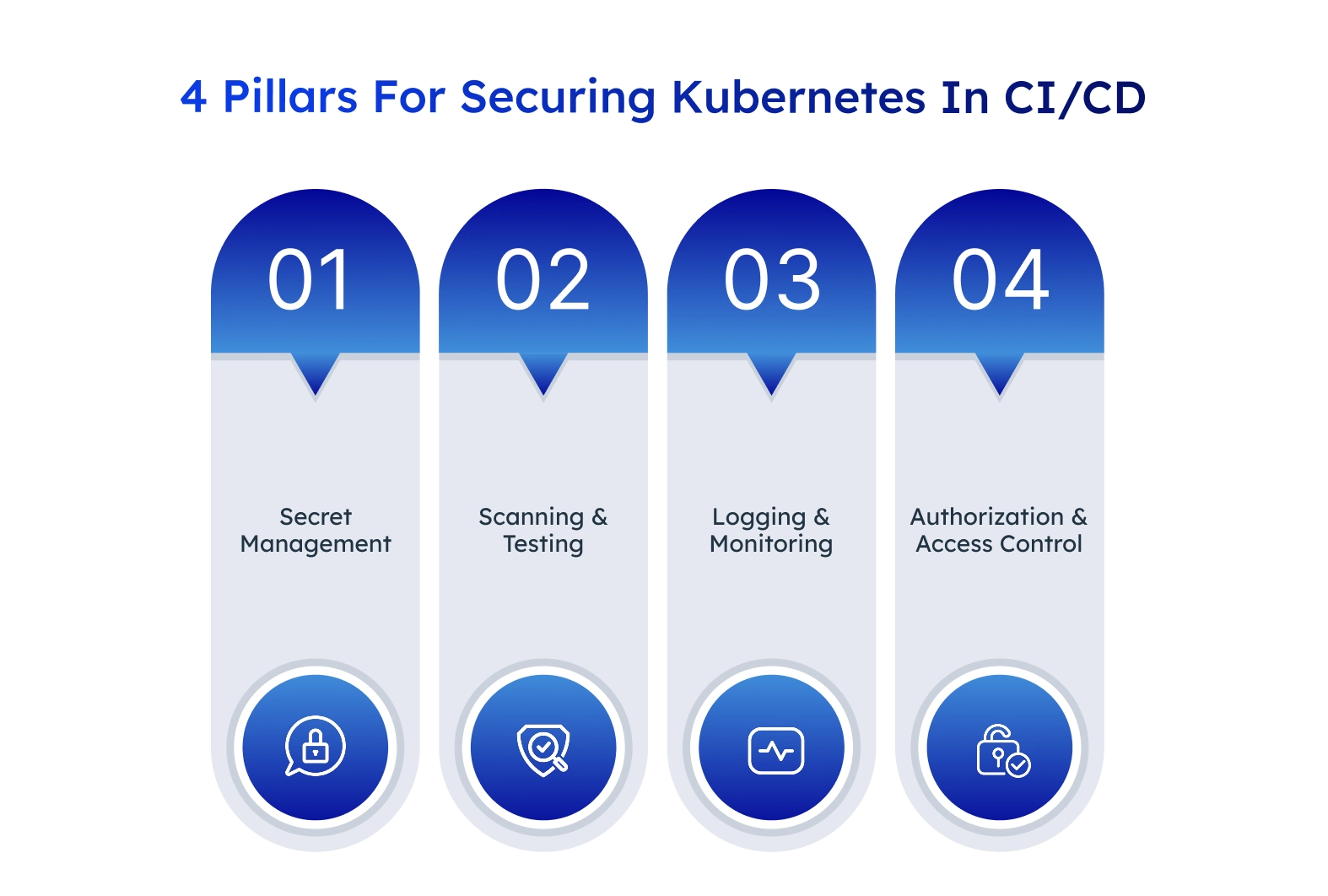
Kubernetes Secrets include sensitive data like passwords, tokens, and encryption keys that are essential for applications to function properly. If an attacker compromises these secrets, they can access sensitive data, gain unauthorized entry, cause data breaches, and trigger other security incidents.
These are a few Kubernetes security best practices for secrets:
- Use external secret managers: Store and manage secrets securely with tools like HashiCorp Vault or AWS Secrets Manager.
- Encrypt secrets at rest: Enable Kubernetes Encryption at Rest to protect stored secrets.
- Control access with RBAC: Restrict who can view or modify secrets using Kubernetes RBAC.
- Avoid hardcoding secrets: Never embed secrets directly in code. Instead, reference them securely from secret objects.
- Rotate secrets regularly: Change secrets periodically to limit exposure from leaked credentials using tools like kubectl rotate secret or an external manager.
Kubernetes security challenges
Kubernetes introduces unique security challenges due to its dynamic and ephemeral nature. Because of this, traditional security methods that rely on static infrastructure no longer apply, which makes it essential to adapt security strategies to Kubernetes environments.
Here are a few to focus on:
Managing security in volatile workloads
Most Kubernetes workloads are volatile—pods can be deleted and replaced at any time. This makes it difficult to apply persistent security patches using traditional methods like security scripts or Ansible scripts, which work well for VMs but not for Kubernetes.
To address this, you should:
- Apply security patches when designing pod specifications and building container images.
- Implement security gating in your CI/CD pipeline to enforce security checks before deploying workloads.
- Store Kubernetes configurations in IaC pipelines with proper security validations to ensure consistency and compliance.
Container security challenges
Containers introduce specific security risks because they use the same kernel as the host system. If an attacker escapes a compromised container, they can then gain access to the underlying node and other running workloads.
To reduce this risk, isolate workloads using separate namespaces, apply network policies to restrict unnecessary communication between containers, and use seccomp profiles to limit system calls. Additionally, avoid running containers with --privileged mode, as this grants unnecessary access to the host system.
Another challenge is securing container images since a vulnerable or outdated image can expose your entire workload to attacks. Here are some ways to combat this issue:
- Always scan images for vulnerabilities before deploying them and pull only from trusted registries.
- Use immutable tags to control updates and prevent unverified deployments.
- Sign images with tools like Cosign or Docker Content Trust to verify their integrity before running them in your cluster.
Network security challenges
Kubernetes networks are highly dynamic, which makes it difficult to enforce strict security controls. By default, all pods can communicate freely, but this increases the risk of lateral movement if an attacker gains access.
To reduce this risk, implement NetworkPolicies to restrict traffic between pods based on specific rules, such as namespace isolation or port restrictions:
apiVersion: networking.k8s.io/v1
kind: NetworkPolicy metadata:
name: allow-frontend-to-backend
spec:
podSelector: matchLabels:
app: backend
policyTypes:
Ingress ingress:
from:
podSelector: matchLabels:
app: frontend
ports:
- protocol: TCP
port: 8080
You can also encrypt in-transit data with mutual TLS to prevent traffic interception and conduct regular audits of network endpoints to identify potential vulnerabilities. Applying strict firewall rules further minimizes exposure to external threats, creating a more secure environment.
Conclusion
Securing Kubernetes requires layered protection across the Control Plane, Worker Nodes, networking, workloads, and development workflows. This 12-step practical guide ensures you reduce your attack surface, protect cloud-native systems, and maintain resilience across distributed clusters—from edge device deployments to large-scale enterprise systems.
By applying these best practices, embracing strong security policies, and adopting the right tools, you can build a hardened Kubernetes environment suitable for modern application development, DevOps, and microservices ecosystems. Continuous monitoring, ongoing patching, and proactive threat detection will ensure your Kubernetes clusters remain secure against evolving risks and vulnerabilities.
People Also Ask

What are the biggest security risks in Kubernetes?
The most common Kubernetes security risks include misconfigured RBAC permissions, exposed API servers, insecure container images, lack of NetworkPolicies, and running privileged containers. These issues can lead to unauthorized access, lateral movement inside the cluster, and container escape attacks.
Why is Kubernetes security more complex than traditional infrastructure security?
Kubernetes environments are highly dynamic. Pods are ephemeral, services scale automatically, and infrastructure changes frequently. Traditional VM-based security tools rely on static hosts, which makes them less effective in Kubernetes. Security must be built into images, manifests, CI/CD pipelines, and runtime controls.
How does RBAC improve Kubernetes security?
Role-Based Access Control (RBAC) limits what users and workloads can do inside a cluster. By applying the principle of least privilege, RBAC prevents unauthorized access to sensitive resources such as secrets, nodes, and control-plane components, reducing the risk of privilege escalation.
What is the role of NetworkPolicies in Kubernetes security?
NetworkPolicies control how pods communicate with each other and with external services. Without them, all pods can communicate freely. Properly defined NetworkPolicies reduce lateral movement by restricting traffic based on namespaces, labels, ports, and protocols.
How should container images be secured in Kubernetes?
Container images should be pulled only from trusted registries, scanned for vulnerabilities during CI/CD using tools like Trivy or Clair, and built from minimal base images. Image signing and admission controllers can further prevent unverified or vulnerable images from being deployed.


.webp)
.webp)
.webp)

.webp)
.webp)



