
.png)

Snowflake vs BigQuery is one of the most common decisions for teams building modern data systems but the right choice depends heavily on your use case, cost expectations, and how much control you need over performance.
If you're comparing Snowflake vs BigQuery for pricing, real-world performance, or scalability, the differences are not obvious at first. Snowflake gives you control over compute and works across AWS, Azure, and GCP, while BigQuery is fully serverless Google manages everything behind the scenes.
In real-world scenarios, this decision impacts cost efficiency, query performance, and how your team scales data workflows over time.Both platforms are widely used by enterprises handling petabyte-scale data analytics, making this comparison critical for teams choosing a long-term Cloud Data Warehouse.
Quick Answer: Snowflake vs BigQuery
- Choose Snowflake → if you need multi-cloud flexibility, workload isolation, and performance control
- Choose BigQuery → if you want serverless simplicity, fast ad-hoc analytics, and zero infrastructure management
- For smaller teams or startups → BigQuery is often easier to start
- For enterprises or multi-cloud setups → Snowflake is usually a better fit
Best Choice Summary
- Best for multi-cloud environments → Snowflake
- Best for serverless simplicity → BigQuery
- Best for predictable workloads → Snowflake
- Best for ad-hoc and real-time analytics → BigQuery
At bnxt.ai, we work with teams across India and global markets. They use cloud services like Google Cloud and Microsoft Azure.
What Are Snowflake and BigQuery Data Platforms?
When comparing Snowflake vs BigQuery, the key question isn’t just what these platforms are—it’s when you should use each based on your workload, cost requirements, and team setup. Both are leading cloud data warehouse solutions, but they differ significantly in how they handle scaling, performance, and infrastructure.
What is Snowflake?
Unlike BigQuery, Snowflake runs across AWS, Azure, and GCP making it the preferred choice for organizations that want multi-cloud flexibility and control over compute resources.
Snowflake is commonly used in industries like fintech and SaaS, where secure data sharing, consistent performance, and workload isolation are critical. If you’re getting started, you can explore our Introduction to Snowflake for Beginners for a deeper understanding.
What is BigQuery?
Unlike Snowflake, BigQuery is fully serverless there are no warehouses or clusters to manage. You simply write SQL queries, and Google automatically handles scaling, performance, and infrastructure behind the scenes.
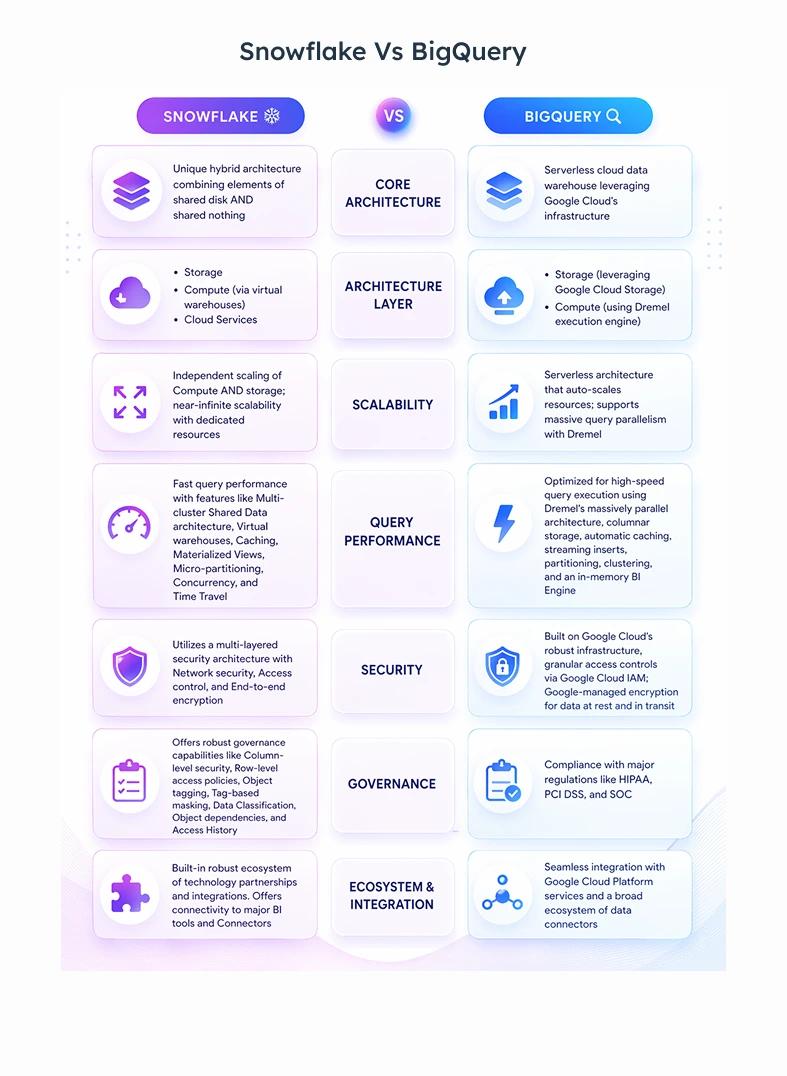
BigQuery is widely used for real-time analytics, marketing dashboards, and large-scale data processing where speed and simplicity matter. Its deep integration with the Google Cloud ecosystem allows teams to easily connect with tools like Google Drive, Sheets, and Cloud Storage for seamless data workflows.
Snowflake Overview: Features and Use Cases
Snowflake is a cloud-native Data System built to simplify data warehousing, analytics, and secure data collaboration. It provides a flexible environment where organizations can scale resources on demand, manage large volumes of data efficiently, and support modern data analytics use cases without complex infrastructure management.
Key Features
- Scalable System Design – Uses multi-cluster shared data Infrastructure model with independent compute scaling via Virtual Warehouses.
- Multi-Format Data Support – Handles structured and semi-structured data like JSON, Parquet, and Avro.
- Strong Security – Built-in data encryption, role-based access, and compliance for secure data protection.
Primary Use Cases
- Cloud Data Warehouse – Centralizes data for reporting and Business Intelligence
- Data Engineering – Supports ETL/ELT tools for efficient data processing
- Secure Data Sharing – Enables zero-copy data sharing across teams without data duplication
BigQuery Overview: Core Capabilities and Architecture Basics
Google BigQuery is part of the Google Cloud Platform and is built to simplify large-scale data analysis with a fully serverless approach. It enables teams to quickly explore, analyze, and derive insights from data without worrying about setup, scaling, or maintenance.
Core Capabilities
- Massive Scalability – Automatically scales to handle data from GBs to petabytes
- High-Speed SQL Analytics – Uses BigQuery SQL (ANSI-compliant) for fast query execution
- Built-in ML (BigQuery ML) – Create and run machine learning models using SQL
Architecture Basics
- Colossus (Storage) – Distributed storage optimized for fast data access
- Dremel (Compute Engine) – Massively parallel processing engine for query execution
- Jupiter (Network) – High-speed data transfer between storage and compute
- Borg (Resource Manager) – Handles resource allocation and fault tolerance
Why Snowflake and BigQuery Are Leading Cloud Data Platforms
Snowflake and Google BigQuery have become go-to choices for many teams because they take away a lot of the complexity of managing data systems. You don’t have to spend time setting up or maintaining infrastructure everything is handled for you so you can focus on actually understanding your data.
Snowflake is great when you need flexible scaling and easy data sharing across teams, while BigQuery is a strong fit if you prefer a fully serverless setup that works smoothly with the Google Cloud ecosystem.
Both Snowflake and BigQuery are widely used by enterprises across industries like finance, healthcare, and e-commerce for large-scale analytics.
Snowflake vs BigQuery Architecture Comparison
Snowflake and Google BigQuery both employ system design that separate storage and compute to enable independent scaling, but they differ fundamentally in their operational philosophy and infrastructure management.
In Short: Architecture Difference
- Snowflake → uses micro-partitions and Virtual Warehouses for controlled scaling
- BigQuery → uses slot-based execution with automatic scaling
Snowflake gives you more control over performance tuning, while BigQuery focuses on automatic optimization and simplicity.
From a technical perspective, Snowflake stores data in micro-partitions, which improves query pruning and performance. BigQuery uses a distributed execution model where slots dynamically process queries across multiple nodes.
Snowflake Architecture: Storage and Compute Separation Explained
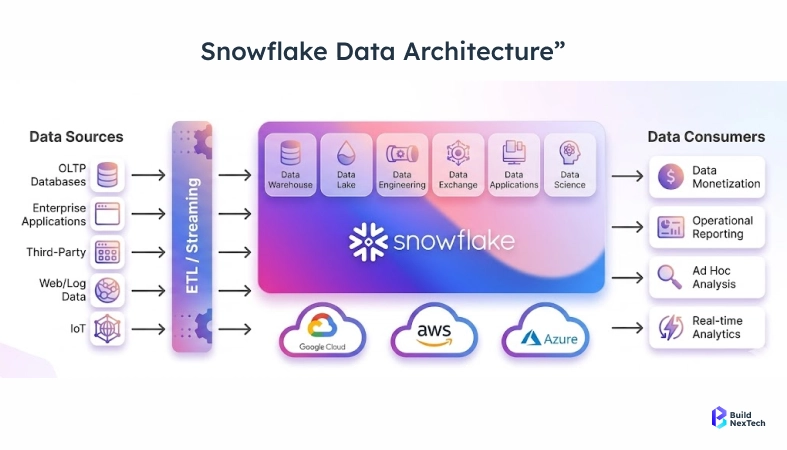
The Snowflake Infrastructure model is built on a clear separation between storage and compute, which allows each layer to scale independently based on workload needs. Data is stored centrally in a compressed, optimized format, while compute is handled by Virtual Warehouses that process queries without interfering with each other. This design improves performance and ensures consistent query execution even with multiple users.
Because compute and storage are decoupled, teams can scale resources up or down without impacting stored data. This flexibility helps optimize costs, supports high concurrency, and makes Snowflake well-suited for modern Cloud Data Warehousing, data processing, and analytics workloads.
BigQuery Architecture: Serverless Model and Dremel Engine
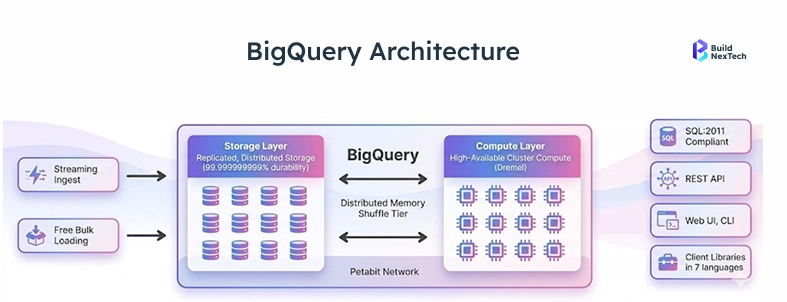
BigQuery Architecture is built on a fully serverless model, which means users don’t need to manage infrastructure, scaling, or resource allocation. Data is stored separately from compute, and Google automatically handles scaling based on query demands. This allows teams to run large-scale SQL queries without worrying about performance tuning or system maintenance.
At the core of BigQuery is the Dremel engine, a distributed query system that uses massively parallel processing to execute queries across thousands of machines. This allows BigQuery to analyze huge datasets quickly and efficiently, making it ideal for real-time analytics, Big Data, and modern data processing workloads.
Which Architecture Is Better for Different Workloads?
The choice between Snowflake and BigQuery model depends on the type of workloads and how your team prefers to manage resources. Snowflake is well-suited for environments that require controlled scaling, high concurrency, and strong data governance, especially when multiple teams are running queries simultaneously.
On the other hand, BigQuery is ideal for workloads that need quick setup, real-time analytics, and automatic scaling without manual intervention. It works particularly well for ad-hoc queries and large-scale data analysis. In practice, both platforms perform well, but the better choice depends on whether you prioritize flexibility and control or simplicity and speed.
Snowflake vs BigQuery Performance Comparison
Snowflake and BigQuery both offer high-performance, cloud-native data warehousing but differ significantly in how they manage and scale performance.
- Snowflake → best for consistent, repeated queries
- BigQuery → best for large-scale, ad-hoc queries
In real-world scenarios, Snowflake can deliver sub-second query performance for dashboards when warehouses are properly sized.
BigQuery, on the other hand, can scan terabytes of data in seconds due to its distributed processing model. However, this speed comes with a tradeoff—cost increases with the amount of data scanned.
Query Performance and Benchmark Differences
Snowflake and BigQuery both deliver strong query performance, but they differ in how they handle workloads and optimize execution. Their performance often depends on whether queries are predictable, real-time, or exploratory in nature.
Performance Strengths & Benchmarks
- Complex Query Performance – Snowflake often performs better for complex and repeated queries due to optimized compute control and warehouse sizing
- Ad-Hoc Analysis – BigQuery excels at large-scale, unpredictable queries as it can instantly scale to scan massive datasets
- Real-Time Data Processing – BigQuery provides strong performance for streaming data and real-time dashboards
- Query Caching – Snowflake uses a Result Cache to return repeated query results quickly, while BigQuery caching helps reduce data scan costs
Handling Large-Scale and Complex Data Workloads
Modern organizations need platforms that can efficiently manage Big Data and complex transformations at scale. Snowflake handles both structured and semi-structured data effectively and supports flexible system designs, including hybrid setups. BigQuery, on the other hand, is designed to process massive datasets quickly, making it ideal for large-scale analytics and real-time data processing.
Both platforms support modern ETL/ELT tools and real-time data pipelines, enabling seamless data workflows. In practice, BigQuery is often preferred for handling extremely large datasets and fast analysis, while Snowflake is chosen for its flexibility and strong multi-cloud capabilities.
Performance Differences in Real-World Use Cases
In real-world scenarios, Snowflake and BigQuery performance depends on the workload type. Snowflake works best for predictable, repeated queries like dashboards and Business Intelligence, offering stable performance through workload isolation using Virtual Warehouses.
BigQuery, however, is better for dynamic and large-scale tasks. It handles ad-hoc queries, real-time analytics, and massive datasets efficiently, thanks to its serverless design and automatic scaling, making it ideal for quick insights without infrastructure management.
Real-World Use Case: Startup vs Enterprise
- Startups → BigQuery is easier to start with and requires no infrastructure setup
- Enterprises → Snowflake is preferred for control, governance, and multi-cloud strategy
Many teams start with BigQuery and later move to Snowflake as their data complexity grows.
Pricing Comparison Between Snowflake and BigQuery
Pricing is one of the most important factors when choosing between Snowflake and BigQuery, as both platforms follow different cost models based on usage and performance.
Real-World Cost Scenario
For a team spending around $1000/month on data processing:
- Snowflake → costs remain stable if workloads are predictable and warehouses are optimized
- BigQuery → costs can vary significantly depending on how much data is scanned per query
Example: A poorly optimized query scanning 5 TB daily in BigQuery can quickly exceed budget, while Snowflake costs remain tied to compute usage time.
Snowflake Pricing: Compute Credits and Storage Costs
Snowflake uses a consumption-based pricing model where costs are split between compute and storage. Compute is charged in the form of credits based on the size and usage of Virtual Warehouses, while storage costs depend on the amount of data stored in the platform.
This flexible model allows organizations to scale resources up or down as needed and pay only for what they use. It works well for businesses with predictable workloads, as they can control costs by managing warehouse sizes and usage efficiently.
BigQuery Pricing: On-Demand and Flat-Rate Models
BigQuery uses a flexible pricing model that mainly depends on how much data you query and how consistently you use the platform. In the on-demand model, you pay based on the amount of data scanned by each query, making it suitable for occasional or unpredictable workloads.
For more consistent usage, BigQuery offers a flat-rate (capacity-based) model where you pay for dedicated compute resources (slots). This provides predictable costs and better performance for regular workloads, making it ideal for teams running frequent queries and large-scale analytics.
How to Optimize Costs on Snowflake and BigQuery
Managing costs effectively on Snowflake and BigQuery comes down to understanding usage patterns and avoiding unnecessary resource consumption.
- Optimize Queries – Write efficient SQL queries to reduce unnecessary data processing
- Use Partitioning & Clustering – Limit the amount of data scanned, especially in BigQuery
- Right-Size Compute – Adjust Virtual Warehouses in Snowflake based on workload needs
- Monitor Usage – Track query and storage usage regularly to identify cost spikes
- Leverage Caching – Use result caching to avoid re-running identical queries
- Snowflake – Enable auto-suspend to avoid paying for idle warehouses
- Snowflake – Right-size Virtual Warehouses based on workload
- BigQuery – Avoid full table scans by using partitioned tables
- BigQuery – Use column filtering instead of SELECT *
Even small query optimizations can significantly reduce costs in real-world scenarios.
Security and Integration Comparison
Security and integration are critical factors when choosing a modern Cloud Data Warehouse, as organizations need to protect sensitive data while ensuring seamless connectivity with other tools. Both Snowflake and BigQuery offer strong Data Security features, including encryption, access control, and compliance support, along with integrations across various Analytics platform tools and ecosystems.
While Snowflake focuses on flexible governance, secure data sharing, and multi-cloud integration, BigQuery emphasizes built-in security within the Google Cloud ecosystem and smooth connectivity with native services. Understanding these differences helps organizations choose a platform that aligns with their security requirements and existing data stack.
In Short: Security Comparison
Both Snowflake and BigQuery support enterprise-grade compliance such as GDPR and HIPAA.
- Snowflake → widely used in finance and healthcare for secure data sharing and governance
- BigQuery → integrates with Google Cloud IAM for centralized access control and security
- Snowflake is preferred where strict governance is required
- BigQuery is preferred for simpler, centralized security management
Snowflake Security Features and Data Governance
Snowflake provides data security and governance features to protect sensitive information and ensure compliance. It includes end-to-end data encryption, both when data is at rest and in transit along with role-based access control to manage who can view or modify data.
Snowflake also supports governance capabilities like secure data sharing, auditing and compliance with global regulations. These features make Snowflake a reliable choice for organizations handling data.
BigQuery Security Model and Access Control
BigQuery offers a robust security framework designed to protect data while providing flexible access control. It uses Identity and Access Management (IAM) to define user roles and permissions, ensuring that only authorized users can access specific datasets and resources. Data is protected with built-in encryption both at rest and in transit.
Additionally, BigQuery supports features like data masking, audit logging, and integration with other Google Cloud security tools. With options such as multi-factor authentication and fine-grained access control, it enables organizations to maintain strong security and compliance while managing large-scale data workloads.
Which Platform Fits Better in Your Data Stack?
Choosing the right platform depends on your ecosystem, existing tools, and how your data workflows are structured.
- Snowflake works well across multi-cloud setups (AWS, Azure, GCP)
- Snowflake offers better control over performance and data governance
- BigQuery provides a fully serverless experience with automatic scaling
- Both support modern data integration, ETL/ELT pipelines, and analytics workflows
Snowflake vs BigQuery: Pros and Cons
Snowflake Pros
- Multi-cloud support
- Strong performance control
- Better cost predictability
Snowflake Cons
- Requires warehouse management
- Slight learning curve
BigQuery Pros
- Fully serverless
- Fast for large-scale queries
- Easy to use
BigQuery Cons
- Cost can increase with large scans
- Less control over performance
Final Verdict: Snowflake vs BigQuery
Snowflake is better for organizations that need control, multi-cloud flexibility, and predictable performance.
BigQuery is better for teams that want speed, simplicity, and fully managed infrastructure.
Decision Tree
- Startup or small team → BigQuery (easy setup, lower operational overhead)
- Enterprise or multi-cloud company → Snowflake (better governance and control)
- Cost-sensitive + steady workloads → Snowflake
- Large-scale analytics + unpredictable queries → BigQuery
Risk-Based Recommendation
- If you choose BigQuery without optimizing queries → costs can increase due to large data scans
- If you choose Snowflake without managing warehouses → you may pay for idle compute
- The right choice depends on workload patterns, not just features.
Conclusion: Which Data Platform Should You Choose?
Choosing between Snowflake and Google BigQuery ultimately comes down to your business needs, workload patterns, and existing ecosystem. Both platforms are powerful, but the real challenge is selecting, implementing, and optimizing the right one for long-term success.
At bnxt.ai, we help teams:
- Compare Snowflake vs BigQuery based on real usage
- Estimate real-world costs before implementation
- Design scalable data architectures
Get a personalized data platform assessment and avoid costly mistakes before you scale.
In a real-world scenario, the “better” platform isn’t just about features it’s about how well it fits your organization. With the right guidance and implementation approach, both Snowflake and BigQuery can deliver strong outcomes and that’s exactly where bnxt.ai helps you get it right.
People Also Ask

What is the main difference between Snowflake and BigQuery architecture?
Snowflake uses a multi-cluster shared data architecture with separate compute and storage, allowing independent scaling and workload isolation. BigQuery uses a serverless architecture powered by Dremel, where compute is automatically allocated using slots for query execution.
Is Snowflake more expensive than BigQuery for real workloads?
Snowflake can be more cost-efficient for predictable workloads, while BigQuery can become expensive if large amounts of data are scanned frequently. The actual cost depends on query optimization, workload type, and usage patterns.
Which platform performs better for large-scale analytics?
BigQuery generally performs better for large-scale, ad-hoc analytics because it can scan massive datasets quickly. Snowflake performs better for consistent workloads and multi-user environments with stable performance.
Can BigQuery handle real-time analytics better than Snowflake?
Yes, BigQuery is optimized for real-time analytics and streaming data ingestion. This makes it ideal for dashboards and applications that require near real-time insights.
Which is better for machine learning use cases: Snowflake or BigQuery?
BigQuery has an advantage with BigQuery ML and integration with Vertex AI for building models directly using SQL. Snowflake supports machine learning through Snowflake Cortex but is still evolving in this area.


.webp)
.webp)
.webp)

.webp)
.webp)



