

Spring Boot has transformed how developers build Back-End systems using the Java programming language. By simplifying configuration and providing production-ready defaults, Spring Boot enables developers to focus on business logic rather than setup.
In modern Web development, applications follow a Client-Server Architecture, where the Front-End communicates with the Back-End via HTTP requests. These interactions are powered by REST, making REST APIs the backbone of scalable applications.
Learning Spring Boot, REST, and database integration with MySQL, MongoDB, or MongoDB Atlas is essential for any Java developer aiming to build secure, high-performance RESTful web services.
What is Spring Boot?
Spring Boot is a framework built on top of the Spring framework that accelerates application development through auto-configuration, embedded servers, and opinionated defaults.
Introduction to Spring Framework
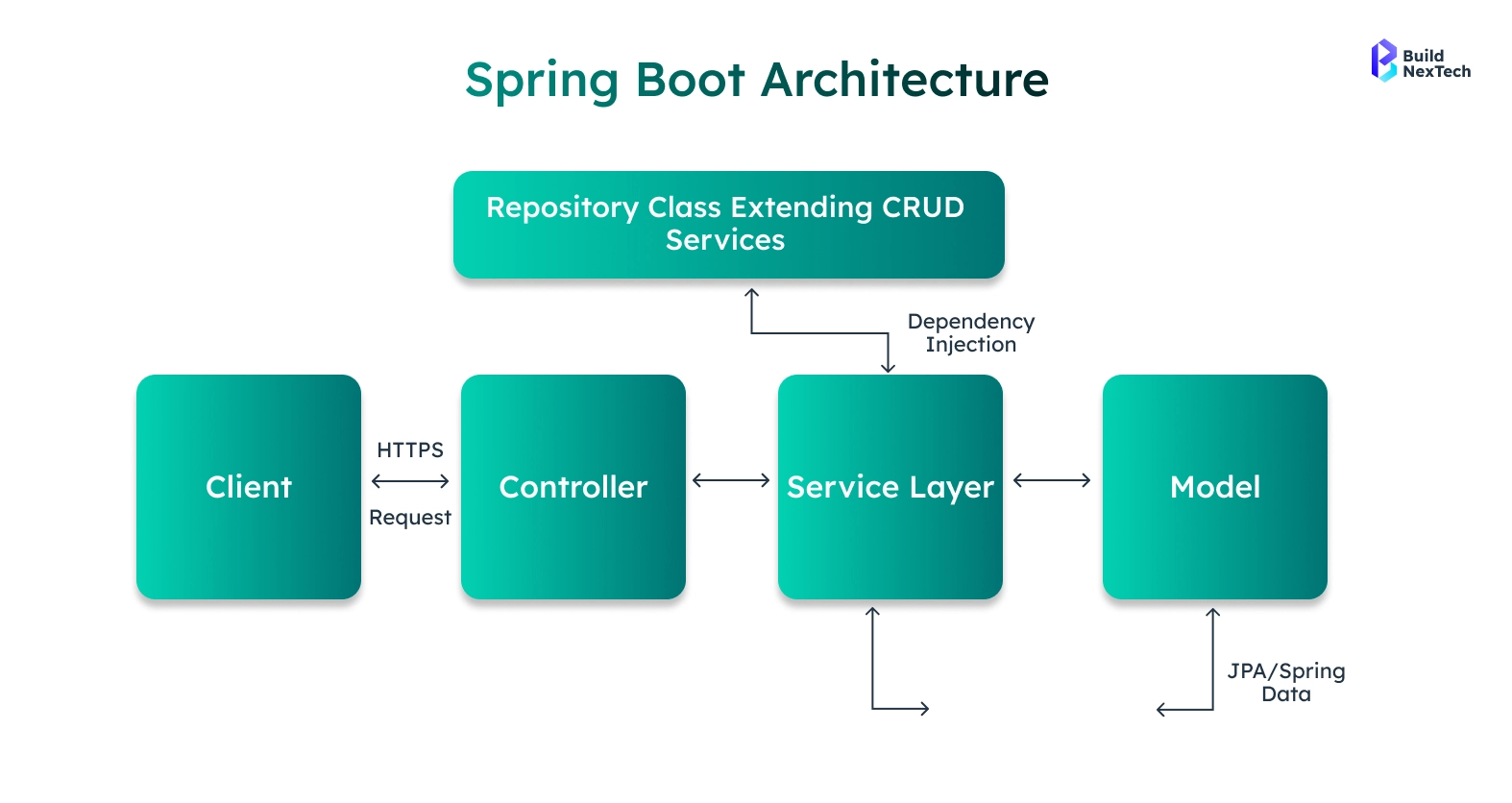
The Spring framework is a comprehensive ecosystem for enterprise Java applications. It introduced key concepts such as:
- Dependency Injection using Spring beans
- Web support through Spring MVC
- Modular and testable architecture
Over time, Spring evolved to reduce complexity, eventually leading to Spring Boot.
Benefits of Using Spring Boot
Spring Boot provides multiple advantages:
- Zero XML configuration using auto-configuration
- Embedded Tomcat server and other embedded servers
- Easy REST API creation using Spring MVC
- Seamless database access using Hibernate, Spring Data REST, and Spring Data MongoDB
- Build support using Maven and Gradle Project
- Built-in production tools like Actuator and metrics
Understanding REST APIs
What are REST APIs?
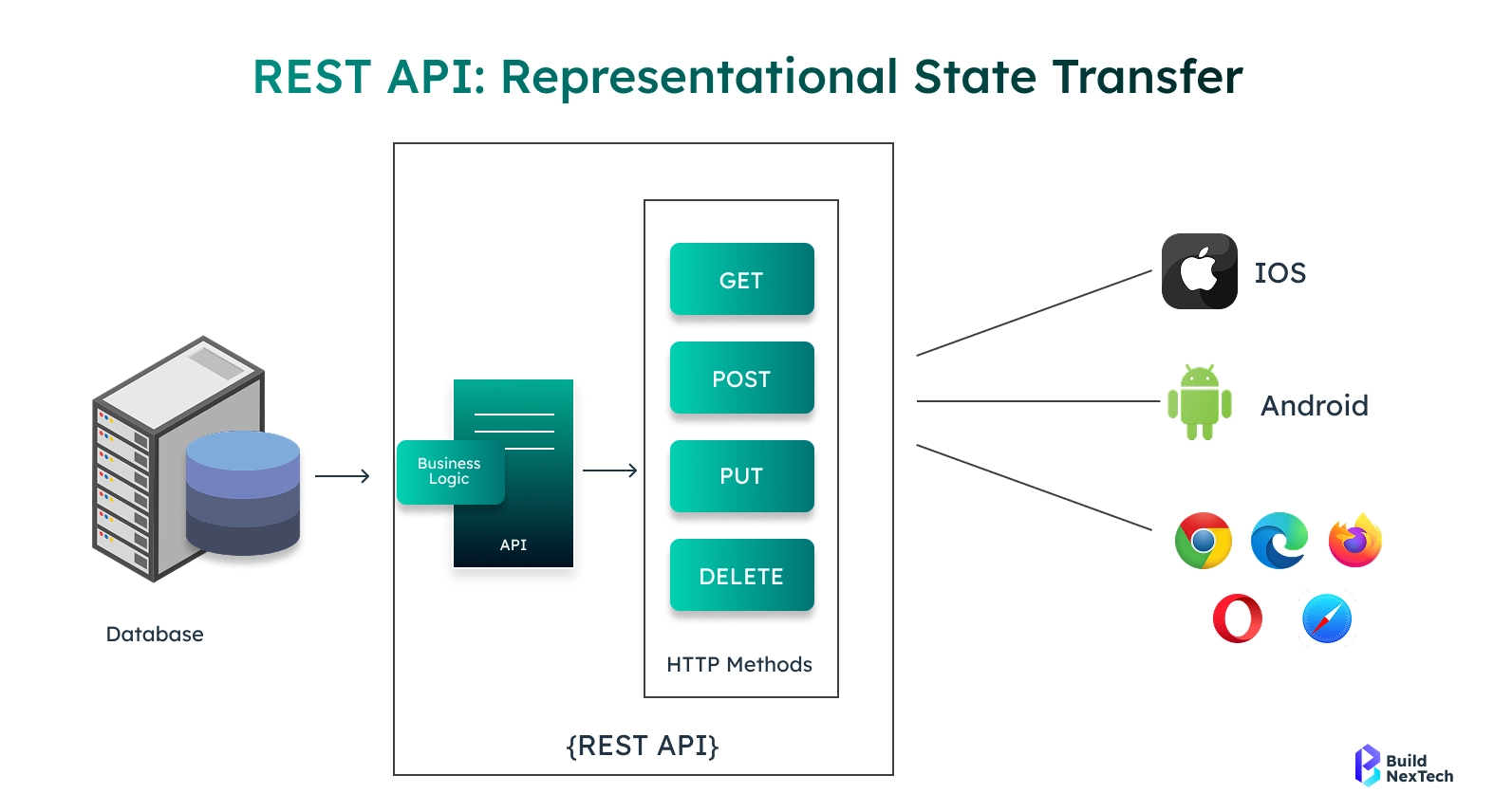
A REST API follows the principles of REST (Representational State Transfer) and communicates over the HTTP protocol. REST APIs are stateless and resource-based, using URLs to represent entities.
Common characteristics:
- Uses HTTP GET requests, POST, PUT, DELETE
- Exchanges data in JSON
- Returns structured Response body
- Follows standard HTTP status codes
REST is essential for modern microservices and distributed systems.
Key Components of REST APIs
Core REST components include:
- Resources (Product, Order, User Model)
- URIs
- HTTP requests and API Requests
- ResponseEntity for response control
- Serialization using Jackson and the Jackson JSON processing library
Setting Up Your Spring Boot Environment
Prerequisites for Installation
To start with Spring Boot, install:
- Java 8 or higher
- IDE: IntelliJ IDEA
- Build tool: Maven or Gradle
- API testing tool: Postman
- Git and GitHub
These tools form a complete Spring Boot development stack.
Creating Your First Spring Boot Project
The fastest way to create a project is Spring Initializr.
Steps:
- Choose Gradle Project or Maven
- Select Java version
- Add dependencies:
- Spring Web
- Spring Data JPA / Spring Data MongoDB
- Spring Security (optional)
Application Entry Point
@SpringBootApplication
public class Application {

    public static void main(String[] args) {
        SpringApplication.run(Application.class, args);
    }
}
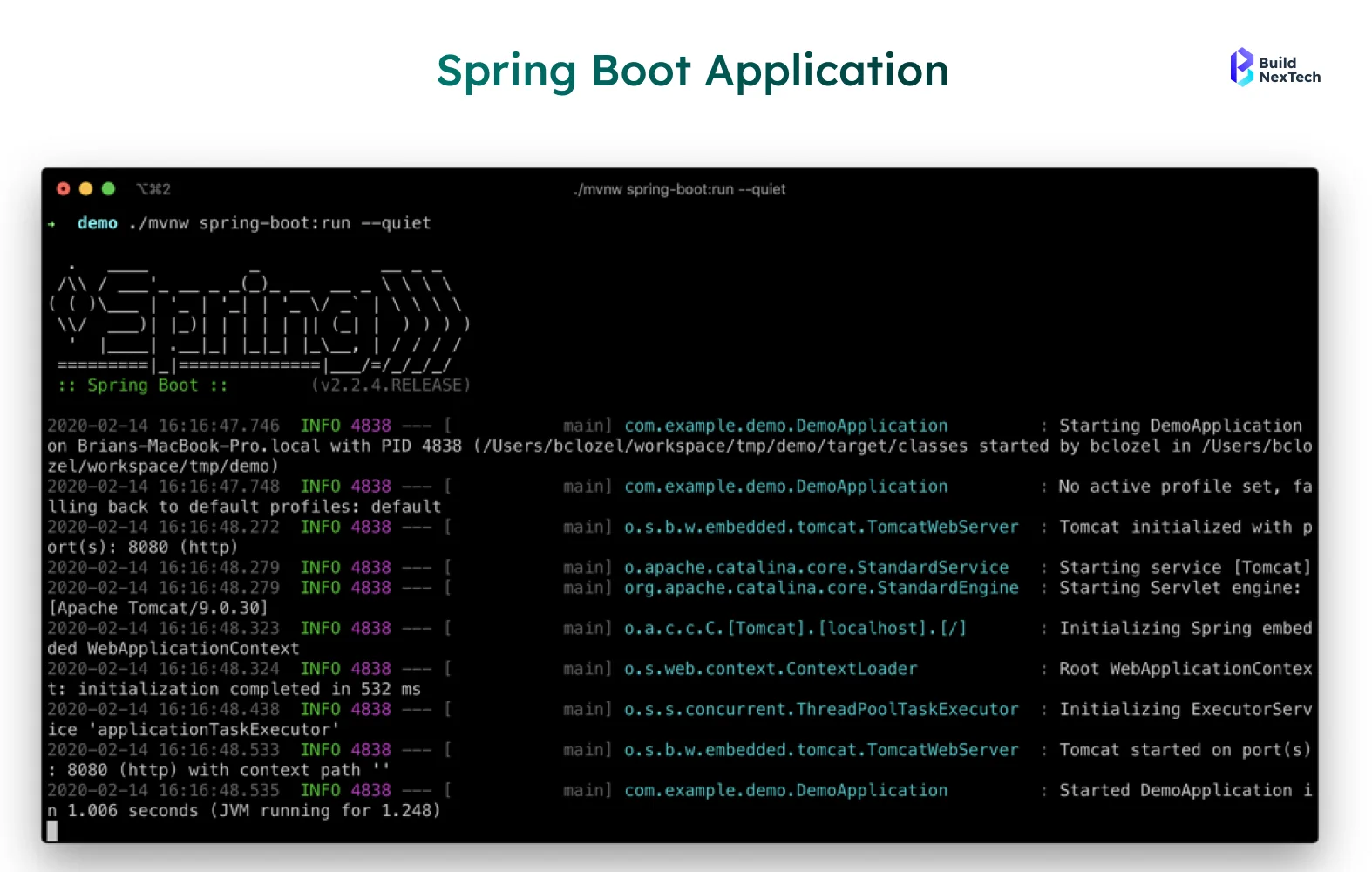
This application class boots the entire Spring context.
Building a REST API with Spring Boot
Creating a Simple REST Controller
Controllers handle incoming HTTP requests and return responses.
3@RestController
@RequestMapping("/api/products")
public class ProductController {

    private final ProductService productService;

    public ProductController(ProductService productService) {
        this.productService = productService;
    }

    @GetMapping
    public ResponseEntity<List<Product>> getProducts() {
        return ResponseEntity.ok(productService.getAllProducts());
    }

    @GetMapping("/{id}")
    public Product getProduct(@PathVariable String id) {
        return productService.getProductById(id);
    }
}
Key concepts used:
- Spring MVC
- ResponseEntity
- RequestParam
- JSON serialization via Jackson
Handling CRUD Operations
Product Entity
@Document(collection = "products")
public class Product {

    @Id
    private ObjectId id;
    private String name;
    private double price;

    // getters and setters
}

Product Repository
public interface ProductRepository
        extends MongoRepository<Product, ObjectId> {
}


This uses MongoRepository from Spring Data MongoDB.
Product Service
@Service
public class ProductService {

    private final ProductRepository productRepository;

    public ProductService(ProductRepository productRepository) {
        this.productRepository = productRepository;
    }

    public List<Product> getAllProducts() {
        return productRepository.findAll();
    }

    public Product getProductById(String id) {
        return productRepository.findById(new ObjectId(id))
                .orElseThrow(() -> new RuntimeException("Product not found"));
    }
}
This clean separation ensures maintainable Repository Classes and business logic.
Order Management Example
Order Entity
@Entity
public class Order {

    @Id
    @GeneratedValue
    private Long id;
    private String description;
}

Order Repository
public interface OrderRepository
        extends JpaRepository<Order, Long> {
}

Custom Exception
public class OrderNotFoundException
        extends RuntimeException {

    public OrderNotFoundException(String message) {
        super(message);
    }
}
Database Configuration
Spring Boot supports multiple databases.
application.properties
spring.datasource.url=jdbc:mysql://localhost:3306/shop
spring.jpa.hibernate.ddl-auto=update
spring.data.mongodb.uri=mongodb+srv://user@cluster.mongodb.net/db
Spring Boot supports both MySQL and MongoDB, but switching requires changes to entity models and repositories.
Testing Your REST API
Introduction to Testing Frameworks
Testing ensures quality and reliability:
- JUnit for unit testing
- Mockito for mocking
- Integration testing for REST endpoints
Writing REST API Tests
@WebMvcTest(ProductController.class)
class ProductControllerTest {

    @Autowired
    private MockMvc mockMvc;

    @Test
    void shouldReturnProducts() throws Exception {
        mockMvc.perform(get("/api/products"))
                .andExpect(status().isOk());
    }
}
Use Postman to manually test HTTP Client behavior and inspect JSON responses.
API Documentation with Swagger
Spring Boot supports Swagger, OpenAPI, and OpenAPI/Swagger standards.
@OpenAPIDefinition(
    info = @Info(title = "Product API", version = "1.0")
)
Swagger simplifies API exploration for developers and consumers.
Sure — here’s a properly elaborated, blog-ready expansion of those sections with more depth, clarity, and examples, while keeping the tone professional and readable. You can drop this directly into your article.
Security with Spring Security
Security is a critical aspect of modern RESTful web service development, and Spring Boot integrates seamlessly with Spring Security to protect applications from unauthorized access and malicious attacks. With minimal configuration, Spring Security allows developers to secure API Requests, enforce authentication, and control user permissions across the application.
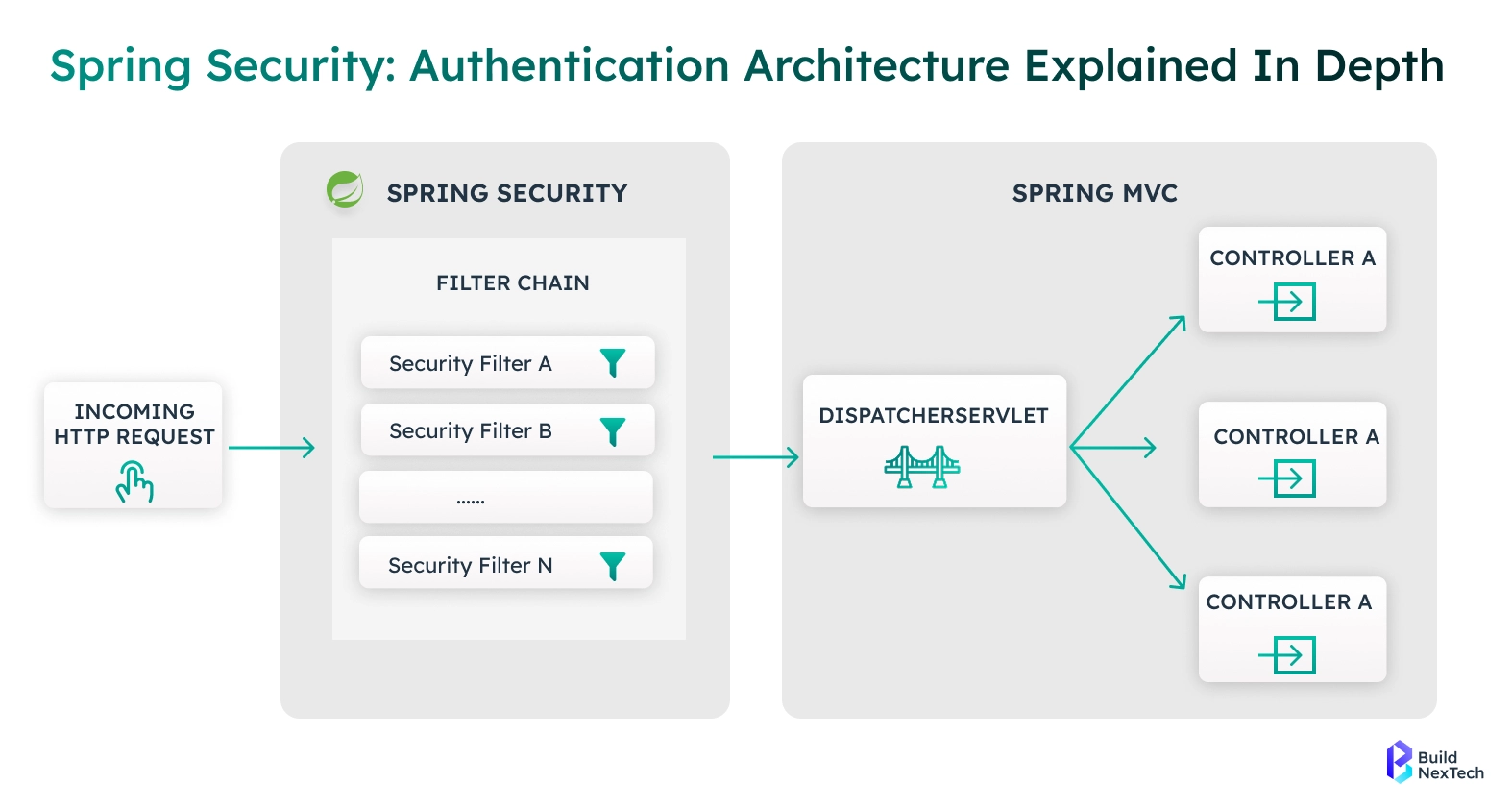
Spring Security works at the HTTP protocol level, intercepting HTTP requests before they reach controllers like ProductController or OrderController. This ensures that only authenticated and authorized users can access sensitive Back-End resources.
Key Security Features Supported by Spring Boot
Spring Boot supports multiple enterprise-grade security mechanisms:
- JWT authentication
JSON Web Tokens (JWT) enable stateless authentication. After a successful login, the server issues a token that the client sends with every request. JWT is widely used in microservices and mobile applications due to its scalability and performance. - OAuth and OAuth2
OAuth2 allows secure third-party authentication and authorization. It is commonly used for social logins and enterprise identity providers. Spring Boot makes OAuth2 easy to implement using Spring Security starters. - Auth0 Integration
Auth0 provides cloud-based identity management. Integrating Auth0 with Spring Boot simplifies user authentication, token management, and role-based access control without maintaining your own user store. - API Key Authentication
API keys are useful for securing internal or partner APIs. Spring Security can validate API keys passed through headers to control access to specific endpoints. - Role-Based Access Control (RBAC)
RBAC allows fine-grained control over who can access what. For example, only users with the ADMIN role can delete a Product, while USER roles may only perform HTTP GET requests. - Rate Limiting
Rate limiting protects APIs from abuse by limiting the number of API Requests a client can make within a defined time window. This is essential for public APIs and high-traffic systems.
Overall, Spring Security ensures data protection, prevents unauthorized access, and builds trust between the Front-End and Back-End of your application.
Advanced Spring Boot Concepts
Once you are comfortable building basic REST APIs, Spring Boot offers advanced features that help you build scalable, interactive, and production-ready systems.
Spring HATEOAS for Hypermedia APIs
Spring HATEOAS enables Hypermedia as the Engine of Application State (HATEOAS). Instead of returning plain JSON, APIs include links that guide clients on what actions can be performed next. This improves API discoverability and reduces tight coupling between client and server.
RestTemplate for External API Calls
RestTemplate is a synchronous HTTP Client used to consume external REST services. It allows Spring Boot applications to call third-party APIs, microservices, or cloud services using simple Java methods.
Common use cases include:
- Fetching data from payment gateways
- Calling external Product or Order services
- Integrating analytics or notification systems
WebSocket for Real-Time Communication
WebSocket enables full-duplex, real-time communication between client and server. Unlike traditional HTTP requests, WebSocket connections remain open, making them ideal for:
- Live notifications
- Chat applications
- Real-time dashboards
- Order status updates
Spring Boot provides excellent WebSocket support through Spring Messaging.
Spring Boot CLI for Rapid Development
The Spring Boot CLI allows developers to create and run Spring applications quickly using Groovy scripts. It is useful for prototyping, demos, and quick experimentation without heavy project setup.
CommandLineRunner for Startup Logic
CommandLineRunner is used to execute code when the application starts. Common use cases include:
- Initializing the Database
- Seeding Product or Order data
- Verifying configurations at startup
- Running background tasks
These advanced tools help Spring Boot scale beyond simple CRUD applications into full enterprise systems.
Deployment to Cloud Platforms
Spring Boot applications are cloud-ready by design. Thanks to embedded servers like the Tomcat server, applications can run as standalone JAR files without external dependencies.
Popular Cloud Deployment Options
- AWS
Supports scalable deployment using EC2, Elastic Beanstalk, and container services. Ideal for enterprise-grade workloads. - Heroku
A developer-friendly platform that simplifies deployment with Git-based workflows and automatic scaling. - Koyeb
A modern cloud platform optimized for APIs and microservices. Koyeb provides fast global deployment, built-in SSL, and seamless integration with Spring Boot.
These platforms manage infrastructure concerns such as:
- Load balancing
- Auto-scaling
- SSL certificates
- Environment variables and environment-specific settings
This allows developers to focus purely on application logic.
Learning Resources and Certification
To continue your learning journey with Spring Boot, it is important to apply concepts through real-world projects and structured study.
Recommended next steps:
- Build complete systems such as:
- Product Management APIs
- Order Processing Services
- Blog or Post systems using PostRepository
- Create a Quote class that returns random quotation data as JSON
- Push your Spring Boot projects to GitHub to showcase your skills
- Practice API testing using Postman and Swagger
- Enroll in structured courses that offer a certificate of completion
Hands-on projects combined with certification help validate your expertise and improve career opportunities in Java web development.
Conclusion
Spring Boot is the most efficient way to build modern RESTful web services using the Java language. With built-in auto-configuration, powerful database support, strong Spring Security, and seamless REST tooling, it empowers developers to create production-grade APIs with ease.
By mastering Spring Boot, REST, databases, and tools like Swagger, Postman, and GitHub, you unlock the full potential of modern Web development.BuildNexTech offers end-to-end Spring Boot application development services, helping businesses design, build, and deploy scalable REST APIs learn more at bnxt.ai.
People Also Ask

How does Spring Boot internally process a REST API request?
Spring Boot routes incoming HTTP requests through the DispatcherServlet, which identifies the correct controller method using handler mappings, applies filters/interceptors, performs validation, and serializes responses using Jackson.
How does Spring Boot convert Java objects into JSON responses?
Spring Boot uses Jackson ObjectMapper to automatically serialize Java POJOs into JSON based on getters, annotations, and configuration without requiring manual conversion.
How are exceptions handled globally in Spring Boot REST APIs?
Spring Boot provides @ControllerAdvice and @ExceptionHandler to manage centralized exception handling, enabling consistent error responses and HTTP status codes across APIs.
How does Spring Boot manage transactions in REST APIs?
Spring Boot leverages Spring’s declarative transaction management using @Transactional, ensuring data consistency with automatic commit and rollback based on runtime exceptions.
How does Spring Boot improve REST API performance and scalability?
Spring Boot enhances performance using connection pooling (HikariCP), asynchronous processing (@Async), caching (@Cacheable), and efficient thread management with embedded servers like Tomcat or Netty.


.webp)
.webp)
.webp)

.webp)
.webp)



