


The strongest features are the ones that reduce operational friction: cleaner pipeline visibility, fewer manual CRM updates, better lead conversion signals, and forecasting data that leaders can actually use.
Sales teams rarely struggle because a CRM has too few features; they struggle when reps ignore fields, managers distrust forecasts, and handoffs break after a deal closes. Salesforce Sales Cloud helps modern teams manage leads, opportunities, accounts, forecasts, and daily selling activity in one CRM workspace.
Salesforce Sales Cloud's highest-value features for modern sales teams are lead and opportunity management (pipeline control), sales automation (reducing manual CRM updates), Einstein AI (deal prioritization and scoring), forecasting tools (reliable revenue planning), and Sales and Service Cloud integration (post-sale handoffs). Feature adoption improves when rollout is sequenced: data hygiene and stage discipline before AI, pipeline fundamentals before advanced analytics.
What Salesforce Sales Cloud Gives Modern Sales Teams
Sales Cloud is Salesforce’s sales CRM for managing the lead-to-opportunity lifecycle, sales pipeline, contact management, activity tracking, forecasting, and sales analytics. For a growing sales team, it becomes the operating layer for customer conversations, deal health, campaign attribution, and revenue planning.
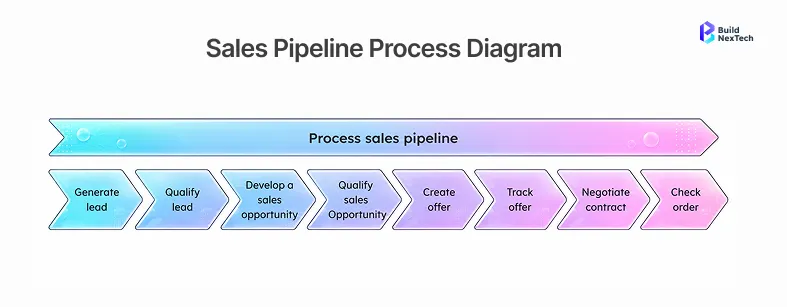
The platform connects activity data with decisions. Managers can review pipeline health before a forecast call, reps can spot deal risks before customer meetings, and operations teams can standardize sales workflows instead of chasing updates across spreadsheets and inboxes.
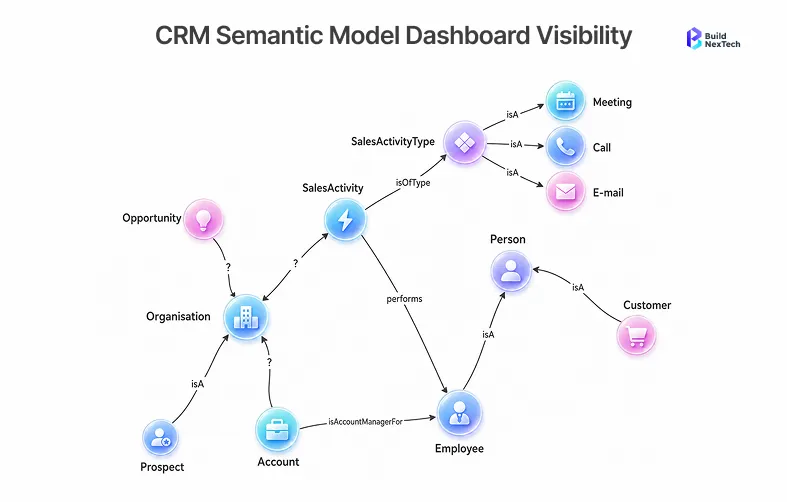
Sales Cloud centralizes accounts, contacts, pipeline, and activity
Sales teams lose time when customer data lives across email threads, spreadsheets, manager calls, and marketing tools. Sales Cloud brings those records into a shared CRM so teams can work from one version of the customer journey.
Teams usually get value when each record has a clear purpose:
- Account context: who the customer is, what segment they belong to, and which team owns the relationship.
- Lead context: source, score, qualification status, and the next required action.
- Opportunity context: stage, expected value, close date, deal risks, and buying committee signals.
- Activity context: Integrating a Salesforce Calling Solution enables sales teams to make and receive calls directly within Salesforce, automatically log call activities, and give representatives complete conversation history without switching between multiple applications.
That structure helps managers see whether the pipeline is healthy, not merely busy.
Sales Cloud overview helps teams connect features to daily selling
Sales Cloud includes many capabilities, but productivity improves only when features map to daily selling. In practice, teams get stuck when they enable advanced features before agreeing on stage definitions, owner rules, and field hygiene. A small team may need lead management and visual pipelines; a mature team may need territory management, forecasting, Revenue Cloud, Slack integration, and custom objects. Start by asking which sales-cycle delays matter most, which data fields can be trusted, and which repeat workflows should be automated.
Sales Cloud Features That Improve Daily Sales Execution
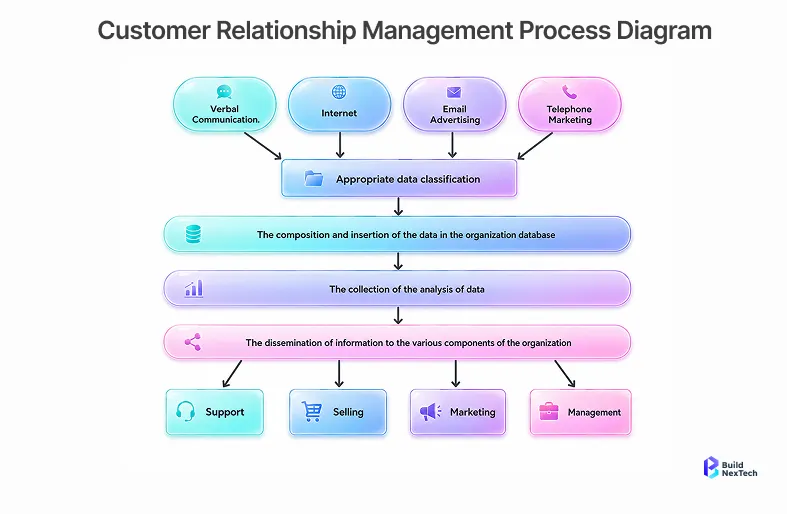
The strongest Sales Cloud features are the ones reps use during real selling motion. If a feature does not improve the next call, next follow-up, next handoff, or next forecast review, it usually becomes admin overhead. Lead management, opportunity tracking, automation, Einstein AI, and Sales Engagement should help reps decide what to do next.
The table below summarizes where core Sales Cloud features usually fit inside a modern sales workflow.
Lead and opportunity management improves pipeline control
Lead and opportunity management is the center of most Sales Cloud rollouts. It helps teams capture leads, qualify interest, convert strong leads into opportunities, and track deal closure through defined stages.
A clean setup defines what qualifies a lead before conversion. Good lead management separates nurturing leads, sales-ready leads, active opportunities, and dormant records so weak intent does not inflate the pipeline.
Sales automation reduces repetitive rep work for follow-ups and updates
Sales automation reduces repetitive work such as reminders, task creation, status changes, alerts, and follow-up sequences. The goal is not to automate judgment; it is to remove routine CRM maintenance so reps can spend more time on customer engagement. Keep rules simple: a few useful reminders protect deal progress, while too many prompts create noise.
Einstein features help reps prioritize the right deals
Einstein AI adds predictive insights, scoring models, conversation intelligence, AI coaching, and AI-powered analytics to Sales Cloud. Its practical value is prioritization: reps can see which lead needs action and which opportunity is at risk.
Einstein Activity Capture reduces manual logging by connecting email and calendar activity to CRM records. Lead scoring, opportunity scoring, and conversation intelligence help teams act on stronger conversion signals.
The risk is enabling AI before the data is ready. Predictive analytics needs clean records, consistent stages, and enough history, so teams should treat AI as decision support rather than a replacement for sales judgment.
Salesforce CRM Features for Forecasting and Manager Visibility
Sales managers need more than a list of open opportunities. They need to know whether the pipeline is realistic, where deal risks are rising, and which metrics explain revenue movement. Dashboards, forecasting, and analytics help when they are tied to clear operating routines.
Forecasting connects pipeline health to revenue planning
Sales forecasting in Sales Cloud helps teams estimate revenue based on opportunity value, stage, close date, owner, and forecast category. When the data is clean, leaders can run a forecast call with fewer manual spreadsheets and more consistent assumptions.
Forecasting works better when the team agrees on categories such as commit, best case, pipeline, and excluded. According to the Salesforce State of Sales 8th Edition (2024), 79% of sales reps cite CRM data quality as a direct factor in forecast accuracy.
That discipline separates sales optimism from evidence and makes pipeline review useful for coaching, not only inspection.
CRM dashboards make team performance easier to coach
Visual dashboards help sales leaders see deal movement, activity quality, conversion trends, and risk signals without reading every record manually. Good dashboards highlight the few numbers that show whether the team is moving in the right direction.
- Common dashboard views include pipeline by stage, lead conversion by source, open opportunities by age, deals without next steps, weekly forecast changes, and follow-up completion.
These sales analytics views help managers focus coaching where it matters, from discovery quality to pricing, objections, and stakeholder alignment.
Clean CRM data makes Sales Cloud features more reliable
Salesforce Sales Cloud depends on data quality. If required fields are unclear, custom objects are poorly designed, or reps do not trust the CRM, dashboards and AI-powered analytics become less reliable. Clean duplicate records, standardize lead sources, define required opportunity fields, and review custom objects before connecting third-party applications. Reps are more likely to update the CRM when the information supports their work.
Sales Cloud Integration Features for Revenue Operations
.webp)
Modern revenue teams rarely use one system. They often connect Sales Cloud with customer service tools, marketing automation, quoting, Slack, analytics, order management, and third-party applications. The practical tradeoff is ownership: every sync needs a source of truth, recovery path, and person accountable when data breaks. Integration decisions decide whether Sales Cloud becomes a revenue hub or another disconnected CRM platform.
This table compares common integration areas and what teams should confirm before implementation.
Sales and Service Cloud alignment improves customer handoffs
Salesforce Sales and Service Cloud alignment matters when the customer journey continues after deal closure. Support and service teams need the promises, requirements, pricing notes, and stakeholder context captured during the sales cycle.
Strong handoffs include a closed-won summary, known risks, contract commitments, account ownership, and service visibility. This alignment reduces confusion after the sale and makes customer data useful across the full revenue lifecycle.
API and IVR integration planning reduces workflow gaps
Sales Cloud integration can connect CRM records with API endpoints, IVR systems, quote tools, marketing platforms, and analytics systems such as Power BI. Integration planning matters because weak connections create duplicate entry and inconsistent customer data.
Teams should define integration direction before building: inbound updates, outbound updates, two-way sync, or event-driven workflows. One workflow may need a simple API; a larger revenue operation may need monitoring, ownership, and recovery plans.
Implementation and Pricing Choices After Feature Fit
Pricing and implementation should come after feature fit. Teams should first validate workflow support, automation, integrations, reporting, scalability, and adoption needs. Then pricing becomes a practical decision about long-term growth, lower friction, and measurable value.
Implementation scope should match team maturity and data quality
A small team with simple lead routing does not need the same scope as a multi-region organization with territory management, quoting, Revenue Cloud, and integrations. Start with workflow mapping, data readiness, role design, and a phased rollout plan. This staged approach protects adoption and avoids building complex dashboards before teams trust the CRM foundation.
Sales Cloud pricing should follow the features the team will use
Sales Cloud pricing should connect to actual usage. A team that needs contact management and visual pipelines should not evaluate the same edition as a team that needs AI, conversation intelligence, advanced forecasting, and Slack integration. Review user access, must-have features, AI readiness, integration costs, and dashboard needs before buying.
Implementation services help teams reduce rollout risk
Sales Cloud implementation services can help with process design, data migration, workflow automation, integration planning, dashboard setup, and user adoption. The need is stronger when teams, regions, or connected systems must work consistently.
A good implementation partner helps teams decide which fields stay standard, which custom objects are necessary, which dashboards matter, which integrations launch first, and which automations should wait. Organizations also benefit from Salesforce managed services to continuously optimize CRM performance, automate business processes, and support evolving business needs after implementation. If your team is evaluating Salesforce Sales Cloud for a larger revenue roadmap, discuss implementation logic before the CRM becomes harder to govern.
Conclusion: Prioritize Sales Cloud Features That Improve Revenue Operations
The most useful Salesforce Sales Cloud features are not always the most advanced ones. Modern sales teams usually get more value from clear pipeline management, reliable customer data, practical sales automation, forecast discipline, and integrations that reduce handoff gaps. Treat Sales Cloud as a revenue operations system: sequence the rollout, protect CRM governance, train teams on adoption discipline, and expand into AI only after the foundation is trusted. To plan a cleaner Salesforce Sales Cloud rollout, visit BNXT.ai and start with the workflows that improve sales productivity without adding avoidable CRM complexity.
People Also Ask

1. What should teams review before choosing Sales Cloud pricing or editions?
Teams should review current sales workflows, required users, must-have features, reporting needs, AI readiness, integration scope, and data quality before choosing Sales Cloud pricing or editions. The best edition is the one that supports the team’s active revenue process without adding unused complexity.
2. How should sales teams use Einstein features without overcomplicating workflows?
To use Einstein features without overcomplicating workflows, focus on a small set of decisions: lead scoring, opportunity scoring, activity capture, call insights, and forecast signals. They should avoid enabling every AI feature at once because predictive insights need clean CRM data and clear sales process definitions.
3. Which CRM data should be cleaned before Sales Cloud implementation?
CRM data that should be cleaned before Sales Cloud implementation includes duplicate accounts, duplicate contacts, inconsistent lead sources, unclear opportunity stages, missing owner fields, outdated activity records, and custom objects that no longer support the sales workflow.
4. When should teams connect Sales Cloud with Service Cloud?
Teams should connect Sales Cloud with Service Cloud when customer handoffs, onboarding, renewals, support issues, or expansion opportunities depend on shared account context. The connection is especially useful when service history should influence future sales conversations.
5. What should leaders check before hiring a Sales Cloud implementation partner?
Leaders should check whether a Sales Cloud implementation partner sequences features correctly (CRM foundation before AI), manages data cleanup proactively, and builds adoption discipline into the rollout — not just configures fields.


.webp)
.webp)
.webp)

.webp)
.webp)



