

A fintech company came to us midway through evaluating vector databases for a new RAG feature, convinced every option on the shortlist was basically interchangeable with Pinecone. That assumption was costing them time: Weaviate's open-source, self-hostable model changes the tradeoffs entirely, from cost to control to how fast a proof of concept reaches production.
Generative AI has pushed most AI applications toward retrieval-augmented generation, and nearly every one of those builds needs an AI vector database underneath. Across 150+ client engagements at BuildNexTech, that gap between assumption and architecture is the most common reason a project stalls. This guide answers what engineers ask first: How Weaviate works, how to stand it up, and when to pick it over Pinecone, Qdrant, or Milvus.
What Is Weaviate?
Weaviate is an open-source AI vector database that stores data objects alongside their vector embeddings, enabling AI vector search by meaning rather than exact matches. Two smaller questions come first: Why vector databases exist, and where this AI Database fits.
Why Vector Databases Exist
Unstructured data- text, images, audio- doesn't sit well behind a SQL command. A relational query filters a price field easily but has no concept of "similar meaning." Embeddings close that gap.
- An embedding is a numeric vector representation of meaning, spanning hundreds of vector dimensions.
- Machine learning models and foundation models generate these vector representations during training.
- Two sentences like "the invoice is overdue" and "payment hasn't come through" land close together, despite sharing almost no words.
That semantic understanding, built from ML models rather than rules, is what a vector database exploits at query time. That's the plain answer to what a vector database is: A tool built to find results by meaning, not exact wording.
Where Weaviate Fits Among Vector Databases
Weaviate sits in the open-source, self-hostable category, alongside Qdrant and Milvus, distinct from managed services like Pinecone. Its edge isn't vector similarity search alone; most competitors handle that well, but native hybrid search paired with a deployment model you control, from a laptop running Docker to a cloud cluster on Kubernetes.
How Weaviate Works
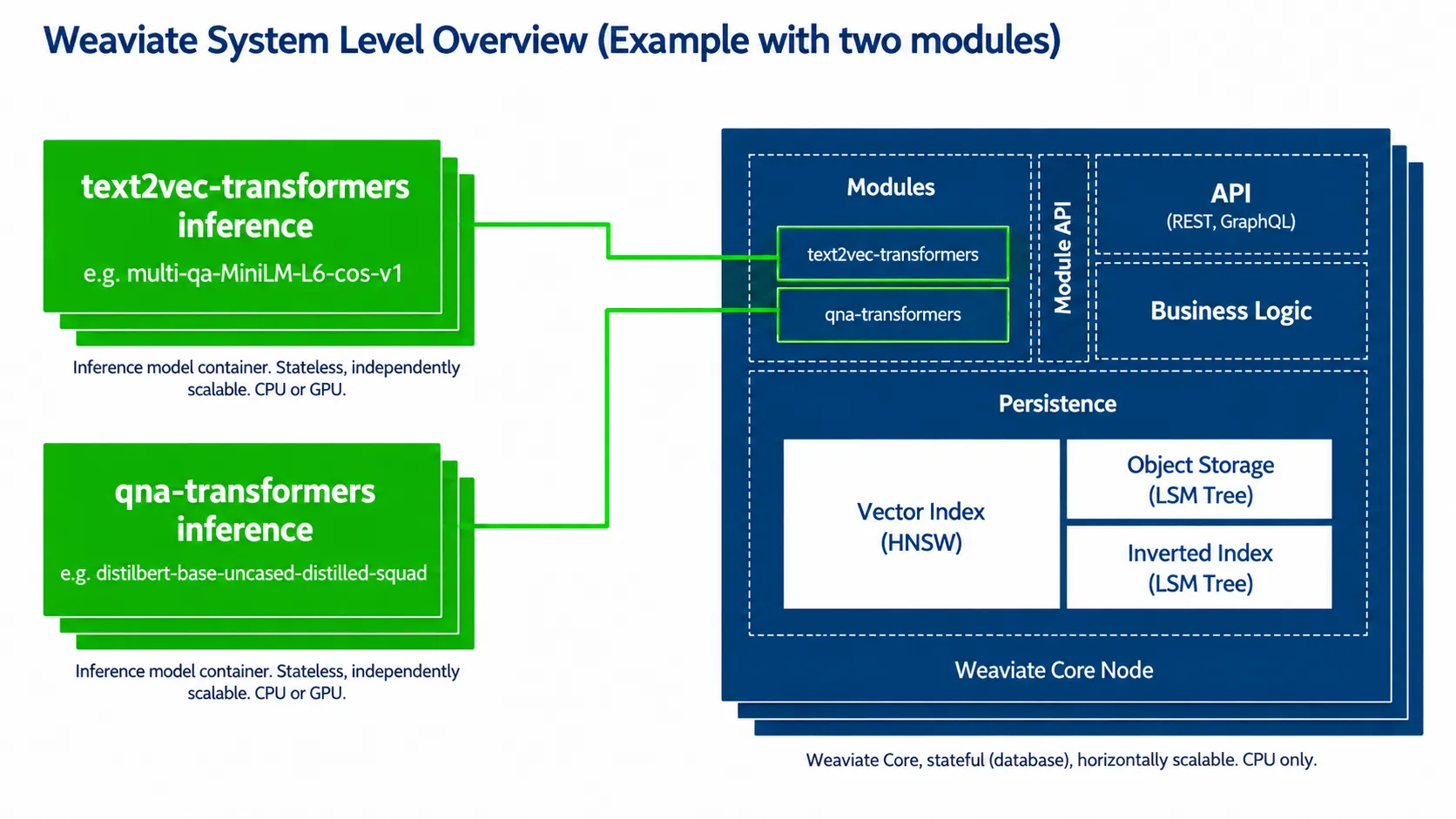
Three cooperating layers handle this. One search technique on top pulls double duty between a query landing and results returning.
Core Architecture
- API layer: REST, GraphQL API, and gRPC endpoints, so a client talks to Weaviate however the stack prefers.
- Search layer: HNSW handles vector search algorithms for approximate nearest-neighbour lookups; BM25 handles keyword ranking.
- Storage layer: Raw objects, an inverted index, and the vector index itself.
Nothing here is exotic alone. Weaviate treats keyword and HNSW as equal citizens of one engine, not a bolt-on, so a hybrid query returns in a single round trip instead of merging results from two separate systems.
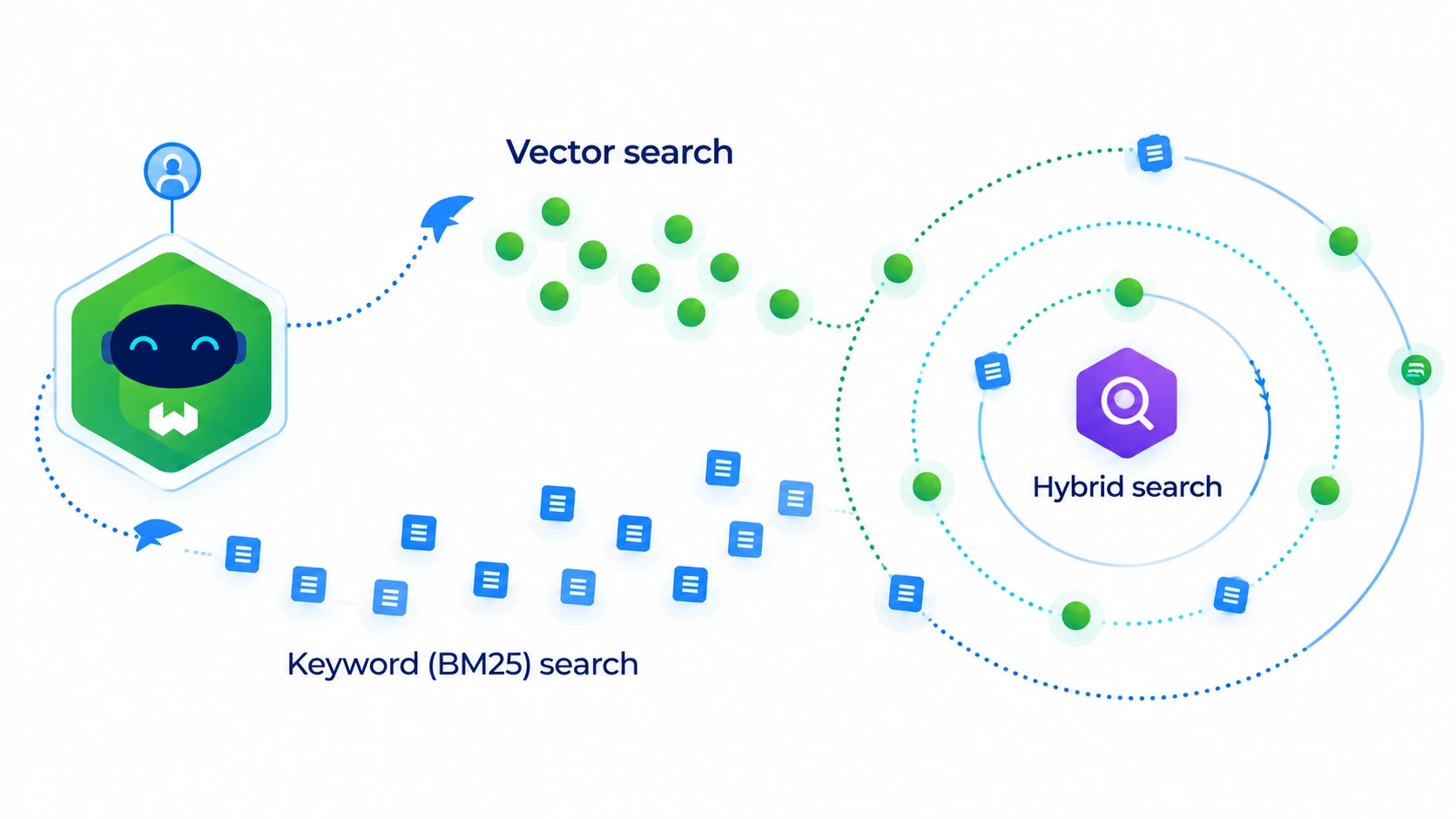
Hybrid Search: Combining Vector Search and Keyword Search
Pure vector search is excellent at meaning and bad at exact strings. A query for "SKU-88214-B" won't reliably surface that product, since an embedding model has no concept of exact codes.
Weaviate's hybrid search fixes this:
- Fuses HNSW and BM25 rankings using reciprocal rank fusion.
- Tuned by a single alpha parameter, shifting weight between meaning and literal match.
- Alpha near 1 leans vector search; near 0 leans keyword matching.
A catalogue search needing both "comfortable running shoe" and an exact SKU in one query is the textbook case for hybrid search. Weaviate's generative search features build directly on this same fused ranking. Most teams start alpha around 0.75 and adjust after watching real query logs, since the right balance depends on how users actually phrase searches.
Getting Started with Weaviate
Standing up Weaviate takes an afternoon, not a sprint. The right entry point below mostly comes down to how much infrastructure a team is willing to own before the first query even runs.
Deployment Options
- Weaviate Cloud: Managed, fast to start, limited free tier.
- Docker: Local instance in minutes, good for hands-on evaluation.
- Embedded mode: Runs from Python or JavaScript, no server at all.
Docker strikes the right balance for most teams testing the waters. It mirrors the same client library and query behaviour as the managed and embedded options, so nothing about the application code changes later. Teams that later need heavier traffic typically move from Docker to Weaviate Cloud without touching application code.
Creating a Collection and Adding Data
Creating a collection, Weaviate's term for a schema-defined class, is the first real step, and it runs through an automatic validation process that checks vectorizer configuration before any data lands.
import weaviate

client = weaviate.connect_to_local()

collection = client.collections.create(
    name="Article",
    vectorizer_config=weaviate.classes.config.Configure.Vectorizer.text2vec_openai()
)

collection.data.insert({
    "title": "Getting started with vector search",
    "content": "A short guide to embeddings and retrieval."
})
That business context matters more than the syntax here: This snippet configures an automatic vectorizer, either OpenAI's or a Hugging Face model, so Weaviate generates embeddings on insert instead of needing a separate pipeline.
Running Your First Semantic Search Query
A basic query, near_text(query="database performance issues", limit=5), returns the five closest matches by meaning. The response includes matched objects and distance scores, not just IDs, so a calling application skips a second round trip, and a working endpoint is realistically a same-day outcome. A where filter alongside near_text narrows results further by property value, useful once a collection holds more than a handful of test records.
Using Weaviate with LangChain for RAG
Most teams want Weaviate as the retrieval layer inside a pipeline built around large language models. LangChain is the common route, needing little custom work.
Connecting Weaviate as a LangChain Vector Store
LangChain's Weaviate integration wraps the client so retrieval slots into a standard chain with a few configuration lines, assuming the collection exists. There's no custom adapter to write, which is why many RAG applications reach for Weaviate first.
Building a Simple Retrieval-Augmented Generation Pipeline
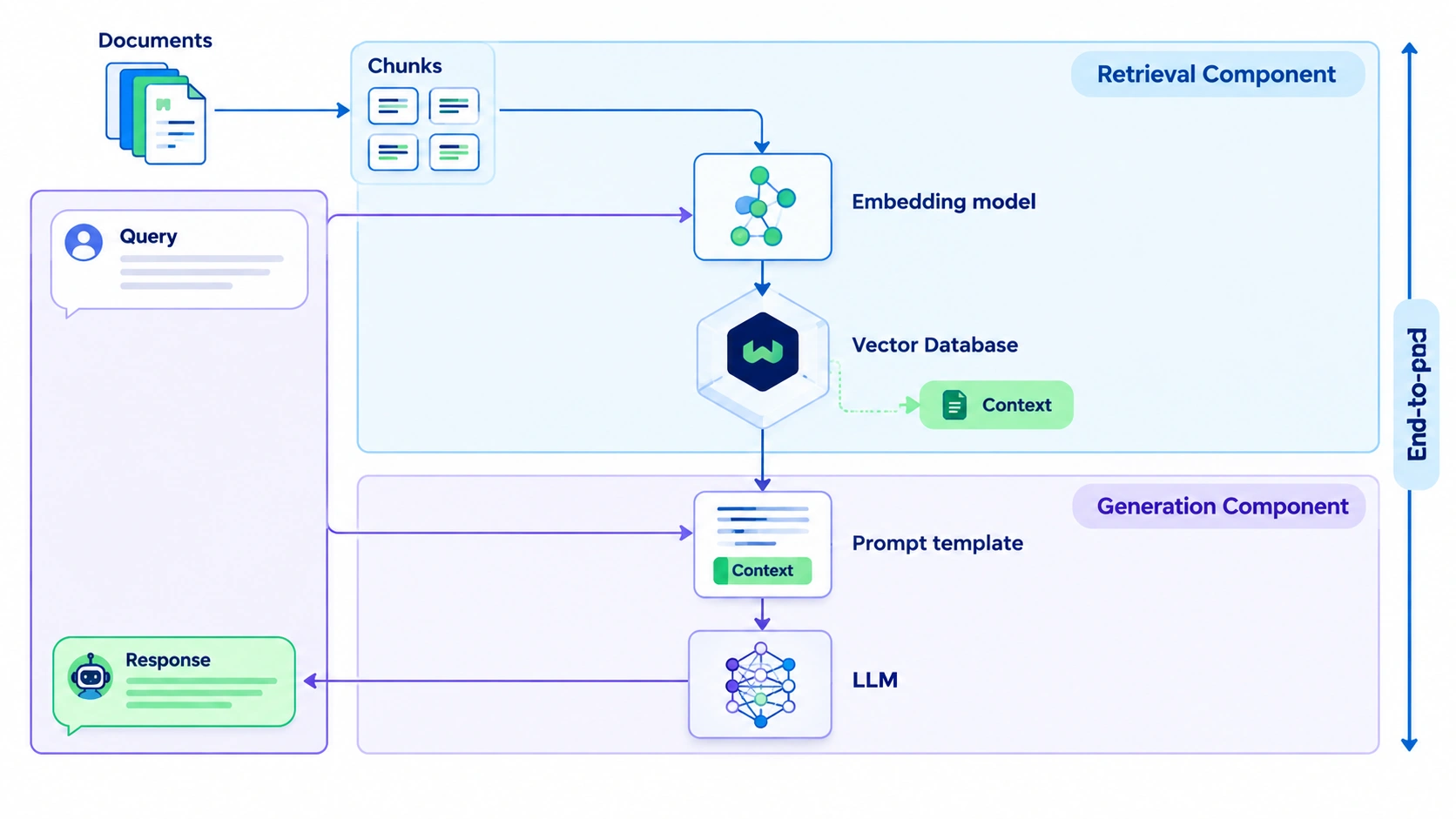
The flow runs in four steps:
- Embed the incoming query.
- Retrieve the closest matches from Weaviate.
- Pass that context to a language model with the original question.
- Generate the final answer grounded in what was retrieved.
What matters conceptually: LLM agents lean on this retrieval step to stay grounded in real data, not training alone. Skipping it is the fastest way to reintroduce hallucination, since the model then has nothing but its own training data to fall back on.
Common Use Cases for Weaviate
Once the pipeline works, the question shifts to where teams actually deploy it. These use cases all lean on the same semantic search meaning: Matching by intent, not exact wording.
Semantic Search and Recommendations
Product search, content recommendations, and similarity matching are the most common entry points. A retailer running semantic product search catches "warm winter jacket" against listings that never use the word "warm," because the embedding captures intent. That's what semantic search is at its core: Retrieval based on meaning and intent rather than literal keyword overlap.
RAG and AI Agent Applications
Weaviate also shows up as the retrieval backend behind the AI experiences most teams now associate with generative AI:
- Chatbots and knowledge-base question answering.
- Agent memory for LLM agents recalling prior context.
- Content classification and content filtering, routing text by meaning rather than keyword lists.
- Anomaly detection and data clustering, grouping records that don't fit an expected pattern.
Weaviate vs. Other Vector Databases
Knowing how Weaviate works is half the evaluation. The other half is what it trades away against alternatives.
Weaviate vs. Pinecone Vector Database Architecture
Pinecone is fully managed and proprietary; Weaviate is open-source and self-hostable. Pinecone gets a team to production faster with no infrastructure to run, while Weaviate trades that speed for control and avoids vendor lock-in.
Weaviate vs. Qdrant and Milvus
Qdrant wins on Rust-level performance and advanced filtering; Milvus wins on horizontal scaling across billions of vectors. Weaviate's edge is hybrid search baked into the core engine.
Which one fits your team?
- Fast production deployment, no infrastructure ownership? Choose Pinecone.
- Rust-level performance and complex filtering? Choose Qdrant.
- Hybrid search out of the box, no stitching two systems together? Choose Weaviate.
Advantages and Limitations of Weaviate
Advantages:
- Native hybrid search that most competitors treat as an add-on.
- Open-source flexibility avoiding lock-in, plus multi-tenancy for isolating customer data.
- Solid multi-modal support across text, images, and other data types.
- A security service layer for role-based access, plus configurable backup retention.
Limitations:
- Self-hosted deployments carry real operational overhead a managed service would absorb.
- A smaller third-party ecosystem than Pinecone's or Milvus's.
- Data transfer to Weaviate Cloud takes deliberate planning, not a one-click migration.
- A limited cloud free tier, so real evaluation often means self-hosting first.
Neither list is a verdict. The right read depends on the constraint: Engineering time or infrastructure budget.
How BuildNexTech Helps Teams Ship Weaviate-Backed AI Features Faster
A weekend hackathon is usually enough to get Weaviate running and prove the concept works, but a prototype rarely survives contact with production traffic, retraining schedules, and access control requirements. The database itself is rarely the blocker. What derails projects is production wiring: Authentication, monitoring, and a plan for keeping the embedding model current as the underlying data changes.
Teams get stuck at "who owns this," not "does this work." A vector database sitting alongside a relational database, a queue, and an LLM provider needs someone accountable for latency, cost, and drift over time, not just the initial integration. We build schema, embedding strategy, and monitoring together instead of bolting them on later, and teams we've worked with have cut retrieval pipeline setup from weeks to days this way.
What a BuildNexTech Weaviate Implementation Looks Like
- Day 1 to 3: Discovery, mapping which processes need semantic retrieval.
- Day 4 to 7: Build, standing up schema, embedding pipeline, and RAG integration.
- Week 2 onward: Iteration, expanding use cases with a human reviewer in the loop.
Conclusion
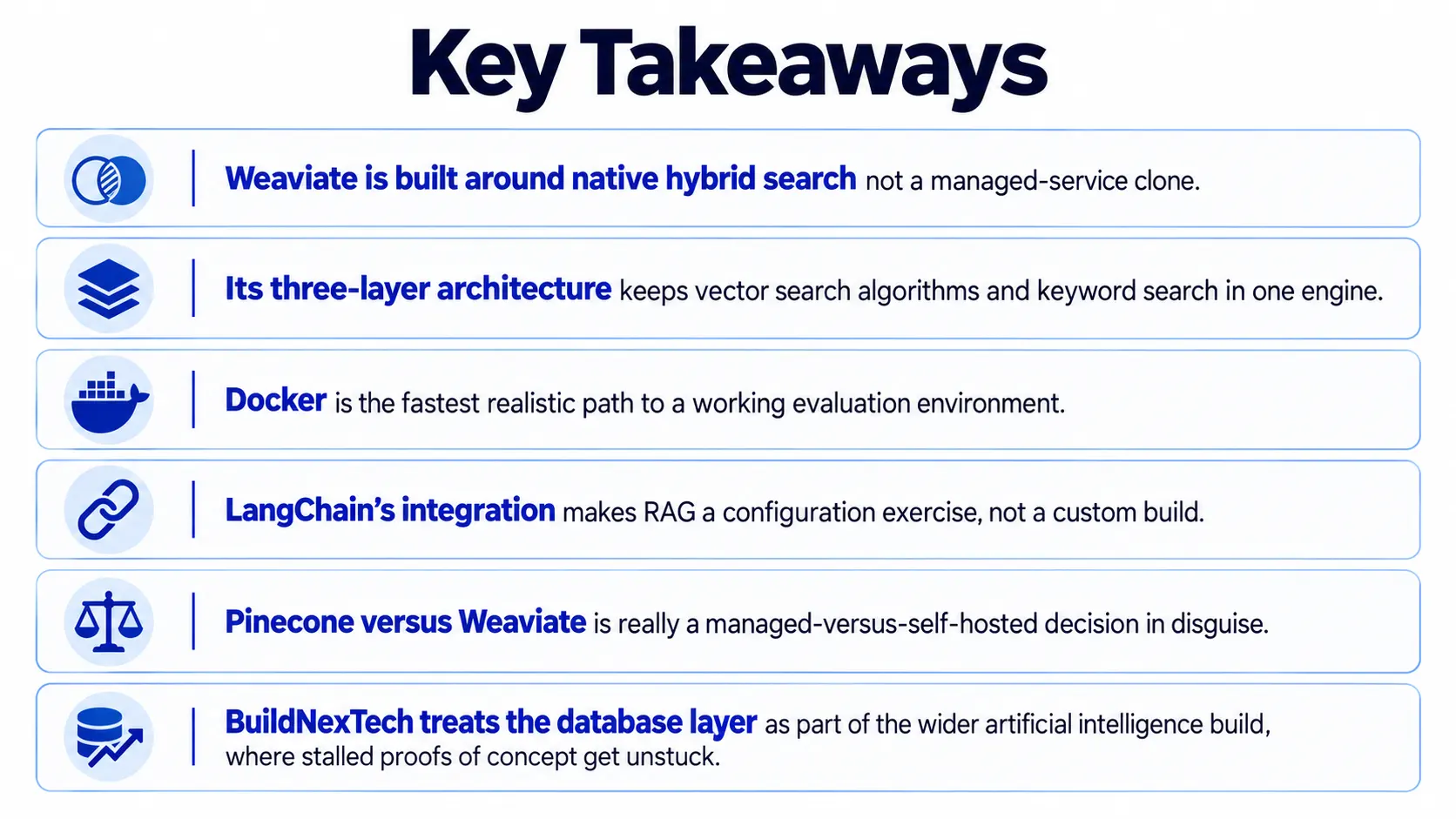
Weaviate earns its place on the strength of hybrid search and an open-source, self-hostable model, not on being interchangeable with Pinecone. The architecture is straightforward once seen: Three layers, one fusion technique, a handful of deployment paths.
The harder question underneath isn't technical; it's a resourcing one: Run this yourselves, or trade that control for speed. Most teams answer it too late, after the proof of concept already works.
People Also Ask

How does Weaviate compare to Chroma or FAISS vector database for smaller projects?
Chroma vector database and FAISS vector database suit lightweight, single-machine prototypes without a server. Weaviate adds hybrid search, multi-tenancy, and cloud scaling once a project outgrows local prototyping.
Does Weaviate work for graph RAG and agentic RAG?
Graph RAG and agentic RAG both work with Weaviate as the retrieval layer, using hybrid search and context lookup while the agent framework handles orchestration and reasoning steps.
What's the difference between word embeddings and OpenAI embeddings?
Word embeddings represent individual words in isolation. OpenAI embeddings represent whole sentences or documents as a single vector, the format Weaviate typically stores and searches against.
Where can I follow the latest Weaviate news and release updates?
Weaviate news and release notes are published on the official Weaviate blog and changelog, covering features like query profiling and diversity search added each release cycle.
Do I need an AI consulting company to put Weaviate into production?
Not always for simple use cases. Production-scale RAG often benefits from an AI consulting company, since top AI consulting companies bring deployment and monitoring experience most in-house teams lack.


.webp)
.webp)
.webp)

.webp)
.webp)



