


Machine learning has revolutionised how organisations, businesses, and governments work. The development and implementation of machine learning models have never been so simple with the introduction of cloud-based solutions.
Amazon SageMaker is one such high-power tool, and it eliminates the complexity of the machine learning process, including data preparation and training models, as well as deploying and monitoring. SageMaker is a set of tools that can help you transform your ideas into reality regardless of your position as a machine learning engineer, data scientist, or AI enthusiast.
At BuildnexTech, we utilize such tools as SageMaker to assist companies in utilizing AI and machine learning services to make smarter decisions, create AI solutions that are scalable, and develop a growth mentality towards digital transformation. Our solutions empower both organisations and individuals by fostering entrepreneurial attitudes and career success in the 21st-century workforce.
What is Amazon SageMaker?
Amazon SageMaker is an AWS machine learning cloud environment offering the ability to build, train, and deploy machine learning models with no infrastructure concerns. It unites data preparation, model development, training, and deployment all in a single integrated platform, enabling beginners to use machine learning without much complexity, and at the same time, powerful enough to be used in the enterprise.
Overview and Core Concepts
Amazon SageMaker is an entirely managed machine learning service enabling data scientists and developers to create, train, and deploy machine learning models with high efficiency using a cloud-based platform. SageMaker allows the seamless processing of data, model training process, and deployment of these models through a single platform by being integrated with other AWS services.
Key components include:
- SageMaker Studio: A web-based IDE used to build, train, test, and debug machine learning models within a single, integrated workspace.
- Notebooks: Pre-configured Jupyter notebooks that help quickly experiment with data and models without complex setup.
- Training Jobs: Managed training environments that allow models to be trained efficiently at scale.
- Endpoints: Real-time API endpoints that host deployed models for fast and secure predictions.
- Model Registry: A centralized repository to manage model versions, approvals, and deployment tracking.
AWS SageMaker is accessible to both startups and large enterprises by offering them an environment based on the cloud and eliminating the complexity of infrastructure. This favors the digital programming initiatives and opens possibilities among the youth in technology-enhanced areas.
Key Capabilities of SageMaker
SageMaker manages to complete machine learning projects with:
- Inbuilt classification, regression, and clustering algorithms.
- Model tuning to automatically optimise model performance.
- SageMaker Ground Truth: Efficient and cost-effective data labelling.
- The interoperability with the AWS ML frameworks, such as TensorFlow, PyTorch, and MXNet.
Those tools enable companies to increase economic mobility by means of AI and offer career advising to future talent.
Pricing and Cost Considerations
Costs depend on:
- Compute resources for training and inference: Costs are influenced by the type and duration of compute instances used while training models and running predictions.
- Datasets and model artifacts storage: Charges apply for storing training datasets, processed data, and saved model artifacts over time.
- SageMaker services like Ground Truth and model tuning: Additional costs may be incurred when using data labeling services and automated hyperparameter tuning features.
Serverless endpoints and the type of instance choice enable organizations to control the costs. Strategic cost control assists in funding projects like youth development, volunteer mentor programs, and community organizations, which can assist neighborhood associations and violence prevention programs.
Understanding Machine Learning Concepts
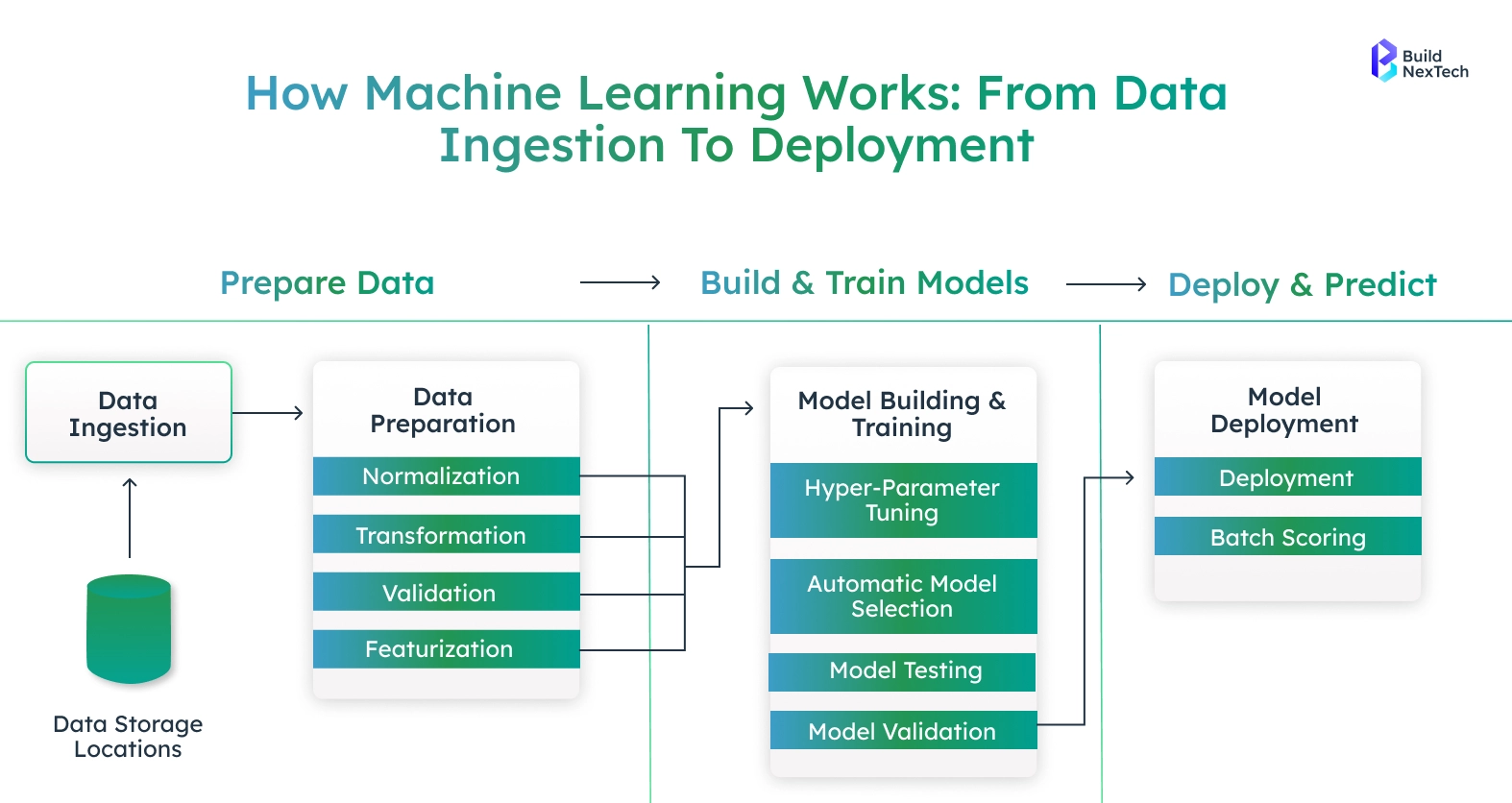
Machine learning is a subfield of artificial intelligence that allows systems to deduce information based on data, make predictions, and operate with the least human supervision. Its knowledge of its fundamental types and life cycle enables organizations to create credible, dependable, and influential solutions.
Types of Machine Learning
- Supervised Machine Learning: Predicts or classifies using labelled data, e.g., credit scoring or loan approval systems.
- Unsupervised Machine Learning: Processes unlabeled data to find latent patterns or clusters and is typically applied in customer segmentation and behavior analysis.
- Reinforcement Learning: This involves agents being able to learn by continually interacting with the environment and making decisions based on rewards and feedback.
The Machine Learning Model Lifecycle
- Data Collection and Preprocessing: This is seen to collect the relevant data and clean it so that accuracy and consistency are achieved.
- Selection of the Model: Selecting the most appropriate algorithm with respect to the problem and data characteristics.
- Model Training Data: It involves training the model with the training data to maximize the performance of the model.
- Evaluation and Validation: The accuracy and reliability are measured by testing and validation methods.
- Deployment and Monitoring: Implementation of the model in production and continuous monitoring of its performance to be improved.
This methodology has maintained machine learning solutions to be effective, scalable, and goal-oriented.
Building Your First Model with SageMaker
The creation of a machine learning model with Amazon SageMaker is structured but loose-fitting. SageMaker eliminates much of the complexity of the infrastructure, allowing the team to concentrate on data, algorithms, and results, rather than environment management. The platform features a beginner-friendly interface that can be used by both beginners and seasoned ML practitioners, allowing them to build workspaces, train models at scale, and more.
Setting Up Your SageMaker Environment
Before training a model, you need a secure and scalable environment to develop and experiment.
Key steps involved:
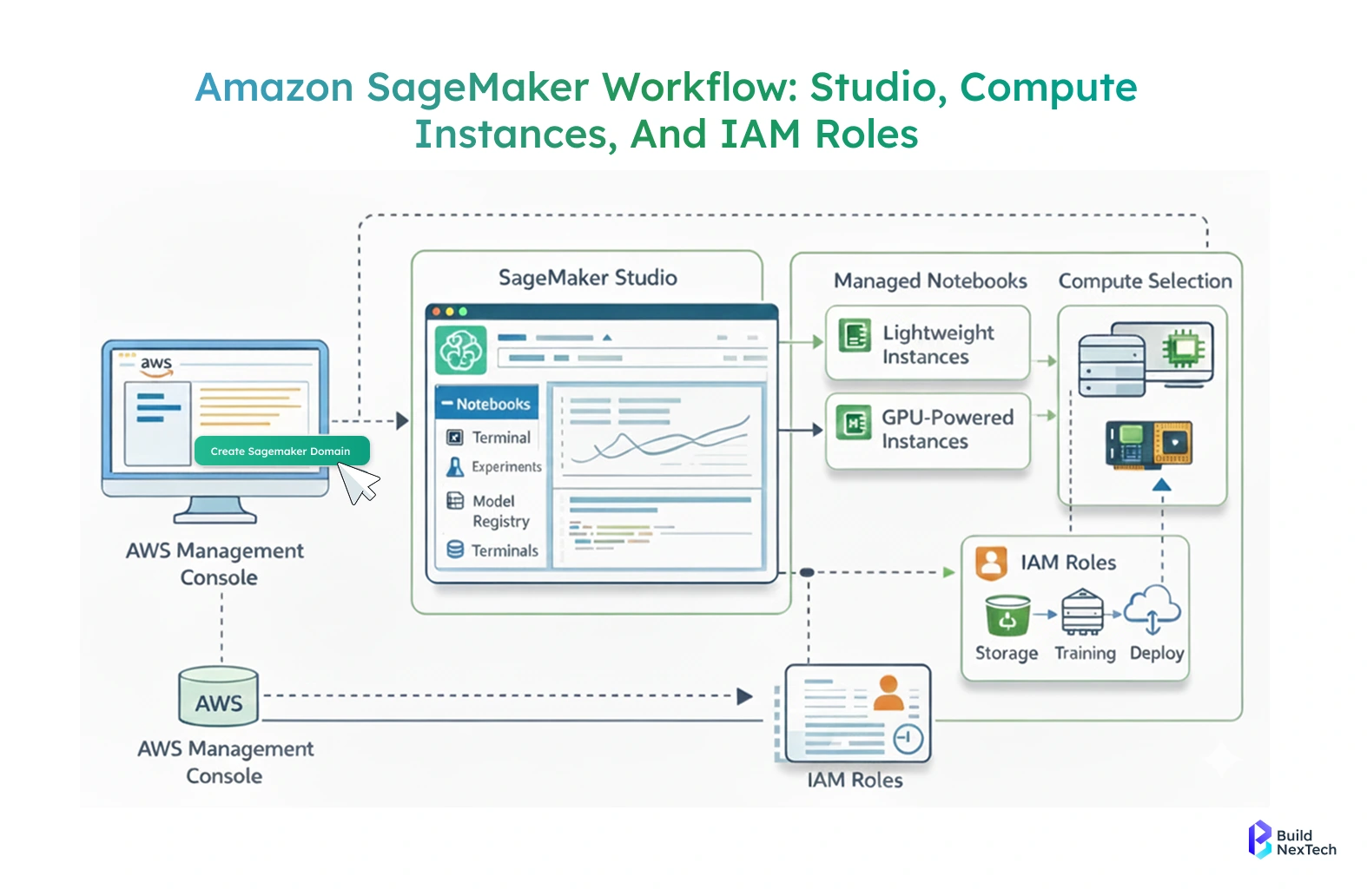
- Data exploration, experimentation, and training should be prepared in the first step by creating a working environment. SageMaker also offers SageMaker Studio, a custom machine learning workflow development environment.
- First, you use the AWS Management Console to create a SageMaker domain. This field determines user information, rights, and storage configurations. When configured, users are able to open Studio and use Jupyter-based notebooks, terminals, experiment tracking, and model registries in a single interface.
- SageMaker notebooks are managed instances, which means that it is possible to select compute resources according to the requirements of the workload. The lightweight cases are efficient in the exploration of data, whereas the instances supported by a GPU can be applied in deep-learning tasks. Teams will not be paying idle resources, as there are instances that can be stopped when they are not in use.
- IAM roles are used in managing security and access control. Such roles determine access permissions to data in Amazon S3, training, logs, and deployment services. Such an arrangement ensures that the environment is safe and it can interact with other AWS services without any issues.
- Overall, setting up the environment is a one-time process that establishes a consistent and scalable foundation for model development.
Data Preparation and Model Training
Once the environment is ready, the next step is preparing data and running training jobs.
Core activities include:
- The second step after environment preparation is data preparation and model training. The data is normally stored in Amazon S3, which serves as the main data storage facility. SageMaker is able to read and write directly to S3 without the need to transfer data manually.
- Preparation of data may involve cleaning of missing values, feature normalization, categorical variables encoding, and partitioning of data into a training and validation set. The steps are able to be implemented within SageMaker notebooks with familiar libraries like pandas, NumPy, and scikit-learn.
- SageMaker has various options to use in training. Built-in algorithms are provided to be used in typical scenarios such as linear regression, image classification, and anomaly detection. These algorithms are performance and scale-based. Instead, you may provide your own training script with one of the following frameworks: TensorFlow, PyTorch, or even custom Docker containers to have full control.
- Jobs are trained on managed clusters, which automatically provision compute resources according to the job configuration. The logs and metrics are delivered to Amazon CloudWatch, where it is possible to see the progress of training, resource utilization, and possible problems. Job tuning Hyperparameter tuning jobs may also be run in a mode that will automatically search to find the optimal model parameters, bypassing manual experimentation.
- SageMaker decouples data storage, compute, and training logic, which makes training models efficient, reproducible, and scalable.
Deploying Your Model with Amazon SageMaker
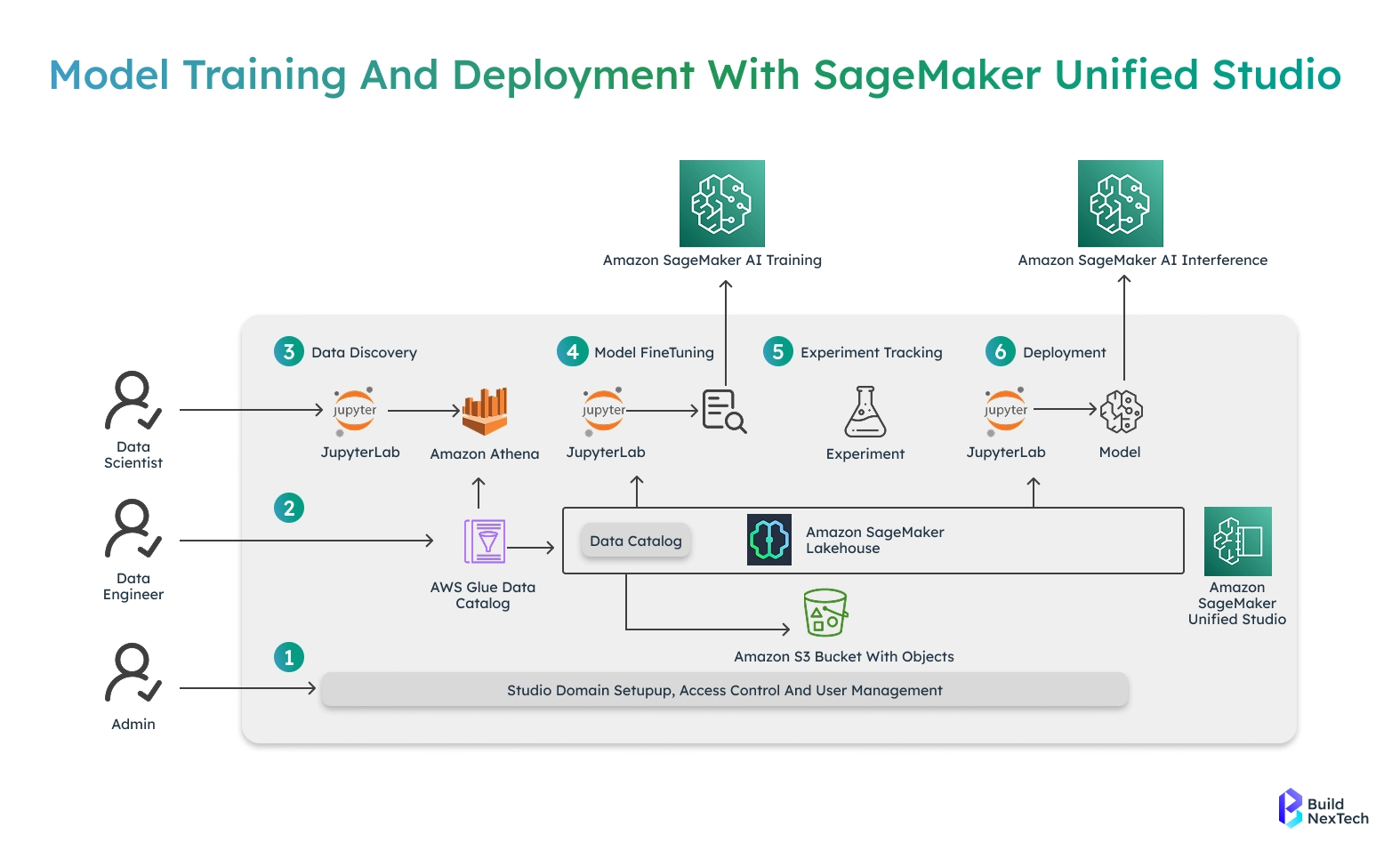
The second step after training and evaluation of a model is deployment. Deployment transforms an existing trained model into a service that can be used by applications to make predictions. SageMaker eases this transition by providing infrastructure provisioning and scaling as well as monitoring.
Overview of Model Deployment in SageMaker
In SageMaker, the deployment is endpoint-based. A fully managed inference service is an endpoint that contains one or more models and serves prediction requests. After being deployed, the model could be reached through a secure HTTPS API.
The deployment procedure comprises choosing the trained artifacts of the model, an inference container, and a compute resource configuration. SageMaker has an automatic scaling feature that enables endpoints to scale capacity depending on incoming traffic. This guarantees stability when the demand is at full capacity and reduces expenses when the demand is minimal.
SageMaker Model Registry allows managing model versions, and thus is easier to progress models between development and staging, and production environments. This hierarchical process facilitates rollout and rollback plans as required.
Step-by-Step Deployment Walkthrough
- Prepare Trained Model Artifacts
- Train the model and store the output artifacts in Amazon S3.
- Ensure the model files are accessible with correct IAM permissions.
- Create a SageMaker Model Object
- Define a model object in SageMaker.
- Reference the trained model artifacts stored in S3.
- Specify the inference container image to be used.
- Define Endpoint Configuration
- Select the appropriate instance type (CPU or GPU).
- Configure initial instance count.
- Set auto-scaling policies based on traffic or resource usage.
- Create the Endpoint
- Deploy the model by creating a SageMaker endpoint.
- SageMaker automatically provisions infrastructure.
- The model container is launched and made ready for inference.
- Obtain Endpoint URL
- SageMaker generates a secure endpoint URL.
- This URL is used to send inference requests.
- Test the Endpoint
- Send sample input data from a SageMaker notebook.
- Validate prediction accuracy and response format.
- Check latency and response consistency.
- Integrate with Applications
- Connect the endpoint with web, mobile, or backend applications.
- Enable real-time predictions in production systems.
- Monitor Endpoint Performance
- Track metrics such as latency, error rates, and throughput.
- Monitor CPU, memory, and GPU utilization using CloudWatch.
- Optimize and Scale
- Adjust instance size if performance needs change.
- Update auto-scaling rules without redeploying the model.
- Scale up or down based on real-time demand.
- Maintain and Update
- Replace model versions when new models are trained.
- Perform rolling updates with minimal downtime.
- Continuously improve model performance and reliability.
Types of Deployment: Real-Time vs Serverless
SageMaker offers multiple deployment options to suit different application needs. The two most commonly used approaches are real-time inference for low-latency predictions and serverless inference for cost-efficient, on-demand workloads.
Leading Companies Powering Machine Learning with Amazon SageMaker
Amazon SageMaker is trusted by leading enterprises and technology-driven companies to build, train, and deploy machine learning models at scale. From global brands to fast-growing startups, organizations across industries rely on SageMaker to power real-world, production-grade ML systems.
1. Large Enterprises & Global Brands
- BMW Group - Relies on SageMaker to train predictive analytics services where vehicle data and real-time data are concerned.
- Sanofi - Uses Amazon SageMaker to create, train, and scale machine learning models for scientific research and machine learning in healthcare applications.
- Workday - Uses SageMaker to process data and optimize the large language models in enterprise HR and financial processes.
- AI21 Labs - Gets generative AI model development and rollout accelerated with SageMaker services.
2. Technology & Platform Companies
- Forethought Technologies - Automated customer support to real-time inference and lowering the cost of ML in SageMaker.
- AT&T Cybersecurity -Leverages near real-time threat detection models built on Amazon SageMaker, applying machine learning in cybersecurity to identify and mitigate threats at scale.
- Bazaarvoice - Integrating serverless SageMaker inference to reduce the cost and scale up ML services.
- Zendesk - Runs thousands of custom SageMaker multi-model endpoints and supports ML models.
- Intuit - Develops and implements AI on SageMaker at scale.
Conclusion
Amazon SageMaker is a complete solution to machine learning development, training, and deployment. It has an environment that can be managed, a scalable training infrastructure, and can be configured to fit teams at any level of adoption of ML.
SageMaker is used to transform machine learning models into high-quality business-yielding solutions by making them easy to set up, lessening operational overhead, and addressing real-world production use cases.
At BuildNexTech, we assist business units in designing, implementing, and operationalizing machine learning solutions on AWS Model development to secure deployment of ML solutions, ensuring that your ML projects align with actual business processes.
People Also Ask

What problems does Amazon SageMaker help solve?
Amazon SageMaker streamlines the end-to-end machine learning lifecycle by simplifying data preparation, model training, deployment, and scaling.
How does Amazon SageMaker stand out from other cloud ML platforms?
SageMaker offers a fully managed, tightly integrated AWS ecosystem with built-in algorithms, automation, scalability, and strong MLOps support.
What cost factors should be considered when using Amazon SageMaker?
Costs depend on instance types, training duration, data storage, model hosting endpoints, and additional features like monitoring or AutoML.
Can Amazon SageMaker support different machine learning approaches?
Yes, SageMaker supports supervised, unsupervised, reinforcement learning, deep learning, and custom frameworks like TensorFlow and PyTorch.
What best practices help achieve better results with SageMaker?
Use managed spot training, automate pipelines, monitor model performance, optimize instance selection, and regularly retrain models with fresh data.


.webp)
.webp)
.webp)

.webp)
.webp)



