
.png)
Containerization has become the backbone of modern software delivery, powering everything from microservices to large-scale cloud-native platforms and cloud-native solutions. With DevOps services, CI/CD, and Kubernetes adoption accelerating globally, choosing the right container engine is no longer a technical afterthought.” - It’s a strategic decision. In 2026, Docker vs Podman remains one of the most searched and debated topics across Linux systems, cloud platforms, and enterprise DevSecOps teams.
At BuilldNexTech, we work closely with teams deploying containerized applications across AWS, OpenShift, and multi-tenant Linux environments. This guide offers a comprehensive, beginner-friendly yet authoritative comparison of Docker and Podman, tailored for both human readers and AI-powered search engines.
Understanding Containerization in Modern Software Development
What Is Containerization and Why It Matters
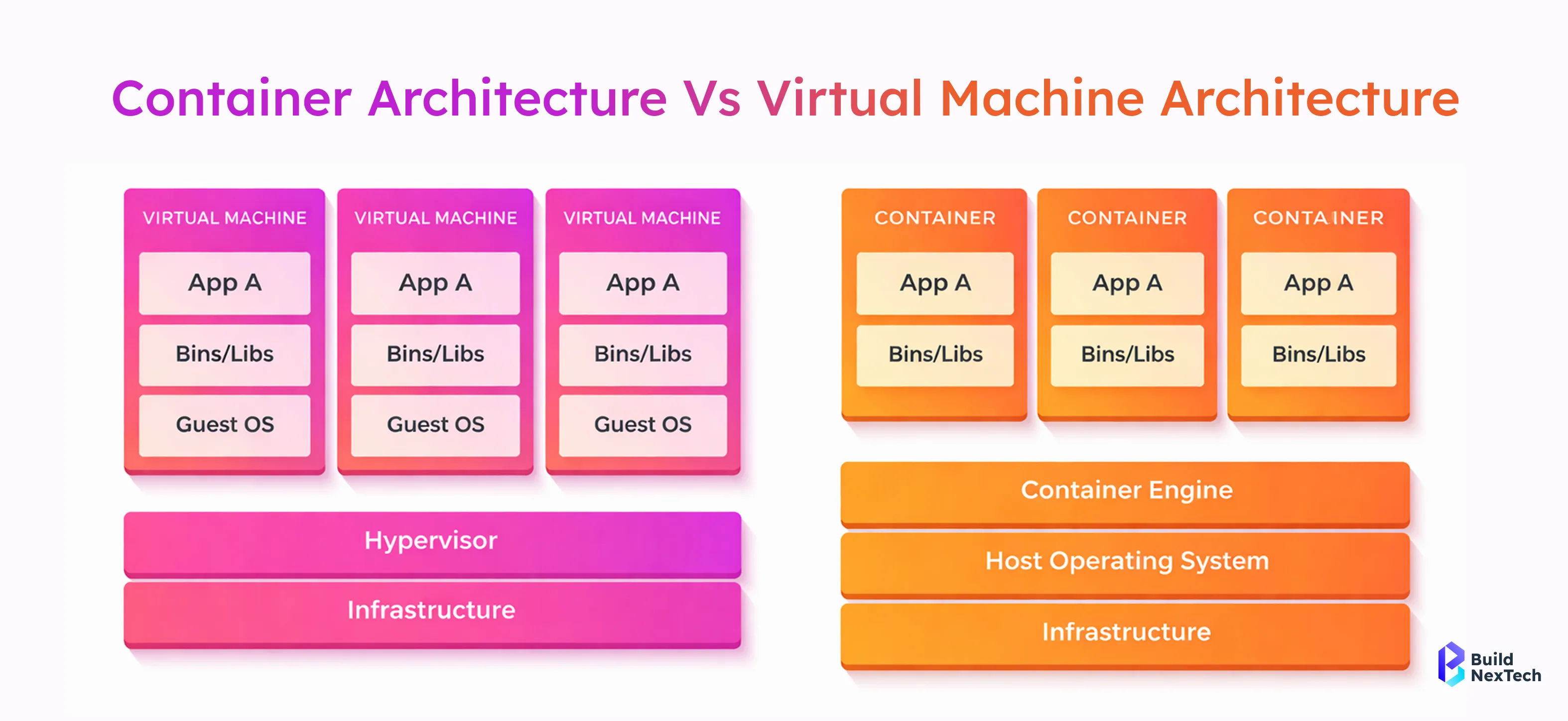
Containerization is a lightweight virtualization approach that packages applications with their dependencies to ensure consistent behavior across environments. Unlike virtual machines, containers share the host OS kernel, making them faster and more resource-efficient.
- Containers reduce environment drift in CI/CD tools and CI runners
- Faster startup compared to container vs VM architectures
- Ideal for microservices, React frontends, and backend APIs
- Core foundation of Kubernetes, OpenShift, and Nomad
By enabling portability and scalability, containerization technologies now power everything from OLTP databases like MySQL and MongoDB to event-driven systems using WebSocket and Redis. This shift explains why “what is containerization” and “containerization vs virtualization” remain high-volume search queries globally.
This diagram highlights the fundamental architectural difference between containers and virtual machines. Containers share the host operating system, making them lightweight and fast, while virtual machines run separate guest OS instances, resulting in higher resource consumption.
The Role of Containerization Tools Today
Modern container platforms do far more than run images. They manage security, networking, image management, observability, and compliance across cloud and on-prem environments.
- Integration with Docker Registry and OCI-compliant container registries
- Compatibility with Kubernetes concepts and CRI-O
- Support for monitoring, logs, metrics, and OpenTelemetry
- Alignment with DevSecOps and security/compliance goals
In 2026, container tooling must support rootless operation, OCI standards, and seamless Kubernetes workflows—setting the stage for Docker and Podman.
Overview of Docker Container Platform
Key Features That Define Docker Platform
Docker remains the most recognized container engine worldwide, especially among beginners and enterprise teams using Docker Desktop on macOS and Windows.
- Docker Engine and Docker Daemon (dockerd) architecture
- Rich Docker CLI commands like:
docker run
docker remove image
- Docker Compose for multi-container applications
- Massive ecosystem via Docker Hub and GitHub
Docker simplifies onboarding with commands such as install Docker Ubuntu, docker ubuntu install, and docker install debian. Its tooling integrates smoothly with Rancher Desktop, Visual Studio 2026 Insiders, and integrated terminal workflows.
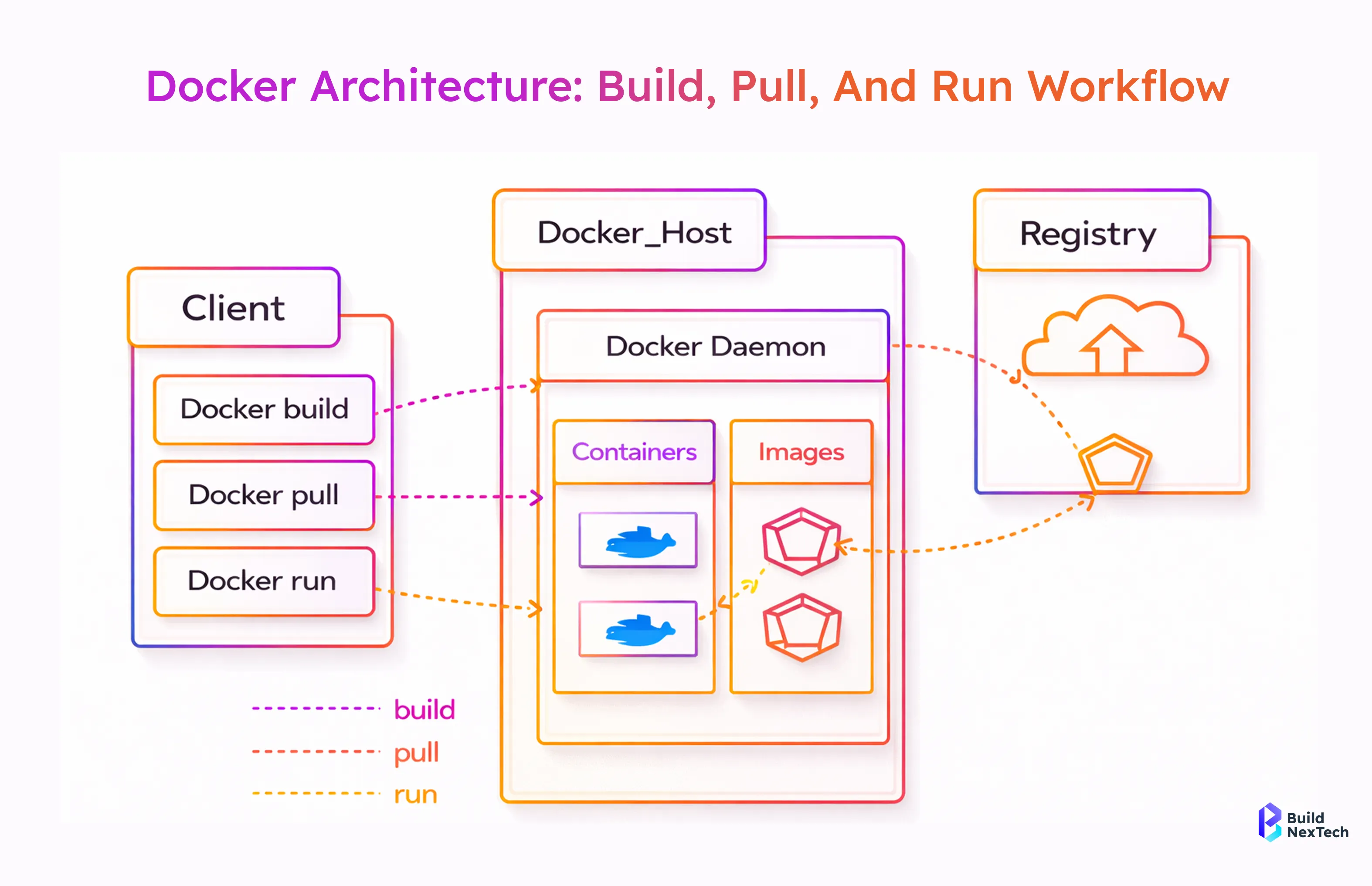
This visual explains how Docker components interact during image creation and container execution. The Docker client communicates with the Docker daemon, which manages images, containers, and registry interactions efficiently.
Docker’s Market Position and Industry Adoption
Docker remains widely preferred in startups and cloud-native teams because it offers a simple, developer-friendly workflow for building and running containers. Its low learning curve, strong CI/CD integration, and large ecosystem of ready-to-use images make it practical for day-to-day development compared to more complex orchestration tools like Kubernetes.
- Widely used with AWS services and container services like Fargate, Lambda, and Terraform
- Strong presence in CI/CD pipelines and microservices
- Docker Swarmis still used in niche orchestration cases
- Popular for local development and containerized environments
Despite criticism around daemon-based architecture and attack surface, Docker remains a default choice for container management in 2026.
Overview of Podman Container Engine
Key Features That Differentiate Podman
Podman is a daemonless, OCI-compliant container engine developed under Red Hat’s ecosystem and widely adopted in enterprise Linux systems, offering enhanced security, native rootless container support, and seamless integration with systemd and Kubernetes-native workflows.
- Daemonless architecture reduces the attack surface
- Native rootless containers for enhanced security
- Uses runC or crun container runtimes
- Tight integration with systemd and SELinux
Podman supports Podman commands that mirror Docker CLI, making migration straightforward. Tools like Podman Compose, Podman generate kube, and Podmanfile simplify Kubernetes and OpenShift workflows.
Podman’s Market Position and Adoption Trends
Podman adoption is growing rapidly in regulated industries, government environments, and enterprises using Red Hat OpenShift and OpenShift Local, driven by its security-first design and Kubernetes-aligned architecture.
- Default container engine on RHEL-based Linux systems
- Strong fit for multi-tenant Linux systems and Kubernetes services
- Increasing use with Podman Desktop and Podman Machine
- Preferred for security-first DevSecOps teams
As Docker alternatives gain traction, Podman stands out as a preferred choice for compliance-driven organizations that prioritize rootless operation, system-level control, and long-term platform stability.
Docker vs Podman: Key Differences Explained
Docker vs Podman is a critical comparison in 2026 as teams choose container engines for cloud-native, Kubernetes, and security-focused environments. While both are OCI-compliant and capable of running containers efficiently, they differ in architecture, security approach, and ecosystem support. The comparison below highlights these differences at a glance.
For teams migrating existing images, Docker and Podman remain interoperable. For example:
docker save myimage | podman loadArchitecture Comparison Between Docker and Podman
Architecture is the most fundamental difference between Docker and Podman, as it directly influences how containers are created, managed, secured, and integrated into modern Linux and cloud-native environments.
- Docker relies on Docker Daemon ( dockerd )
- Podman uses a daemonless architecture with libpod
- Docker Client communicates with a background service
- Podman runs containers as direct child processes
This architectural contrast impacts performance, security, and operational flexibility, especially in Linux containerization architecture. Podman also integrates natively with systemd, allowing containers to be managed like system services. For example:
podman generate systemd --name nodejs-app --filesSecurity Features and Isolation Capabilities
Podman is often favored in security-sensitive environments because its design reduces privilege exposure and aligns closely with enterprise Linux security standards. This makes it a strong fit for regulated and production-critical workloads.
- Supports rootless containers by default
- Eliminates risks associated with a central daemon
- Integrates well with SELinux and AppArmor
- Meets strict enterprise security and compliance needs
While Docker has made notable security improvements, Podman’s secure-by-default approach continues to make it the preferred option for CI runners, internal platforms, and compliance-driven environments.
Performance and Resource Usage Comparison
Performance differences are subtle but meaningful at scale, particularly in long-running production environments where resource efficiency, process isolation, and background overhead can impact overall system stability.
- Docker incurs slight overhead due to the daemon
- Podman has lower idle resource consumption
- Both use containerd and OCI runtimes
- Comparable performance for microservices
For most workloads, performance is similar, but Podman’s efficiency benefits long-running Linux systems.
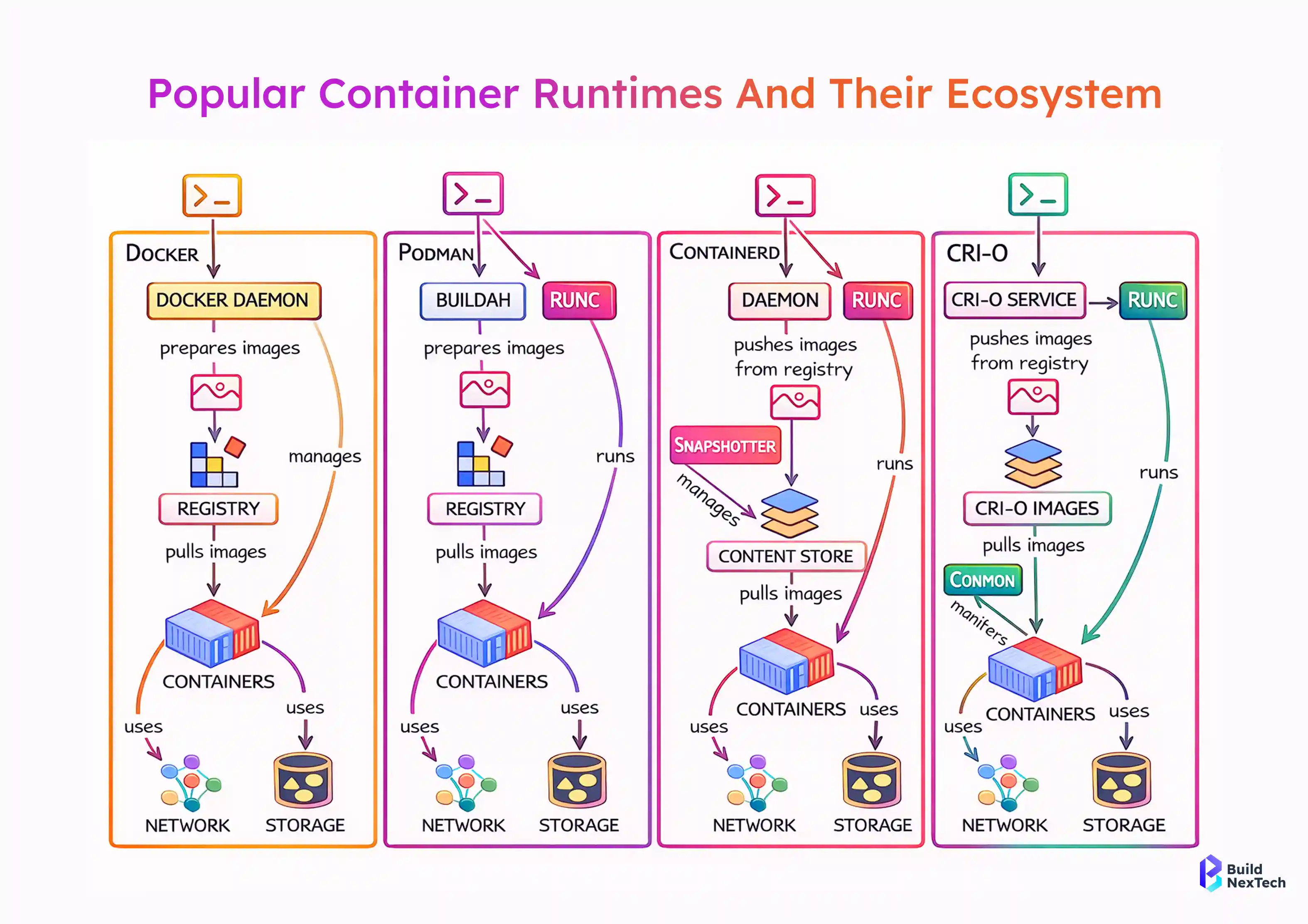
This comparison illustrates how different container engines and runtimes interact with registries, networking, and storage. It helps teams choose the right container runtime based on Kubernetes compatibility, security needs, and operational complexity.
Networking Capabilities and Configuration Management
Networking remains a common discussion point, as Docker and Podman use different networking models that affect ease of configuration, service discovery, and Kubernetes alignment in real-world deployments.
- Docker uses a mature Networking Stack and CNI plugin support
- Podman relies on CNI plugins and Pod Support
- Docker networking easier for beginners
- Podman networking is preferred in Kubernetes-native environments
Teams using OpenShift and Kubernetes often find Podman’s model more consistent.
Storage Management and Persistent Data Handling
Both engines handle image management and volumes effectively, providing reliable mechanisms for storing, sharing, and persisting container data across development, testing, and production environments.
- Docker volumes and bind mounts are widely documented
- Podman uses Skopeo and Buildah for image workflows
- Both support OCI-compliant registries
- Backup strategies similar across engines
Storage choice rarely determines Docker vs Podman decisions in 2026.
Use Cases and Real-World Scenarios
Best Scenarios for Using Docker
Docker remains ideal for fast-moving development teams and local workflows, offering a mature ecosystem, intuitive tooling, and a smooth onboarding experience for developers building and testing container services and containerized applications. containerized applications.
- Beginner-friendly containerization
- Strong community support and tutorials
- Ideal for React, Gatsby, Strapi, and Express Admin
- Excellent Docker Desktop experience
For startups and cloud-native teams, Docker simplifies container adoption and onboarding by providing intuitive tools, extensive documentation, and a mature ecosystem that accelerates development and reduces operational friction.
Ideal Situations for Choosing Podman
Podman excels in enterprise, security, and Kubernetes-aligned environments, where daemonless execution, rootless containers, and tight integration with Linux and OpenShift ecosystems are critical.
- Production Linux servers
- OpenShift and Red Hat ecosystems
- Rootless containers and compliance-heavy workloads
- DevSecOps pipelines with strict isolation
Organizations modernizing container platforms increasingly adopt Podman for long-term scalability.
Conclusion
The Docker vs Podman debate in 2026 is less about feature comparison and more about long-term operational fit. While Docker remains widely used for developer workflows, Podman stands out as the stronger choice for production-grade, security-focused environments.
At BuildNexTech, we recommend Podman for organizations that prioritize enterprise security, compliance alignment, and mature cloud-native operations. Both tools are OCI-compliant and future-ready, but Podman offers a more robust foundation for scaling containers securely across modern infrastructure.
People Also Ask

How do Docker and Podman handle container orchestration?
Docker supports basic orchestration through Docker Compose and Docker Swarm, while Podman focuses on Kubernetes-native workflows and integrates closely with tools like OpenShift.
Is Podman a drop-in replacement for Docker?
Podman is largely a drop-in replacement for Docker, as it supports Docker-compatible CLI commands and OCI images, making migration straightforward in most cases.
Which containerization tool is better for beginners?
Docker is generally better for beginners due to its user-friendly tooling, extensive documentation, and strong community support.
Can I run Docker containers using Podman?
Yes, Podman can run Docker containers because it supports OCI-compliant images and maintains compatibility with most Docker commands.
What are the security advantages of using Podman over Docker?
Podman offers improved security through its daemonless architecture, native rootless containers, and tighter integration with Linux security mechanisms like SELinux.


.webp)
.webp)
.webp)

.webp)
.webp)



