

Kubernetes migration to Amazon Web Services typically begins confidently but ends with a post-mortem. The team finishes the tutorial, understands the architecture, and runs applications on Minikube. However, moving them to Amazon EKS is an entirely new game that impacts your approach to networking, security, deployment, and cost management all at once.
The problem here is not whether you know Kubernetes and Docker or understand what AWS and AWS services are. You simply underestimate what comes with bringing real-world, business applications into AWS using Kubernetes. Beneath the hood of any modern technology stack, there's always Kubernetes. It powers the split-second predictions made by your AI, the stream processing of vast amounts of data, the coordination of armies of intelligent AI agents everything works like a charm behind the Kubernetes curtains. According to bnxt.ai's experience with Kubernetes-to-AWS projects, teams who plan their architecture ahead of migration minimize incident risk by 65–75% in comparison to those who consider it lift-and-shift only.
The following five expert methods can avoid such problems:
- Pre-migration assessment for cluster design that is done in advance.
- CI/CD pipelines migration through shadow deployments.
- Security control enforcement during migration and not after migration is done.
- Application right-sizing and tagging costs right from the beginning to avoid bill shock.
Waves of application migration with testable rollback points.
Organizations that use all five of these methods achieve stable EKS operation six to eight weeks sooner than other organizations and also avoid the remediation of their security problems.
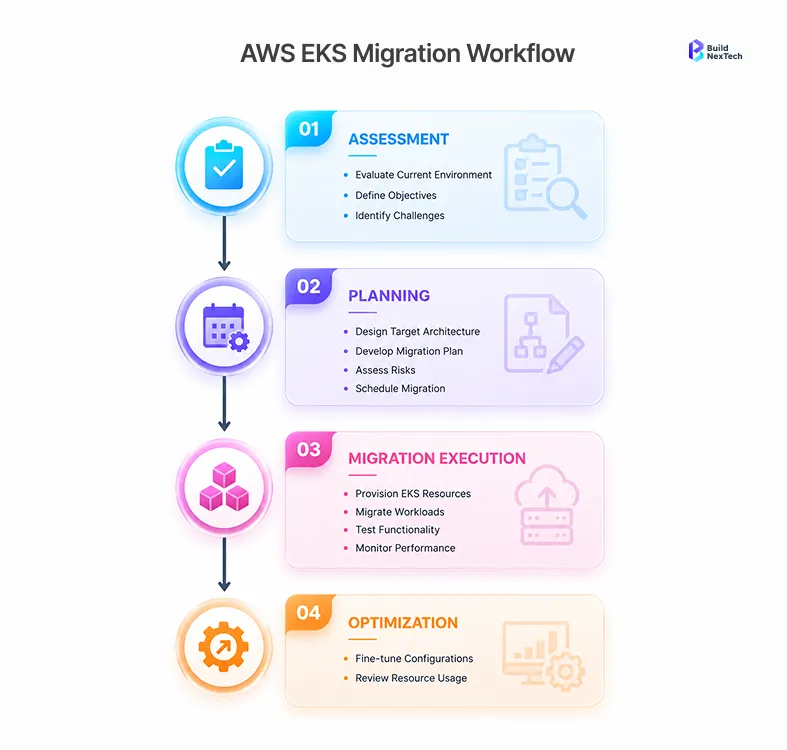
Pre-Migration Assessment: What to Evaluate Before Moving to AWS EKS
This is when a successful migration is either achieved or turned into a weeks-long process. Teams normally rush through this stage because of deadlines, and that’s precisely when things start to go wrong.
How to Inventory Workloads, Dependencies, and Cluster Configurations Before Migration
Pre-Migration Inventory Includes Three Levels:
- Workload inventory – Before you start moving anything, have a full map of all apps – how expensive is it to run them, how much storage do they consume, and how do they behave when something breaks. Stateless applications will almost migrate by themselves, but any application with data storage must have its own VIP path to migration and its own plan.
- Dependency Mapping – Include all internal APIs, third-party services integration, and other application-to-application communication. IPs and DNS hard coding is silently broken in Amazon EKS in case of network model changes.
- Cluster configuration audit – RBAC (Role-Based Access Control), Network Policies, Ingress controllers, and Custom Webhooks. Your risks include differences between existing configurations and Amazon EKS native features.
AWS Migration Hub will help you with an infrastructure inventory. Application layer dependencies should be mapped manually – there is no such tool that could do this job.
Key Questions That Determine Whether Your Team and Infrastructure Are EKS-Ready
- Have you done hands-on management of live clusters on AWS before, or have you worked exclusively with traditional Kubernetes setups?
- Are your containerized applications currently hosted on Amazon ECR, or do you need to arrange this step independently?
- Are your apps truly cloud-native design, or containerized applications running on-premise that have never been re-engineered for cloud?
- Do you use Amazon EKS for running machine learning and/or Agentic AI applications that require GPU node support?
- What is your downtime threshold at cutover? This one answer will determine everything about your cloud migration plan.
What Makes Kubernetes Migration to AWS Uniquely Complex
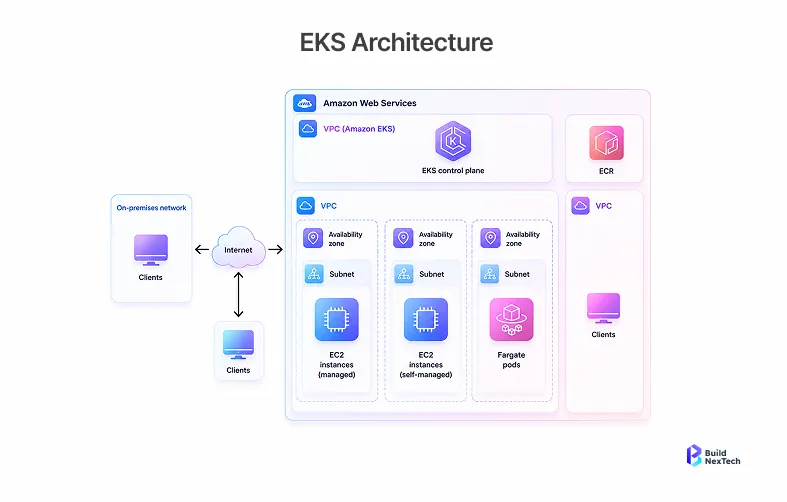
The Gap Between Local Kubernetes and Production-Grade EKS
Running Kubernetes on Minikube teaches mechanics. Amazon EKS adds a managed control plan, VPC-native networking, and an approach to billing such that every architectural choice has associated costs. Migrating to AWS is not going to be simple copy-and-pasting. If you've been using GCP or even running clusters out of your own data centers, you quickly learn that AWS has very definite opinions about networking, security, and storage. And you will have to change them all.
Most common gotchas for teams:
- Networking – The default Amazon EKS uses VPC CNI (Container Network Interface). Pods receive VPC IPs. Small-sized subnets run into exhaustion – aim for /19 or bigger per AZ.
- Nodes – The worker nodes are EC2 instances and hence AWS EC2 hourly pricing comes into effect for every node-hour of every node operating in your cluster. Amazon EKS Auto mode and AWS Fargate can serve as alternative architectures, each with their own AWS EKS pricing implications.
- Load Balancing – EKS load balancing integrates with ALB and NLB through the AWS Load Balancer Controller. Ingress set-ups in pre-existing environments will likely need to be rebuilt to accommodate the new environment.
- Storage – EBS volumes on Amazon EKS behave differently than self-managed clusters. CSI Driver configuration needs special attention, especially in case of data and stateful workloads.
Why Most Teams Underestimate the Scope Before They Start
Even though Kubernetes pronunciations have become a norm when discussing modern work engineering, running Production EKS is something entirely separate. The underestimation of IAM, networking, and AWS cloud integration always stands out because these all require being rebuilt from the ground up. Cloud migration into AWS means a change at the operational level, not only technical. This is observed by bnxt.ai's Cloud migration teams time and again - the gap between having your cluster and running Production EKS is the most frequent cause of post-migration rework.
Challenge 1: Designing the Right AWS EKS Architecture for Scalability and Reliability
Where Cluster Design, Networking, and AZ Planning Go Wrong
- Deployment in a single Availability Zone - If the whole operation happens inside one AZ, then any failure in that particular Availability Zone will bring the whole cluster down. Multi-AZ deployment is mandatory for EKS in production.
- Small subnet size - When using VPC CNI, pods will need VPC IPs. In time, teams will run out of IPs and find themselves having to rethink their architecture.
- All workloads in a single node group - Combining different types of workloads like general computation, business application computing, and artificial intelligence/machine learning computing will either require overspecification or underperformance.
- Not modeling EKS pricing up front - Amazon EKS charges according to the number of clusters, EC2 instances, data transfers, load balancers, and storage. Teams that neglect to do so beforehand will experience billing shock upon launch.
How Experts Structure EKS for Reliability and Cost from Day One
Three node pools in three different AZs using pod anti-affinity. Group nodes based on application type; general business workloads, Data & AI pipelines, and AI/ML workloads on purpose-built instances for the workload. Amazon EKS Auto Mode does node selection and sizing, eliminating the ops gap that comes when transitioning from self-managed clusters to managed services; It picks and provisions the right type of nodes automatically, even provisioning GPU instances used by machine learning models and Agentic AI solutions. AWS Fargate manages burst workloads following cloud-native architecture without having EC2 instances.
Post AWS re:Invent 2025, Amazon EKS Hybrid Nodes is available. It allows for bringing nodes into an Amazon EKS cluster. bnxt.ai's engagement with regulated industry workloads uses Amazon EKS Hybrid Nodes for reducing migration stress; data residency-bound workloads stay on-prem, whereas new services can be provisioned in AWS cloud environment.
Challenge 2: Rebuilding CI/CD Pipelines Without Disrupting Releases
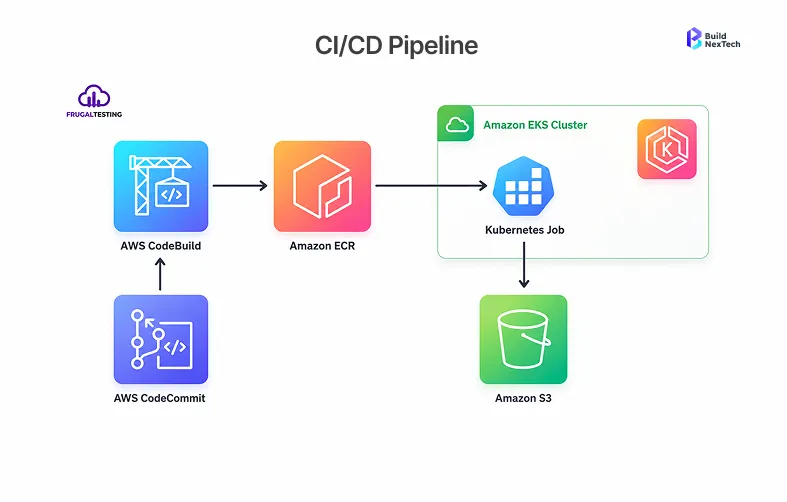
What Breaks in Build, Deploy, and Rollback When Moving to EKS
- The problem is not the definition of what a CI/CD pipeline looks like; the problem is that these pipelines are supposed to integrate into AWS. Things that break every time include:
- Registry authentication - Pipeline processes sending images to Docker Hub have to be altered to work with Amazon ECR; IAM permissions for build servers need to be correct.
- Cluster access - Each CI/CD platform (AWS CodePipeline, GitHub Actions, or any other CI/CD platform) requires IAM-based Amazon EKS cluster authentication; hard-coded kubeconfig files are useless anymore.
- Different manifests - Special annotations in the application manifest, unique ingress classes, and special storage class names have to be taken care of prior to deployment to Amazon EKS.
- No rollbacks - Organizations that have not specified the rollback step of their pipeline as a separate process learn about this during an actual incident.
How Experts Stage Pipeline Migration to Protect Release Velocity
- Dual-registry write - Register to both the old registry and Amazon Elastic Container Registry. Verify that the pulls from ECR work in Amazon EKS before continuing.
- Shadow deployment - Deploy to both clusters but without any production traffic going through Amazon EKS yet. This verifies the manifests and behavior in CI/CD.
- Transition to native AWS tools - Consider the AWS alternatives for CI/CD, such as AWS CodePipeline compared to current CI/CD tools with regard to team ownership.
- Move only after rollback has been verified - A rollback process which hasn't been tested is a theoretical construct.
Challenge 3: Securing IAM, RBAC, and Network Policies Before Go-Live
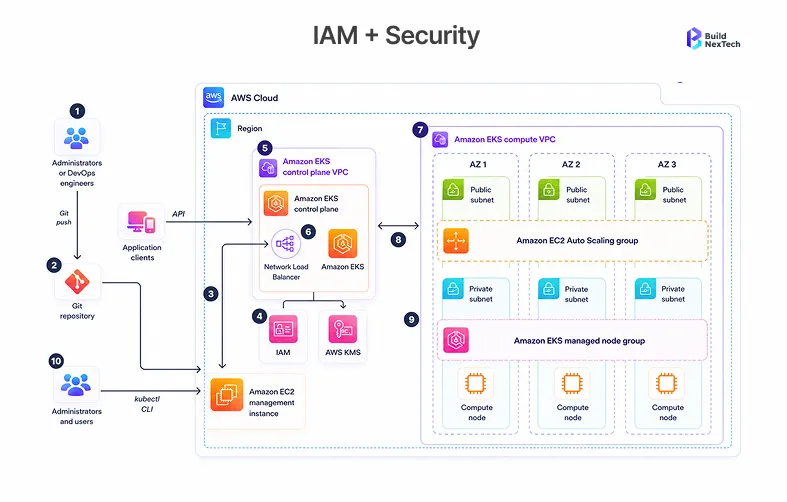
The Most Common IAM and RBAC Gaps Teams Miss During Migration
- Excessive node permissions – Only necessary access is required for nodes: EC2 instance role with ECR read and AWS S3 bucket permissions when needed. IAM permissions assigned in bulk on EC2 instances' node roles are the quickest way for an account to get hacked.
- No IRSA(IAM Roles for Service Accounts) – If pods need any kind of AWS resources, they need to use IRSA and not the instance role that assigns the same permissions across all pods running on the node.
- Dev RBAC in prod – The whole idea behind dev RBAC is its permissive nature. The average time taken by clients in bnxt.ai’s enterprise migrations to fix security in production is 3-4 weeks post go-live.
How Secrets and Network Policies Get Overlooked Under Migration Pressure
For EKS clusters running Kubernetes 1.28 or higher versions, AWS KMS v2 enables encryption through an envelope for Kubernetes API data by default. But if your EKS cluster is running a version lower than 1.27, then you have to manually enable secret encryption. Additionally, during the migration process, one has to ensure that the version number is greater than 1.27 to ensure that the secret encryption is active. In all cases, ensure that you audit your KMS keys and that there are no secrets in Kubernetes Secret format when using AWS Secrets Manager. The enforcement of network policy in Kubernetes is equally deferred since VPC CNI will not enforce Kubernetes NetworkPolicy unless it’s enabled.
How Experts Enforce Least-Privilege Access and Harden Security Before Go-Live
Security controls are migration gate controls, not post-migration activities: ensure that KMS encryption is enabled prior to loading secrets into the system; configure IRSA for all workloads accessing any AWS managed services; test RBAC using kubectl auth can-i --list; establish default-deny NetworkPolicy in each namespace; prefer AWS Secrets Manager over Kubernetes Secrets wherever feasible. As part of a multi-agent AI deployment in Amazon EKS, security controls need to be extended to include the boundaries between Model Context Protocol servers, as AI agents follow the least privileged IAM paradigm as well.
Challenge 4: Preventing Cost Overruns and Operational Waste
Why Lift-and-Shift Kubernetes Creates Immediate Billing Problems on AWS
The on-premises cluster is designed based on peak capacity needs. In the case of using an AWS cloud platform, the charge for each hour that each node is used must be paid. The “Lift-and-Shift” model transfers the problem of over-provisioning to the pricing of AWS EC2. The inclusion of idle load balancers that incur charges per hour, cross-AZ data transfer fees which no one had ever modeled, and the utilization of EBS volumes within the wrong storage class will all combine to make your first AWS invoice shocking.
How Experts Right-Size, Autoscale, and Govern Spend From the Start
- Karpenter over Cluster Autoscaler – Designed for Amazon EKS, ensures proper matching between node types and the workload. Particularly useful for machine learning tasks that require GPU scaling.
- HPA based on application metrics – The rate of requests or number of items in queue better represents the load than CPU utilization. Suitable for business applications with predictable traffic.
- Cost tracking through tag usage since Day One – All resources in Amazon EKS get tagged according to the team, environment, and application. Without tags, analyzing costs turns into forensics.
- Scaling on schedule in non-production environments – Predictable idle periods are easiest to exploit when reducing costs on AWS infrastructure.
Challenge 5: Moving Applications to EKS Without Breaking Dependencies
Where Stateful Apps, Databases, and Service Meshes Break During Migration
Stateless components in a microservices application behave in a predictable way when migrated. Stateless components don't behave in a predictable way. Databases must perform snapshot, restore, validation, and cutover in a minimum-write window process. Message queues must be drained prior to cutover. Storage class mapping of the EBS volumes attached to stateful pods needs to be validated before migration. The machine learning pipeline that has dependencies on datasets hosted on Amazon S3 needs verification of connectivity in the target VPC.
How Internal APIs and Third-Party Integrations Fail Silently on EKS
Silent failures occur days post go-live due to the following three factors: caching of the old in-cluster DNS address by an internal API client; allowing only the old egress IP for webhooks instead of allowing the new NAT gateway IP for the VPC in the webhook allowlist; difference in load balancer behavior between the old ingress and the new Application Load Balancer. These do not seem like errors when go-live occurs because it is hard to trace back.
How Experts Define Migration Waves, Rollback Checkpoints, and Service Readiness Gates
Wave 1: Stateless validation
Stateless and low-risk services. Validate the networking, CI/CD pipeline, and managed services connectivity for Amazon EKS before any critical work is done. Amazon EKS Auto Mode takes care of node provisioning without requiring configuration.
Wave 2: Migration of internal services
Internal services that depend on Wave 1, and have readiness gates including: health checks, integration testing, and connectivity tests to the dependent systems. Amazon EKS Auto Mode will still take care of nodes’ lifecycle, leaving us only doing application-level validation.
Wave 3: Critical path and stateful workloads
Stateful workloads, business applications critical path, and AI/ML jobs. Rollback capability tested, agreed maintenance windows, and a pre-defined abort condition.
The rollback checkpoints should include traffic routing rollback either by DNS or load balancer, the database snapshot taken just before migration and previous image tags on the old cluster. Make sure you can rollback in under fifteen minutes or it is not a rollback but rather a slow recovery process.
When to Bring in Expert Help for Your Kubernetes-to-AWS Migration
Signs Your Internal Team Is Carrying Too Much Migration Risk
- Strong Kubernetes experience but limited Amazon EKS production exposure.
- Timeline fixed by a business deadline, not technical readiness.
- Running Agentic AI, machine learning, or Data and AI workloads with no EKS deployment experience.
- Undocumented cluster configurations held by two or three people.
- Compliance requirements are adding review overhead beyond available bandwidth.
bnxt.ai's structured migration engagement compresses risk through three elements that generic consulting firms rarely combine:
- Architectural review before cutover to catch design flaws before they are built into production.
- Dependency mapping and CI/CD shadow staging that validates cluster readiness without risking live traffic.
- Security hardening enforced as a migration gate - IAM, RBAC, and NetworkPolicy validated before any workload goes live, not after. This approach has delivered 6–8 weeks faster time to stable EKS operations and reduced post-migration security rework from 3–4 weeks to zero across mid-market engineering teams.
What a Structured Migration Engagement Actually Delivers
Cloud migration services add pattern-matched experience that compresses risk: architecture review before mistakes get built in; security hardening validated against the actual cluster; wave planning from real dependency analysis; runbooks written for the specific environment. bnxt.ai's structured migration engagements have helped mid-market engineering teams reach stable EKS operations 6–8 weeks faster than self-managed transitions, with zero post-migration security rework for teams that completed the hardening gate before go-live.
Teams that lack AWS EKS production experience, face business-driven timelines, or manage Agentic AI and machine learning workloads should consider engaging AWS EKS migration consultants early. bnxt.ai's cloud migration services have helped dozens of mid-market companies avoid these five failure modes by providing kubernetes to aws migration expertise that compresses the path to stable operations - without the security debt that self-managed migrations typically carry.
The Cost of Getting Kubernetes Migration Wrong on AWS
Visible costs: extended timelines, AWS bills higher than projected, and engineering hours spent debugging EKS-specific failures. The invisible costs compound longer operational debt in cluster architecture that limits platform evolution for years; security gaps that never get reprioritised once the cluster is live; and team confidence damage that the next infrastructure initiative inherits. These costs show up in sprint boards, cloud invoices, and post-mortems. The fix that holds across all five challenges is architectural - not another plugin, not another runner, not another workaround.
Conclusion
Amazon EKS, as a managed service, reduces long-term operational overhead. Cloud migration AWS tooling, like AWS Migration Hub, makes workload tracking manageable. The broader AWS managed services ecosystem - IAM, CloudWatch, Amazon ECR, Secrets Manager - reduces glue code that cloud-native architecture teams otherwise build themselves. Teams that complete all five stages - assessment, architecture, CI/CD migration, security hardening, and wave-based rollout - consistently reach stable EKS operations without the rework that skipped steps produce.
The five challenges in this article are the standard failure modes, not edge cases. Teams that navigate them well treat pre-migration assessment as seriously as the migration itself. Start with a hard look at your cloud migration strategy. If it does not cover dependency mapping, EKS architecture review, pipeline sequencing, and security controls before go-live, build that foundation first.
bnxt.ai's structured migration engagement compresses risk through three elements that generic consulting firms rarely combine:
- Architectural review before cutover to catch design flaws before they are built into production.
- Dependency mapping and CI/CD shadow staging that validates cluster readiness without risking live traffic.
- Security hardening enforced as a migration gate - IAM, RBAC, and NetworkPolicy validated before any workload goes live, not after.
This approach has delivered 6–8 weeks faster time to stable EKS operations and reduced post-migration security rework from 3–4 weeks to zero across mid-market engineering teams. To plan a cleaner path to Amazon EKS, visit bnxt.ai.
People Also Ask

What are the biggest Kubernetes migration challenges when moving workloads to AWS?
The five most significant are EKS cluster architecture design, CI/CD pipeline rebuilding, IAM and RBAC security configuration, cloud cost management, and application dependency migration. Teams running machine learning, Data and AI, or Agentic AI workloads face additional complexity around GPU node configuration and model serving on Amazon EKS.
How do AWS EKS migrations reduce Kubernetes operational risk?
Amazon EKS is a managed service - AWS operates the control plane, handles version upgrades, and integrates natively with IAM, Amazon ECR, ALB, and CloudWatch. Amazon EKS Auto Mode further reduces the burden by managing node lifecycle automatically, especially valuable for AI/ML workloads scaling dynamically.
What should teams check before migrating on-premise Kubernetes clusters to AWS?
Pre-migration assessment should cover workload and dependency inventory, cluster configuration export, IAM and RBAC gap analysis, subnet planning for VPC CNI, CI/CD AWS integration requirements, and stateful workload sequencing. AWS Migration Hub helps at the infrastructure layer; application dependency mapping requires manual review.
How does CI/CD change during a Kubernetes migration to AWS?
The CI/CD pipeline needs updating for Amazon ECR, IAM-based Amazon EKS authentication, EKS-specific manifest configuration, and tested rollback stages. Migrate the pipeline in parallel using shadow deployments - never simultaneously with the cluster cutover.
When should a business use cloud migration consulting for Kubernetes on AWS?
Cloud migration services add the most value when the team has limited Amazon EKS production experience, the timeline is business-driven, or workloads include Agentic AI, machine learning inference, or multi-agent AI systems. bnxt.ai's structured engagements consistently deliver 6–8 weeks faster time to stable operations and eliminate the 3–4 week security remediation cycle that self-managed migrations typically incur.


.webp)
.webp)
.webp)

.webp)
.webp)



