

Release day always exposes the truth, usually at the worst possible moment. Somewhere between the final merge and the deploy button, someone asks a question no dashboard can answer on the spot: are we actually safe to ship? Silence follows. Not because the team lacks skill, but because nobody agreed, months earlier, on what "tested" actually means. A regression slips through a gap two people assumed someone else was covering, and the whole release stalls over a definition nobody ever wrote down.
That gap is exactly what software testing basics fix. Get the vocabulary, the levels, and the types straight, and the rest stops being guesswork: which checks matter, which tools earn their keep, and where automation genuinely pays for itself. This guide walks through every layer a working QA team relies on, from the smallest unit test to the AI-native automation reshaping how fast teams can move without losing confidence in what they actually ship.
What Is Software Testing? (Verification vs. Validation)
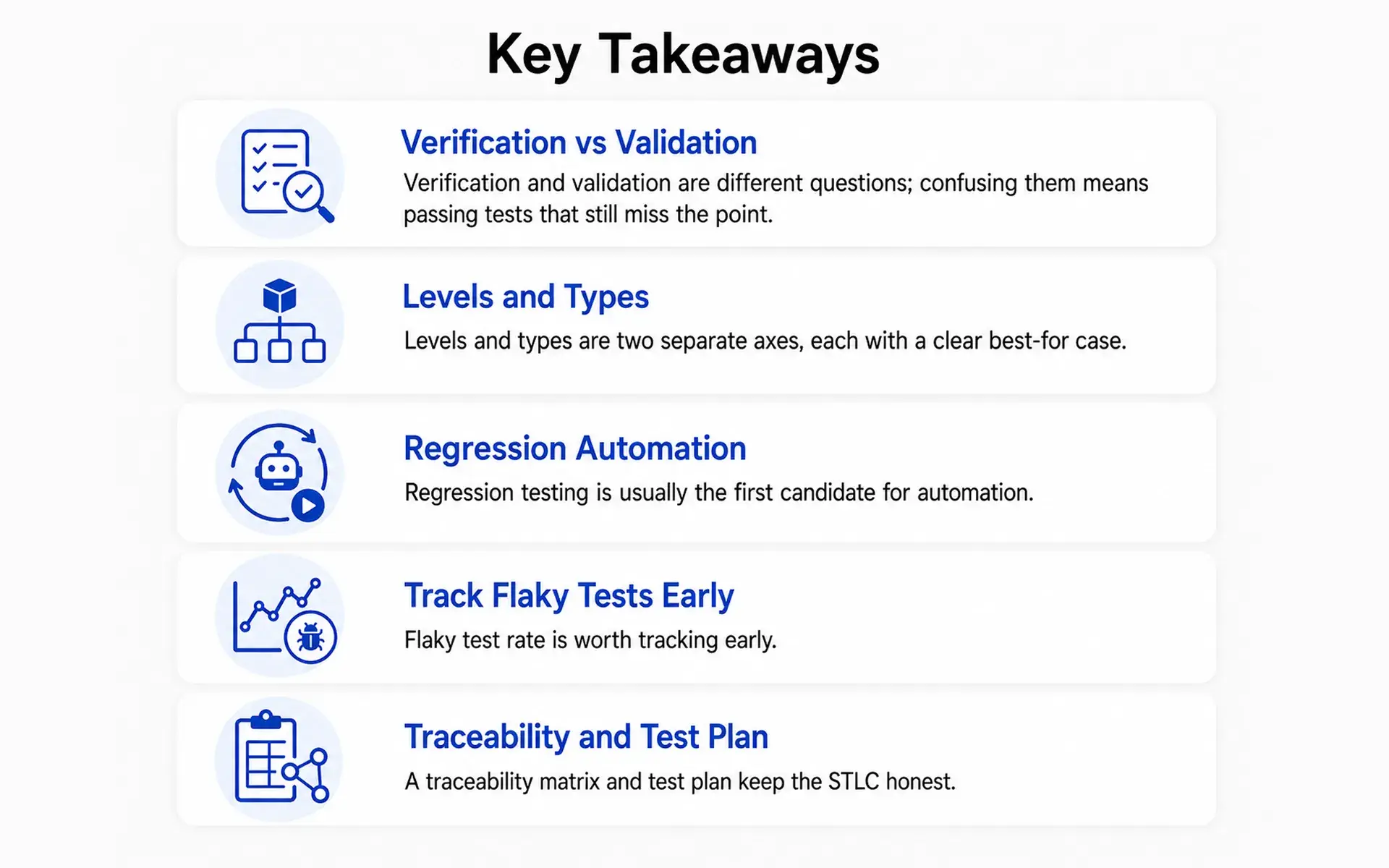
Software testing is the systematic evaluation of software products against their requirements. The verification vs validation split sits at its centre: verification asks "did we build the thing right?" validation asks "did we build the right thing?"
Testing splits into static and dynamic testing: static reviews source code without running it; dynamic means executing the software.
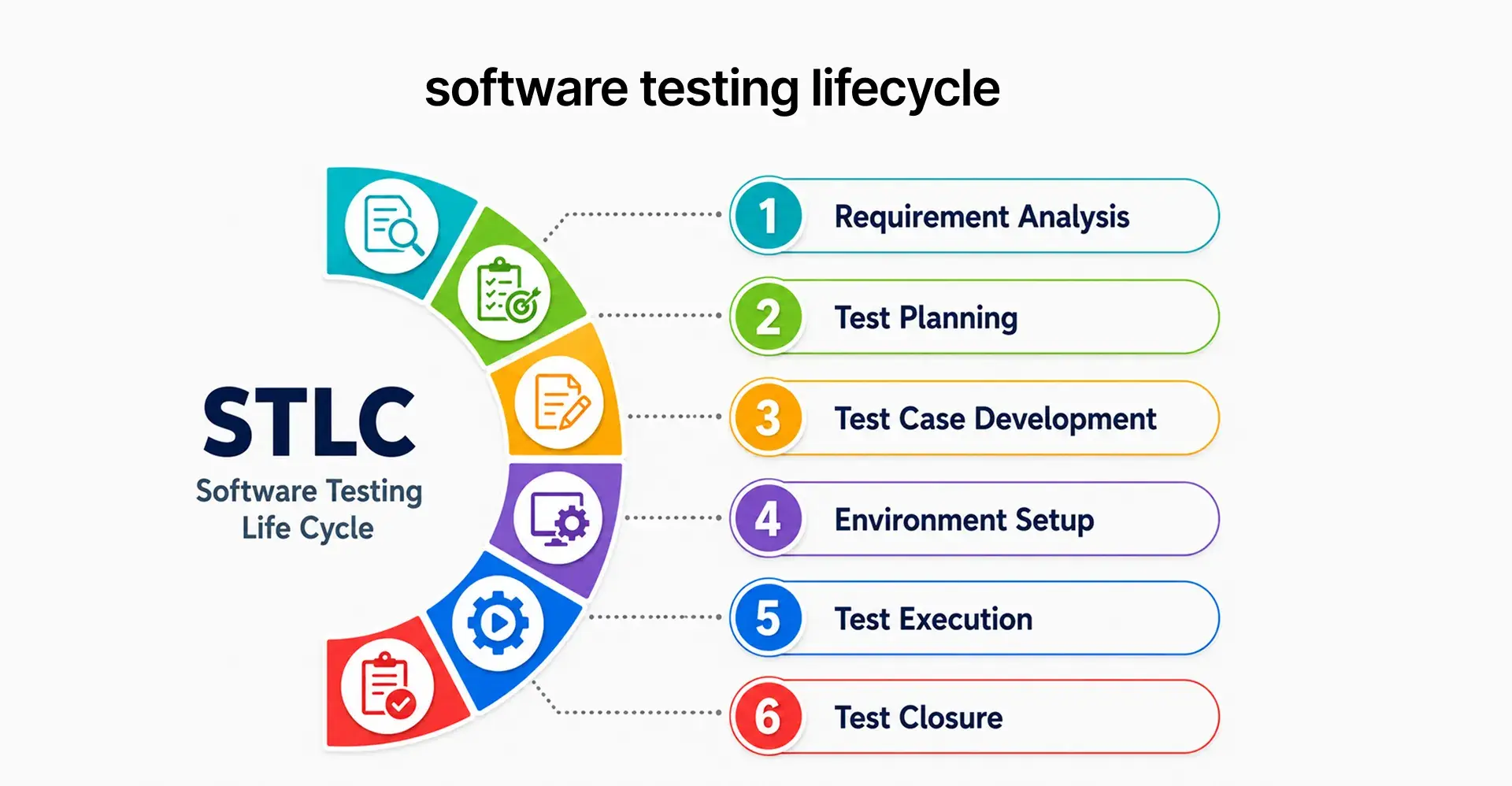
This sits inside the software testing life cycle, or STLC: requirements analysis, test planning, test execution, and defect management. A test manager owns the test plan and traceability matrix, while QA engineers and a test analyst handle test creation, with testing models favouring shift-left testing under agile development.
Defect vs. Bug vs. Failure: Getting the Vocabulary Right
One chain of cause and effect, not three separate problems.
Chasing fewer bugs without tracking failures often means fixing code that was never the real source, while the failures customers actually hit keep eroding user trust.
The Levels and Types of Software Testing
Levels answer where in the build a test runs. Types answer what it checks for. Coverage applies the same way whether the surface is web, mobile app testing, or an API.
Unit Testing: Validating a Single Function or Method in Isolation
Unit testing validates a single function or method in isolation, everything else mocked out.
- Why: catches logic errors early, before they spread.
- Where: on every commit; the cheapest layer of white-box testing, since the writer sees the source code.
- Best for: pure logic; the layer teams practising test-driven software development write first.
Module Testing: Validating a Complete Component Before Integration
Module, or component, testing validates a fully assembled unit with real internal wiring, one step above unit tests.
- Why: confirms a piece behaves correctly with fewer mocked dependencies.
- Where: after unit tests pass.
- Best for: components with real logic.
Integration Testing: Where Components Meet
Integration testing checks how modules, services, APIs, and databases behave once combined.
- Why: most incidents start here, where two correct pieces combine into failures.
- Where: after module testing, inside a test suite exercising real connections.
- Best for: API-to-database handoffs.
System Testing: Validating the Whole Product
System testing evaluates the fully integrated application inside a test environment mirroring production.
- Why: confirms the user interface and backend work together as a user would.
- Where: just before acceptance testing.
- Best for: full workflows like sign-up or checkout.
Acceptance Testing: Confirming It's Ready for Users
Acceptance testing is the final validation confirming the system meets business requirements before release.
- Why: gives formal sign-off that the build is ready.
- Where: right before release, the last gate in the STLC.
- Best for: release decisions.
Functional Testing: Does the Feature Do What It's Supposed To?
Functional testing is black-box testing: inputs go in, expected outputs come out, no source code required.
- Why: confirms functional validation without caring how the code works.
- Where: across web, mobile app testing, and API surfaces.
- Best for: feature acceptance criteria.
Non-Functional Testing: Performance, Security, and Usability
Non-functional testing checks how the system behaves under real conditions, not just whether a feature works.
- Why: protects user experience under load or on an unfamiliar device.
- Where: performance tests, performance checks, volume testing, security testing, accessibility testing, cross-browser testing, and gorilla testing on one module.
- Best for: launch readiness touching scale, security, or devices.
Regression Testing: Why It's the One You Can't Skip
Regression testing re-runs prior test cases after a change, confirming nothing that worked before silently broke.
- Why: change is the biggest source of new defects; regression testing is the safety net.
- Where: on every release, usually first candidate for automation.
- Best for: stable features repeatedly touched by unrelated changes.
Smoke Testing: Is the Build Even Stable Enough to Test?
Smoke tests are a broad, shallow check on a new build, confirming critical functions work.
- Why: rejects a broken build early.
- Where: right after deploy to a test environment.
- Best for: fast go or no-go decisions.
Sanity Testing: Did This Specific Fix Actually Work?
Sanity testing is a narrow check run after one specific fix or minor change.
- Why: confirms the fix works without repeating the whole suite.
- Where: right after a bug fix.
- Best for: quick confidence checks on small changes.
API Testing: Validating the Contracts Between Systems
API testing verifies an endpoint returns the right data, shape, and status code, independent of any user interface.
- Why: catches contract violations cheaply, before they surface in the browser.
- Where: directly against the API layer, often with Postman.
- Best for: systems agreeing to exchange data.
End-to-End Testing: Validating the Full User Journey
End-to-end testing validates a complete workflow, UI through backend through database, as a real user would experience it.
- Why: gives the highest confidence of any test type, exercising the whole system at once.
- Where: on critical paths, kept small since it's the slowest layer to maintain.
- Best for: workflows where failure does the most damage, capped at 5-10% of a test automation pyramid.
User Acceptance Testing (UAT): Sign-Off From the People Who'll Actually Use It
UAT is the flavour of acceptance testing where real end users or stakeholders, not the test team, validate the software.
- Why: catches gaps no other level can; a system can pass every technical test and still miss the business need.
- Where: right before release, run by a User Acceptance Tester, not a QA engineer.
- Best for: confirming user experience and business fit.
Comparison Table: Manual Testing vs. Traditional Automation vs. AI-Native Testing
Every team chooses between three ways to run a test suite. Manual testing means a person executes a test case by hand, useful for exploratory work no script can make. Traditional automation turns that check into a test script running inside a CI/CD pipeline, via Azure DevOps, GitHub Actions, or other CI/CD tools, through continuous integration and continuous delivery. This automation testing is fast to run but costly to maintain: a UI change breaks a locator, which breaks the test script, and QA teams lose time, which is why flaky test rate is worth tracking early.
AI-native testing changes the maths. Generative AI and machine learning, built on natural language processing, support natural-language test authoring: describe a scenario in plain English and get a working script back. Self-healing test automation adapts to UI changes without a manual fix, a practical form of AI-assisted testing that removes the old maintenance tax.
Software Testing Tools: What a Modern Stack Actually Looks Like
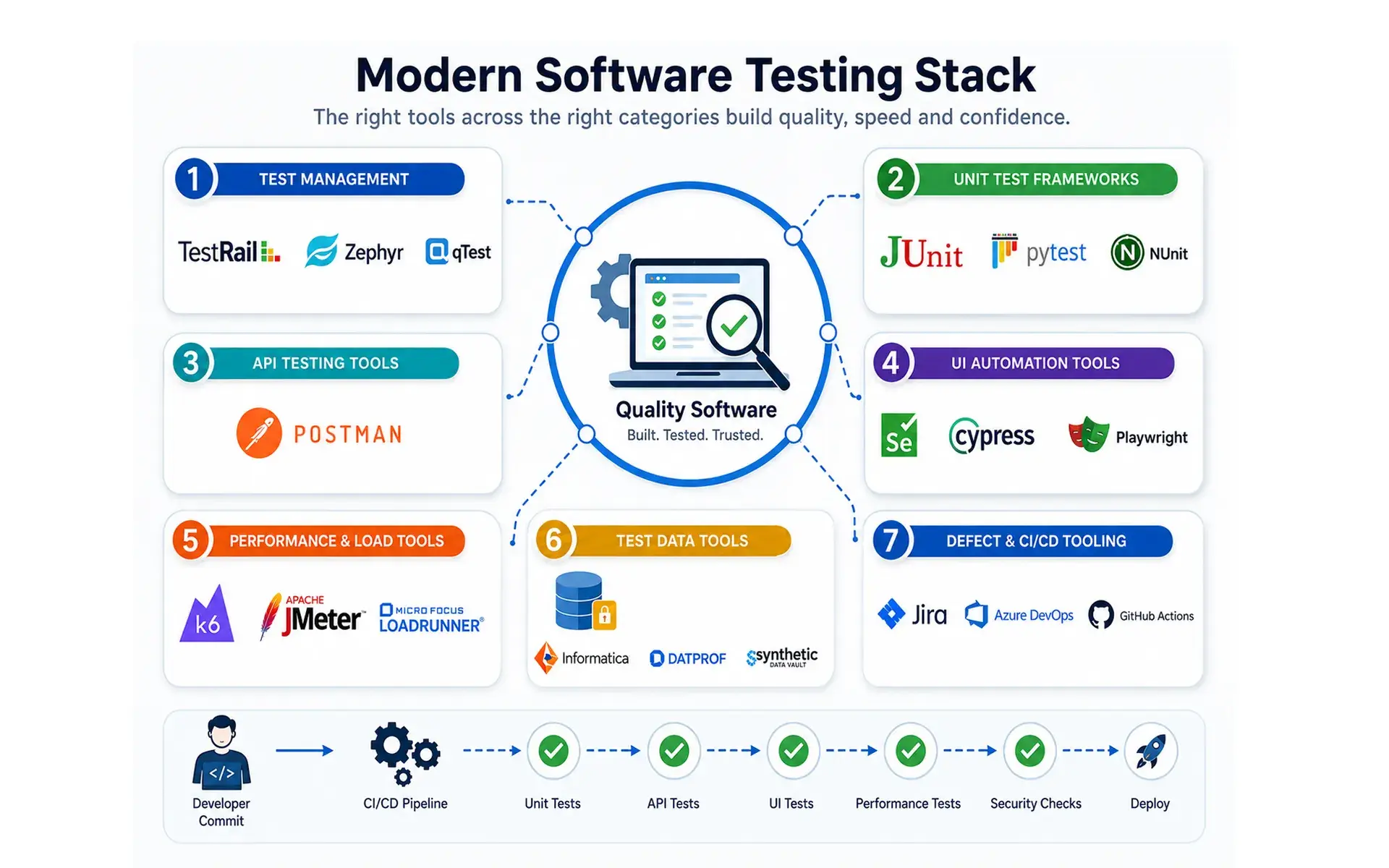
A working stack needs a few categories covered, not a pile of point solutions:
- Test management: a test folder, a traceability matrix linking requirements to tests, and the test plan.
- Unit frameworks: closest to the source code, keeping unit testing fast on every commit.
- API testing tools: Postman validates contracts, checking response shape and status codes.
- UI automation tools: test automation frameworks like Selenium, Cypress, and Playwright drive regression and end-to-end testing.
- Performance and load tools: performance tests and volume testing before a traffic spike.
- Test data tools: support Test Data Management with realistic, anonymised test data.
- Defect and CI/CD tooling: defect management tracks every software bug to its requirement, while CI/CD pipelines in Azure DevOps or GitHub Actions decide what runs.
Choosing Between Open-Source Frameworks and AI-Native Platforms
Open-source frameworks give maximum control at zero licence cost, but that cost moves into engineering time, favouring AI-native platforms for teams that cannot staff a dedicated engineer per surface, mobile app testing included.
How BNXT.ai Helps You Turn Testing Basics Into a Scalable Practice
BNXT.ai's AI-native test authoring and self-healing automation moves teams from "we understand the basics" to "coverage running in CI" without a dedicated automation hire. Teams describe scenarios in plain language, using natural language processing to turn that into working coverage. Our agents generate and maintain automation across unit, API, and end-to-end layers, so regression testing runs without constant fixes, and test analytics showQA teams's flaky test rate improving. A logistics client went from zero coverage to production-ready coverage in under two weeks, a timeline that used to take a quarter and a hire.
What a BNXT.ai Testing Implementation Looks Like
Days one to three cover discovery of critical user journeys. Days four to seven produce generated tests for QA Engineers to review. By week two, the suite is integrated into CI/CD pipelines, and test creation continues as part of the test lifecycle.
Who This Is For
Engineering teams past product-market fit, shipping weekly, without a dedicated QA automation function: maintenance eating more time than new coverage, releases stalling on regression, or evaluating build versus buy.
Conclusion
Software testing basics are not a checklist to tick off once. They are vocabulary, structure, and decisions about manual testing, automation testing, and AI-assisted testing, decisions that shift as release velocity climbs. Get the fundamentals right early, and the test suite scales with the team. The teams pulling ahead are the ones whose QA teams keep pace.
People Also Ask

What are the basics of software testing every beginner should know?
Three layers matter most: vocabulary like defect versus bug versus failure, structure covering levels and types, and practice, meaning manual testing, automation testing, and AI-assisted testing.
What's the difference between unit testing and module testing?
Unit testing isolates a single function or method using white-box testing techniques. Module testing validates a fully assembled component with real internal wiring, using fewer mocked dependencies.
What's the difference between smoke testing and sanity testing?
Smoke tests are broad and shallow, run on a new build to confirm basic stability. Sanity testing is narrow and deep, run only after one specific fix.
What's the difference between API testing and end-to-end testing?
API testing verifies the contract between systems directly, independent of the user interface. End-to-end testing verifies the full user journey through the UI, and it costs more to maintain.
When should a team move from manual testing to a dedicated automation platform?
When maintaining manual test cycles starts limiting how often the team ships, that is the trigger to evaluate automation tools and platforms, including AI-native options for smaller QA teams.


.webp)
.webp)
.webp)

.webp)
.webp)



