


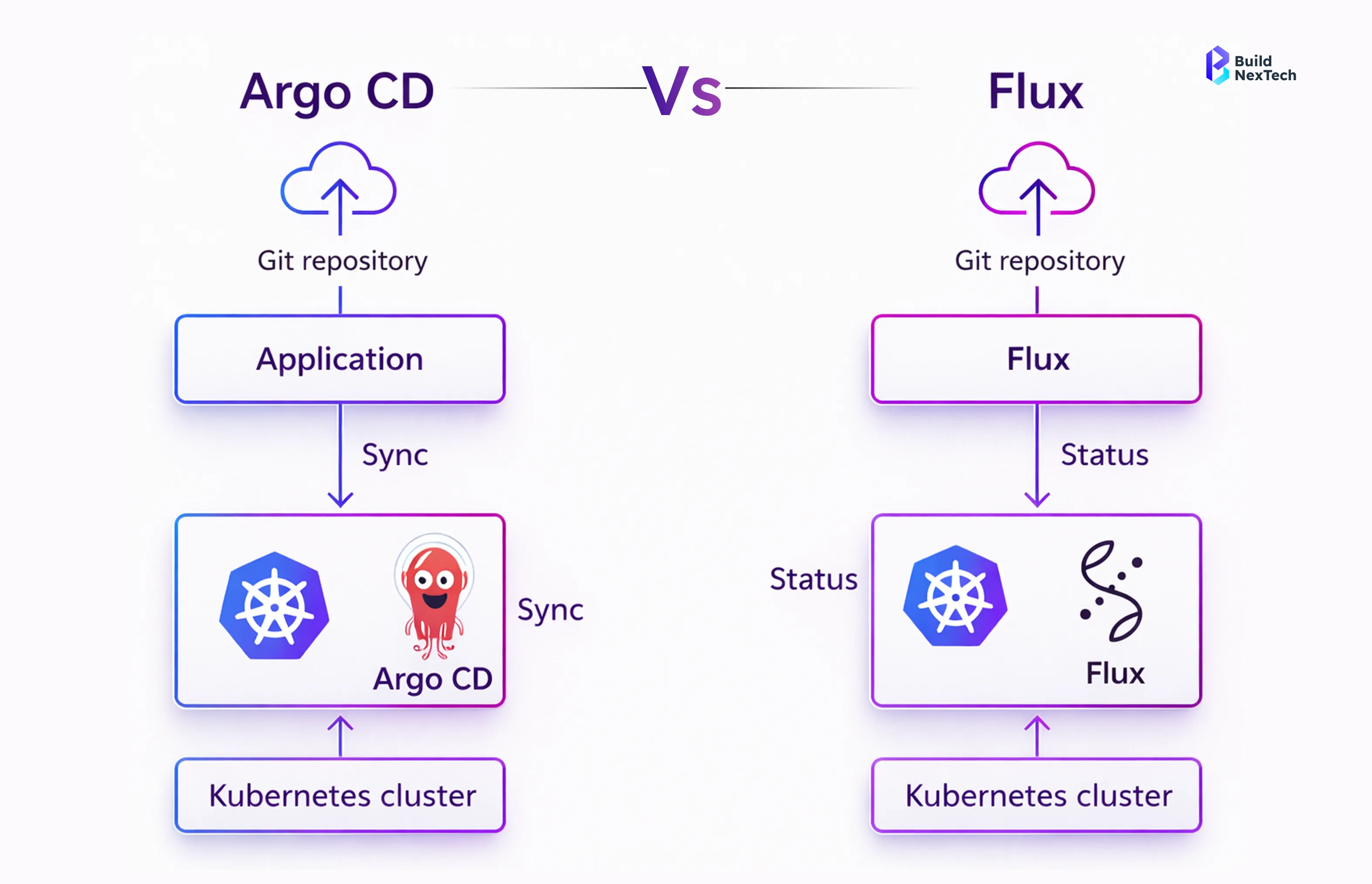
ArgoCD and FluxCD are the two most popular GitOps tools for Kubernetes but choosing between them isn’t always straightforward.
Both automate deployments using Git as the source of truth, but they differ in architecture, usability, and real-world use cases.
If you’re deciding which one fits your setup, this guide breaks down ArgoCD vs FluxCD in simple terms including key differences, when to use each, and which tool is better for your team.
- GitOps aligns software development workflows with Git-based version control
- Kubernetes-native tools enable automated deployment and rollback
- CI/CD pipelines benefit from transparency and repeatability
- GitOps enables different deployment models, including UI-driven and automation-first approaches
- Tools like Argo CD and Flux CD address different operational and scaling requirements in Kubernetes CI/CD
- Choosing the right GitOps tool depends on visibility, automation needs, and team workflows
As cloud adoption grows across regions like North America, Europe, and Asia-Pacific, GitOps provides a standardized operational model that works across Google Cloud Platform, on-prem data centers, and hybrid SaaS platforms.
ArgoCD vs FluxCD: Quick Comparison
- ArgoCD → Best for UI-based management and ease of use
- FluxCD → Best for Git-native workflows and automation
Choose ArgoCD if you want visibility and control
Choose FluxCD if you prefer lightweight, Git-driven operations
Understanding GitOps for Kubernetes Deployments
Definition of GitOps and Its Core Principles
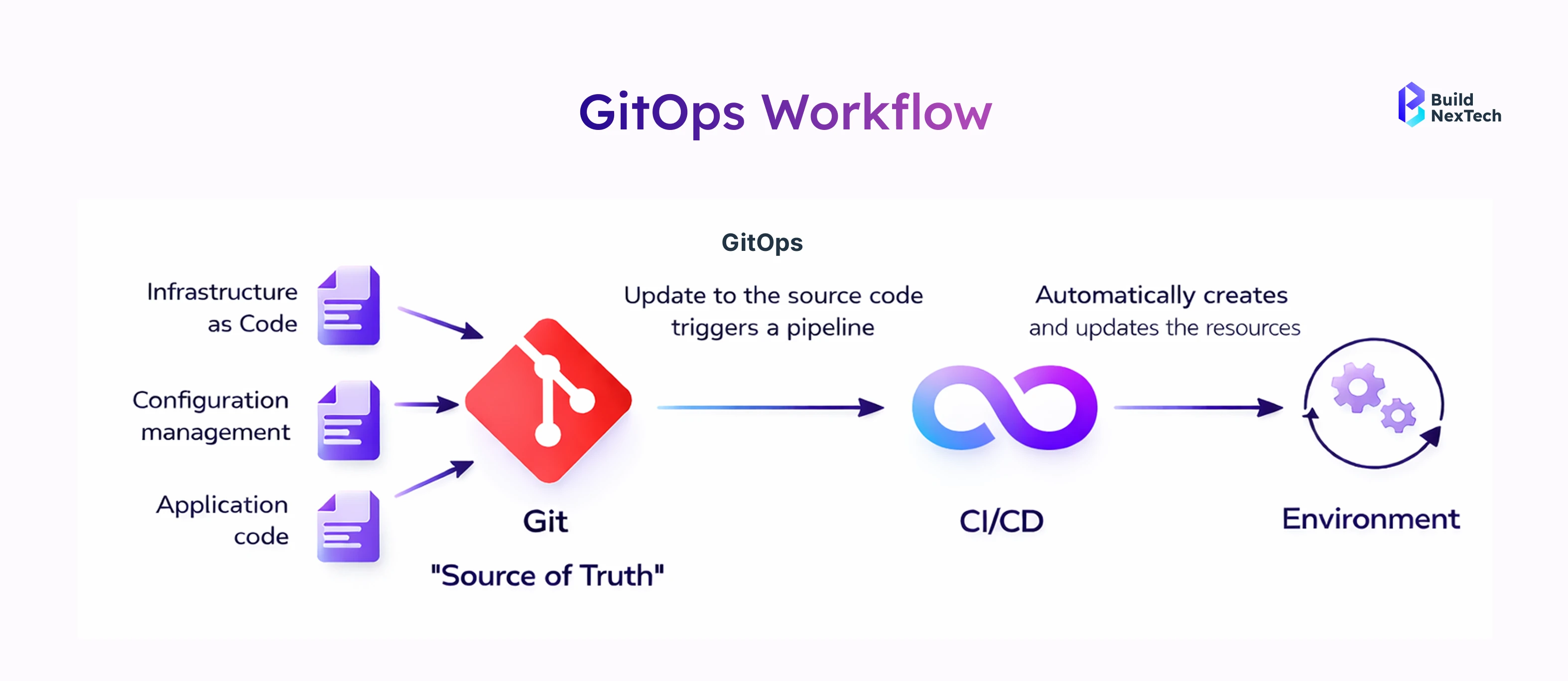
GitOps is an operational framework where Git repositories define the desired state of systems, and automated agents reconcile that state with live Kubernetes clusters. It emphasizes application-centric workflows rather than imperative scripts.
- Declarative infrastructure stored in Git
- Continuous reconciliation using controllers
- Automated change tracking and rollback
This model, championed by the Cloud Native Computing Foundation, ensures that Application Management is auditable, secure, and scalable. For DevOps Engineers managing global deployments, GitOps reduces configuration drift while supporting multi-cluster support and cluster provisioning.
Key Benefits of Implementing GitOps in CI/CD Pipelines
Why are CI/CD platforms shifting toward GitOps? The answer lies in speed, reliability, and governance. GitOps integrates naturally with existing CI systems while improving deployment confidence.
- Faster Continuous Delivery with fewer manual steps
- Improved security using Sealed Secrets and Helm Secrets
- Built-in garbage collection and sync policies
By enabling self-service environments and ephemeral environments, GitOps empowers teams to experiment safely while maintaining compliance—an approach increasingly adopted by enterprises using bnxt.ai for large-scale Kubernetes operations.
Overview of ArgoCD as a GitOps Deployment Tool
Core Features and Capabilities of ArgoCD
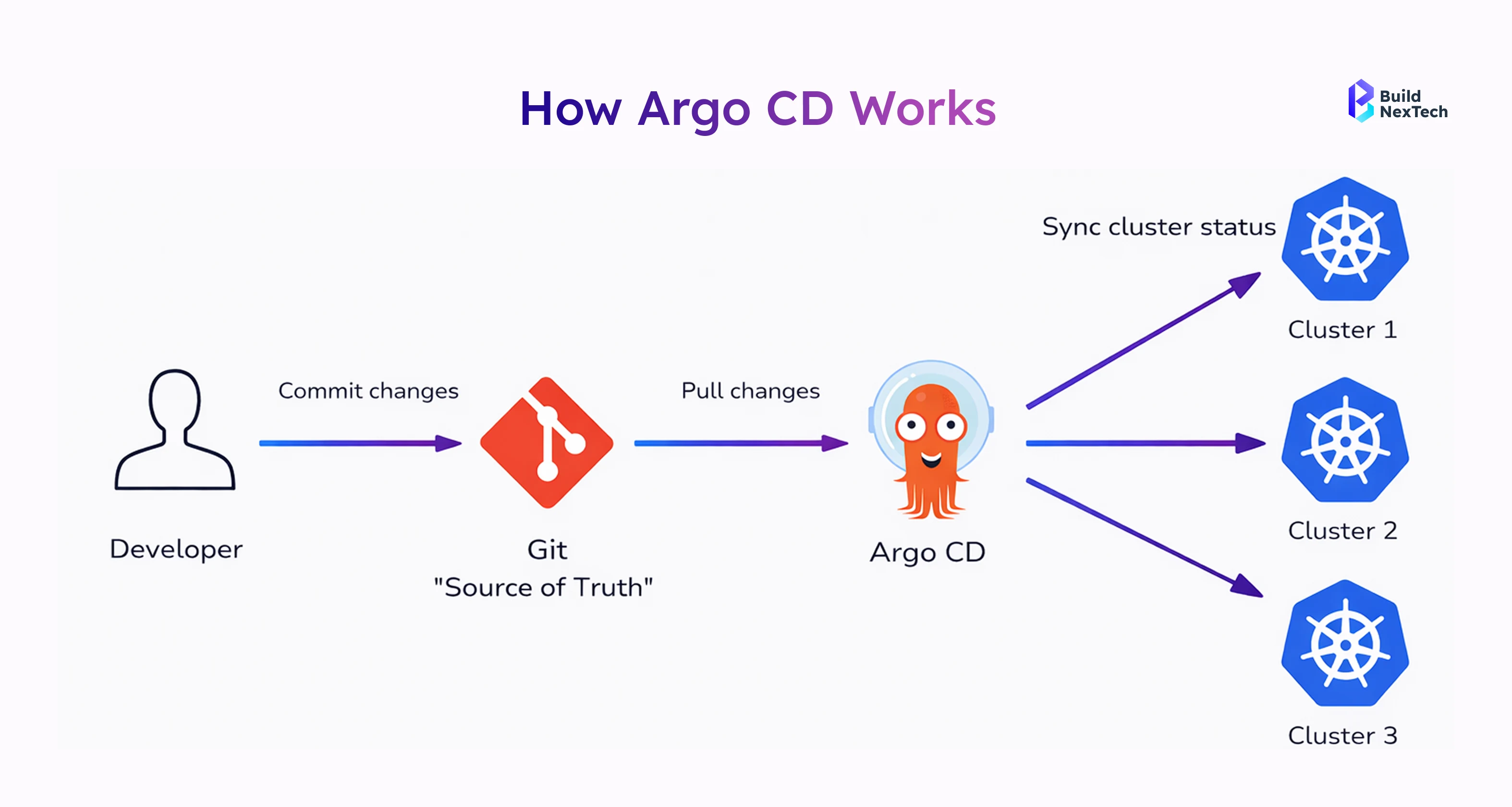
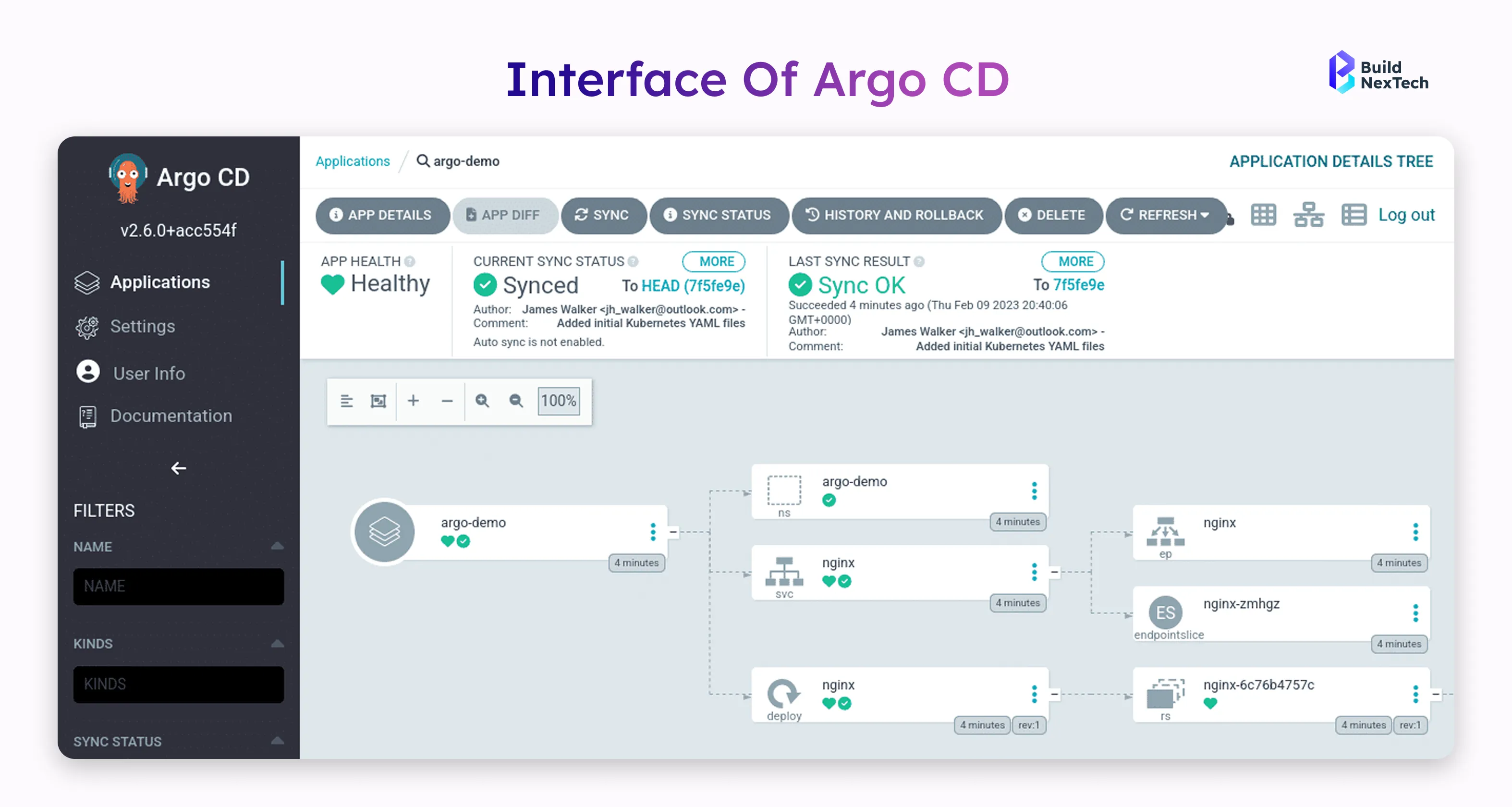
Argo CD is a Kubernetes-based tool for using GitOps as a means of continuous delivery. It allows users to deploy and manage applications based on configuration files stored in Git, using a declarative approach. As performance of an application changes over time (in the underlying infrastructure), Argo CD automatically detects any discrepancies between how a user intended for it to operate and how it actually is operating; this is called "drift." Argo CD provides visualizations of drift to assist users in correcting them. With the ability to deploy applications across multiple clusters and to combine multiple applications into a single group, Argo CD gives teams control and visibility into their entire microservices architecture while maintaining consistency in all environments.
- Rich Web UI with single sign-on and REST API
- Advanced sync waves, Sync Windows, and sync policies
- Native support for Helm Chart, Kustomize, and OCI images
ArgoCD’s application-centric workflows are ideal for organizations managing multi-cluster environments across regions like the US and EU, where visibility and control are critical.
Common Use Cases and Real-World Applications of ArgoCD
Argo CD shines in enterprises that prioritize visibility and governance. Financial services and SaaS platforms often rely on its UI-driven approach.
- Managing Application Sets across dozens of clusters
- Deploying Helm-based microservices architecture
- Enforcing deployment windows using Sync Windows
Teams using Argo CD benefit from clear audit trails and intuitive Application Management, making it popular among Engineers transitioning from traditional CI/CD pipelines to GitOps.
Overview of FluxCD for Kubernetes GitOps Automation
Key Features and GitOps Toolkit Capabilities of FluxCD
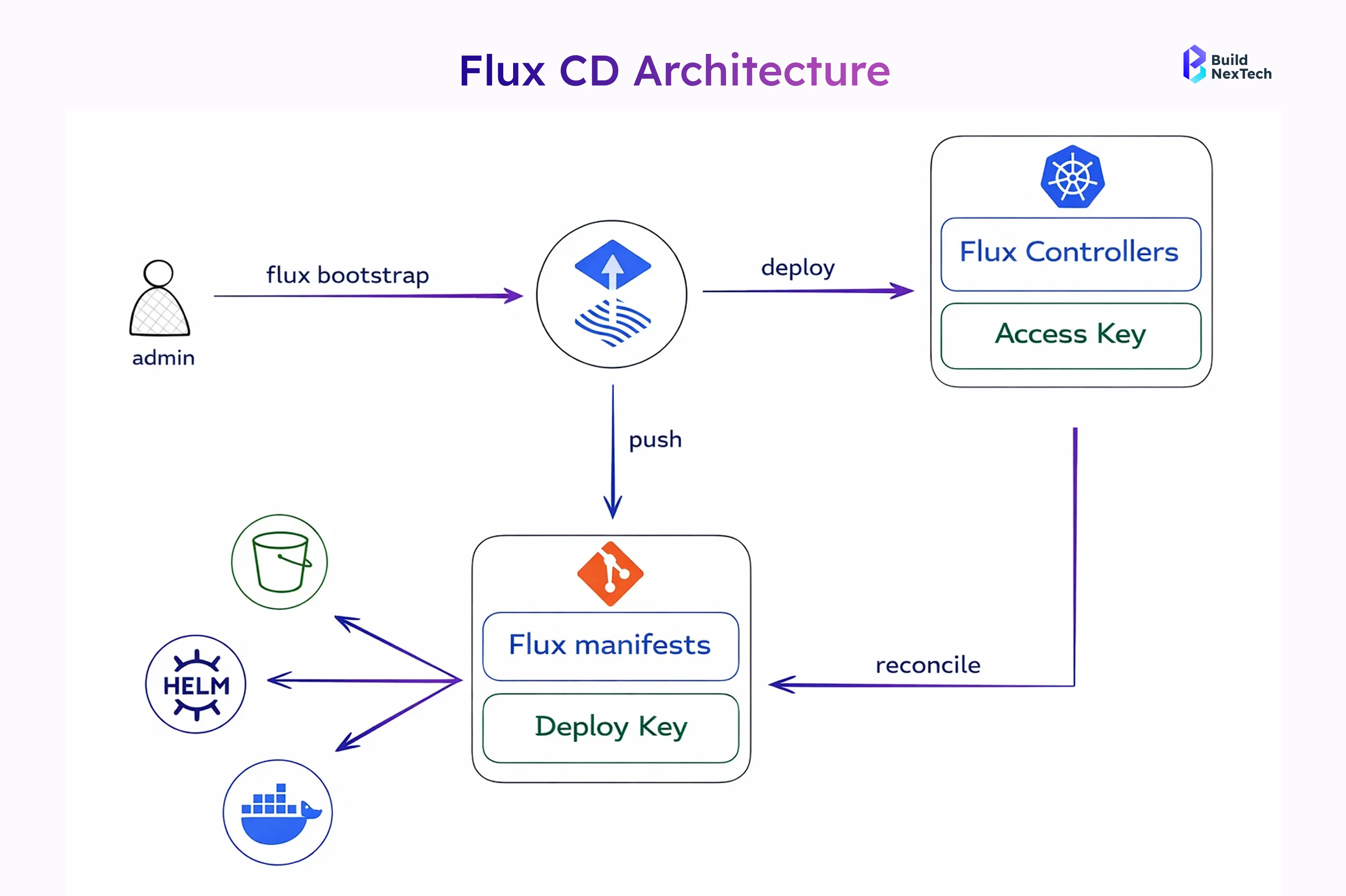
Flux CD is a GitOps toolkit designed for automation-first teams. Originating from Weaveworks, it focuses on modular controllers rather than a single monolithic tool.
- Native support for OCI registries, OCI images, and S3-compatible buckets
- Manifest Management via Git, S3 buckets, and Helm
- Optional Weaveworks UI for visualization
Flux CD integrates deeply with CI systems and cloud-native ecosystems, making it attractive for teams operating at scale on Google Cloud Platform or edge locations.
Typical Use Cases and Adoption Scenarios for FluxCD
Flux CD is often chosen by platform engineering teams who prefer CLI-driven workflows and minimal UI dependencies.
- Automating deployments from OCI images and Helm Chart sources
- Managing ephemeral environments for testing
- Integrating tightly with CI/CD pipelines
Its flexibility suits organizations practicing hyper-agile methodologies, where automation and performance outweigh the need for a full-featured Web UI.
Manual Cluster Sync
Both tools allow manual control by disabling auto-sync.
Argo CD (steps):
- Disable auto-sync.
syncPolicy: {}- Trigger sync via UI or CLI.
Flux CD (steps):
- Suspend auto-sync.
- Trigger reconciliation:
kubectl annotate --overwrite kustomization/podinfo \
reconcile.fluxcd.io/requestedAt="$(date +%s)"Argo CD vs Flux CD: Quick Comparison Overview
When evaluating GitOps tools for Kubernetes CI/CD pipelines, decision-makers often look for a concise, side-by-side comparison before diving deeper. Argo CD and Flux CD are both CNCF-backed solutions, but they differ significantly in user experience, installation approach, and enterprise readiness. The table below provides a quick, practical comparison to help DevOps Engineers and platform teams identify which tool aligns better with their operational needs.
Key aspects such as interface design, multi-tenancy, deployment strategies, and secret management directly impact how teams manage declarative infrastructure at scale. This comparison is especially useful for organizations running multi-cluster environments, SaaS platforms, or resource-limited Kubernetes setups.
Argo CD favors visibility, governance, and enterprise controls, while Flux CD emphasizes simplicity, performance, and automation. This distinction often becomes a deciding factor as organizations mature their CI/CD platforms.
Installation of Argo CD in Kubernetes Environments
Step-by-Step Installation of Argo CD in Kubernetes
Step 1: Create a Namespace
kubectl create namespace argocdStep 2: Add Argo CD Helm Repository
helm repo add argo https://argoproj.github.io/argo-helmhelm repo updateStep 3: Install Argo CD Using Helm
helm install argocd argo/argo-cd -n argocdStep 4: Verify Installation
kubectl get pods -n argocdStep 5: Access Argo CD Web UI
kubectl port-forward svc/argocd-server -n argocd 8080:443Access URL:
https://localhost:8080
Step 6: Get Admin Password
kubectl get secret argocd-initial-admin-secret -n argocd \-o jsonpath="{.data.password}" | base64 --decodeUsername:
admin
Step 7: Login Using Argo CD CLI (Optional)
argocd login localhost:8080
Step 8: Post-Installation Configuration
- Create Projects for access control
- Define Application CRDs
- Configure auto-sync or manual sync policies
- Set up Application Sets for multi-cluster deployments
The Flux CD Installation Process Explained
Step-by-Step Installation of Flux CD in Kubernetes
Step 1: Verify Kubernetes Cluster Access
kubectl cluster-infoStep 2: Install Flux CLI
curl -s https://fluxcd.io/install.sh | sudo bashVerify installation:
flux --versionStep 3: Check Cluster Compatibility
flux check --preStep 4: Bootstrap Flux CD with Git Repository
flux bootstrap github \ --owner=<github-username> \ --repository=<repo-name> \ --branch=main \ --path=clusters/my-clusterStep 5: Verify Flux CD Components
kubectl get pods -n flux-systemStep 6: Manage Deployments via Git
- Commit Kubernetes manifests, Helm charts, or Kustomize files to the Git repository
- Flux CD automatically reconciles changes to the cluster
Step 7: Manual Reconciliation (Optional)
flux reconcile kustomization flux-system --with-sourceStep 8: Post-Installation Configuration
- Configure Helm releases and OCI image automation
- Set up SOPS or Sealed Secrets for secret management
- Integrate with CI/CD pipelines
How to Choose the Right GitOps Tool for Your Organization
Key Factors to Consider When Selecting a GitOps Tool
- Ease of adoption and usability
The tool should match the team’s experience level and operational workflow, whether UI-driven or CLI-based. - Kubernetes environment scale
Consider how well the tool supports single-cluster and multi-cluster Kubernetes deployments. - Automation and deployment control
GitOps tools differ in how much automation they provide versus manual control during deployments and rollbacks. - Security and compliance requirements
Role-based access, audit logs, and secure configuration management are important for regulated environments. - Integration with CI/CD tools
Compatibility with CI/CD platforms such as Jenkins, GitHub Actions, and GitLab CI ensures smooth pipeline execution. - Cloud and regional deployment needs
The tool should work consistently across cloud providers, on-prem setups, and regions with data residency requirements.
Recommended Use Cases for ArgoCD and FluxCD
There is no universal winner only the right fit for your context.
- Choose Argo CD for application-centric workflows and governance
- Choose Flux CD for automation-heavy, cloud-native teams
- Hybrid approaches are increasingly common
Platforms like bnxt.ai often support both tools, allowing organizations to evolve their GitOps strategy over time.
Conclusion and Final Thoughts on ArgoCD vs FluxCD
As GitOps continues to shape the future of Kubernetes operations, understanding the differences between Argo CD and Flux CD is essential for building resilient and scalable platforms. Both are well-established GitOps tools backed by the Cloud Native Computing Foundation and strong community support. Argo CD is commonly chosen for its visibility, application management, and enterprise governance capabilities, while Flux CD focuses on automation, performance, and flexibility for Git-centric teams. Both tools support reliable continuous delivery and modern CI/CD pipelines using declarative Kubernetes infrastructure, with the final choice depending on team workflows, deployment scale, security needs, and operational maturity.
Organizations should seek out an expert to assist them in creating an optimized GitOps-based CI/CD Pipeline. bnxt.ai is available to assist Teams in establishing, optimizing and validating Kubernetes CI/CD Pipelines by aligning their chosen GitOps Tools with their Existing Workflows to deliver secure Deployments from both Cloud and On-Prem environments, thereby enhancing Reliability across both types of environments as well. Selected GitOps Tooling and Implementation Strategies are paramount to establishing scalable and resilient Kubernetes Platforms of the future.
People Also Ask

What is the main difference between Argo CD and Flux CD?
The primary difference between Argo CD and Flux CD lies in their approach to GitOps workflows. Argo CD is application-centric and UI-driven, offering rich visibility, RBAC, and enterprise governance features. Flux CD is automation-first and CLI-driven, focusing on lightweight, modular controllers for continuous reconciliation with minimal overhead.
Which GitOps tool is better for enterprise Kubernetes environments?
Argo CD is generally better suited for enterprise Kubernetes environments that require strong governance, audit trails, role-based access control, and visual insights. Organizations running regulated workloads or large multi-cluster setups often prefer Argo CD for its Web UI, SSO support, and fine-grained access control.
Is Flux CD suitable for production workloads?
Yes, Flux CD is production-ready and widely used in large-scale Kubernetes platforms. It excels in automation-heavy environments where Git is the primary control plane. Many platform engineering teams use Flux CD in production for managing OCI images, Helm releases, and multi-environment deployments with high reliability.
Can Argo CD and Flux CD be used together?
Yes, Argo CD and Flux CD can be used together in hybrid GitOps setups. Some organizations use Flux CD for low-level infrastructure automation and image updates, while Argo CD is used for application-level deployments and visibility. This approach is common in mature DevOps teams with diverse workflows.
Which tool is easier to learn for beginners in GitOps?
Argo CD is often easier for beginners because of its intuitive Web UI, visual diffing, and guided workflows. Flux CD has a steeper learning curve for beginners as it relies heavily on CLI commands and Git-driven automation, making it more suitable for experienced DevOps or platform teams.


.webp)
.webp)
.webp)

.webp)
.webp)



