

Every business runs on data. But most businesses have a problem they rarely talk about: That data lives in too many places, in too many systems, with no reliable way to move it between them. Your CRM does not talk to billing. Your AI model is ready but cannot reach the data it needs. Your team spends hours manually syncing information that should move on its own.
That is an integration problem. Cloud integration is the practice of connecting your apps, data, and infrastructure across cloud platforms, on-premises systems, and everything in between, so the right information reaches the right place automatically.
TL;DR: Cloud integration is how you connect your apps, data, and infrastructure across cloud and on-premises environments. The right approach depends on your data needs and cloud service models. We have applied cloud integration solutions across 150+ projects at BuildNexTech.
What Is Cloud Integration and Why It Is No Longer Optional
The process of cloud integration involves the connections of applications, data sources, and infrastructure in on-premises, cloud-native, and hybrid environments. Besides making standard API calls, cloud integration offers functionality such as data transformation, orchestration of workflows, access governance, and metadata management.
When it works well, the benefits of cloud integration are easy to see: Teams ship faster, data stops getting stuck between systems, and AI projects have the clean, reliable inputs they need to actually run. There are four main types of cloud integration:
- Application integration: Makes sure cloud applications work with SaaS applications.
- Cloud data integration: Transfers and transforms data from sources, through warehouses, to data lakes.
- API integration: Manages agreements between your services and other partners.
- Process integration: Integrates processes that span multiple steps in cloud environments.
Cloud Integration vs. Traditional Middleware: What Actually Changed
Older tools like enterprise service bus (ESB) and point-to-point middleware made sense when everything ran on-premises. That world has changed. Microservices, SaaS sprawl, and multi-cloud management needs have made integration estates more complex than those tools can handle.
Modern cloud computing integration connects services so each can be updated without breaking everything else. Infrastructure as code makes deployments version-controlled and keeps cloud cost manageable.
The Four Core Cloud Integration Architecture Patterns
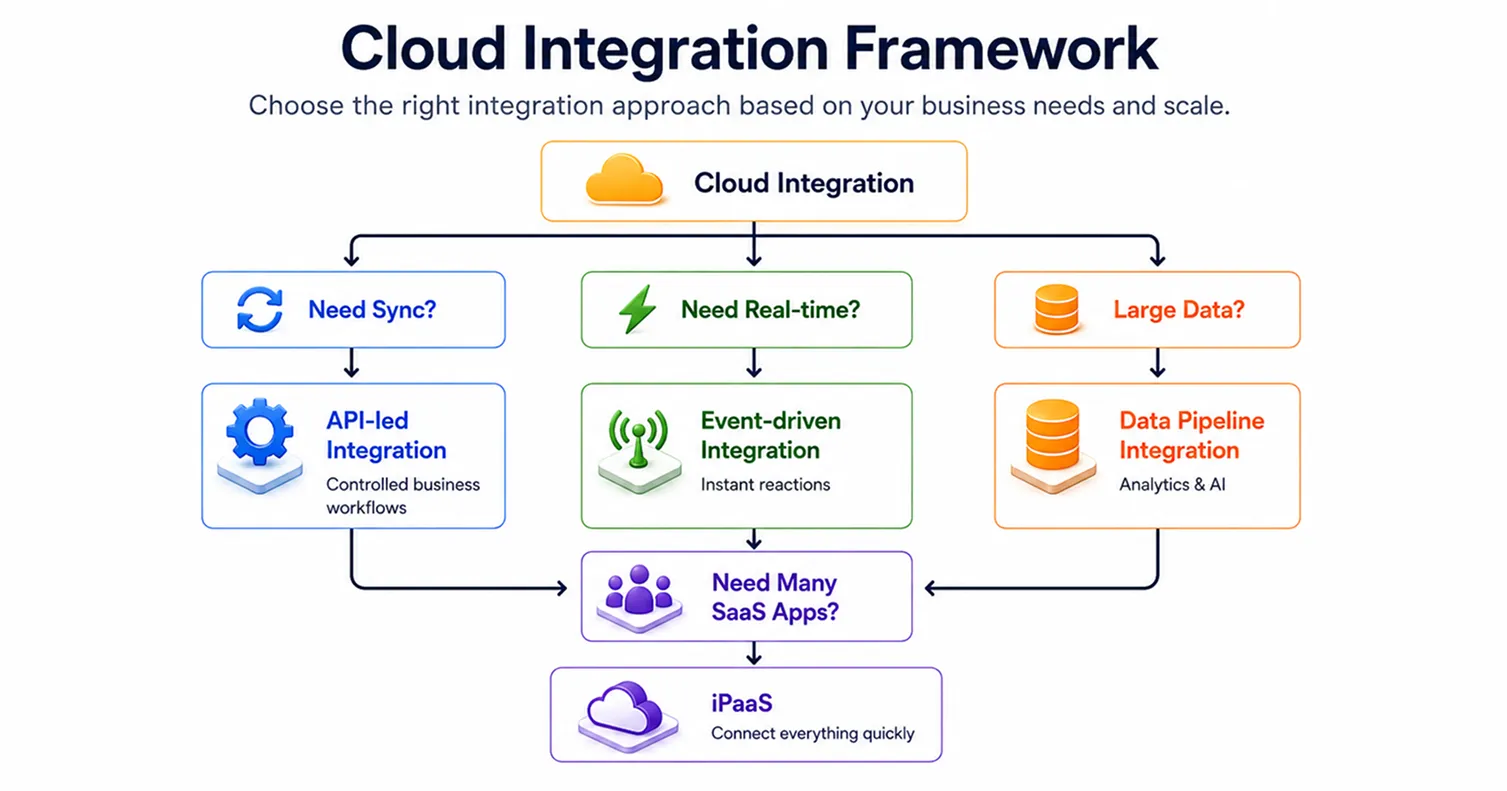
This is not an either-or decision between the four. This is the combination of four layers working together. Most organizations would require two or three layers simultaneously working according to their data amount, service integration requirements, and cloud computing service models used.
API-Led Integration: The Foundation of Modern Hybrid Cloud Connectivity
Every cloud architect building toward hybrid cloud infrastructure starts here. API-led integration uses a three-tier structure:
- System APIs: Pull data from source systems like ERP, CRM, or legacy databases.
- Process APIs: Handle the logic that ties multiple systems together.
- Experience APIs: Deliver the right data to the right place: mobile apps, web platforms, partner cloud apps.
A contract is established for each link. No communication occurs between any two without a contract. Weakness in this approach: If you have requirements for real-time data processing and burst traffic handling at horizontal scalability level, then you will need event-driven capabilities along with this.
Event-Driven Architecture: Real-Time Data Flows Without Tight Coupling
Services publish events (OrderPlaced, PaymentSettled) and other services react on their own schedule. No polling, no waiting. You need:
- A message streaming layer (Kafka or similar) to buffer and distribute events
- A schema registry to keep data formats consistent across all the services
- Idempotency controls and dead-letter queues so failed events do not get lost
New services subscribe without changing anything upstream. For AI workflows, this keeps inference pipelines from becoming a bottleneck.
iPaaS: Managed Integration for Hybrid and Multi-Cloud Environments
An iPaaS (Integration Platform as a Service) gives you ready-made connectors, data transformation, workflow automation, and governance without your own integration servers. MuleSoft, Boomi, and Azure are well-known cloud integration software in this space.
iPaaS suits cloud service integration across SaaS applications, older systems, and cloud-native services. The key difference from ESB:
- ESB sits on-premises, is tightly coupled, and suits systems that rarely change.
- iPaaS is cloud-native, loosely coupled, and built for hybrid estates with SaaS sprawl and multi-cloud management needs.
If AI is blocked despite having an iPaaS, the gap is usually governance and visibility, not the tool.
Data Pipeline Integration: Moving and Transforming Data at Enterprise Scale
Data pipeline integration moves large volumes of data between source systems, data storage layers, and analytics platforms, separate from real-time application integration.
What a solid data pipeline needs:
- Connectors that pull from source systems into cloud data integration targets.
- Logic to handle schema mapping, data format conversion, and transformation.
- Scheduling with data quality checks built in.
- Metadata management so you can trace every piece of data from data storage to where it ends up.
Shaky data pipelines mean shaky AI outputs. Unresolved cloud data integration issues cause model drift. Metadata management and data storage design are what separate a proof-of-concept from production.
Hybrid Cloud Integration: Connecting On-Premises Systems to Cloud-Native Infrastructure
A logistics company we worked with moved order management to AWS but kept SAP on-premises for inventory. Testing looked fine. In production, latency spikes caused order failures, inventory records to desync, and a 12-hour outage. No one had set latency monitoring on the hybrid cloud integration layer before go-live.
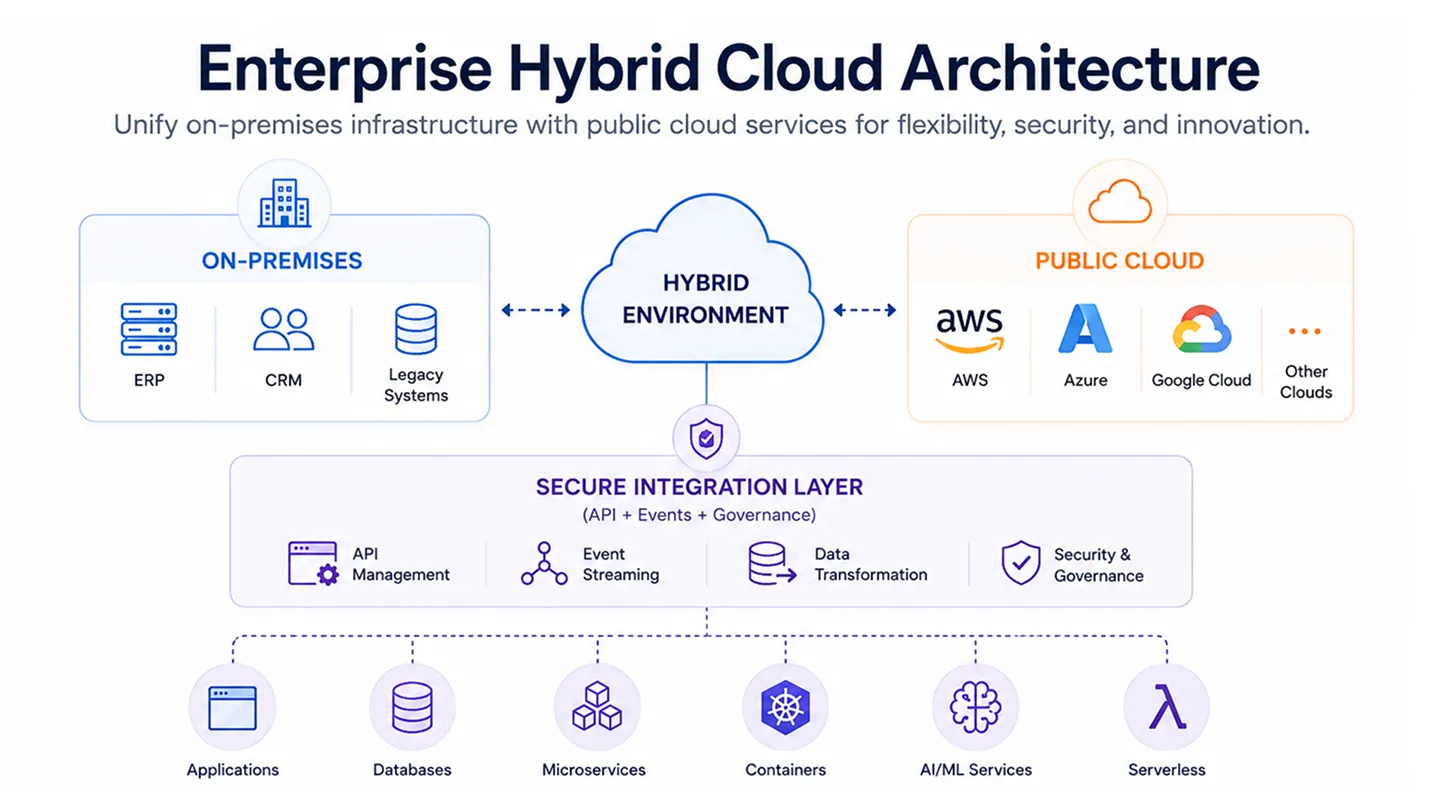
Hybrid cloud integration keeps data flowing reliably across three types of connections:
- Cloud-to-cloud: Between SaaS applications or across private cloud environments.
- Cloud-to-on-premises: Between cloud-native services and legacy systems sitting behind a firewall.
- On-premises to on-premises: Legacy system modernisation paths through phased cloud migration.
Secure gateways, mTLS, OAuth 2.0/OIDC token scopes, and firewall connectors are the minimum security baseline. Disaster recovery must be built into the hybrid layer from the start.
Hybrid Cloud Integration vs. Full Cloud Migration: When to Use Each
Hybrid cloud integration is the right call when:
- You have data residency rules to follow (SOC 2, HIPAA, CCPA)
- Moving legacy systems fully to the cloud is too expensive right now
- Your roadmap means cloud and on-premises systems need to live side by side for three to five years
Full cloud migration makes sense when:
- The ongoing cost of keeping legacy systems running is more than what migration would cost.
- Performance needs cannot be met through a hybrid setup.
- On-premises constraints are constantly slowing down application development.
Most teams underestimate what it costs to keep legacy systems running. That cost is real; it just stays hidden.
Platform Selection: iPaaS, Middleware, or Custom Integration Layer?
Building your own integration infrastructure rarely makes sense. The tools exist, they are mature, and custom builds cost more to maintain than most teams expect.
One category worth watching: AI-native cloud integration software that adjusts routing in real time based on latency and cloud cost.
Our Take: iPaaS is where most enterprises should start. But it is not enough on its own if you are building AI-native workloads. Teams that add agentic AI on top of a standard iPaaS without proper visibility and governed API contracts tend to hit the same wall they hit last time. The platform matters less than whether governance is built in from the start.
What Most Cloud Integration Architectures Get Wrong Before AI Adoption
A US financial services team came to us nine months into an AI project. The LLM was giving different outputs for the same inputs. The model was fine. The data pipeline had no lineage tracking, so it was receiving different data formats from different source systems on every run.
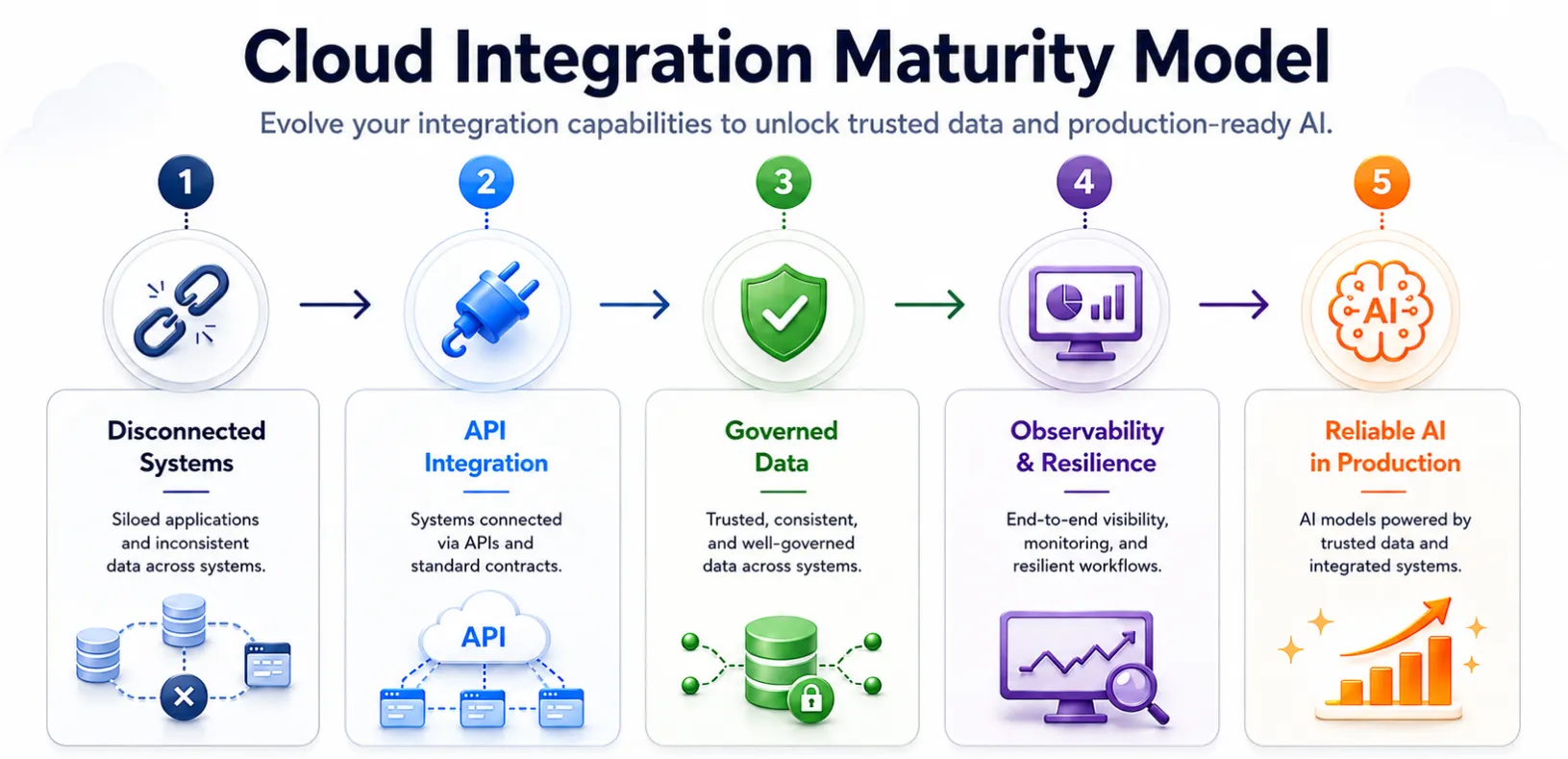
Three patterns we see in teams that stall before AI reaches production:
- Monitoring gets added after something breaks, not before. Most teams treat observability as reactive. You need distributed tracing across APIs and event streams, metadata management, and latency tracking per path set up before anything goes live.
- Governance is treated as a compliance exercise. Real governance means versioning policies, deprecation rules, and role-based access built into the integration layer. NIST AI RMF and OpenTelemetry give you the standards to do it properly.
- Teams confuse AI readiness with having the right model. It starts with integration. Teams with fragmented source systems, ungoverned integrated cloud services, and no metadata management strategy will not get there. The model is the last piece, not the first.
How BNXT.ai Accelerates Cloud Integration for AI-Native Engineering Teams
BNXT.ai delivers cloud integration services through a single runtime across multi-cloud and hybrid environments. Every path has built-in monitoring: latency, error rates, token cost. Multi-Cloud Management, horizontal scaling, and infrastructure as code are built in from day one.
Across our engagements:
- Pipeline build time cut by 60%.
- AI moved from prototype to production in under two weeks.
- A US digital bank cut manual underwriting by 65% after we set up governed API contracts on their cloud data integration layer. The model was ready for months. The integration layer was the bottleneck.
What a BNXT.ai Cloud Integration Implementation Looks Like
Four phases:
- Days 1 to 2: Audit your APIs, data pipelines, and source systems against your AI workflow needs.
- Days 3 to 5: Set up connector and governance layer: API contracts, access scopes, data formats, zero custom code.
- Days 6 to 10: Connect event streams and cloud data integration layer, linking data storage and source systems with latency targets per path.
- Week 2 onwards: AI deployment against governed API and data surfaces, with live monitoring.
Who This Is For
This is for engineering teams at growing companies running a mix of cloud-native and legacy systems, where AI is ready but the integration layer is not.
- AI pilots fail because data pipelines and source systems are unreliable.
- Over 40% of sprint time goes to connector fixes across cloud apps.
- Multiple clouds, no unified observability.
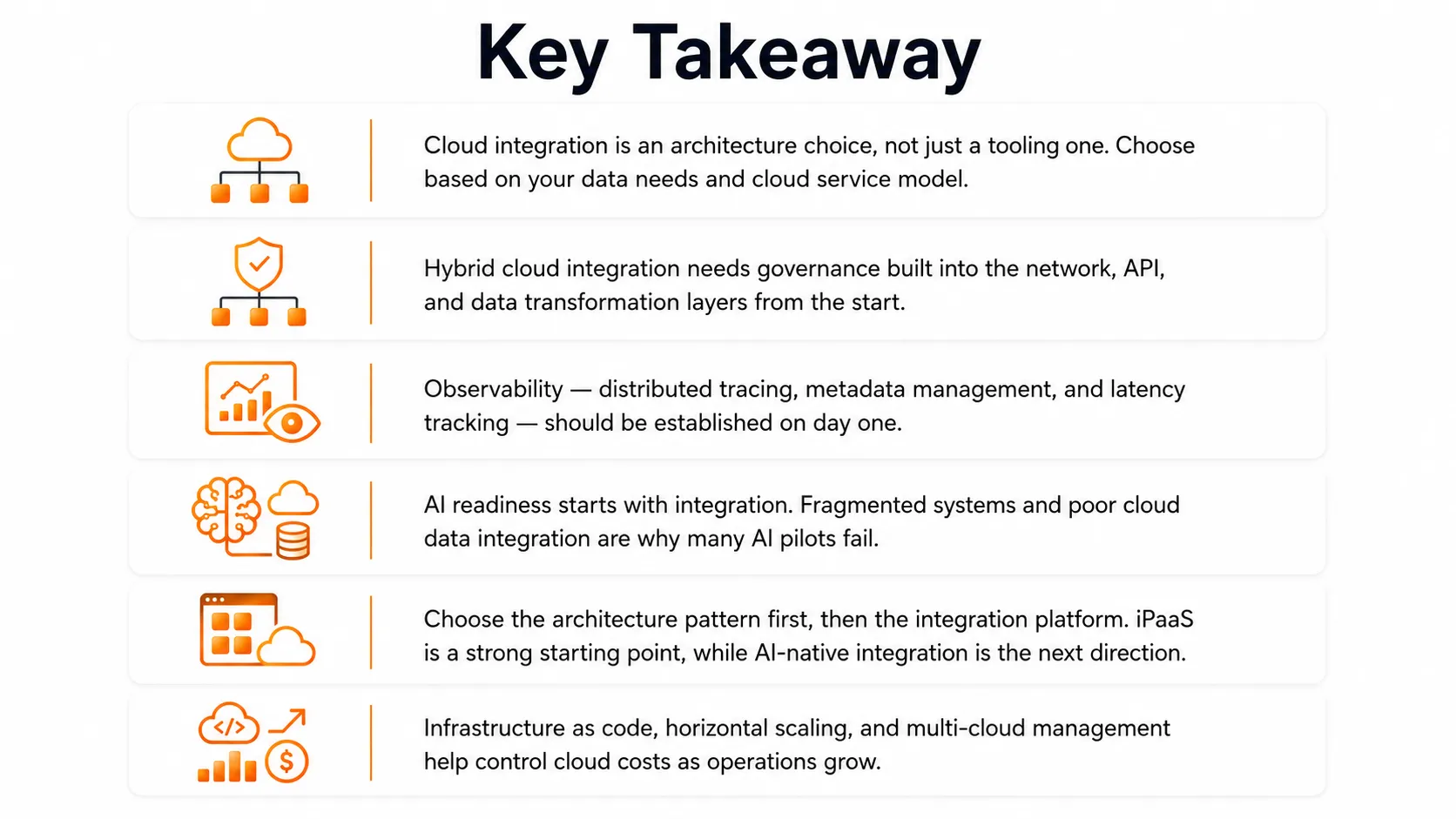
Where Integration Architecture Ends and AI Strategy Begins
Cloud integration is the layer nobody notices until it breaks. In 2025, what breaks is different. AI deployments get stuck at proof-of-concept because source systems are inaccessible, data formats are inconsistent, and disaster recovery was never built into the hybrid layer.
The teams doing well on AI sorted out the cloud-based integration architecture first, then gave the model something reliable to work with.
People Also Ask

What is cloud integration and what are the main benefits of cloud integration?
Cloud integration connects applications, data, and source systems across cloud and on-premises environments. Benefits include faster application development, lower cloud cost, reduced data silos, and AI-ready data pipelines.
What are the main types of cloud integration?
The four core types are API integration, event-driven integration, iPaaS-managed integration, and cloud data integration. Most enterprises run two or three in parallel based on cloud service models.
When should we use event-driven architecture instead of API-led integration?
Use API-led integration for synchronous, contract-driven workflows. Choose event-driven architecture when data velocity is high, services need asynchronous reactions to events, or horizontal scaling requirements make tight coupling impractical.
How does cloud integration support disaster recovery and data storage resilience?
Governed cloud data integration replicates data across source systems and data storage in real time, ensuring recovery objectives are met, and no single failure causes unrecoverable data loss.
What is the difference between iPaaS and an enterprise service bus (ESB)?
ESB is on-premises, centralised middleware for stable internal systems. iPaaS is cloud-native, provider-managed, and built for hybrid estates where SaaS applications and legacy systems must interoperate with horizontal scaling.


.webp)
.webp)
.webp)

.webp)
.webp)



