

Imagine five people using the same 400-word prompt from a shared document across five separate chat windows, yet getting five different answers to the same question. There was no reliable way to identify which output had worked best last Tuesday or determine whether an answer had later been withdrawn from customer use due to a policy change.
This is what prompt engineering without the support of a prompt engineer looks like. We've witnessed it in nearly every AI system launch we have seen across 150+ client engagements at BuildNexTech. The solution is simple: Replace frequent prompts with a list of stored commands then link them up to workflows. This guide demonstrates, step-by-step, how it can be done both for engineers and for decision-makers, on realistic schedules and budgets.
What Is Prompt Engineering?
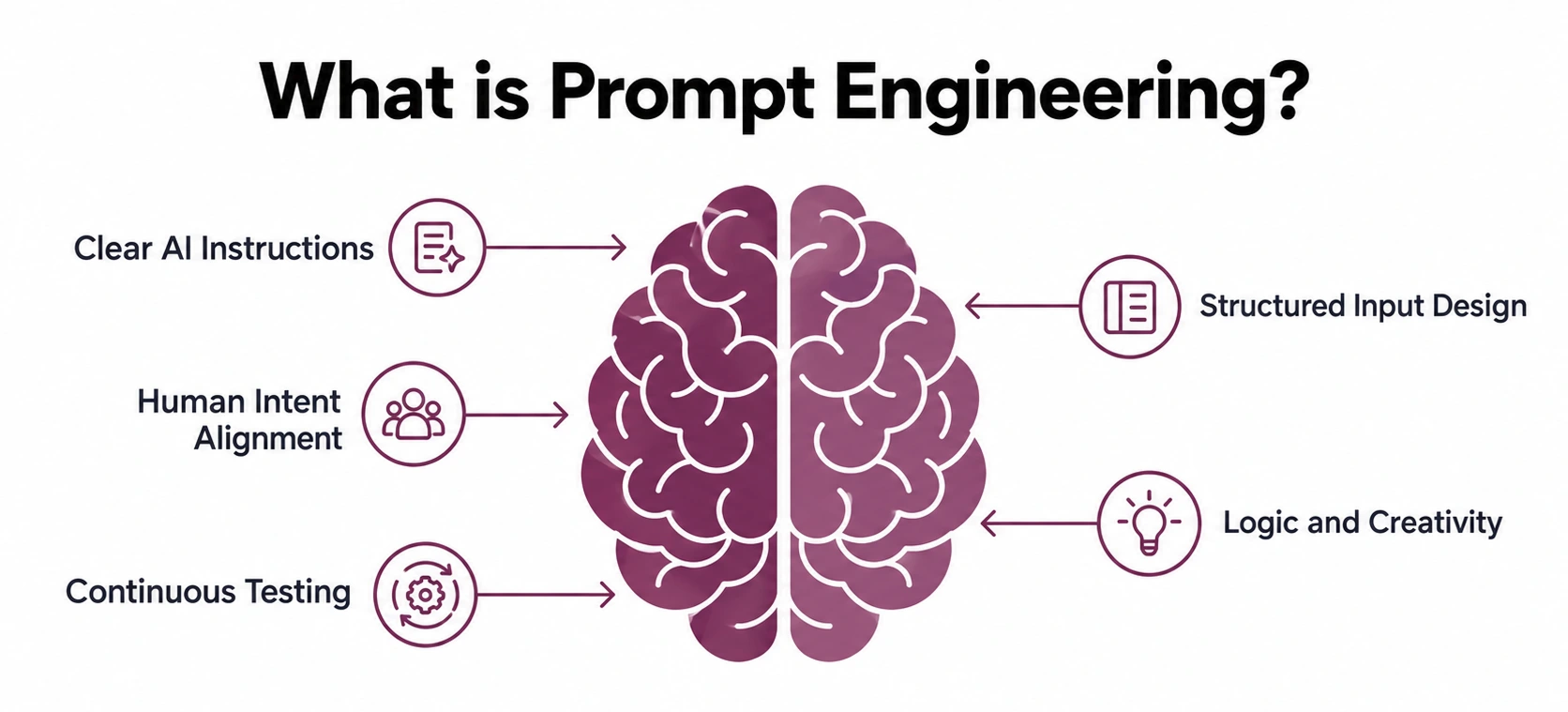
Prompt engineering involves crafting and optimising prompts, context and examples provided to an AI model to generate reliable outputs. The generative AI definition is when the model generates text, images or code. Prompt design is the art, context engineering is the addition of documents and history, and memory-aware models carry it on either side.
Careful prompting pays off quickly. Three benefits show up first:
- Improved quality of output: Vague off-target answers and invented detail eliminated by clear instructions, contexts and examples.
- Faster delivery: Reduced rework results in fewer modifications, retries, and token expenditures, all of which speed up response times.
- Consistent response: All have a consistent level of response regardless of experience or role.
Link: Prompt Engineering
The Hidden Cost of Copy-Pasting Long Prompts
Three costs hide in every copied prompt. Each compounds as the team grows:
- Boilerplate: The same 400 words, retyped.
- Drift: Each copy gets edited, none reconciled.
- No audit trail: No one can determine who made what changes.
A one-line command such as /summarise-call points at one stored template with one owner. Nothing drifts, and nobody hunts for the good version.
How Quick Commands Replace Long Prompts
A short trigger that has a stored template, but fixed instructions with slots for variable input, is a quick command. The template completes the rest when you type /summarise-call, paste a transcript and click the button.
Here is the contrarian part. Short prompts are not simpler prompts. A one-line command is only as good as the 400-word template behind it.
The last row matters most. A command with an owner and change log can be audited, but a prompt in someone's clipboard cannot.
Turning Repeated Prompts into Reusable Commands
Four steps cover most teams. Follow them in order:
- Audit prompts used three or more times a week.
- Extract the constant instructions from the variable input.
- Name each command by task verb.
- Store it in a shared library with one named owner.
Leave one-off prompts alone, because converting them adds overhead without reuse. Reuse is what pays back the effort of writing a good template.
Cost is the next objection. Ten people losing 20 minutes weekly to retyping prompts is roughly 170 hours a year, and McKinsey's 2026 State of AI survey found one in five organisations limit AI use over operating costs.
Popular AI Shortcuts You Can Use Today
Definitions can be found in IBM's explainer, Amazon Bedrock's documentation, or in Braintrust's roundups of the tools. Productivity lists of AI tools (top, popular, best, free, paid) have lists of products that are comparable, but few lists contain reusable shortcuts.
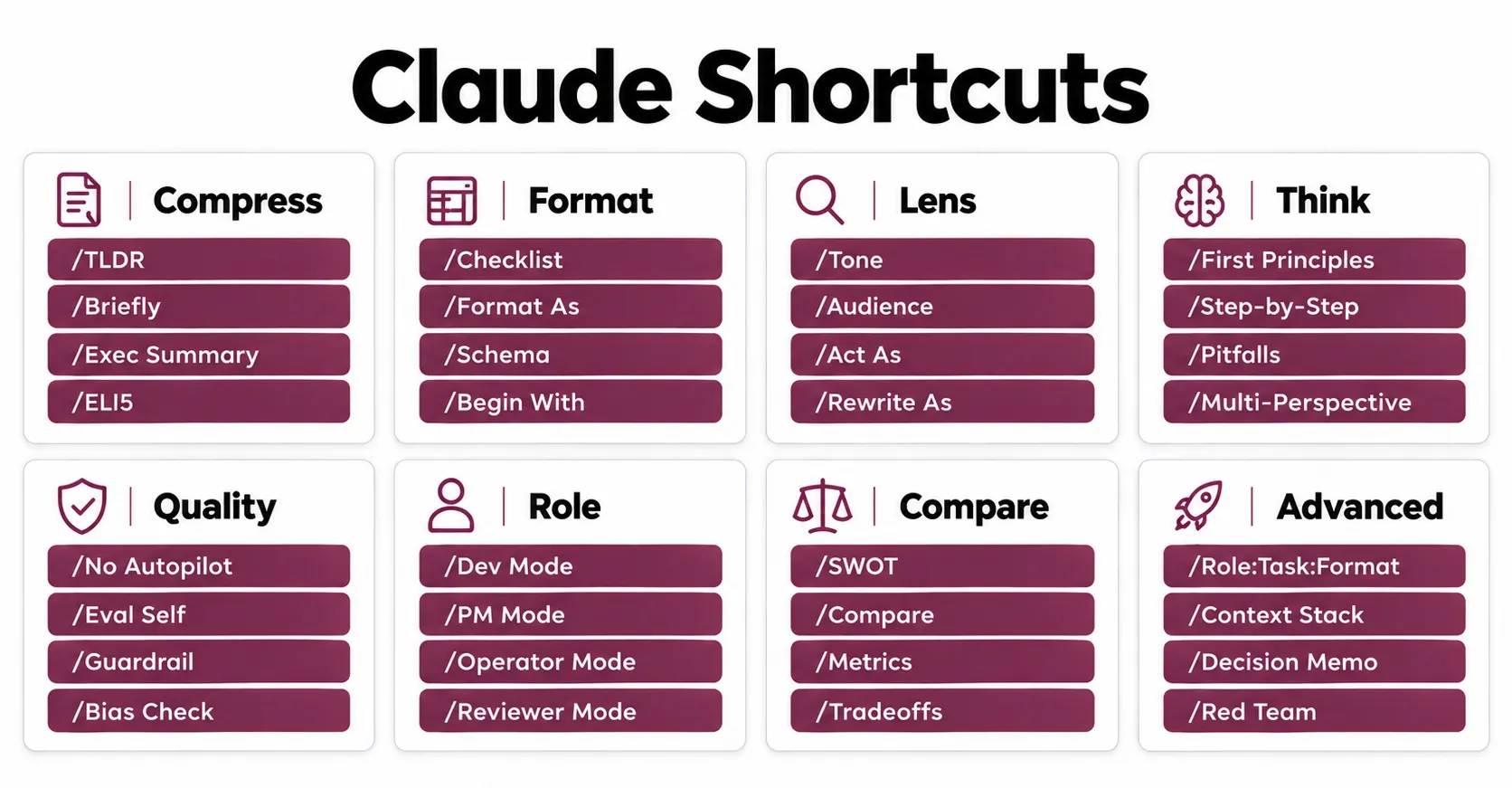
Shortcuts such as /TLDR are community conventions, not built-in commands. Each works because it is a saved prompt template, so quality lives in the template, and the same template works across different AI tools.
Shortcuts for Summarising and Simplifying
Pick the shortcut by audience. One transcript often needs three different outputs:
- /TLDR: Gets a super-short summary for busy executives.
- /ELI5: Explains a complex topic in plain words for non-specialists.
- /EXEC SUMMARY: Forces a concise, high-level overview for board readers.
Shortcuts for Formatting and Structure
These three save the most rework. Structure is fixed before the model starts writing:
- /FORMAT AS: Forces a table, JSON or bullet output.
- /CHECKLIST: Turns notes into an actionable list.
- /PROS_CONS: Shows both sides for decision-makers.
Shortcuts for Role, Tone, and Reasoning
Role and output format are the core of any reliable template. Test them first:
- /ACT AS: Assigns a persona, like a copywriter or auditor.
- /AUDIENCE: Sets who the answer is written for.
- /TONE: Adjusts voice, from formal to friendly.
- /STEP-BY-STEP: Breaks logic into sequential steps.
- /PITFALLS: Lists risks and common mistakes.
How to Create Custom Commands for AI Workflow Automation
A custom command combines a prompt with a series of slashes that are repeated, so that all members of your team run them in the same manner. Do this in 7 steps to create one that remains reliable as you use it more.
Step 1: Write the prompt once in a markdown file named after the command, as in this /summarise-call example:
---
description: Summarise a call transcript for the account owner
argument-hint: [short|full|save]
---
Summarise the transcript for the account owner.
Return JSON with summary, risks and next_steps.
Mode: $ARGUMENTS
- The header drives autocomplete, and the body is your template.
- Commit the file so git gives you the version and a reviewer gives you the owner.
Step 2: Save the file in the same folder where your tools are; this folder will determine who can run the command:
- In Claude Code, a file at .claude/commands/summarise-call.md makes /summarise-call and custom commands and skills both in effect. Teams package these CLI commands as code.Teams package these CLI commands as code.
- Both use plain markdown in.cursor/commands/, so the same file can be used.
- A best practice is to store prompts in a centralized, version-controlled repository rather than relying solely on individual AI assistant chats. This makes prompts easier to manage, review, update, and share consistently across teams.
Step 3: Add arguments so that one file can process multiple arguments and modes:
- For Claude Code, the argument list follows right after the command name in the program and $ARGUMENTS will contain all the argument types.
- Describe the modes in common terms in Cursor.
Step 4: Fix the output format, so that the results of each run are easily reviewed and compared:
- Repeat the same sections in the same sequence as each time.
- Use prompt engineering techniques: Few-shot examples, chain-of-thought and multi-stage prompting.
Step 5: Take the timing of each run, to determine if the command actually saves time:
- Use a trace ID to indicate each run, similar to a Cloudflare Ray ID.
- Get a two-week baseline and re-run 30 real inputs after each edit.
- Monitor time on tasks, regeneration time, token spending time and response time.
Step 6: Connect it to your workflows, so other systems can call it instead of a person:
- AI workflow automation tools can call a command, so enterprise workflows run it without anyone typing.
- Slack messages, CRM events and webhooks give you auto-triggered behavior.
- In Claude Code, custom slash commands such as /summarise-call full can trigger configured workflows with arguments. See the Anthropic documentation.
- Keep templates model-agnostic, because one model type may fail where another succeeds, and you can then switch between Claude, Google Gemini and OpenAI. See our guide to integrating the Claude API into enterprise applications.
Step 7: Chain commands into agents, where one step decides what runs next, and build it in this order:
- Return structured output: End every command with JSON, so the next command can read it without guessing.
- Use fixed chain: Start using the output from one command as input for the next, e.g. /summarise-call, /draft-followup. This is how to safely build AI agents, and each link can be individually tested. All AI agents for business, ranging from AI agents for marketing to a virtual AI assistant, begin with simple chains.
- Decisions after the fact: Only run /escalate after the fixed chain has been stable, such as when the risks include churn.
- Log every step: Reuse the trace ID from Step 5, so you can replay a failed run.
- Read the build guides: Our production-ready agent workflows and agentic AI prompt engineering guides cover the full build.
Autonomous agents need guardrails. Add these five:
- Ask a person before any step that sends money, emails customers or changes records.
- Pre-approve only read-only tools with allowed-tools, so riskier tools still need approval.
- Set a turn limit, such as maxTurns in the Agent SDK, so a looping agent stops.
- Parameterise any SQL command, and never execute raw model output.
- Put a security solution in front, such as a prompt-injection filter or a gateway security service.
How BuildNexTech Helps Simplify AI Workflows
BuildNexTech provides teams with stored commands, variables and triggers for LLM API in one managed workflow layer, on top of any workflow automation software. Every command maintains an owner, a version history and an audit trail, and there's no reliance on anyone's notes. The best way to use AI in business is when that layer is governed, versioned and visible from the start.
Teams select us for AI-native architecture, a low-code agent builder, enterprise observability and no model lock-in, meaning switching models remains inexpensive. I'm not sure what the difference is between a programme-scale transformation and a two-week working commands, but the difference is one is for AI consulting firms, the other is for integrators like Accenture or Infosys. AI services include our AI integration consulting and custom AI development.
What a BuildNexTech AI Workflow Looks Like
- Days 1-3: Conduct a Top Prompts by Frequency and Risk Audit.
- On Days 4-7: Create templates and variables, and link the LLM APIs.
- From week 2 forward: Deploy, monitor and refine the most frequently used commands.
At rollout, your team owns a command library, version history and usage dashboards. Where templates live is an AI architecture decision, so your Application Architect can choose code through an AI DevKit or a platform, and our client outcomes show both routes.
"A one-line command is only as good as the 400-word template hiding behind it. Short prompts are not simpler prompts."
Conclusion
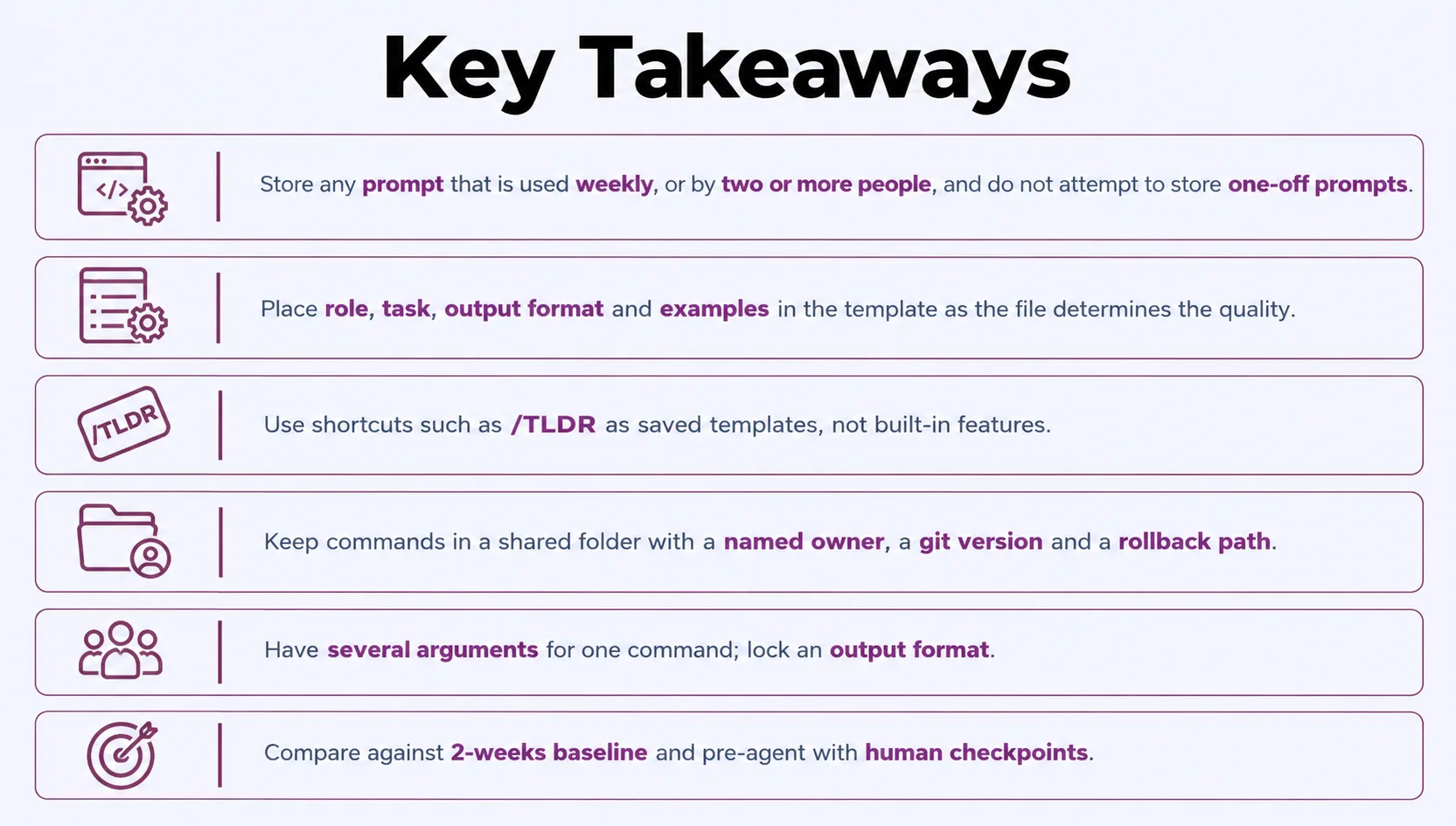
Prompt engineering at team scale is less about clever wording than about ownership. Consistent teams are not writing better sentences; they are storing, versioning and measuring the ones that already work. Ownership is what turns a prompt from a draft into an asset your whole team can trust, week after week.
Which of your twenty most-used prompts is quietly costing you the most? Most teams have never measured it. BuildNexTech helps teams uncover hidden prompt costs and identify opportunities to reduce them.
People Also Ask

Is prompt engineering still relevant as AI models improve?
Prompt engineering remains relevant because it is still impossible for the better models to know your policies, formats and tone. Its emphasis is on clarifying and sustaining those standards, rather than clever wordsmithing.
What is the difference between prompt engineering and fine-tuning?
Prompt engineering alters the input instructions to a fixed model, while fine-tuning re-trains the model. Prompts are faster and cheaper and suit stable, high-volume tasks; fine-tuning suits fine-grained tasks.
Can non-technical staff create and edit quick commands?
Non-technical staff can, if the library provides a simple form over the template syntax. Allow them to suggest changes, but have one named owner to approve each change prior to release.
Do quick commands create data privacy risks?
If prompts or inputs are sensitive, they can remove information before sending, limit who can execute each command, and verify with your provider on how long they will retain their data.
What does a quick command cost to run at scale?
Price varies based on the number of tokens used per call and the number of calls. A predictable spend with a fixed template, and caching repeated context and tighter output formats to reduce the bill.


.webp)
.webp)
.webp)

.webp)
.webp)



