

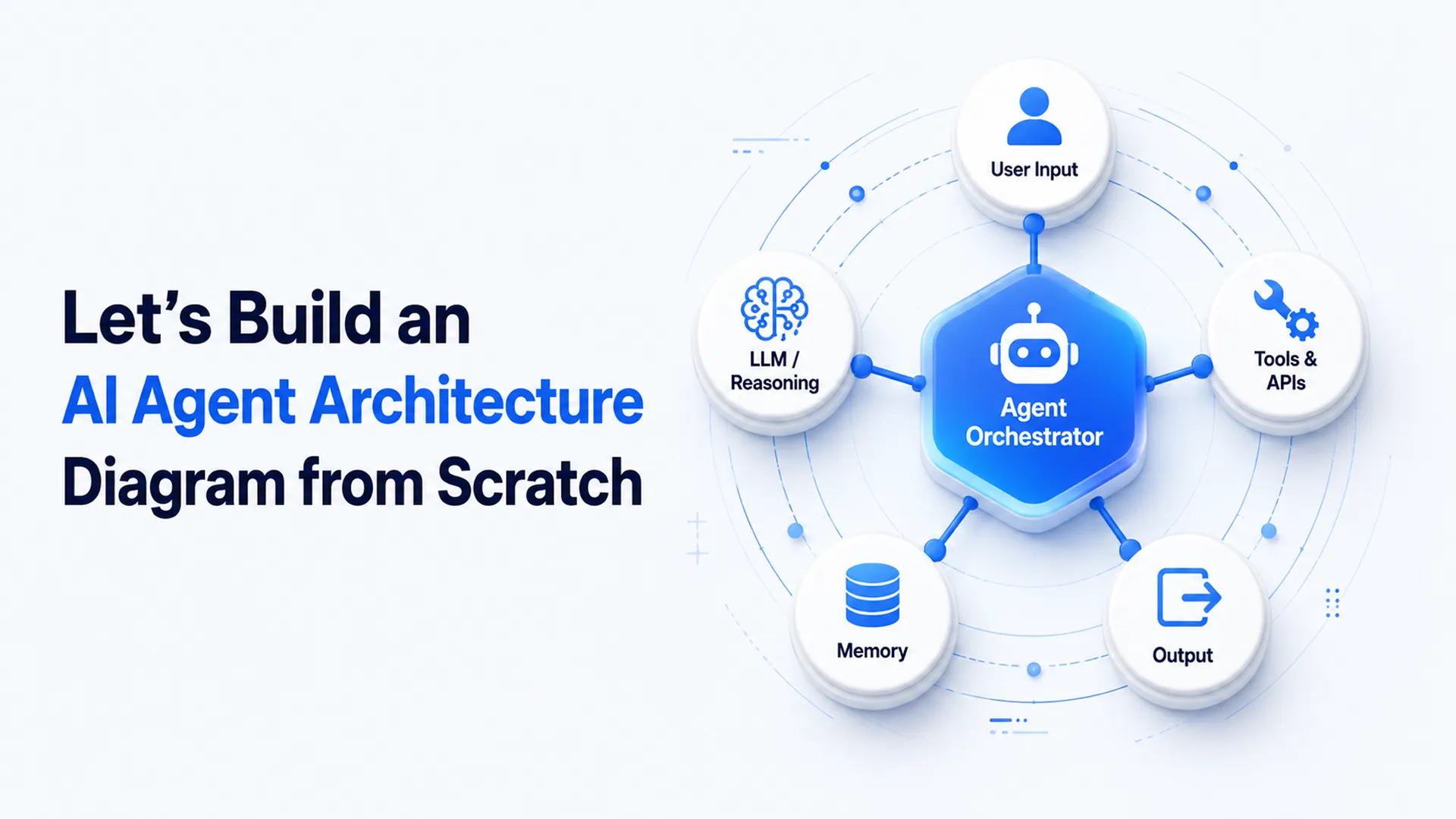
Most diagrams labelled "AI agent architecture" that we review are a single box with an arrow pointing at a database. A client walked into a review last quarter with exactly that: one rectangle, one line, six months of roadmap riding on it.
A real AI agent architecture diagram earns its name when it shows the full agent loop: what a large language model perceives, where it reasons, what it remembers, and how human intervention corrects it when something goes wrong. Business leaders keep approving diagrams like this without knowing what they are signing off on. Across 150+ client engagements, the gap is rarely the language model; it is a diagram nobody built from.
What Is an AI Agent?
An AI agent is a system built on a large language model that perceives input, reasons about a goal, and acts through external tools, with memory and feedback closing the loop.
- A chatbot only responds, using natural language processing inside a conversational AI interface to shape the user experience.
- An agent acts on a reasoning engine's decisions, using API calls or function calling to update a record, and those actions carry real consequences.
- Machine learning and neural networks power the underlying model either way, but the agent layer turns a passive model into something that works on your behalf.
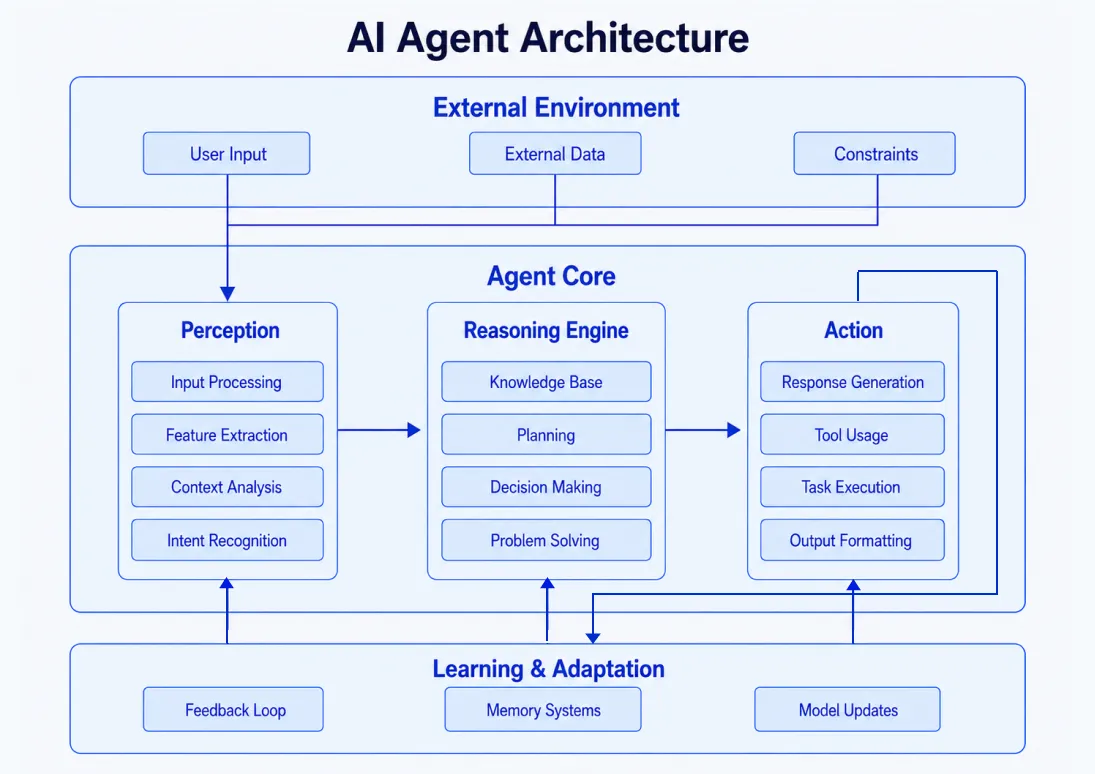
Five Core Components for AI Agent Architecture
Five boxes anchor most agentic design patterns before any framework gets chosen: perception, memory, reasoning, action, and feedback. This same agentic AI architecture, or agentic architecture, applies whether you are figuring out how to create an AI agent, how to make an AI agent, or how to build an AI agent from scratch. Boundary labels- trusted versus untrusted, read-only versus write-capable- keep the orchestration layer easy to review.
1. Perception
Perception is the input layer: User inputs, documents, database events, webhooks, or retrieval pipelines that fill the agent's context window.
- Untrusted input needs its own boundary, separate from trusted internal systems.
- Multi-modal AI, spanning text, computer vision, and voice, needs its own trust label per input type.
2. Memory
Memory systems keep session state and long-term memory apart, not blended into one bucket.
- Session state: The current conversation, held via session persistence.
- Long-term memory: User history stored in a vector database, found through vector search over embedding indexes. What is a vector database, or what is vector database in short? Simply, a store built for similarity search over embeddings, not row-by-row matching.
- Popular vector databases: A Qdrant vector database, a Milvus vector database, a Chroma vector database, a FAISS vector database, or a managed AWS vector database.
- Knowledge base: Enterprise data with its own access rules, kept separate from the rest.
Context compression keeps the context window usable as memory grows.
3. Reasoning and the Decision Loop
Reasoning follows the ReAct pattern: observe, reason, act, observe again, the backbone of most reasoning engines running in production agents today.
- Planner-executor split: For multi-step tasks needing checks.
- Single-call reactive design: Enough for one retrieval pass.
- State management: Tracks where the agent sits mid-loop.
Agent orchestration decisions should follow task complexity, not whatever framework is trending.
4. Action and Execution
Action is where the agent touches the real world: API calls, database updates, or sending an email.
- Label every tool read-only, write-capable, or approval-required before it goes live.
- Tool validation and error handling catch failures early.
- Clean tool integration keeps tool execution reliable.
Production incidents start here, not in model choice.
5. Feedback Loop
Feedback closes the system: Evaluation datasets, human intervention queues, and monitoring dashboards.
- Reinforcement learning and evaluator models catch some drift automatically.
- A human review queue is still the backstop for high-risk actions.
This is the box most rushed builds cut first, and the one that catches failures before customers do.
Creating an AI Agent from Scratch Using n8n
This n8n workflow creates a research agent that accepts a user request through chat, collects information from several sources, verifies the results, and generates a structured PDF report.
Step 1: Create the Workflow
Open n8n, create a blank workflow, and name it something clear, such as Company Research AI Agent.
The workflow will contain four main parts:
- Chat input.
- AI Agent.
- Research tools.
- Report generation.
Step 2: Add the Chat Trigger
Add the When Chat Message Received node. This node starts the workflow whenever a user enters a request such as:
Research a company, its founders, funding, competitors, and recent news.
Connect the Chat Trigger directly to the AI Agent node. The incoming message will normally be available through:
{{ $json.chatInput }}Step 3: Add the AI Agent
Add an AI Agent node. This is the central controller of the workflow. The agent reads the request, decides which external tools are needed, makes the required API calls, compares the collected information, and prepares the final report.
Step 4: Connect a Language Model
Connect an Anthropic Chat Model, OpenAI model, or another tool-compatible language model to the AI Agent's Chat Model input. Use a low temperature, usually between 0.1 and 0.3, because research reports should be consistent and factual. Store the model API key inside n8n Credentials or environment variables instead of adding it directly to the workflow.
Step 5: Add Memory
Connect a Simple Memory node to the Agent's Memory input. Memory allows the agent to understand follow-up messages. For example:
Research HubSpot.
Followed by:
Now compare it with Salesforce.
Simple Memory stores context during the current session. A vector database can later be added when Long-Term Memory is required across different sessions.
Step 6: Connect Research Tools
Add separate HTTP Request or integration nodes for each information source. Useful tools include:
- Social Profiles for public social accounts.
- LinkedIn for professional information.
- PitchBook, Crunchbase, and Dealroom for funding.
- Craft and Owler for company and competitor data.
- IndiaFilings and OpenCorporates for registration details.
- IMARC and Statista for market information.
- News Search for recent developments.
Connect every tool to the AI Agent's Tool input. Give every tool a clear description. For example:
Use this tool to find company funding rounds, investors, and acquisitions.
Allow the agent to provide tool parameters using expressions such as:
{{ $fromAI('company_name', 'Company name to research') }}Step 7: Add Firecrawl
Add Firecrawl tools for information that is not available through structured APIs. Use one Firecrawl node for normal webpage scraping and another for structured extraction. The structured output can contain:
{
  "company_name": "",
  "description": "",
  "founders": [],
  "products": [],
  "locations": [],
  "source_url": ""
}
A separate deep-page extraction tool can be used for annual reports, regulatory documents, or long company pages.
Step 8: Control Tool Selection
Tell the agent not to call every tool for every request. Funding questions should use Crunchbase or PitchBook. Registration details should use OpenCorporates or IndiaFilings. Recent updates should use News Search. Firecrawl should only be used when normal API results are insufficient. This reduces execution time and API costs.
Step 9: Build the Report
Connect the AI Agent to a Code node named Build Report (HTML). Use the Code node to remove Markdown formatting, validate the HTML, and create a filename.
const html = ($json.output || '').replace(/```html|```/g, '').trim();

return [{
  json: {
    html,
    fileName: `research-report-${Date.now()}.pdf`
  }
}];
Step 10: Generate and Deliver the PDF
Send the HTML to an HTML-to-PDF API, Puppeteer service, or PDF-generation node. The completed report can then be saved to Google Drive, Amazon S3, or another storage service. Finally, return the downloadable report link through the n8n chat response.
Before publishing, test every API individually, configure error handling, secure all environment variables, and add retries for temporary API failures.
This workflow is a solid way to learn how to build an AI agent in n8n, but it is not production infrastructure on its own. Keep your project structure tidy as you add tools, and write clear system prompts for every new capability you connect.
If you want to build your own AI agent with more autonomy, an open source AI agent framework like LangChain pairs well with n8n once you outgrow the visual canvas, and an open source vector database fits the same pattern for memory. Emerging multi-agent systems, like Microsoft's Magentic One or Google DeepMind's SIMA 2, show where multi-agent systems and AI tools are heading next, and vector database news moves just as fast.
Common Mistakes That Break the AI Agent Architecture in Production
A fintech client's agent, live for three weeks, sent two duplicate refund confirmations. No stopping rule; it retried a failed webhook until it succeeded twice, and the failure traced back to a missing boundary, not the model.
Gartner puts a number on this: Over 40% of agentic AI projects will be cancelled by 2027, citing governance and scoping failures, not model capability (Gartner). Nearly every incident above traces back to a boundary that existed on paper, never in the running system.
How BuildNexTech Turns AI Agent Design Into a Running Agent
BuildNexTech's low-code agent builder maps directly onto the five core components of an AI Agent covered above.
- Perception and memory: Defined visually, backed by real data infrastructure.
- Reasoning: A configurable LLM reasoning engine, so nobody writes orchestration logic from scratch.
- Tools: Permission-scoped external tools and API calls, governed from the start.
- Feedback: Built-in observability and human intervention queues by default.
A US logistics fleet we worked with cut downtime by 30-50% after moving from an n8n prototype to a governed build, tracking inventory levels through one orchestration layer.
What a BuildNexTech Implementation Looks Like
Implementation follows four stages: Discovery, integration, deployment, and monitoring, run in order rather than reshuffled to hit a deadline.
- Day 1-3: Map the diagram to real components, naming an owner for each source.
- Day 4-7: Wire tools and memory into the platform, setting permission scopes from discovery.
- Week 2 onward: Monitor against evaluation datasets and review queues, using real production traffic.
The team walks away owning a running agent with logged, auditable decisions, not a webhook-retry prototype.
Who This Is For
This fits teams that outgrew a no-code prototype and need governed orchestration:
- Engineering teams in fintech, healthcare, logistics, or retail running agent workflows against real customer or operational data.
- Teams with an n8n prototype that works fine in testing but has never carried real production traffic or a real incident.
- Teams hitting permission, governance, or compliance ceilings that a no-code canvas was never built to handle at scale.
.webp)
Conclusion
A real AI agent architecture diagram shows the control loop, not a labelled box wrapped in generative AI hype. It maps perception, memory, reasoning, action, and feedback as separate, boundary-labelled components, and every framework decision- n8n, LangChain, or a governed platform like BuildNexTech - should follow from that diagram rather than replace it. n8n proves the concept exists fast and cheaply, and production readiness comes later, once every box becomes a ticket with an owner and a schema attached.
Most teams get the first half right and stop there. The diagram gets drawn, the prototype ships, and the feedback loop stays theoretical until an incident forces the question. That gap closes on a schedule, not by accident.
People Also Ask

What is the difference between AI agent orchestration and simple workflow automation?
Workflow automation follows a fixed path every time. Agent orchestration lets a reasoning engine choose the path dynamically, deciding which tools to call and in what order based on context.
Do I need a vector database for every AI agent, or only ones with long-term memory?
Only agents that need long-term memory across sessions require a vector database. A simple task agent working from a single conversation can run entirely on session state instead.
What is the best AI agent builder for a team without dedicated engineering resources?
A no-code platform like n8n is the best AI agent builder for small teams testing an idea, since it needs no custom code, though it hits limits at production scale.
How much does custom AI agent development typically cost for a mid-sized business?
Costs vary widely with scope, but most custom AI agent development engagements for mid-sized businesses range from a focused pilot project to a multi-month platform rollout with ongoing support.
What are common AI agent use cases beyond customer support and IT ticketing?
Common AI agent use cases include invoice processing, inventory levels forecasting, contract review, sales lead qualification, and internal knowledge base search across fintech, healthcare, logistics, and retail teams.


.webp)
.webp)
.webp)

.webp)
.webp)



