

A logistics company came to us with an AI agent that looked busy but never finished. Asked why Tuesday's deliveries ran late, it ran a query, got an empty result, rewrote it slightly, and ran it again, three hundred times. Nothing errored and nothing completed, so the first alert anyone saw was the token bill.
That is an AI agent infinite loop, and it shows up in every industry. The agent looks busy, so nobody notices it is stuck. Below are seven fixes, each matched to a loop symptom, that end loops instead of postponing them. A comparison table later in this post shows the effort each one takes.
What Is an AI Agent Loop?
An AI agent loop is a run where the agent repeats one action, or cycles between a few tools, without moving closer to its goal. It never crashes or stops. In AI for business automation, an unwatched loop gets costly fast because runs happen overnight and at volume. Each step looks reasonable alone, which is why agentic AI examples like the text-to-SQL agent above pass review and fail in production. See our AI agent architecture guide for where guards sit.
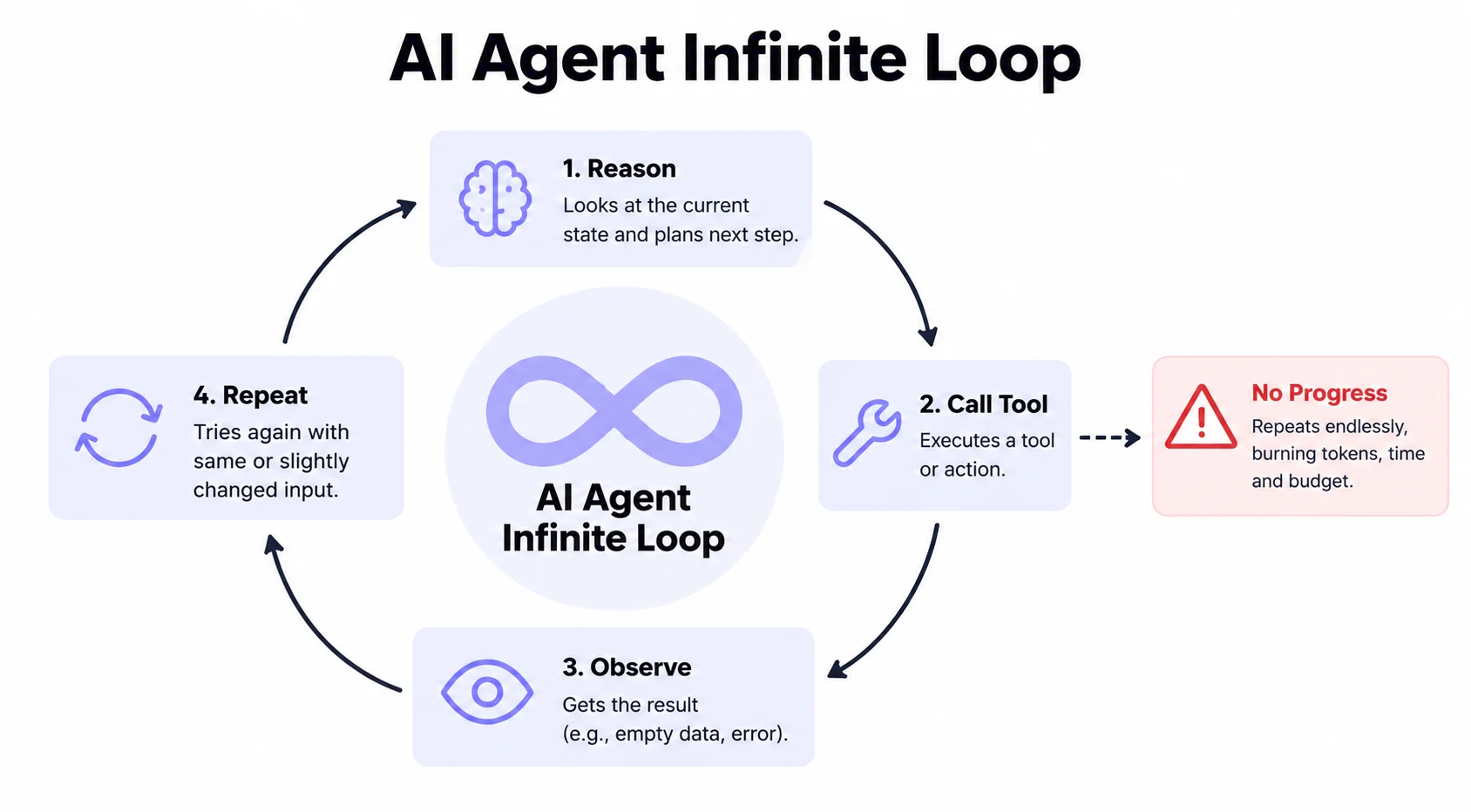
Why Do AI Agents Get Stuck in Loops?
Three root causes explain most cases of an agent stuck in a loop. Each is a missing control, not a model flaw:
- No memory of past attempts: The agent sees a similar state and picks the same action again.
- Ambiguous tool feedback: An empty list or a bare 'error' says nothing about what to change, so the agent retries the same call.
- No stop condition: Nothing defines done, so the agent keeps working until a cap or timeout ends the run.
All three compound on tasks harder than expected, where every retry looks like reasonable progress. A step cap fixes none of them, because it is a backstop, not a goal check.
AI Agent Loop Fixes at a Glance
Each fix plugs into the agentic AI tools you already run, such as LangChain AgentExecutor, LangGraph, CrewAI, or the OpenAI Agents SDK. The table below gives the symptom, layer, and effort for each of the seven fixes.
Which fix first?
- Identical calls back to back? Fix 1.
- Runs only ending at the cap? Fixes 2 and 5.
- Calls vary, but nothing changes? Fix 4, then Fix 3.
Fix 1: Hash and Fingerprint Tool Calls
Catches: Identical repeated calls. The agent fires the same tool with the same arguments again and again and never moves on.
Tool call deduplication is the cheapest loop detection you can ship. Hash the tool name plus its sorted arguments and count repeats per run, whether the tool is custom or served over MCP. After two or three identical calls, block the call and tell the agent what it has already tried, or halt the run for review.
import hashlib, json

def guarded_call(run, tool, fn, args, max_repeats=2):
    raw = json.dumps({"t": tool, "a": args}, sort_keys=True)
    key = hashlib.sha256(raw.encode()).hexdigest()
    run.seen[key] = run.seen.get(key, 0) + 1
    if run.seen[key] > max_repeats:
        return {"blocked": True, "note": "Already tried. Change approach."}
    return fn(**args)
Watch out for:
- Exact hashes miss near-duplicates, such as a query with one extra space, so add embedding similarity later.
- Hashing misses cycles with varied arguments, so pair it with Fix 4.
Fix 2: Enforce Hard Budgets and Caps
Catches: Ends only at the step cap. The run never stops on its own, so only the step limit ends it, after the tokens and money are already spent.
Every framework ships a cap, such as max iterations in LangChain AgentExecutor (max_iterations), a recursion limit in LangGraph, max_iter in CrewAI, and max_turns in the OpenAI Agents SDK. Use them, then add token, time, and cost-per-minute ceilings, since one max_tokens setting will not catch fifty cheap calls.
limits:
  max_iterations: 25
  max_wall_clock_seconds: 300
  max_cost_per_run_usd: 2.00
  max_cost_per_minute_usd: 0.50
  on_breach: halt_and_escalate
Watch out for:
- Set thresholds from a high percentile of healthy runs, such as p95, plus headroom, because a limit that is too tight halts valid work and one that is too loose never fires.
- A cap ends the run but does not explain it, so pair it with Fix 3.
Fix 3: Implement an Independent Watchdog
Catches: Agent drifts unseen. The agent wanders off course and nothing outside it notices, because its own reasoning still looks fine to itself.
An independent watchdog is a circuit breaker for agents. It is a monitor outside the agent's own context, so a confused agent cannot talk its way past it. It reads the run's trace (for example, through OpenTelemetry) and interrupts, halts, or escalates to a human when it sees repeated calls, out-of-sequence calls, or runaway spend. A multi-agent system needs one watchdog across all agents.
In one published SRE write-up, two agent tasks timed out after exactly 600 seconds of tool calls with no progress. The author's fix included middleware that terminates a run after more than 15 tool calls without task state progression.
Watch out for:
- It needs reliable step-level traces, so instrument first.
- Decide what happens to half-finished work when it halts a run (see Fix 5).
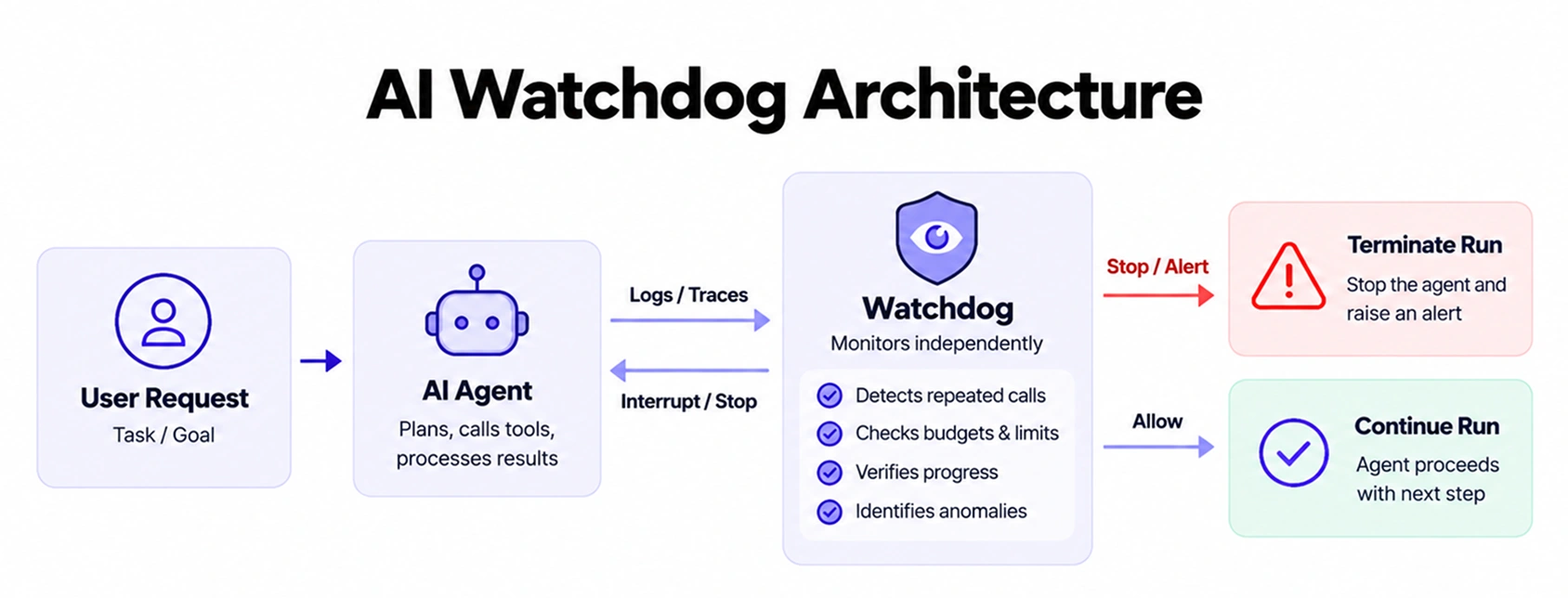
Our Take: If you ship one fix beyond a cap, make it this one. Hashing and state checks sit in code inside the agent's own process; a separate watchdog still works when everything else fails.
Fix 4: Require an Explicit State Delta (Anti-Stalling)
Catches: Varied calls, no change. Each call looks slightly different, so hashing misses it, but the task state never moves forward.
A state delta is a measurable change after a step, such as a record updated, a file written, or a new fact stored. After every step, fingerprint the state that matters and compare it with the last one. If N calls in a row pass with no change, end the run with a clear error, and treat 15 as a reasonable starting limit.
def check_progress(run, before, after, limit=15):
    same = after.fingerprint() == before.fingerprint()
    run.stalled = run.stalled + 1 if same else 0
    if run.stalled >= limit:
        raise LoopDetected(f"{limit} calls without state progress")
Watch out for:
- Fingerprint task-relevant fields only, because adding a timestamp makes every step look like progress.
- Read-only research steps change nothing, so give those phases a higher limit.
Fix 5: Define Objective Stop Conditions Upfront
Catches: Never decides it is done. The agent has no way to check success, so it keeps working after the goal is met, or when the goal can never be met.
'Do a good job' is not a stop condition, because the agent cannot verify it. Write success criteria as checks that return true or false, run them after every step, and end the run when they pass. Add a clean exit for runs that never pass, returning a partial result with an honest explanation. Typical checks and exits look like this:
- The query returns at least one row, and the count matches the control total.
- The ticket carries a resolution code and a customer-facing reply.
- On budget exhaustion, the agent returns partial results plus a plain-language reason.
Watch out for:
- Criteria that are too strict create new loops, so cap attempts per criterion.
- Run the check outside the agent where possible (see Fix 3).
Fix 6: Replace Blind "Try Again" Prompts with Informed Retries
Catches: Blind retry repeats failure. A generic 'try again' sends the agent back into the same state, so it hits the same error every time.
Blind retries reproduce the same state, so a bare 'try again' makes the agent repeat the same action and get the same error. Split failures into two groups, where transient ones (timeouts, rate limits) get bounded retries with backoff and permanent ones (a 401, failed validation) stop the run. When a retry is justified, tell the agent what was tried, what failed, and what to change.
An agent queries an order API with a one-day filter and gets zero rows. The orchestrator replies 'try again,' and the same query fails five more times. A more informed reply, 'The one-day filter returned nothing; widen to 90 days or report that none exist', ends the loop on the next step.
Watch out for:
- The right retry count depends on the API, so start at three and tune from real failures.
- Classify errors in code, not in the prompt (see Fix 7).
Fix 7: Enforce Two-Tier Guardrails (System and Prompt)
Catches: Prompt rules ignored. Instructions such as 'stop after two failures' are only advice, and the agent can skip them under pressure.
Guardrails work best in two tiers. System guardrails live in code (tool allowlists, budgets, phase transitions, human approval before irreversible actions), while prompt guardrails live in instructions such as 'reflect and replan'. Prompts guide behaviour; code guarantees it.
system_tier:            # enforced in code
  tool_allowlist: [search_orders, update_ticket]
  approval_required: [issue_refund, delete_record]
  phases: [investigate, propose, execute]
prompt_tier:            # advisory
  - "Every 5 steps, summarise progress and replan."
  - "If blocked twice, say so and stop."
Watch out for:
- System guardrails add latency and maintenance, so start with the three actions that must never fail.
- Prompt rules can be ignored under pressure, and expectations such as human oversight (NIST AI RMF) and approval trails (SOC 2) can only be met by the system tier.
How BuildNexTech Builds AI Agents That Do Not Get Stuck in Loops
Our AI agent platform, one of our AI services, enforces most of these fixes by default. Budgets, a watchdog, typed tool results, and tracing live in the platform layer, not in each agent's code. The same guards apply to an AI voice agent platform, and anyone learning how to create an AI agent can skip rebuilding them.
Whether you build in-house, hire an AI application development company such as Thoughtworks or EPAM, or choose us, ask who wrote the guards. We bring a low-code AI agent builder, AI-native architecture, and enterprise observability with no model lock-in. Whichever best AI agent platform or best AI agent builder you pick, the best AI agents for business are the ones that finish reliably because the guards are built in.
What a BuildNexTech AI Agent Implementation Looks Like
- Day 1 to 3, discovery: Trace your agent's tool loop and map missing stop conditions.
- Day 4 to 7, integration: Connect budgets, watchdog hooks, and typed tool results.
- Week 2 onwards, deployment: Go live on the highest-volume workflow with a human reviewer.
- Ongoing, iteration and monitoring: Tracing shows every decision; thresholds tighten with real data.
You finish the rollout owning the stop conditions, budgets, watchdog, and trace dashboards. If you would rather have a generative AI consulting company audit an existing agent first, our generative AI consulting services start with the discovery step.
Conclusion
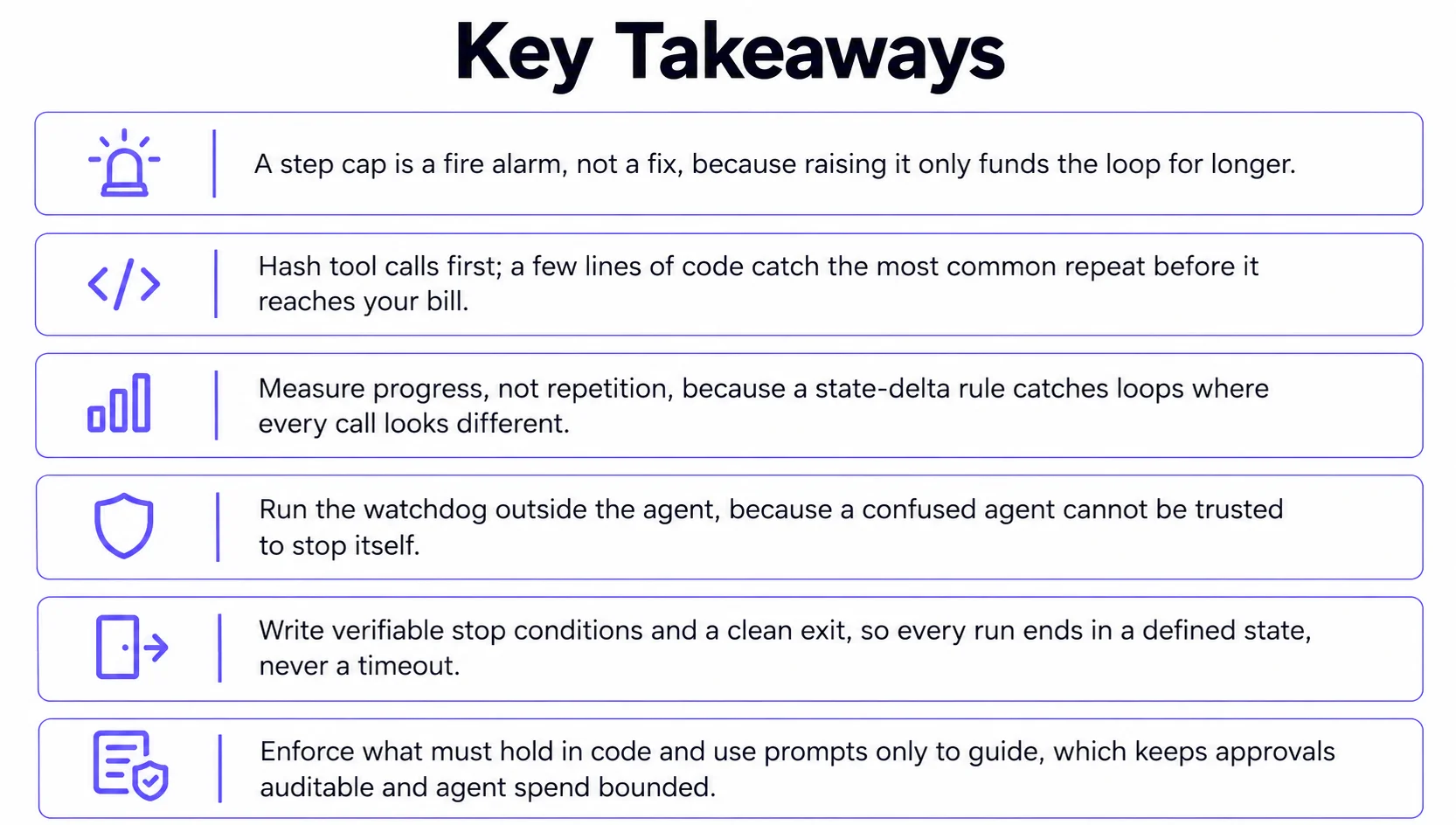
An AI agent that cannot stop is unsupervised, not autonomous. Raising caps postpones a loop; hashing, state deltas, and informed retries give the agent new information, and a watchdog is the net underneath. Together they turn an open-ended bill into a bounded, auditable run that finance and security teams can trust.
Teams that ship fastest add these guards before the first deployment, not after the first invoice lands. The harder question is which of your agents is looping right now, and whether anyone would notice.
People Also Ask

How do I test an AI agent for loops before launch?
Simulate failures in staging by returning empty results, throttling APIs, and setting impossible goals. Pass only when every run ends on a stop condition, budget, or watchdog halt.
Which logs should I keep to debug an AI agent loop later?
Log each step's tool name, argument hash, state fingerprint, token count, and cost, tied to one trace ID. Those fields let you replay exactly where progress stopped.
Do stronger models stop AI agents from looping on their own?
Stronger models may loop less often, but loops come from missing memory, vague tool feedback, and absent stop conditions, so they still need external limits and monitoring.
Can loop guards reduce an agent's output quality?
Poorly tuned guards can hurt quality by halting slow but valid runs. Set thresholds at a high percentile of healthy runs, such as p95, and review halted runs weekly.
What should I do after an AI agent has already looped in production?
Halt the run, capture the trace, and replay it in staging to find which guard was missing. Add that guard, then rerun the same scenario before redeploying.