

Imagine a team that adopts three AI coding agents in one quarter. Pull requests double, and so does the cleanup, because reviewers spend every Friday untangling plausible code that nobody can trace back to a decision. The developers love the speed, yet nobody can say what actually changed in the codebase that week.
That gap between demo speed and review load is where most rollouts stall. According to Stack Overflow's 2025 survey, 84% of developers use or plan to use AI tools, yet about two-thirds say the output is almost right but not quite. This guide compares ten agents, in no strict order, by deployment model, strengths, and honest trade-offs.
What Is an AI Coding Agent?
An AI coding agent is an AI agent built for software work: It takes a goal, plans the change, edits files, runs commands and tests, and iterates until the task is done. Unlike autocomplete, it works through a task end to end, with the developer reviewing the result.
Modern AI for coding is judged by finished tasks. Ask an agent to "add OAuth authentication and make sure all tests pass", and it handles the whole job instead of one snippet.
- Best used for: Multi-file edits, bug fixes across a module, and technical debt cleanup.
- Not an agent: A chat window that only suggests code, however good the AI underneath it.
AI Coding Agent vs. AI Coding Assistant
AI code generators and AI coding assistant tools stop at suggestions, while agentic coding hands the whole edit-test-fix loop to the agent. The best AI coding agent does not write the most code. It leaves your team the least cleanup, so judge tools on autonomy, codebase context, and review burden. The table below compares the two.
The 10 Best AI Coding Agents in 2026
Most lists of the best AI coding tools crown one winner, often the publisher's own product. We drew this shortlist from the Agentic.ai ranking and current roundups, and the entries below follow no strict order. So what is the best AI for coding? It depends on your stack: The best AI tools for coding differ by workflow, and the best generative AI for coding is the model behind each agent.
For most teams, the best AI to use for coding is a stack of two or three agents. The best AI coding assistant for you may not be an agent at all.
1. Claude Code
Claude Code is Anthropic's terminal-native agent. It reads your repository, plans a change, edits across files, runs the tests and reads the failures, and it works in the terminal, in IDE extensions and on the web.
- Best for: Engineers who want a terminal-native coding agent for multi-file refactors and git workflows.
- Where it shines: Deep codebase context and tool access through the Model Context Protocol (MCP) and any MCP server you connect, which reaches issue trackers, databases, and internal services.
- Trade-off: Terminal-first habits take time to form, so plan for onboarding.
2. Cursor
Cursor, built by Anysphere, is a VS Code-style editor where agents make multi-file edits from a plain-language goal. Cloud agents keep working while developers move on, and privacy mode limits what leaves the machine.
- Best for: Teams that want an AI-native IDE with agents, background agents, and pull request review in one place.
- Where it shines: Daily flow. Autocomplete, chat, and agents live in one editor, so developers switch tools less mid-task.
- Trade-off: Usage limits can interrupt a sprint, and value depends on making Cursor everyone's editor. Teams split across editors can lose time in handovers, so agree on one before rollout.
3. GitHub Copilot
GitHub Copilot now offers agent mode in the editor, a cloud agent you can assign issues to, and a choice of underlying models. Assigned work comes back as a pull request for human review.
- Best for: GitHub-centric teams that need one vendor, audit controls, and central policy management.
- Where it shines: Pull request automation and automated code review. As one of the more practical AI code review tools, it catches routine issues before a human opens the diff, which suits teams already living in pull requests.
- Trade-off: May be less suited to complex multi-file reasoning than agent-first tools, so test hard refactors first.
4. Factory AI
Factory AI builds agents called Droids that take a task, plan it, and work through it across multiple models. They support MCP, so they can reach the same tools your developers already use.
- Best for: Teams that want a coding agent inside their existing IDE and CLI workflows.
- Where it shines: Fit and flexibility. Droids slot into the workflows you already have, and working across multiple models keeps you from depending on a single vendor.
- Trade-off: A smaller public footprint means fewer independent benchmarks, so verify its claims against your own repository.
5. OpenHands
OpenHands, from All Hands AI, is an open-source agent with an MIT-licensed core. Agents run in sandboxed execution through Docker or Kubernetes and integrate with GitHub and CI pipelines.
- Best for: Teams needing an open-source, model-agnostic agent they can self-host and customise.
- Where it shines: Control. You choose the model, host it inside your own network, and inspect every action, which matters in regulated industries. Its open code lets your security team audit how it behaves.
- Trade-off: More setup and infrastructure to run, so plan platform engineering time.
6. Cline
Cline is an open-source agent that runs inside VS Code in plan and act modes, with terminal and browser tools and MCP support. You bring your own model, so you control both model choice and data handling, and setup takes minutes.
- Best for: Developers who want an open-source VS Code agent with approval at each step.
- Where it shines: Oversight. Every command waits for your approval, which keeps a human-in-the-loop and makes it a sensible first agent for cautious teams.
- Trade-off: Output quality tracks the model you connect, and the interface is less polished than commercial peers.
7. Devin
Devin is Cognition's cloud agent. It plans a ticket, writes code, runs tests, and opens a pull request for human review. Devin Desktop, formerly Windsurf, is the local half of the family and hands longer tasks off to cloud Devin from one command center.
- Best for: Teams delegating migrations, refactors, and bug fixes asynchronously through Slack, Linear, or Jira.
- Where it shines: Background agents on work nobody wants to babysit, such as dependency upgrades and repetitive migrations that otherwise stall behind feature work. Reviewers then judge a finished pull request.
- Trade-off: Results on real tickets can vary with ticket quality, so review its pull requests closely.
8. Augment Code
Augment Code is built around a Context Engine that handles up to 200K tokens of codebase context, which matters when a change touches forty files nobody fully remembers. Suggestions can then reflect how services connect, not just the open file.
- Best for: Enterprise teams working in large, legacy codebases.
- Where it shines: Code review. It supports automated code review at scale, so reviewers get a second opinion that already knows the surrounding code.
- Trade-off: Closed-source SaaS and less autonomous than dedicated agent tools.
9. Google Antigravity
Google Antigravity is Google's agent-first development environment, offered as an IDE, a 2.0 desktop app, a CLI, and an SDK. Its agents work across the editor, terminal, and browser, and can browse documentation and run browser tests to check their own work.
- Best for: Developers who want agents that test their own changes in a browser.
- Where it shines: Running several agents in parallel through dynamic subagents, plus scheduled tasks that start agents at fixed times. Apply the same human-in-the-loop review you would to any agent.
- Trade-off: It is newer than most tools here, so supported models, limits, and behaviour are still moving.
10. Kiro
Kiro is hosted on AWS and stores task context, pairing chat with code changes. It follows spec-driven development, where requirements and design are written down before any code.
- Best for: Developers who want an agent that retains task context across multi-step work.
- Where it shines: Writing requirements and design before code. The spec becomes a reviewable artefact, so reviewers check intent before they check code, which can cut rework on larger features.
- Trade-off: A newer product with a shorter track record, so keep one human owner for each spec.
Pilot any shortlist on ten real tickets and track developer productivity metrics such as review minutes per pull request. Include the engineers who do the reviewing in that pilot, because review is where agent output succeeds or fails.
How BuildNexTech Helps You Deploy AI Coding Agents at Scale
Picking an agent is easy, but running four across six teams is an AI agent orchestration problem, with governance, review, and usage questions that no single vendor can answer. The problems tend to surface after rollout, when review queues grow, usage sprawls, and nobody can say which agent changed which part of the codebase.
BuildNexTech closes that gap with an operating layer around your agents: AI-native architecture, a low-code agent builder, enterprise-grade agent observability dashboards that track review time and regressions, and no model lock-in. Explore our AI services to see how that layer fits alongside your existing CI setup and AI workflow.
What a BuildNexTech AI Coding Agent Implementation Looks Like
Here is the schedule we follow, with human review on every merge. Each phase ends with a review checkpoint.
- Days 1 to 3: Discovery of repositories, review burden, and data-handling rules.
- Days 4 to 7: Integration with CI, pull requests, and your identity provider.
- Week 2 onward: Deployment to one team, then iteration on review time and regressions.
- Handover: Your team owns the configuration, dashboards, and review rules.
Conclusion
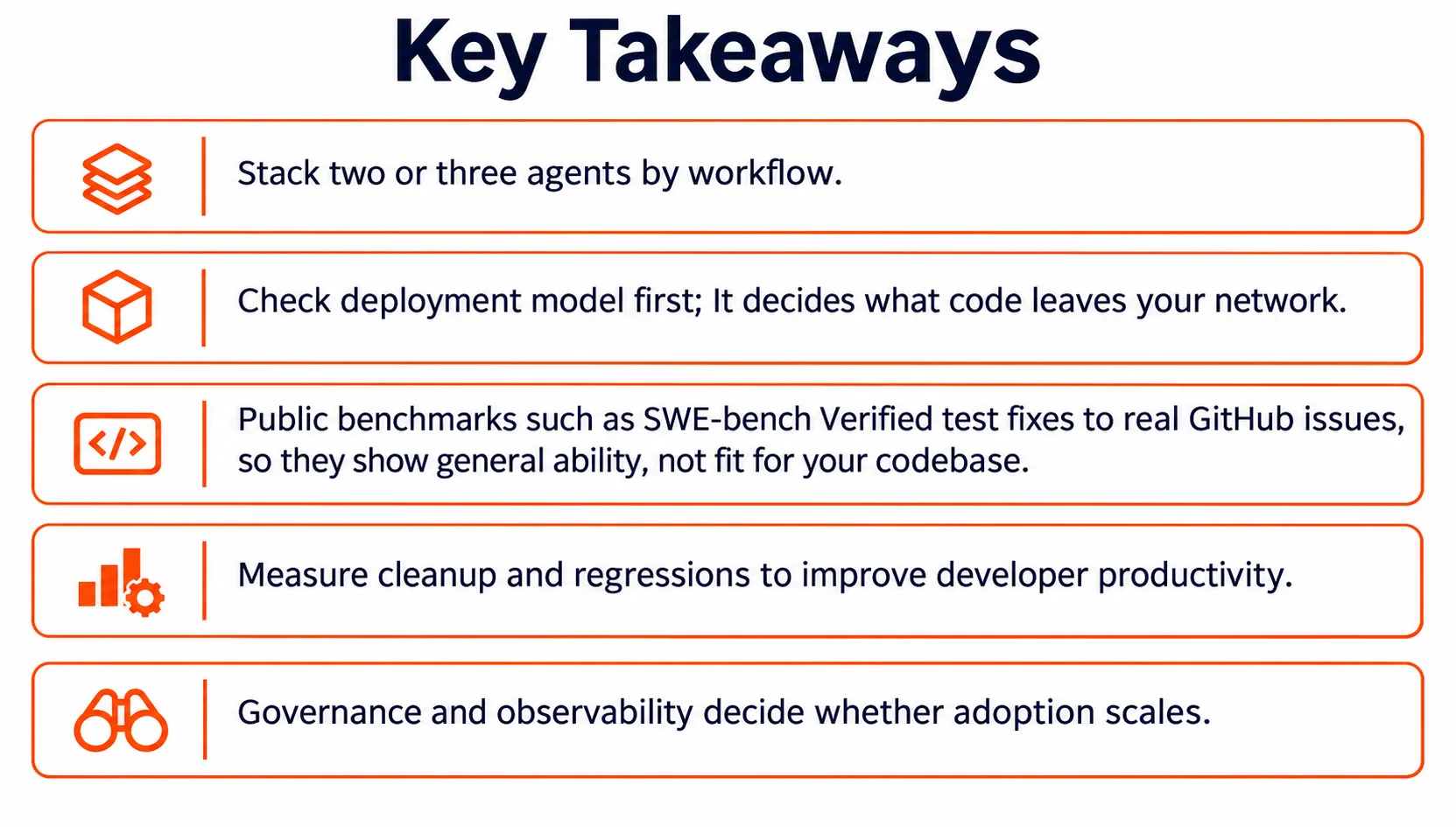
AI coding agents differ by autonomy and deployment model, but the real test begins after the code is written. Review burden decides whether developer productivity rises or moves into the pull request queue. The right agent depends on your stack and your review habits.
Agents will improve every quarter, so this shortlist will age quickly. Your next step is the pilot above: Run two agents from this list on the same ten tickets and compare review minutes per pull request before you standardise. Let your own data make the choice.
People Also Ask

What is code review and where do AI coding agents fit?
Code review is a peer check of changes before they merge, catching defects and sharing knowledge. Agents can draft and pre-screen changes, but humans should still approve what ships.
How secure is code written by AI coding agents?
Agents can introduce vulnerabilities and unsafe dependencies, so pair them with AI code security solutions such as static analysis and secret scanning, plus human review.
Which programming languages do AI coding agents handle best?
Mainstream languages such as Python, JavaScript, TypeScript, and Java tend to work best because training data is richest, while niche or legacy languages need closer review and tighter instructions.
How long does it take to see a return from AI coding agents?
Early signals often show within two to four weeks of a pilot, tracked through review time and merge rate. Treat that as a rough guide, since returns depend on governance.
What is the Model Context Protocol and why does it matter?
MCP is an open standard that lets agents connect to external tools and data through one interface. It matters because it cuts custom integration work.