

.webp)
TLDR: Artificial Intelligence has split software development into three layers: AI assistants inside your editor, terminal agents that handle multi-file edits, and autonomous agents that run entire tasks independently. Picking the wrong layer costs more than picking the wrong tool. Here are all 12, with pricing, honest trade-offs, and a clear decision framework.
Picture this: it is a Tuesday morning standup. Your team lead mentions the sprint is behind again. Someone quietly points out that three different AI coding tools are active on the team. Two are barely used. One is racking up a bill nobody approved.
Sound familiar?
This is the story of most engineering teams in 2026. Not because AI coding tools do not work. They do. The Stack Overflow Developer Survey 2025 reports that 84% of developers are now using or planning to adopt them. The problem runs deeper: the same challenge appears in AI consulting services, where teams often pick tools before defining the right execution layer.
And the cost of getting that choice wrong is rising fast. Across 150+ client engagements at BuildNexTech, the teams that struggled almost always chose the right tool for the wrong AI integration layer of their workflow. One wrong configuration, and a single AI developer's monthly bill can quietly jump from $29 to $750 before anyone notices.
How We Categorised the 12 AI Coding Tools
Before comparing any AI productivity tool, you need to know what job each type is built to do.
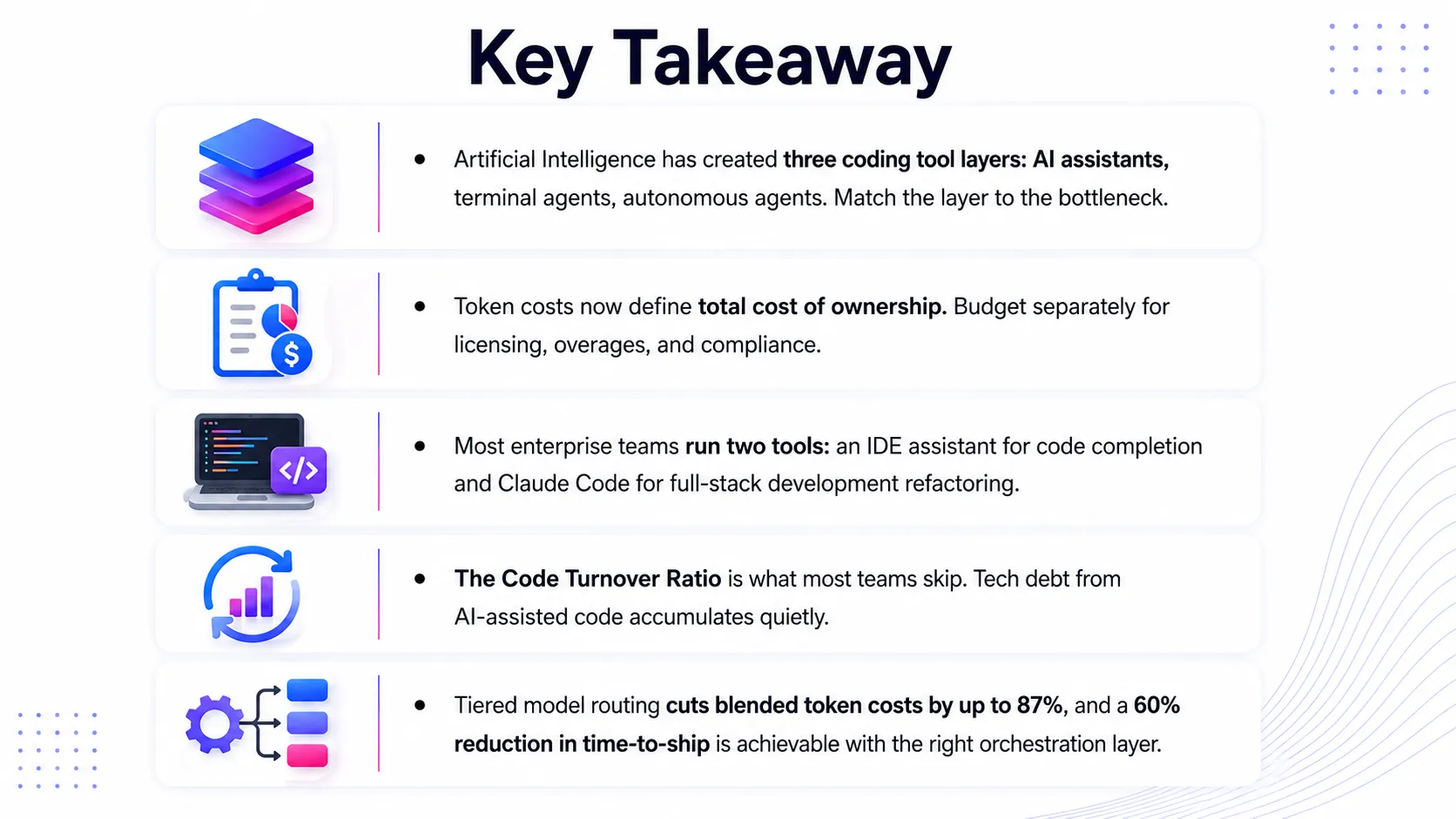
The AI coding tools market today breaks down into three distinct tiers:
- AI assistants live inside your code editor. They offer context-aware suggestions, code completion, and complete boilerplate code automatically. Fast autocomplete that understands your codebase.
- Terminal agents are more capable. They read your entire codebase, plan multi-file edits, run tests, and fix errors step by step, without you clicking around manually.
- Autonomous agents go the furthest. Give them a task description, and they return a working result with minimal back-and-forth.
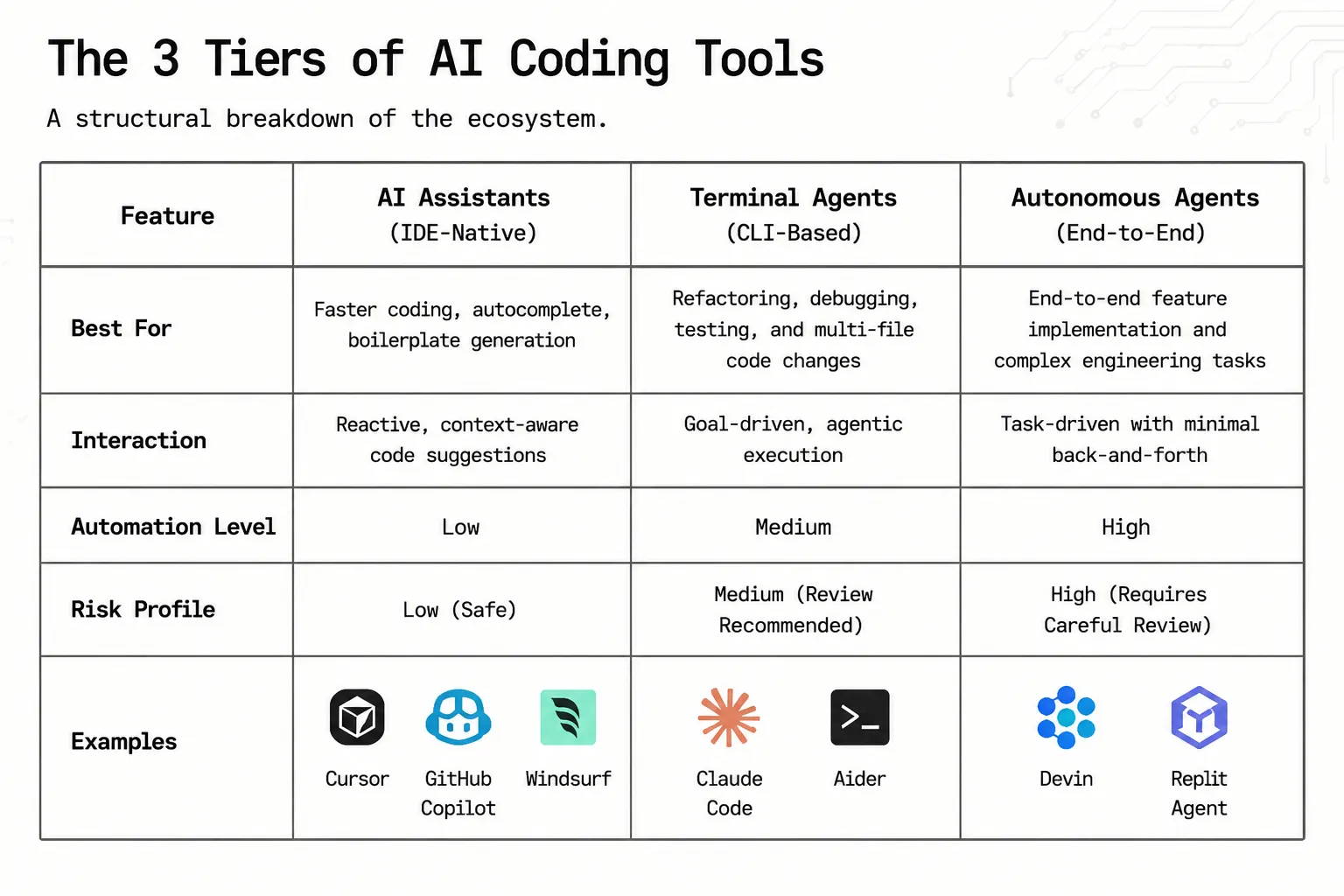
Comparing a code completion tool to an autonomous agent is a category error. The right question: which execution layer solves your team's biggest bottleneck, and which development platforms within that layer match your compliance needs?
Our selection framework helps identify the best AI tools based on capability, large language model access, compliance posture, and total cost of ownership. The tools that win benchmark scores are rarely the ones that win on total cost. Most teams find that out after the first invoice shock.
AI Coding Tools at a Glance: 2026 Comparison Table
IDE-Native AI Coding Tools: Where Most Teams Start
Editor-based coding AI assistants are the natural entry point. Context-aware suggestions appear as you type, and teams see results within days, not weeks. These four programming tools stand out from the rest in 2026.
Cursor Pro: Best for Multi-File Agentic Editing
Cursor Pro's Composer mode takes a plain-English instruction and makes multi-file edits across your entire codebase in one go.
- 200K token context window, large enough for most production codebases.
- 72% code acceptance rate on large TypeScript and Python projects (independent benchmarks).
- Pro at $20/month; Pro+ at $60/month; Ultra at $200/month(pricing may vary; check the latest on their website).
- Token exhaustion under agent mode catches most teams off guard in month two.
GitHub Copilot X: The Go-To for Regulated Industries and GitHub-First Teams
GitHub Copilot X holds 37% market share and 28 million monthly active developers. For regulated industries, it clears procurement because of what it brings beyond code:
- Runs inside VS Code, JetBrains, Neovim, and Eclipse.
- SOC 2, IP indemnity, SAML SSO, and audit logs are included.
- Plugs directly into your CI/CD pipelines through GitHub Actions- no extra setup needed.
- Credit-based billing from June 2026: Business at $19/user/month, Enterprise at $39/user/month(pricing may vary; check the latest on their website).
- Promotional credits mask real costs until August 2026.
Windsurf Pro: Best Value for Autonomous Coding Workflows
Windsurf Pro is the budget-smart alternative. Its Cascade agent runs background automation agents in parallel while the developer stays focused.
- Security scanning, dependency updates, and refactors run automatically in the background.
- $15/month delivers 80 to 85% of Cursor Pro's capability at 75% of the price(pricing may vary; check the latest on their website).
- Strongest cost-per-value IDE entry point without strict compliance requirements.
- OpenAI acquisition raises questions about future model access worth monitoring.
Gemini Code Assist: Best for Google Cloud and Workspace-Heavy Teams
Gemini Code Assist moved to paid-only plans on 18 June 2026. Standard at $19/user/month; Enterprise at $45/user/month(pricing may vary; check the latest on their website).
- Native Google Cloud infrastructure context that other tools cannot replicate.
- 1M+ context window from Google Gemini 3.1 Pro is the standout feature for large codebases in microservices environments.
- Best fit for teams already fully inside the Google ecosystem.
Terminal-Native AI Coding Agents: The Harder Problems
When problems require understanding your whole codebase at once, IDE assistants fall short. Terminal agents read your entire project from the command line and handle complex tasks step by step.
Claude Code: Best for Complex Reasoning and Codebase-Wide Refactoring
The specialist you call in when the problem is genuinely difficult.
- Leads SWE-bench Pro (the AI coding industry benchmark) at 64.3% with Claude Opus 4.7.
- 1M context window: understands more of your codebase at once than any tool here.
- Best for large migrations, full API redesigns, and full-stack development restructuring.
- Usage-based pricing with no monthly floor (pay via API).
- LLM and MCP support connect natively with tools like Zapier MCP.
- Most teams pair it with Cursor Pro or Copilot X for daily code generation and code completion.
Aider: Best Open-Source Terminal Agent for Privacy-First Teams
Most tools send your code to external servers. Aider does not.
- Fully free, zero-data-retention deployment path.
- Run local large language models via Ollama, DeepSeek Coder V3, and Code Llama 3 on your own infrastructure.
- The only terminal agent built for air-gapped environments in healthcare and financial services.
- Trade-off: quality on complex multi-file edits lags behind Claude Code.
AI Code Review and Testing Tools: The Layer Most Teams Skip
Most teams invest in writing code. Far fewer invest in checking it. That gap is where tech debt builds up.
CodeRabbit: Best for Automated PR Review
A fintech team we worked with had 12 engineers and 40-plus pull requests every week. The bottleneck was reviewing code, not writing it. CodeRabbit automates the code review process on every pull request before a human sees it.
- Plugs into GitHub and GitLab.
- Flags security vulnerabilities, performance problems, and logic errors automatically.
- Free for open-source; $15/user/month for private repositories(pricing may vary; check the latest on their website).
Qodo (CodiumAI): Best for AI-Generated Test Coverage
Most AI test generation tools produce generic stubs. Qodo generates tests from actual business logic, which matters for compliance audits and static application security testing.
- Tracks tech debt building across deployment pipelines via a governance dashboard.
- Pro at $19/month; Enterprise adds SSO/SAML, BYOK, and on-prem deployment(pricing may vary; check the latest on their website).
Autonomous Agents and Prototype Builders
The newest tier. Autonomous agents handle entire tasks from start to finish. High ceiling. High risk.
Devin: Best for End-to-End Autonomous Task Execution
Give Devin a task description, and it handles planning, code generation, testing, and iteration on its own.
- Best for clearly scoped, well-defined tasks.
- Failure mode: vague requirements lead to over-engineering, expensive in tokens and time.
- A sprint accelerator, not a replacement for engineering judgement.
Replit Agent: Best for Full-Stack Development and Non-Developer Teams
Built on Replit Ghostwriter's foundations, Replit Agent is for non-engineers who need to build and ship fast.
- Browser-based, zero setup, build and deploy in one environment.
- AI costs reach $40 to $50 per app at volume(pricing may vary; check the latest on their website).
- Not built for enterprise compliance: a prototyping tool, not a production platform.
What Most AI Coding Tool Evaluations Get Wrong
Most generative AI coding tool comparisons stop at features. Almost none address the three gaps that actually cause teams to underperform after buying their tools.
Gap 1: Nobody models the real cost. AI-related infrastructure costs are rising faster than the productivity gains they produce. Most AI coding budgets were built on per-seat logic that breaks the moment agent mode enters the workflow.
Gap 2: Tool tiers get conflated. Comparing Cursor Pro to Devin is like comparing a spell-checker to a junior engineer. The question is which execution layer addresses your team's bottleneck, not which tool wins a feature comparison.
Gap 3: Nobody tracks quality. The Code Turnover Ratio measures how often AI-assisted code introduces tech debt requiring post-merge fixes. Static application security testing results in CI/CD workflows tell part of the story. Velocity data tells the rest.
The Token Economics Problem No Roundup Addresses
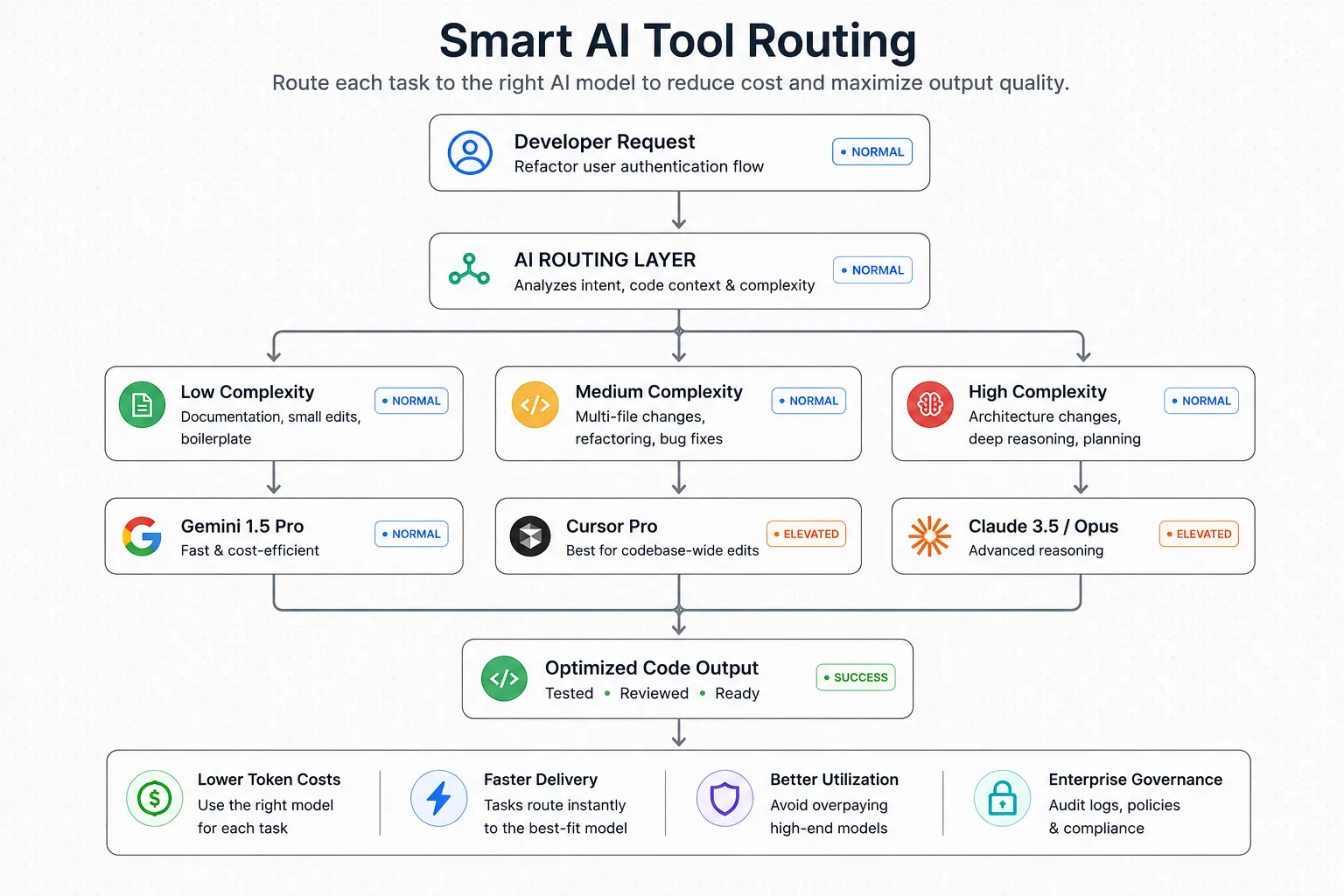
One of the biggest lessons from AI consulting is that routing all tasks to frontier large language models costs up to 87% more than a tiered approach:
- Boilerplate code and documentation workflows go to smaller, cheaper models.
- Complex reasoning and multi-file refactors go to frontier models only.
Most teams default to one tool for everything. The invoice reflects it.
How BNXT.ai Helps Engineering Teams Govern and Scale Their AI Coding Stack
Choosing the right tools is the first decision. Running them at a team scale with ROI data, you can show that finance is the harder one.
BNXT.ai's AI services platform deploys custom automation agents that route tasks to the right model, whether Claude, GPT, or Google Gemini, based on complexity and cost.
Results from teams we have worked with:
- 60% reduction in time-to-production-ready features by adding an orchestration layer, not switching tools.
- 1.2 million hours were returned to a UK financial services firm by automating documentation workflows, adaptive content, and code review tasks across CI/CD workflows.
What a BNXT.ai AI Coding Workflow Implementation Looks Like
- Days 1 to 3: Audit the tool stack and identify workflow patterns consuming the most developer hours.
- Days 4 to 7: Configure the orchestration layer, routing IDE tasks to Copilot X or Cursor Pro, terminal tasks to Claude Code, and prototype tasks to Replit Agent.
- Week 2 onwards: Add token observability, set spend thresholds, connect to deployment pipelines, and hand over a system the team owns.
Who This Is Built For
For teams already running multiple AI coding tools inconsistently, with no routing logic and no ROI data for finance.
Common triggers:
- A billing overage that caught finance off guard.
- An upcoming procurement cycle where leadership needs ROI numbers.
- A post-mortem where AI-generated code introduced security vulnerabilities that the code review process missed.
The Right Stack Is Not the Most Expensive One
Most teams working with a software development company still fail with AI coding tools if they are picking the wrong tools. Nobody owns the layer above them. Developers default to favourites, finance sees unpredictable invoices, and leadership cannot produce ROI data when procurement comes around again.
The AI coding tools that deliver in 2026 are not always the ones with the best benchmarks. They are the ones matched to the right workflow, the right compliance posture, and a cost model that does not surprise you in month three.
Get workflow fit, compliance fit, and cost fit right, and the selection becomes obvious. Get them wrong, and you spend the budget twice.
People Also Ask

What is the difference between an AI coding assistant and an AI coding agent?
AI assistants suggest code as you type. Agents plan, make multi-file edits, run tests, and iterate with minimal input. That distinction defines your total cost model in 2026.
How much do AI coding tools actually cost at team scale?
Sticker price is not the total cost. Under agent mode, token overages multiply the per-seat price by 10 to 30 times. Budget separately for licensing, overages, and compliance infrastructure.
Which AI coding tool is best for large enterprise codebases?
GitHub Copilot X for regulated industries. Cursor Pro for multi-file editing. Claude Code for complex reasoning and codebase-wide refactoring. Most enterprise teams run two tools in parallel, not one.
Are AI coding tools safe to use with proprietary source code?
Yes, at paid tiers. Copilot X, Cursor Pro, and Windsurf Pro guarantee no training on your code. Tabnine Pro and Aider offer zero-data-retention or air-gapped deployment for regulated, high-security environments.
Can AI coding tools replace software engineers?
No. AI tools automate boilerplate code, tests, and documentation. McKinsey reports a 46% reduction in routine coding time. The real risk is falling behind peers who adopt these tools effectively.


.webp)
.webp)
.webp)

.webp)
.webp)



