

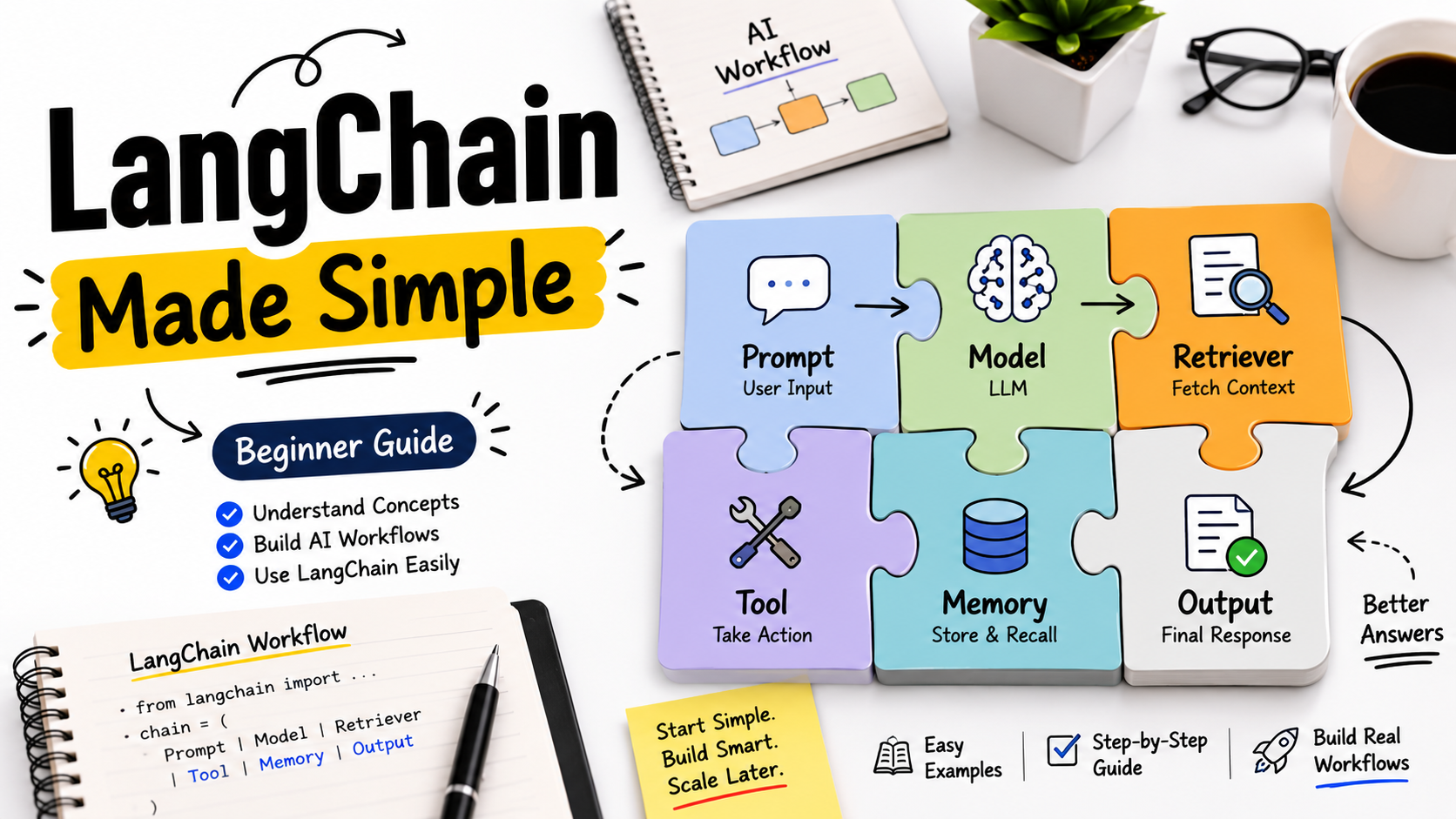
Picture this: your team spends three weeks getting a LangChain demo to work beautifully. The AI assistant answers questions, calls tools, and retrieves documents. Everyone is impressed. Then you push it to production environments. Within 48 hours, it loops indefinitely, hallucinates tool names, and crashes with no error logs. Sound familiar?
That gap, between a working prototype and a reliable production system, is where most teams lose months. This guide covers what LangChain actually is, the three workflow patterns that matter most, where things break, and how to make the right architecture call from day one.
TLDR: LangChain is a software development toolkit that connects large language models to tools, conversational memory, and external data. For stateful or multi-step agentic AI workflows, pair it with LangGraph. For production environments, you will also need observability, cost governance, and deployment infrastructure on top. Across 150+ client engagements in 30+ industries, BuildNexTech engineers have seen the same failure modes repeat. This guide covers them.
What LangChain Actually Does and Why the Architecture Matters
The LangChain framework has two layers: one managing components, the other (LangGraph) managing execution flow for complex, stateful tasks.
The Five Primitives Every LangChain Workflow Is Built From
Before writing a single line of code, decide how these five components fit together. Get this wrong, and rebuilding is inevitable.
- Models: LangChain LLM abstraction layer connecting OpenAI, Anthropic, and Hugging Face through a unified interface. Switch providers without rewriting orchestration logic.
- Prompts: Manage prompt templates and few-shot examples via LCEL (LangChain Expression Language), the current replacement for the legacy LLMChain.
- LangChain chains: Link components in sequence, forming data processing pipelines where one output feeds the next input.
- Tools: Handle API integrations, databases, web search, vector stores, and Model Context Protocol (MCP) compatible services.
- Memory: Short-term memory for active conversations and long-term retrieval via vector embeddings for conversational memory across sessions.
Get these five right at the start. Teams that skip the design phase rebuild everything at the six-month mark.
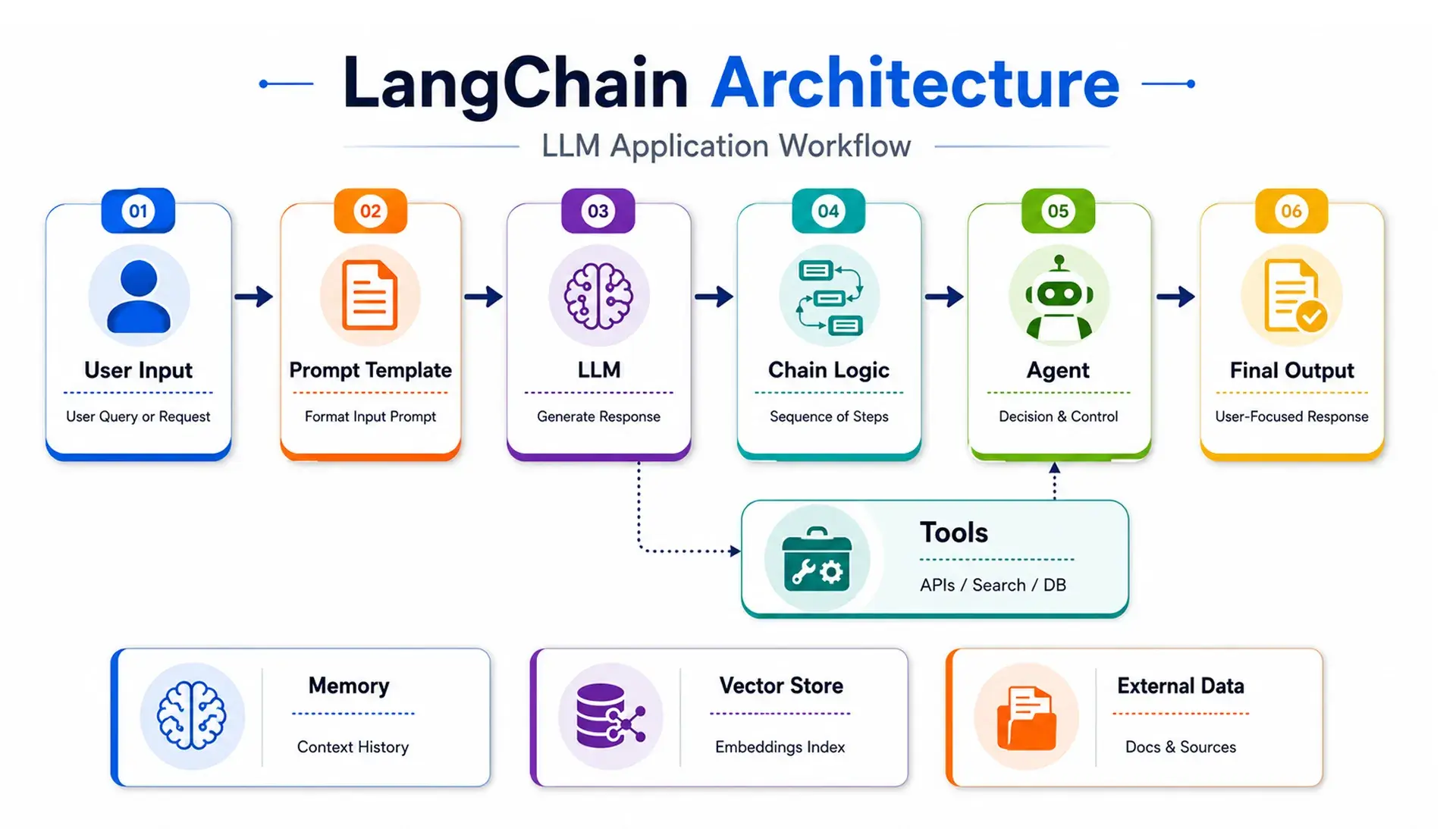
The Three LangChain AI Workflow Patterns That Cover Most Production Use Cases
Most real-world LangChain applications fall into one of three patterns. Picking the wrong one is the most common reason a workflow works in demos but fails under real traffic.
The Linear Chain: When Sequential Chains Are Enough
The linear chain is the simplest pattern. User input moves through prompt templates, a language model, an output parser, and into a final response, in a fixed order, every time.
Best for: document Q&A, structured data processing, summarisation, and document analyzers.
Use LCEL, not the legacy LLMChain. LCEL supports streaming natively and integrates with LangSmith without extra configuration.
The RAG Workflow: Connecting Language Models to Your Private Data
Retrieval-augmented generation connects your LangChain LLM to private data. The pipeline runs in this order:
- Document loader pulls content from your data source
- Text splitter breaks it into chunks
- Embedding model converts chunks into vectors
- Vector store (Pinecone, FAISS, or Weaviate) indexes them
- Retriever fetches the most relevant chunks for each user query
- Language model generates the final response using retrieved context
The two settings teams most often get wrong: chunk size and retrieval strategy. Too large and the model drowns in noise. Too small and context breaks across boundaries. MMR (Maximum Marginal Relevance) retrieval handles repetition better than pure similarity search. A miscalibrated setup does not fail loudly. It just never earns trust.
The Agentic Workflow: When the LLM Needs to Decide What Happens Next
This is where the LLM stops following instructions and starts making decisions. The ReAct pattern drives it:
- Reasons about its current state and available tools
- Selects a tool and fires an API call
- Observes the result
- Repeats until the task is complete
Research assistants, customer support bots, and AI assistants handling multi-turn conversations all run on this pattern. The moment your workflow needs conditional logic, branching logic across more than three paths, or state that survives a server restart, LCEL alone is not enough. You need LangGraph and the LangGraph visualizer to see what is happening across logic nodes.
.webp)
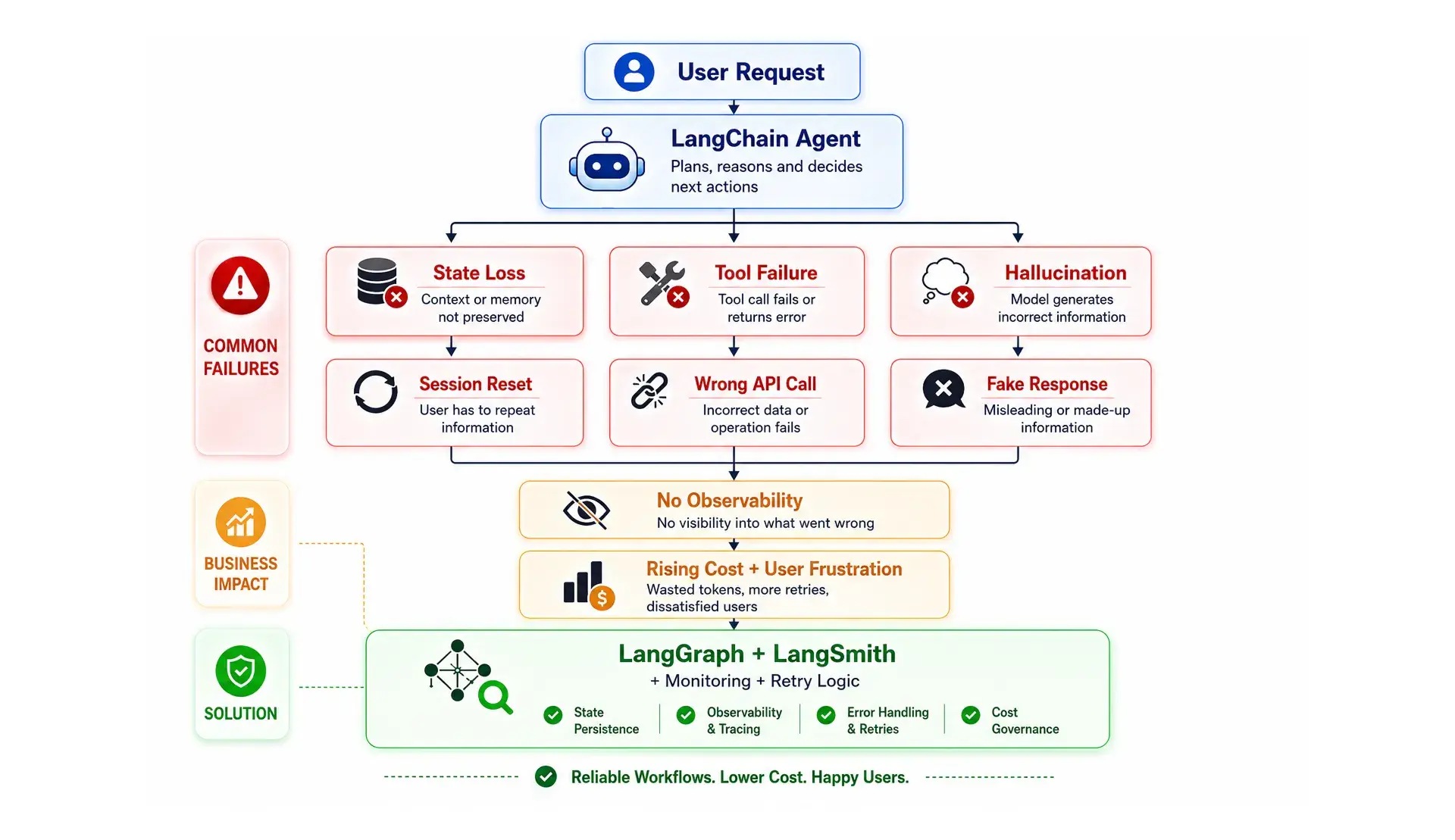
Where LangChain AI Workflows Break in Production and How to Prevent It
Most teams only discover what breaks after they ship. Here is what goes wrong in production environments, and why it is always predictable in hindsight.
State Management Brittleness in Multi-Step Agents
LangChain tracks state through mutable dicts and message lists. For simple linear flows, fine. For Multi-Agent Systems with conditional routing or human approval steps, it becomes unmanageable fast.
LangGraph solves this with typed state transitions and checkpointing to SQLite (dev) or Postgres (production), so conversational memory and session data survive restarts and model call timeouts.
Untyped Tool-Call Failures and Structured Error Handling
When a tool call fails at step 7 of a 10-step agent, LangChain's default behaviour is to pass the error back to the language model. The model then tries to recover, often by hallucinating the tool output. That is not recovery. That is confident hallucination.
The right pattern:
- Explicit retry logic with exponential backoff for transient API call errors
- Structured error context returned to the model, not raw stack traces
- Hard halt with alerting for fatal tool failures
LangSmith Observability and Cost Attribution
According to LangChain's State of Agent Engineering, 89% of teams with production agents use some form of observability, yet most have no per-step cost attribution at all.
Set LANGCHAIN_TRACING_V2=true to activate LangSmith observability: token usage per node, tool call traces, and input/output diffs across prompt calls. Externalise LangChain templates to a version control system. Teams that keep prompts in application code need a full deployment for every tweak.
LangChain vs. LangGraph: The Decision Framework Engineering Teams Actually Need
LangChain gives you the components. LangGraph gives you the execution runtime when things stop being linear. Here is how to choose.
When to Stay with LangChain Alone
Use LangChain LCEL when the workflow is simple, predictable, and does not need to remember what happened three steps ago:
- The workflow is linear with 1 to 3 tool calls
- No branching logic or human approval steps needed
- Simple RAG pipelines, document analyzers, or single-turn AI assistants
When LangGraph Becomes the Right Call
Switch to LangGraph when your workflow outgrows a straight line and starts needing memory, decisions, and recovery built in:
- Conditional logic or branching across multiple paths
- Agent runs 3 or more tool calls per turn
- Session state must persist across restarts
- You are building Multi-Agent Systems coordinating across services
Which one fits your team?
- Linear pipeline, 1 to 3 tools, no branching logic? LangChain LCEL.
- Conditional routing, conversational memory, or human checkpoints? LangGraph.
- Multi-Agent Systems coordinating across services? LangGraph with a supervisor agent pattern.
Our Take: Start with LangGraph even for simple intelligent agents. The setup adds two to three days upfront. Rearchitecting a production LCEL agent when requirements expand takes weeks. We have seen teams delay this decision until it became a crisis.
Three Production-Readiness Gaps LangChain Workflows Expose as You Scale
The LangChain framework gives you orchestration logic. Deployment, cost governance, and monitoring are separate builds.
Accuracy Must Be Measured at the Workflow Level, Not the LLM Level
In multi-step AI-powered steps, measuring accuracy at the individual language model response level misses the real failures: routing errors, wrong tool selection, and chained-reasoning mistakes that compound across steps. Workflow-level evaluation needs execution trace logging and per-step output validation. Skip this, and you discover the accuracy problem in production.
Token Budget and Inference Cost Governance Across Multi-Tool Workflows
Each retrieval step, tool result, and memory injection adds tokens to data processing pipelines. Without token budgets and per-step cost attribution, inference costs grow invisibly as pipeline generation scales. The fix:
- Set token budgets per workflow run
- Route lower-stakes tasks to smaller models via HuggingFace
- Attribute cost by logic node so you know where the spend is
Most teams have no visibility into per-node cost at all.
The Infrastructure Gap Between the LangChain Framework and a Production Deployment
LangChain handles orchestration. It does not handle containerised deployment, multi-model routing with fallback, LangChain templates under version control, or CI/CD for agent updates. Teams that skip scoping these end up rebuilding six months in.
How BuildNexTech Closes the Infrastructure Gap in LangChain AI Workflows
BuildNexTech's AI services give engineering teams LangChain-compatible orchestration, LangGraph-style state management, and enterprise-grade LangSmith observability in one platform. No wiring components together from scratch.
Teams using BuildNexTech have moved from prototype to production-ready AI-driven workflows in weeks, not months. A US hospital system using our AI assistants cut administrative burden by 40%. A US logistics fleet reduced downtime by 30 to 50% through predictive AI-powered steps.
BuildNexTech provides a low-code agent builder with native state management and tool usage, multi-LLM routing, and production observability surfacing token cost, latency, and tool call accuracy per run.
What a BuildNexTech LangChain Workflow Implementation Looks Like
- Days 1 to 2: Connect LLM provider using API keys and API credentials, define the first LangChain application (typically a RAG pipeline or document Q&A agent)
- Days 3 to 5: Add API integrations across databases and vector stores, promote to a test environment with LangSmith observability and visual workflows active
- Week 2: Deploy to production environments with multi-model routing, token budget controls, and per-run Data Science reporting active
Who This Is For
Engineering teams with a working LangChain application hitting the infrastructure wall: rising inference costs, Multi-Agent Systems complexity, or observability blind spots.
Two signals:
- LangChain agent works in demos but breaks under real production traffic
- About to hire an MLOps engineer just to manage the deployment layer
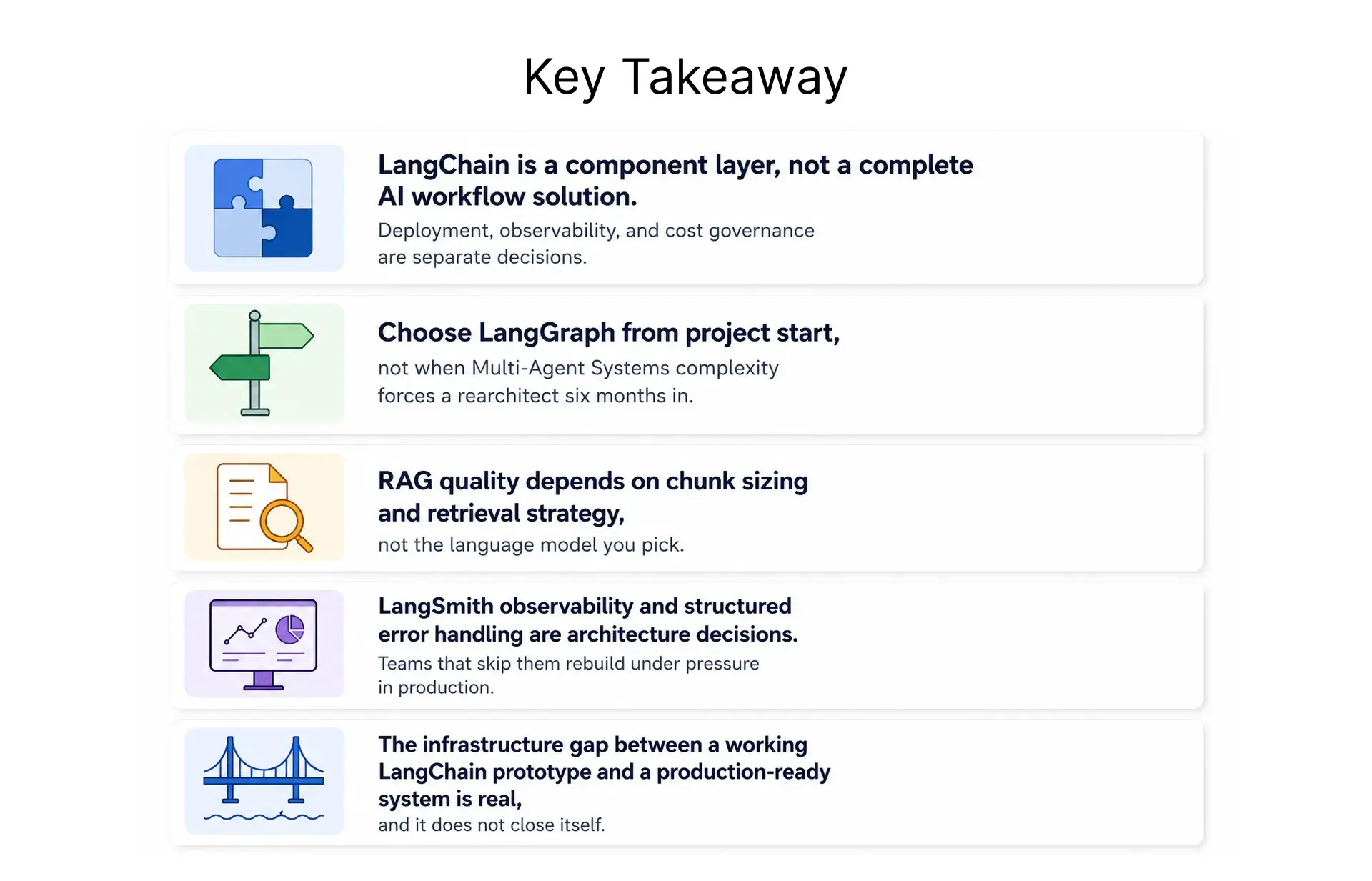
LangChain Workflows Work in Demos. What Breaks Them in Production Is Not What You Think.
Getting a LangChain AI workflow running in an afternoon is easy. Getting it to run reliably in production environments, without runaway costs, hallucinations, or state loss on restart, is the actual work.
LangChain gives you the building blocks for end-to-end language model applications. LangGraph gives you the runtime for when workflows stop being linear. Neither gives you the production infrastructure layer. That is where most teams spend their unplanned engineering hours.
The decision cannot wait until the LangChain application is already live.
People Also Ask

What is LangChain and what does it actually do?
LangChain is a Python software development toolkit that connects large language models to tools, conversational memory, and external data sources for building AI-driven workflows and end-to-end language model applications.
Do I need LangGraph if I am already using LangChain?
For simple sequential chains with 1 to 3 tool calls, LangChain LCEL is enough. For Multi-Agent Systems or workflows with conditional logic, use LangGraph from project start.
How does LangChain handle retrieval-augmented generation?
LangChain's RAG stack connects document loaders, text splitters, embedding models, vector stores, and retrievers in sequence. Chunk size and retrieval strategy are the two settings that determine output quality.
What is LangSmith and do I actually need it for production?
LangSmith tracks prompt calls, API call costs, and tool usage per run. Running intelligent agents without LangSmith observability means operating with zero visibility into what is failing.
How does LangChain compare to LlamaIndex for AI workflow automation?
LangChain with LangGraph suits agents requiring tool usage, conversational memory, and conditional logic. LlamaIndex fits retrieval pipelines. Many teams combine both for end-to-end language model applications.


.webp)
.webp)
.webp)

.webp)
.webp)



