

Best vector databases for enterprise GenAI applications support fast retrieval, scalable AI search, secure data access, and reliable RAG performance. Choosing the right vector database has become a critical architecture decision for organizations building enterprise AI systems.
For enterprise GenAI applications, the best vector database is the one that balances retrieval quality, governance, security, scalability, and operational reliability. While almost any vector store can support a proof of concept, production AI systems require filtering, access control, embedding compatibility, observability, and predictable query performance.
This decision is becoming more important as enterprise AI adoption grows. MarketsandMarkets estimates the vector database market will grow from USD 2.65 billion in 2025 to USD 8.95 billion by 2030, while McKinsey reports that 88% of organizations now use AI in at least one business function.
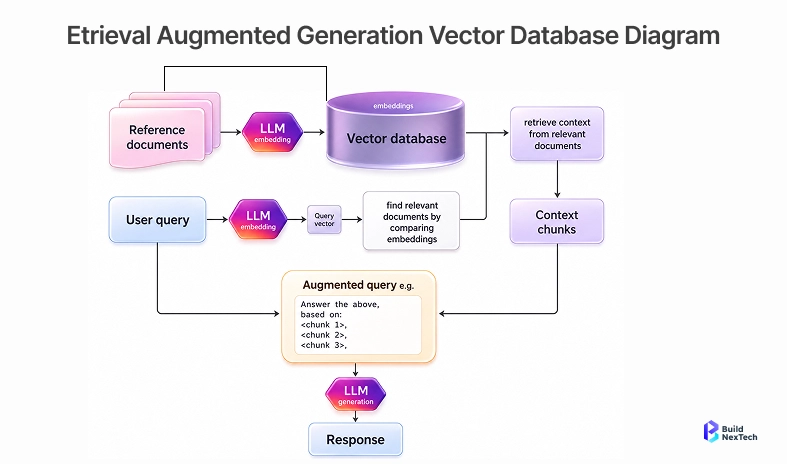
Basic vector search is useful for prototypes, but enterprise GenAI systems need more than nearest-neighbor results. They need a retrieval system that can search unstructured data, apply metadata filtering, handle multi tenancy, and return context with semantic accuracy under real production pressure.
A simple vector store can answer clean test questions from a small knowledge base. Enterprise systems are messier. They include private files, regulated records, changing policies, multiple embedding models, and users who expect answers that reflect the right permissions and the latest content.
Retrieval latency, governance, and context quality shape application outcomes
Query latency decides whether a GenAI workflow feels usable. If vector retrieval adds too much delay before a language model responds, users lose trust. Governance decides whether the system should have retrieved that content at all. Context quality decides whether the answer is grounded or only confident.
Enterprise teams should test vector databases against operating realities:
• Query speed at realistic traffic levels, not only benchmark datasets
• Metadata filtering for users, departments, products, regions, and document types
• Hybrid search support when keyword matching and BM25 still matter
• Observability for failed searches, weak matches, and low-confidence retrieval
• Controls for deleting, refreshing, and versioning vector embeddings
Those checks turn vector search into part of the GenAI operating model. The database is no longer only an index; it connects knowledge bases, permissions, prompt engineering, feedback loops, and application behavior.
Managed vs Open Source Vector Databases for RAG, AI Agents, and Enterprise Search
Managed vector databases reduce infrastructure work and can help teams reach production faster. Open-source vector databases give teams more control over deployment, tuning, data sovereignty, and multi-region design. The right path depends on ownership, risk, and the maturity of the platform team.
For RAG applications, managed platforms often help when teams need uptime, request-response API support, and predictable scaling. For AI agents, open-source or self-hosted options may be useful when the agent needs private retrieval, event-driven applications, or tighter control over sensitive tools and documents.
Enterprise search adds another layer. It often needs semantic search, structured records, document retrieval, and keyword search together. That is why hybrid search, knowledge graphs, and metadata quality matter as much as the vector index itself.
How to Evaluate the Best Vector Database for Enterprise Workloads
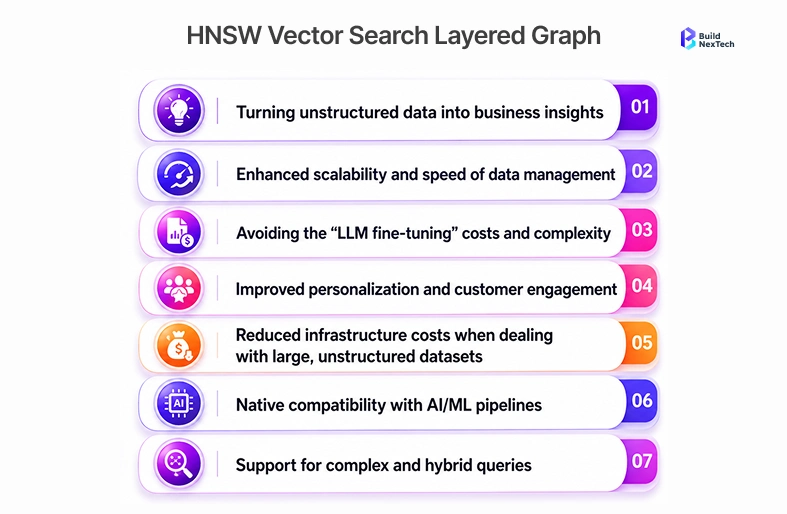
The best vector database for enterprise workloads depends on retrieval patterns, data sensitivity, engineering maturity, and scale. A managed platform may be right when speed to production matters. A self-hosted or open-source deployment may be better when the team needs infrastructure control or strict deployment boundaries.
The evaluation should start with the application, not the vendor shortlist. Ask what the GenAI application must retrieve, who can access it, how often data changes, and what failure would cost the business.
Indexing, filtering, metadata, and hybrid search capabilities
Indexing controls how embeddings are stored and searched. Filtering controls which results are allowed. Metadata controls how the system narrows results by attributes such as user role, department, region, document date, or product area. Hybrid search combines vector similarity with keyword relevance.
A practical evaluation should test:
• Exact metadata filters used by the application
• Filtered search performance under realistic query volume
• Hybrid retrieval for technical terms, product names, and compliance language
• Re-ranking options when similar chunks compete
• Chunk refresh behavior when source documents change
This is especially important for enterprise GenAI applications because users often ask specific questions that need both semantic relevance and exact constraints. Pure vector similarity can miss those boundaries.
Operational controls, embedding compatibility, security, backup, and observability
Enterprise vector databases must support operational discipline. That includes encryption, access control, audit logs, backup options, data residency, deletion workflows, and monitoring. These controls matter because embeddings can still reveal sensitive relationships even when raw text is not directly visible.
Embedding compatibility deserves its own review. A vector database should work with the embedding model the team uses today and the foundation models it may adopt later. Check vector dimensions, cosine similarity support, vector compression, batch ingestion limits, multi-model support, and migration paths when embeddings need to be regenerated.
Teams should also inspect how alerts work when indexes fail, ingestion slows, or retrieval quality drops. In production, a weak retrieval layer can create poor answers even when the language model is strong.
Cost signals that appear after embeddings and query traffic scale
Vector database cost can look small during a pilot and grow quickly after production launch. Cost depends on stored vectors, metadata volume, replicas, query traffic, hybrid search, backup retention, and the compute needed for millisecond response times.
Enterprise teams should estimate cost across three stages:
• Pilot: one product area, limited users, small vector datasets
• Launch: production traffic, monitoring, backup, and access controls
• Scale: multiple departments, more embeddings, more queries, and freshness requirements
The right question is not only which platform is cheapest. It is which platform gives the best cost-to-reliability trade-off for the application’s retrieval workload.
The table below summarises how four key vector database factors change at scale and when each matters for enterprise deployments.
Vector Database Options for RAG and AI Agent Architectures
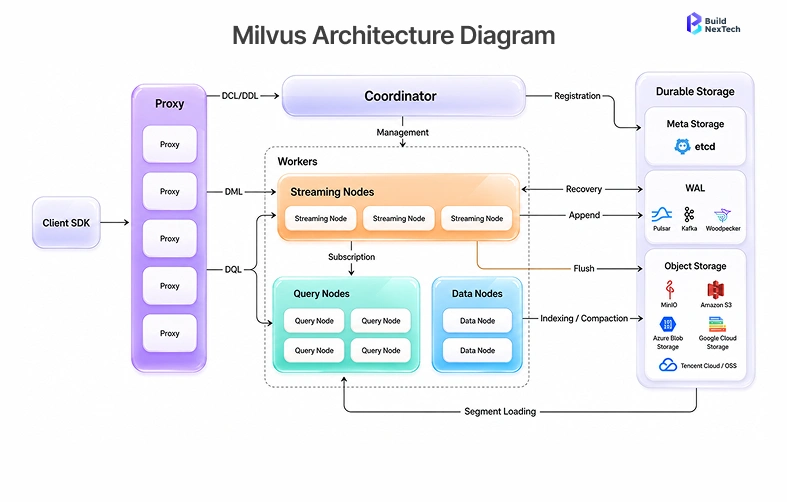
Vector database options usually fall into three groups: managed platforms, open-source databases, and lightweight local tools. Each group can work, but they solve different problems. Enterprise teams should avoid choosing only by popularity because the right option depends on how the GenAI system will be operated.
Managed services are attractive for fast production readiness. Open-source tools give more control. Local tools help with prototyping, test environments, and smaller retrieval tasks.
Managed platforms for production GenAI teams
Managed vector databases such as Pinecone, Zilliz Cloud, Astra DB, Amazon OpenSearch Service, Amazon DocumentDB, Neptune Analytics, and cloud-native search services reduce infrastructure burden. They can help teams move faster when the priority is production deployment, uptime, scaling, and support.
They are often useful when:
• The team wants less operational overhead
• The application needs predictable uptime
• Query traffic may grow quickly
• Security and compliance features must be available early
• Engineering resources should focus on the GenAI product instead of database operations
The trade-off is control. Managed platforms may limit deployment choices, pricing flexibility, or deep customization. That is acceptable for some teams and risky for others.
Open-source vector databases for control and portability
Open-source vector databases such as Qdrant, Milvus, Weaviate, Chroma, FAISS, and pgvector can give teams more control over deployment, tuning, and data boundaries. This is useful when infrastructure teams already manage Kubernetes, private cloud, or strict security environments.
Open-source does not mean free in production. Teams still pay for infrastructure, monitoring, reliability work, upgrades, and engineering time. The advantage is control over how the system is deployed and operated.
A managed-vs-open-source comparison should include ownership. If the organization has strong platform engineering, open-source may be practical. If the team needs faster delivery and fewer operational responsibilities, a managed vector database may be the better enterprise choice.
Local and lightweight options for prototyping and edge use cases
Local vector stores and lightweight tools are useful for prototypes, developer testing, and edge cases where the dataset is small. Chroma, FAISS, Milvus Lite, Couchbase Lite, SQLite extensions, and local pgvector setups can help teams validate retrieval logic before committing to a production platform.
These tools are valuable because they let teams test chunking, embeddings, retrieval prompts, and ranking methods quickly. They should not automatically become the production architecture. Production needs backup, security, monitoring, scaling, and support paths.
A smart enterprise workflow starts locally, validates retrieval behavior, and then moves to the platform that matches operating requirements.
Vector Database Comparison: Pinecone, Weaviate, Qdrant, Milvus, Chroma, and pgvector
A vector database comparison should focus on workload fit rather than declaring one universal winner. Pinecone, Weaviate, Qdrant, Milvus, Chroma, and pgvector all appear in enterprise GenAI discussions, but they differ in operational model, ecosystem, and best-fit use cases.
The strongest choice depends on whether the application needs managed operations, open-source control, SQL integration, high-speed searches, fast prototyping, or hybrid search.
The table below compares six commonly evaluated vector databases across typical strengths and enterprise fit, using vendor documentation and ANN Benchmarks as reference points; use it as a first-pass filter before running a structured pilot.
Performance and retrieval quality trade-offs
Performance is not just raw query speed. It includes filtered search, recall, ingestion speed, update behavior, and how retrieval quality behaves when data becomes messy. A vector database that performs well on unfiltered benchmarks may struggle when every query includes department, region, permission, or timestamp filters.
Retrieval quality also depends on the full pipeline. Chunking, embedding model choice, metadata quality, re-ranking, model scoring, and prompt design can matter as much as database selection. Enterprises should test the whole flow with real documents and real user questions.
A good pilot should include successful searches, failed searches, ambiguous queries, and permission-restricted content. That exposes issues before the database becomes a production dependency.
Enterprise fit by workload, cloud model, and engineering maturity
Enterprise fit depends on who will own the platform after launch. A lean product team may benefit from a managed service because it removes operational complexity. A mature platform team may prefer open-source or cloud-native deployment because it aligns with existing controls.
Consider these decision factors:
• Cloud model: SaaS, private cloud, self-hosted, or hybrid
• Data sensitivity: public documents, internal knowledge, regulated data, or customer records
• Engineering maturity: product engineers, platform team, or dedicated AI infrastructure team
• Retrieval pattern: RAG, AI agents, semantic search, personalization, multi-modal retrieval, or analytics
• Growth path: one application now or many GenAI products later
The best vector database is the one the organization can run responsibly, not just the one that looks strongest in a feature list.
Implementation Risks Enterprise Teams Should Plan Before Selection
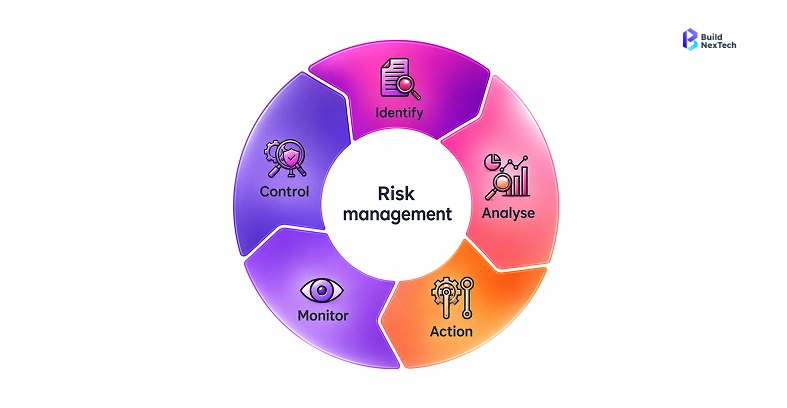
Enterprise teams should evaluate implementation risks before selecting a vendor. Key risks include unclear ownership, weak data governance, integration complexity, security gaps, hidden costs, poor user adoption, and limited vendor support. Planning for these risks early helps teams define controls, assign responsibilities, monitor progress, and reduce failures during rollout.
Data privacy, access controls, and embedding lifecycle management
Data privacy starts before embeddings are created. Teams should define what content can be embedded, what must be excluded, and how sensitive values are handled. Access controls should be enforced at retrieval time, not only at the application screen.
Embedding lifecycle management includes:
• Document ingestion and chunking rules
• Embedding model version tracking
• Refresh schedules for changed content
• Deletion workflows for expired or restricted data
• Testing retrieval quality after model or data updates
Without lifecycle control, the vector database can slowly drift away from the source of truth. That creates stale answers and weak user trust.
Avoiding vendor lock-in and retrieval quality drift
Vendor lock-in can appear through proprietary APIs, hosted-only features, metadata designs, or operational workflows that are hard to move. Some lock-in is acceptable if the value is clear, but teams should know where it exists.
Retrieval quality drift is more subtle. It happens when source documents change, user questions shift, or embeddings become inconsistent across models. Teams should measure retrieval quality with test queries, expected sources, and feedback loops.
A practical selection process includes an exit plan, a monitoring plan, and a clear owner for retrieval quality. That keeps the GenAI application maintainable after launch.
Choosing the Right Vector Database for Enterprise GenAI
The best vector database for enterprise GenAI applications is the one that balances retrieval quality, scalability, security, governance, and operational reliability. The right choice depends on the AI workload, infrastructure strategy, embedding compatibility, and long-term maintenance requirements. Instead of selecting a platform based only on popularity, enterprises should evaluate real-world performance, filtering accuracy, cost, and operational complexity before moving to production.
To evaluate the right vector database architecture for your enterprise AI initiative, visit the BNXT.ai website and connect with the team for a GenAI infrastructure and RAG strategy consultation.
People Also Ask

1) What should enterprises evaluate before choosing a vector database for GenAI applications?
Enterprises should evaluate retrieval quality, metadata filtering, security controls, embedding compatibility, backup, observability, cost at scale, and who will own operations after launch. The best vector database is the one that matches the GenAI application’s production requirements, not only the one with the most features.
2) Which vector database is best for RAG workloads with sensitive enterprise data?
The best vector database for RAG workloads with sensitive enterprise data is usually the one that supports strong metadata filtering, private networking, encryption, auditability, and clear data retention controls. The right choice may be managed or open-source depending on the organization’s security and platform maturity.
3) How do vector database costs change as embeddings and query volume grow?
Vector database costs grow with stored vectors, replicas, query traffic, backup needs, hybrid search, and operational support. A pilot may look inexpensive, but production workloads need cost modeling across ingestion, retrieval, monitoring, and scaling.
4) When should a team use an open-source vector database instead of a managed service?
A team should use an open-source vector database when it needs deployment control, private infrastructure, customization, or portability and has the engineering capacity to operate it. A managed service is often better when speed, uptime, and lower operational burden matter more.
5) How can vector databases support AI agents and enterprise search together?
Vector databases can support AI agents and enterprise search by retrieving relevant documents, past decisions, tool context, and semantic matches from the same governed knowledge layer. The key is to separate retrieval rules by use case so agents and search experiences receive the right context under the right permissions.


.webp)
.webp)
.webp)

.webp)
.webp)



