

A mid-sized fintech company came to us eighteen months into a Docker-only pipeline that worked well, until the business needed workloads across three cloud regions with a compliance audit six weeks out. Docker got them to production, but nothing else in the stack could handle cluster management, security policies, or workload scaling.
That gap is where most teams evaluating containerization technologies get stuck: One engine picked early, the rest of the stack never mapped. Across 150+ engagements spanning 30+ industries, BuildNexTech sees this constantly. This guide breaks the landscape into four layers that matter beyond a single Docker container on one machine: Engines, orchestrators, management platforms, and security tooling.
What Is Containerization?
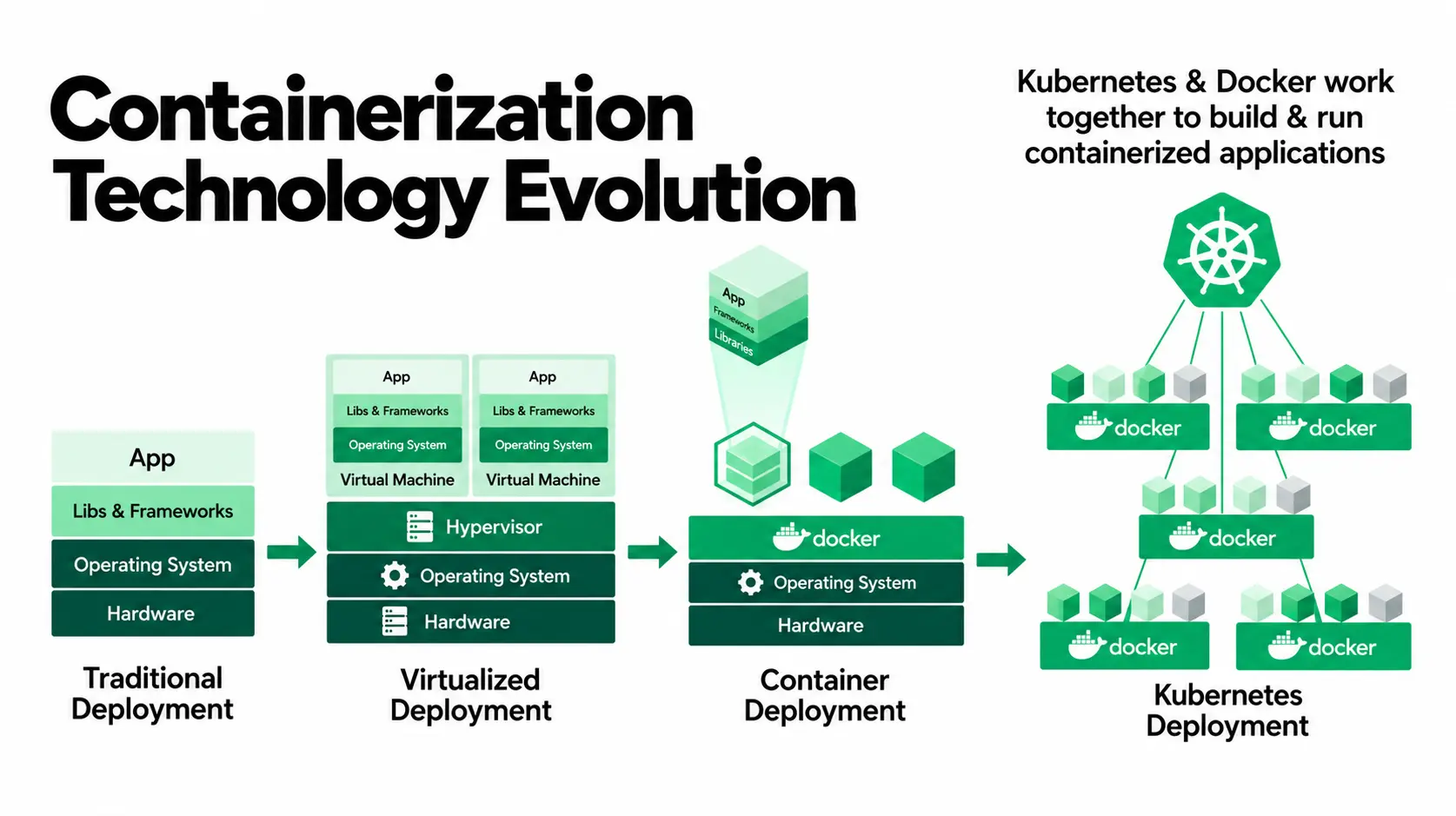
Containerization is OS-level virtualization that packages an application and its dependencies into a portable, isolated unit. A container shares the host kernel rather than replicating a full operating system, which is why it starts in seconds where a VM takes minutes.
Containerization technologies split into two broad types:
- App containers: Also called software containers, they package one application process and its dependencies; Docker and Podman work here.
- Sys containers: They provide OS-level isolation closer to a lightweight VM, running multiple processes, which is how LXC operates.
Both build from a base image, a read-only template every container image layers on top of, and a Docker image is the distributable version pulled from a registry like Docker Hub. This is also where microservices architecture enters: It splits one application into small, deployable services, and microservices development typically ships each as its own container.
Why Use Containerization?
Containerization is the baseline for consistent deployment across dev, staging, and production. A build that passes on a laptop behaves identically elsewhere, since the container carries its own runtime and configuration through the entire container lifecycle, which is what the benefits of containerization in practice are.
Benefits of Containerized Applications for Dev Teams
Containerization delivers concrete, measurable benefits for engineering teams:
- Portability: Build once, run identically on any host, cloud, on-prem, or laptop, one of the clearest advantages of containers.
- Resource efficiency: Shared-kernel architecture means faster startup and higher density than VM-based deployment, another of the practical advantages of containerization.
- Isolation: Dependency conflicts in one container do not affect another container, one of the definite benefits of containerization.
- Faster CI/CD Pipeline: Small, cacheable image layers and build outputs ensure that the pipeline, which used to take 20 minutes, can now be done in just 2 minutes.
- Consistency at scale: The bigger win sits above individual convenience. Containerized applications behave the same everywhere, justifying containerization development as a real investment.
- Reduced onboarding friction: Teams that containerize applications early spend less time debugging environment drift, one of the real container benefits most guides undersell.
Container Engines and Runtimes
This layer builds and executes individual containers before orchestration enters. Get it wrong, and every decision above inherits the problem, which is why teams researching what a Docker container is start here.
Docker: The Industry-Standard Container Engine
Docker Engine, the core of Docker containerization, is the default entry point for local development. The Docker CLI is the interface most engineers learn first, running docker build and docker run to start a container. Its core strengths:
- Mature tooling and near-universal CI/CD pipeline support.
- A vast library of third-party integrations and container images on Docker Hub.
- The standard for defining a base image via a Dockerfile.
- Docker Compose for multi-container setups in one YAML file.
Install Docker on Ubuntu with one command; the Docker Desktop download covers Mac and Windows. Docker's daemon-based architecture runs a privileged background process, a real security concern once a team scales, particularly after Docker Desktop's licensing changes. Most teams add the layers Docker never provided, rather than swapping Docker containers out.
Podman: The Daemonless, Rootless Alternative
Podman drops the background daemon and runs rootless by default, the security posture compliance-conscious teams ask for once an audit is scheduled. What makes it worth the switch:
- Its CLI is close enough to Docker's that migration rarely means retraining a team.
- podman generate kube turns a local setup into a deployable Kubernetes manifest.
- Native systemd integration lets Podman run containers as managed services.
- No central daemon means one compromised container cannot escalate through a shared root process.
Teams that adopt Podman rarely rip Docker out. Most run both, using Podman for production credentials or compliance workloads.
containerd and LXC
containerd is the minimal runtime for most production Kubernetes clusters, as it is rarely invoked by developers; it only downloads and executes the container images, which is the reason Kubernetes depends on it as its default runtime. Differences between the two include:
- containerd focuses on one job done well, rather than the broader tooling Docker layers on top.
- It exposes a plugin architecture that lets Kubernetes swap runtime behaviour freely.
- LXC offers system-level containers closer to a lightweight VM than an app container.
- LXC suits legacy applications, or workloads on edge computing devices with limited resources.
Choosing between them rarely means picking one; containerd runs invisibly under Kubernetes, while LXC solves a narrower problem most teams only hit occasionally.
Container Orchestration Platforms
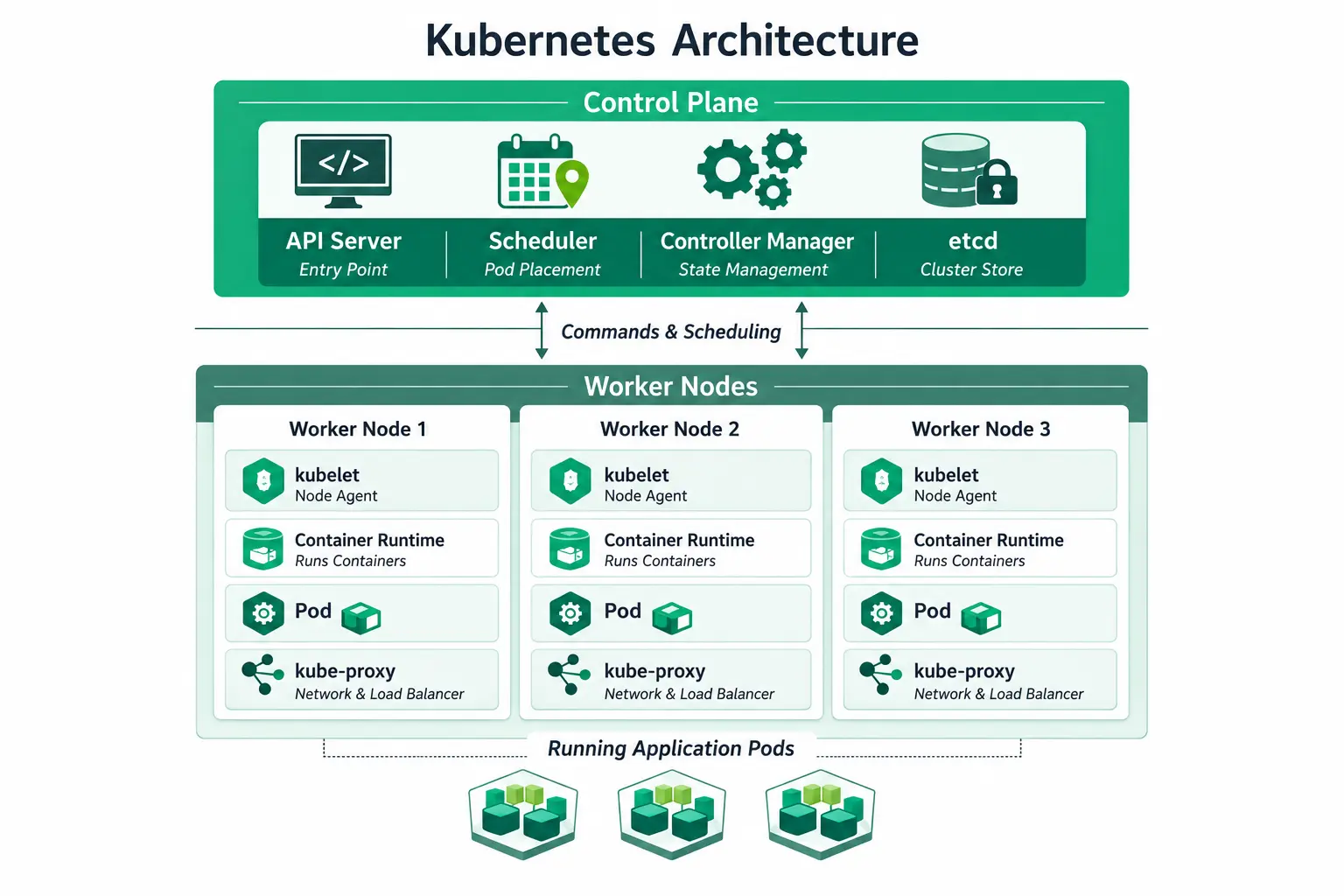
When containers start operating on multiple machines, there needs to be some mechanism that determines which containers should operate on which machines, handles any failovers, and performs service discovery. This is called orchestration and is precisely what Kubernetes does.
Kubernetes: The Standard for Orchestration at Scale
Kubernetes is the default choice for multi-cloud, multi-service deployments, and its ecosystem is governed largely by the Cloud Native Computing Foundation (CNCF). So what is Kubernetes actually good at?
- Cluster management across nodes with automated failover keeps workloads alive.
- Service discovery and load balancing route traffic automatically.
- Kubernetes Helm charts package repeatable deployments, so teams stop hand-writing manifests.
- API objects can be defined in YAML or JSON format, with a service mesh like Istio on top once needed.
- Many formalise this via a Kubernetes certification such as the CKA.
"Kubernetes vs Docker" is a misleading framing: Kubernetes orchestrates hundreds of containers across a fleet; Docker builds and runs one. Older container orchestrators include Apache Mesos and Mirantis Kubernetes Engine.
Which orchestrator fits your team?
- Fewer than ten services, small ops team? Docker Swarm or a managed platform.
- Multi-cloud, dedicated platform team in place? Kubernetes.
- Mixed containerized and legacy workloads? HashiCorp Nomad.
Docker Swarm: Lightweight Orchestration for Small Teams
Swarm's minimal setup suits small teams running basic multi-node applications without the operational weight Kubernetes demands. Why it still works for some teams:
- Setup takes an afternoon rather than weeks, using Docker's own CLI.
- Works well for teams under ten services with no dedicated platform engineer.
- Momentum has slowed as ecosystem investment went almost entirely to Kubernetes.
Swarm remains a legitimate choice for small deployments, not a stepping stone teams must outgrow.
HashiCorp Nomad: One Orchestrator for Containers and Legacy Workloads
Nomad's genuine differentiator is orchestrating containerized and non-containerized workloads from one control plane, useful for a mixed environment. Where that flexibility shows up:
- A Java monolith that was never containerized can sit alongside Docker services under one scheduler.
- Kubernetes cannot schedule that monolith directly; Nomad can.
- Its footprint is lighter than Kubernetes, appealing to teams that find its abstraction excessive.
- Adoption tends to concentrate in organisations midway through a containerization migration.
Our Take: Kubernetes is right once you have a dedicated platform team and genuinely multi-cloud requirements. Below that, it is often over-engineering: Five-person teams have burned six weeks standing up a cluster a managed platform would have handled in an afternoon.
Management Platforms for Containers
This layer abstracts infrastructure overhead away, handing patching and node management to a cloud control plane. These container management tools matter most once hybrid and multi-cloud deployments enter the picture.
AWS Fargate: Serverless Containers
What is AWS Fargate, in practical terms? A serverless compute engine for running containers without a team touching a server. What that trade-off buys a team:
- No server management means engineering time shifts to product work.
- Pricing scales with actual usage, not idle provisioned capacity.
- A logistics client cut container setup time from six weeks to eleven days on Fargate.
Amazon ECS, EKS, GKE, and AKS
Each cloud offers its own take on managed container platforms, and the right one usually follows whichever cloud a team already runs on.
- Amazon Elastic Kubernetes Service (EKS): Complete Kubernetes control in AWS.
- Amazon ECS: An easy-to-use solution for running Docker containers within AWS.
- Google Kubernetes Engine (GKE): Workload automation with Google Cloud Platform support.
- Azure Kubernetes Service (AKS): Similar to the previous one but for Azure users.
Red Hat OpenShift: Compliance Built-In
OpenShift is Kubernetes with CI/CD, security policies, and policy enforcement built in, which matters for regulated industries like healthcare and finance. What that includes:
- Audit trails and compliance dashboards ship out of the box.
- It rarely makes sense as a startup's first platform.
- It frequently makes sense for an enterprise already answering to SOC 2 or HIPAA auditors.
Which managed platform fits your team?
- Zero server management, fast time to production? Fargate.
- Full Kubernetes control across a large org? EKS, GKE, or AKS.
- Operating under heavy compliance requirements? OpenShift.
Container Security in Production
Container security is not one tool. It is a layered practice across the container lifecycle, from build to runtime, and it is the layer most roundup guides skip entirely. Five practices that matter most:
- Vulnerability scanning at build time, checked against vulnerability databases, catches malicious dependencies before an image ships.
- Image integrity and license compliance checks belong in the build pipeline, not an afterthought.
- Runtime enforcement and runtime monitoring watch runtime behaviour once containers are live, flagging runtime threats a static scan would miss.
- Identity and access control, plus secrets monitoring, close the gap attackers exploit most.
- Behavior monitoring paired with runtime defence separates mature container security tools from a checkbox scanner.
A real DevSecOps workflow feeds this into shared compliance dashboards, not disconnected screens. A single container security solution rarely covers build-time scanning and runtime security tools equally well, and real security maturity treats this as continuous.
How BuildNexTech Helps Teams Choose and Deploy the Right Containerization Stack
Most teams do not need one containerization tool. They need a coherent stack across engine, orchestrator, platform, and security, and nobody has time to evaluate every option while shipping the product roadmap.
BuildNexTech's engineers assess the existing stack, identify the bottleneck layer, and integrate the right containerization technologies without ripping out what works. Our DevOps automation platforms extend past infrastructure too, covering data pipelines, data lakes, generative AI workloads, build pipelines and build artifacts, and cloud-native capabilities inside containerized environments.
What a Rollout Looks Like
The rollout breaks into four stages:
- Day 1 to 3: Stack assessment, mapping the bottleneck layer.
- Day 4 to 7: Engine and orchestrator selection based on team size and compliance.
- Week 2 onward: Deployment with observability and audit trails.
- Ongoing: Iteration based on real usage data, not a static diagram.
Who This Is For
This fits a team scaling past a single-container setup, evaluating orchestration for the first time, or facing multi-cloud sprawl nobody planned for. It also fits teams under a compliance audit deadline, or feeling licensing pressure from Docker Desktop's changes.
Conclusion
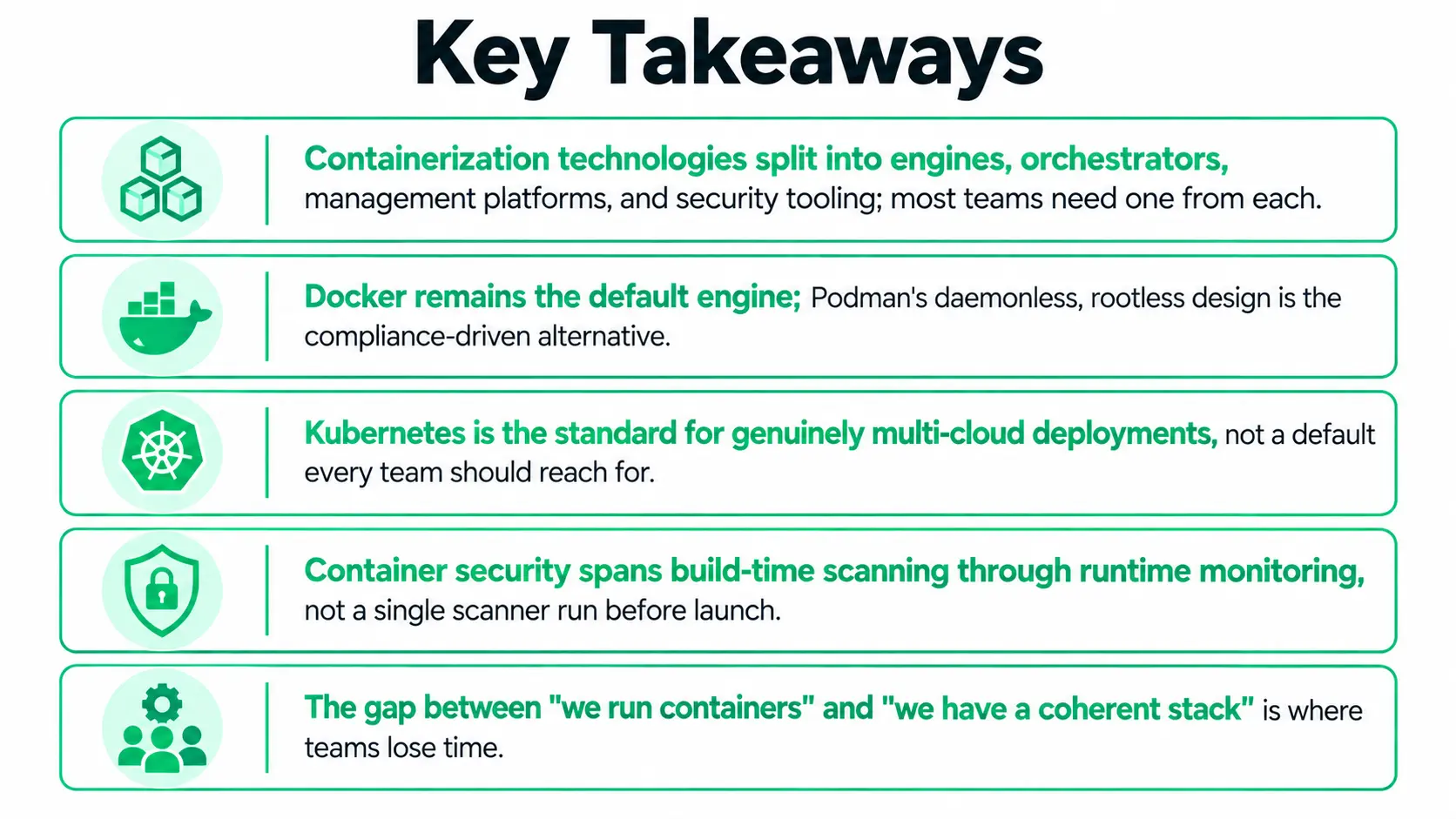
Containerization technologies are not one decision; they are several: Which engine builds your container images, which orchestrator schedules them, and which platform runs them without your team babysitting servers. Most teams get the first layer right by accident and never revisit the rest until an audit forces the question.
Whichever combination your team lands on, the stack should be a decision made on purpose, not inherited from the first Dockerfile.
People Also Ask

How long does it typically take to migrate a legacy application to containers?
Most migrations run 6 to 12 weeks, depending on how tightly coupled the application is to its current environment and how much refactoring it needs.
Can containerization tools run on-premises as well as in the cloud?
Yes. Docker, Podman, and Kubernetes run on-premises, or on bare metal, though platforms like Fargate and OpenShift are cloud or hybrid by design.
What happens to a running container if the underlying host fails?
An orchestrator like Kubernetes detects the failure and reschedules the container onto a healthy node, depending on cluster configuration.
Do containerization technologies work well for stateful applications like databases?
They can, using persistent volumes and StatefulSets, but stateful workloads add real complexity compared with stateless services.
How much does adopting enterprise-grade container security typically cost a mid-sized team?
Costs vary by tool and team size, but most teams budget for a build-time scanner plus a runtime monitoring tool.


.webp)
.webp)
.webp)

.webp)
.webp)



