

.webp)
Ever been woken up at 2 a.m. because a container crashed and nobody was watching? A logistics company that came to us had lived through exactly that: a service went down, an engineer got paged, and someone ran the same manual restart script for the third time that month. Container orchestration is what fixes this. It's the automated deployment, scaling, networking, and lifecycle management of containerized applications across a cluster, so a human never has to trigger that restart by hand again.
Operating in more than 30 different industries, we have seen this page play out for groups working with fewer than 10 containers manually, and cease the moment orchestration is used. This guide will cover what container orchestration is, how it works, and how it compares to other options with regard to Kubernetes, along with what vendors usually do not mention.
What Is Container Orchestration?
Container orchestration is the system that automatically handles deployment, scaling, networking, and the full lifecycle of every container running across a cluster of machines, so a human doesn't have to trigger each step by hand. It needs to be here because managing a single Docker host becomes impossible once an application is broken down into several services. One simple answer to "What is Kubernetes used for?" is the management of container-based workloads at a large scale, without babysitting them manually.
The monolith splits into ten microservices under a microservices architecture, and then forty; each one has its own container deployment and communication channel to all the other services:
- Cluster management gets harder linearly, then exponentially, as service count grows.
- Compute resources need constant rebalancing across nodes as workloads shift.
- Container orchestration platforms such as Kubernetes and Docker Swarm take that coordination problem off a human's desk.
Container Orchestration vs. Basic Containerization
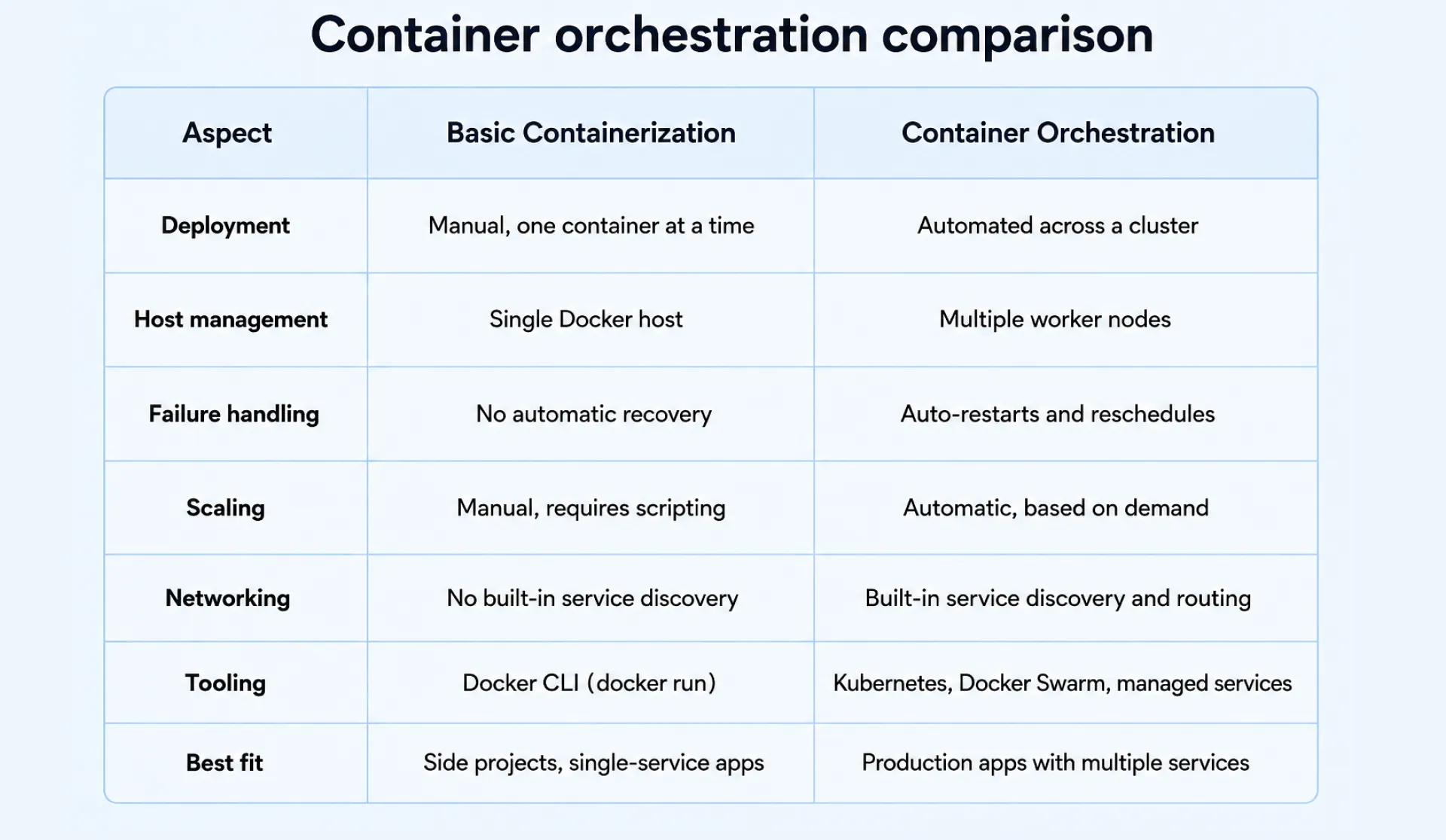
Running a container isn't the same as orchestrating one. The use of a single Docker CLI command called 'docker run' is perfect for side projects, yet the problem is that this method does not have a host failure awareness mechanism, nor does it have any ability to distribute load or detect a crash.
Containerisation addresses the "how do I package and execute this" problem. On the other hand, orchestration solves an even more challenging problem of maintaining multiple container workloads running without any human intervention. This is essentially the crux of the difference between the various Docker vs Kubernetes arguments, as well as those about Docker container orchestration.
How Container Orchestration Works
Container orchestration works through a loop that runs constantly in the background. Here's the basic mechanism, step by step:
- You make an "ideal" description of a desired state using a YAML or JSON configuration file, specifying what container images to run, how many instances of these to launch, and how much memory each image should have. That's the declarative configuration.
- The orchestrator compares the described state with the current one, using the Kubernetes API to read the configuration file.
- If there are discrepancies between these states, the control plane makes the necessary changes automatically, without human interference.
That constant check-and-fix cycle is called a reconciliation loop, and it's what powers everything else you see an orchestrator do:
- A container crashes, and it gets restarted on its own.
- A node goes down, and its pods get rescheduled onto a healthier one.
- Traffic spikes, and new replicas of containerized workloads spin up to absorb the load.
The process of placing workloads works in the same manner as well, as it involves checking the available compute resources of each of the worker nodes and then deciding which node will be able to accommodate the containers. The cycle is constantly running, and it is the foundation of all container orchestration engines such as Kubernetes or Docker Swarm or any managed solution on top of those two.
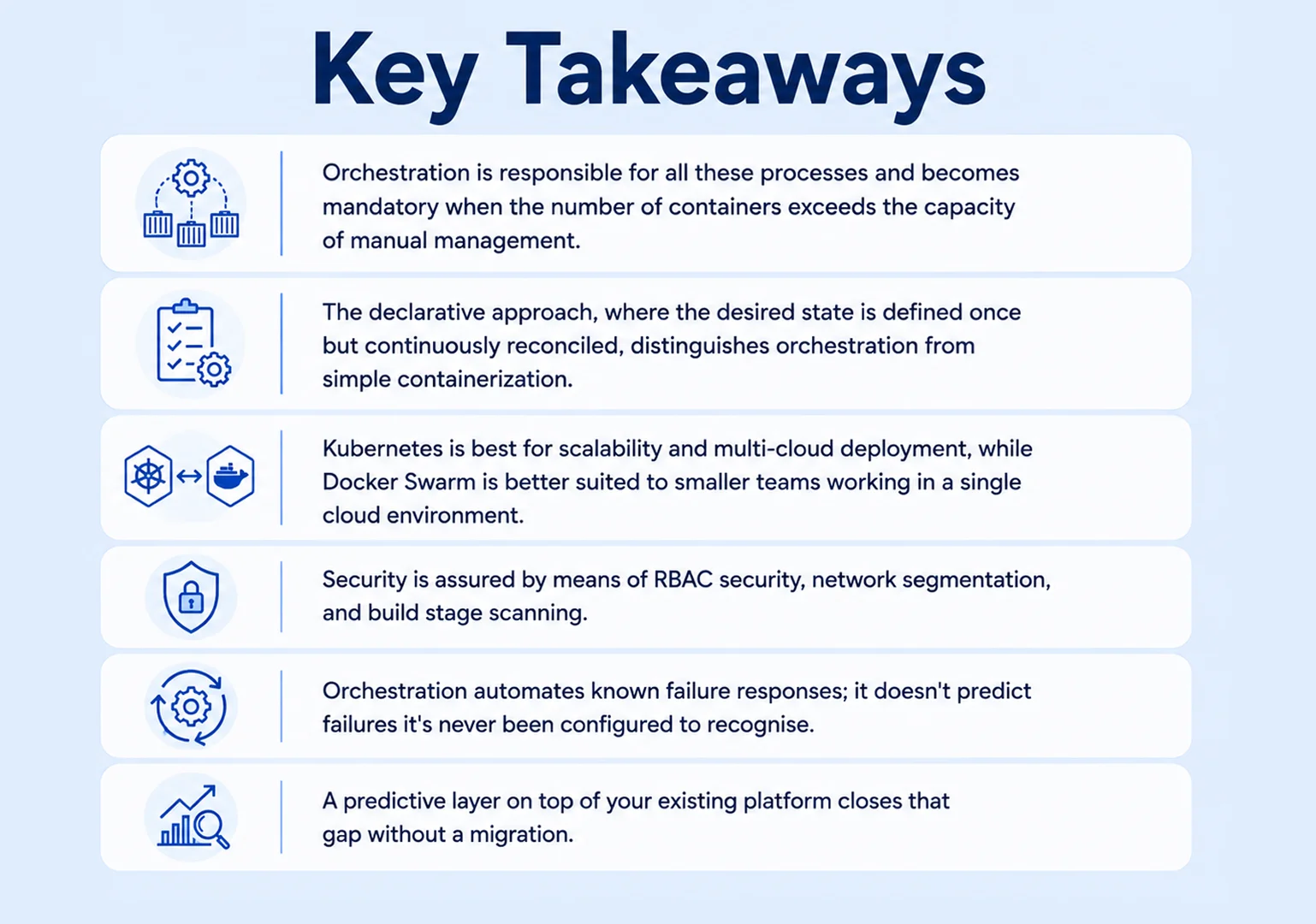
However, there is one aspect of orchestration which should be understood properly: orchestration does not really possess the intelligence that the term is associated with. It reacts only to the failure scenarios for which it has been set up, but it won't be able to recognize any issue that wasn't anticipated in advance.
Key Components of an Orchestration Cluster
An orchestration cluster is built from a small number of interacting parts, and understanding cluster orchestration starts with these four. Together they form what's commonly called Kubernetes architecture, making up a working Kubernetes cluster:
- Control plane: tracks desired state and schedules workloads through the Kubernetes API.
- Worker nodes: run your container runtime and report status back.
- Networking layer: handles service discovery and routes traffic between containers.
- Persistent storage: attaches volumes across restarts, so stateful workloads survive.
This model, running on cloud-native infrastructure, is no longer niche. Survey data from the Cloud Native Computing Foundation shows Kubernetes is now the default cloud native technologies pattern for production.
Container Orchestration Platforms: Kubernetes vs. Docker Swarm vs. Managed Services
Picking a platform is mostly an operational capacity question: how much control-plane complexity your team can run day to day. Kubernetes is open source container orchestration with a large ecosystem of container orchestration software and container deployment tools, from Helm charts to GitOps pipelines. Docker Swarm is one of the simpler Docker orchestration tools around, while Kubernetes orchestration stays the default for multi-cloud deployment at scale.
Here's how the main container orchestration platforms and container orchestration services break down:
- Kubernetes: open source, the widest ecosystem of container orchestration tools, full configurability for multi-cloud teams.
- Docker Swarm: the simplest of the Docker orchestration tools, a good fit for small teams on one cloud.
- Amazon Web Services: Amazon Elastic Kubernetes Service, run as an EKS cluster, plus Amazon ECS for lighter workloads.
- Microsoft Azure: Azure Kubernetes Service (AKS) and Azure Container Instances for serverless architecture use cases.
- Google Cloud Platform: Google Kubernetes Engine (GKE), a managed Kubernetes service for GCP-native teams.
- IBM Cloud: its own managed Kubernetes service for teams already on that stack.
When teams ask us for a container orchestration comparison before committing budget, we start with this same list of container management tools and container management software, then narrow by cloud commitment and team size. These container platforms differ mainly in setup complexity and how much control you keep, which is usually a better filter than chasing a generic list of the best container orchestration tools.
Which one fits your team?
- Small team, one cloud, simple services? Choose Docker Swarm.
- Already on AWS, Azure, or Google Cloud Platform and want less overhead? Choose EKS, AKS, or GKE.
- Multi-cloud, large scale, need full configurability? Choose Kubernetes.
Benefits of Container Orchestration for Engineering and DevOps Teams
The payoff from orchestration comes in three areas that engineering and DevOps teams care about the most, and that is why orchestration tools in DevOps workflows have become essential rather than optional:
- Faster delivery: an updated CI/CD platform allows for deploying several times daily rather than once every three months due to rolling updates and rollbacks that reduce the need for manual control of the CI/CD pipeline.
- Lower cost: automated bin-packing fits more container workloads onto fewer machines, and autoscaling means DevOps teams stop paying for idle cloud infrastructure between traffic spikes.
- Better reliability: self-healing replaces a crashed container in seconds instead of waiting on someone to notice a page.
A logistics firm we worked with cut manual deployment processing time by 40% in six weeks after adopting an orchestrated cluster, freeing two engineers entirely.
Container Security and Compliance in Orchestrated Environments
Security in an orchestrated environment comes down to a few consistent container security best practices, not one big checklist:
- RBAC security: use role-based access control (RBAC) to grant specific permissions rather than default access.
- Network policy segmentation: limit which containers can communicate with others so that a compromised container does not infect others in the cluster.
- Build-stage vulnerability scanning: perform scanning using a container security tool like an image scanner.
- Docker container security: secure the base image and the registry because any compromised image will affect all containers created using it.
For teams running AI workloads, frameworks including NIST's AI Risk Management Framework and SOC 2 are increasingly the baseline enterprise customers expect. And for teams worried their industry is too specific for a generic setup: RBAC security and segmentation are the same controls we apply across healthcare, fintech, and logistics engagements. Container security depends more on consistent process than industry-specific tooling.
Why Orchestration Alone Doesn't Guarantee Reliability
A fintech engineering lead told us their cluster had never looked healthier on paper: green dashboards, zero failed pods, right up until a cascading memory leak took down checkout for eleven minutes during a payment window they couldn't afford to lose. Every recovery mechanism did what it was configured to do; none of it was configured to catch a pattern the team had never seen.
That's the gap most guidance stops short of. Kubernetes restarts a failed container and reschedules a pod off a dead node, reacting rather than anticipating:
- Predict a resource exhaustion trend hours before it becomes an outage.
- Correlate a memory creep across services to find the one responsible.
- Handle multi-cluster management complexity past a single cluster, with consistent health monitoring across all of them.
Closing the Gap with Predictive Infrastructure Management
The AI-powered predictive reliability is above the orchestration layer but not to replace it. Rather than being alerted after a breach of threshold values, it correlates metrics, logs, and traces across your cloud-native infrastructure and detects any anomalies well before it reaches the state of becoming an incident. BuildNexTech precisely creates such a layer for those already using Kubernetes, EKS, AKS, or GKE.
How BuildNexTech Strengthens Reliability on Top of Your Orchestration Layer
We don't replace your orchestration platform; we sit on top of it. Our predictive infrastructure management capability correlates signals across your cluster: control plane metrics and Kubernetes API activity, node-level health monitoring, and application traces across containerized applications.
This isn't a rebrand of standard monitoring, which tells you something is already broken. Our anomaly detection works ahead of failure, and automated remediation recommendations give your on-call engineer a specific next action instead of a wall of alerts at 2 a.m. In our AI-Ops case study, a client running a high-throughput orchestrated environment cut unplanned downtime by a measurable margin in its first quarter.
Teams layer BuildNexTech on top of Kubernetes rather than building custom monitoring for a simple reason: in-house observability costs months of engineering time better spent shipping product. We built that layer once and tested it across 150+ engagements in 30+ industries.
"Orchestration automates what you configure it to handle. It doesn't predict what it's never seen."
What a BuildNexTech Reliability Layer Looks Like in Practice
Onboarding runs in three steps, and our case study walks through the full timeline and outcome:
- Connect to your existing cluster telemetry, no configuration changes required.
- Establish a baseline of normal behaviour over one to two weeks.
- Activate predictive alerting and automated response, tuned to that baseline.
Container Orchestration in 2026: Where Teams Go From Here
Container orchestration is not something that teams choose anymore but rather infrastructure that they build on. In terms of scale and multi-cloud deployment, Kubernetes takes the lead while Docker Swarm continues to dominate among small teams not in need of additional complexity. Managed container orchestration and deployment services by Amazon Web Services, Microsoft Azure, Google Cloud Platform, and IBM Cloud make up the middle ground. Thinking of containerization and orchestration as a whole and not two independent issues is the key behind successful container orchestration and deployment in every environment where a team needs to deploy their application. What none of these approaches addresses alone is the issue of automated recovery and prediction of potential failures. Those who continue to get paged at 2 a.m. in 2026 are not missing orchestration.
People Also Ask

What is Kubernetes ingress?
Kubernetes ingress manages external HTTP and HTTPS access to services inside a cluster, routing traffic to the right container based on host or request path.
What is Istio service mesh?
Istio service mesh adds traffic management, security, and observability between microservices without changing application code. Most teams add it once service-to-service communication becomes too complex to manage manually.
Is Kubernetes certification worth it?
Kubernetes certification such as CKA or CKAD validates hands-on cluster skills and helps hiring managers filter candidates quickly. It's most valuable for engineers running production clusters daily.
Kubernetes monitoring vs. a Kubernetes dashboard, what's the difference?
Kubernetes monitoring tracks metrics, logs, and alerts over time. A Kubernetes dashboard is a visual view of current cluster state, not a substitute for ongoing monitoring.
What does a DevOps consulting company actually add?
A DevOps consulting company brings cross-client pattern recognition: which failure modes recur, which configurations scale, and how to sequence migrations safely without learning it the hard way first.


.webp)
.webp)
.webp)

.webp)
.webp)



