

.webp)
A mid-size SaaS company approached us after six weeks of discussions within their organization about a framework that resulted in only Slack threads and two spike repositories abandoned, with nothing built. Vue.js holds a 17.6% usage share among developers worldwide, ranking eighth among web frameworks in the 2025 Stack Overflow Developer Survey, the most recent edition published; hence, it finds itself shortlisted by people who create modern web applications.
The majority of these discussions take place before coming to terms with what the Vue js framework is: One senior engineer talks about its learning curve, the CTO is worried about recruitment, and nobody bothers to read beyond the marketing pages. This guide gives a plain answer on the Vue js framework, its features, and what front-end web development actually takes.
What Is Vue.js?
A Vue frontend framework earns that description less from a definition and more from how it feels to build with: Templates that read like plain HTML, and state that updates without touching the DOM by hand. Evan You built it in 2014, focused on the view layer rather than a full application stack. That focus lets Vue scale either direction:
- Add one interactive widget to content-rich websites with nothing more than a script tag, a form of progressive enhancement most frameworks abandoned.
- Scale into a modern build pipeline with ES Modules once the project grows past one component.
- Run a full single-page application (SPA) once the whole product lives in the browser.
How Vue.js Compares to React and Angular
All three solve the same problem: Rendering web user interfaces that update when data changes. The comparison is about team fit, not which one wins.
- React gives the largest ecosystem and hiring pool, at the cost of more decisions left to the team. Unlike a typical React tutorial, wiring up JSX and a bundler first, Vue's script-tag path skips that.
- Angular offers the most built-in structure that many enterprise development teams look for; however, its learning curve is steep.
- Vue is the middle ground between the two, providing just enough opinions to keep your decisions clear while still being flexible enough not to argue with you.
"I don't have time to evaluate three frameworks" is a legitimate complaint, and the answer is to time-box it: Two days beat six weeks of discussion.
Why Choose the Vue.js Framework
Three reasons show up in nearly every Vue.js adoption: A shallow learning curve, real performance without extra tuning, and enough flexibility to start small and grow.
Simplicity and an Approachable Learning Curve
Vue's template syntax stays close to standard HTML, CSS, and JavaScript, so teams coming from jQuery ramp up in days, not weeks:
- No new templating language to learn, just HTML with extra attributes.
- Official documentation that reads like a walkthrough, not a spec sheet.
- A gentle on-ramp for junior developers who touch the frontend occasionally.
Performance and a Lightweight Footprint
A small bundle size and a virtual DOM-driven rendering system batch updates efficiently, without hand-coding DOM changes the way a Chrome Experiments demo might:
- Faster initial page loads, especially on slower mobile connections.
- Smooth UI updates even as the component tree grows.
- No manual performance tuning required for most production applications.
Flexibility: From a Single Widget to a Full SPA
A team can drop the Vue frontend into a single page of an existing product, then expand it into a full SPA later, no rewrite:
- Starting with one component embedded in an existing, non-Vue page.
- Adding routing and state management only once the app needs them.
- Scaling to a full SPA without revisiting the original architecture.
Here is the contrarian point most comparison articles skip. Choosing a Vue framework based on popularity is one of the more expensive mistakes a team can make: It tells you about hiring pools, nothing about fit.
Which one fits your team?
- Need maximum ecosystem and hiring pool? React.
- Building for a large enterprise with a strict structure already in place? Angular.
- Want a gentle learning curve and room to start small? Vue.js.
Core Features of Vue.js
Four features make up the technical core Vue is built on, each worth a look at the code behind it.
Reactive Data Binding
Every Vue instance tracks state and updates the DOM automatically when it changes, no manual DOM manipulation required.
// Vue 3, Composition API
import { ref } from 'vue'

const cartCount = ref(0)

function addItem() {
  cartCount.value++
  // The DOM updates automatically
}
That single shift removes a category of bugs where the UI drifts out of sync with application state.
.webp)
Component-Based Architecture
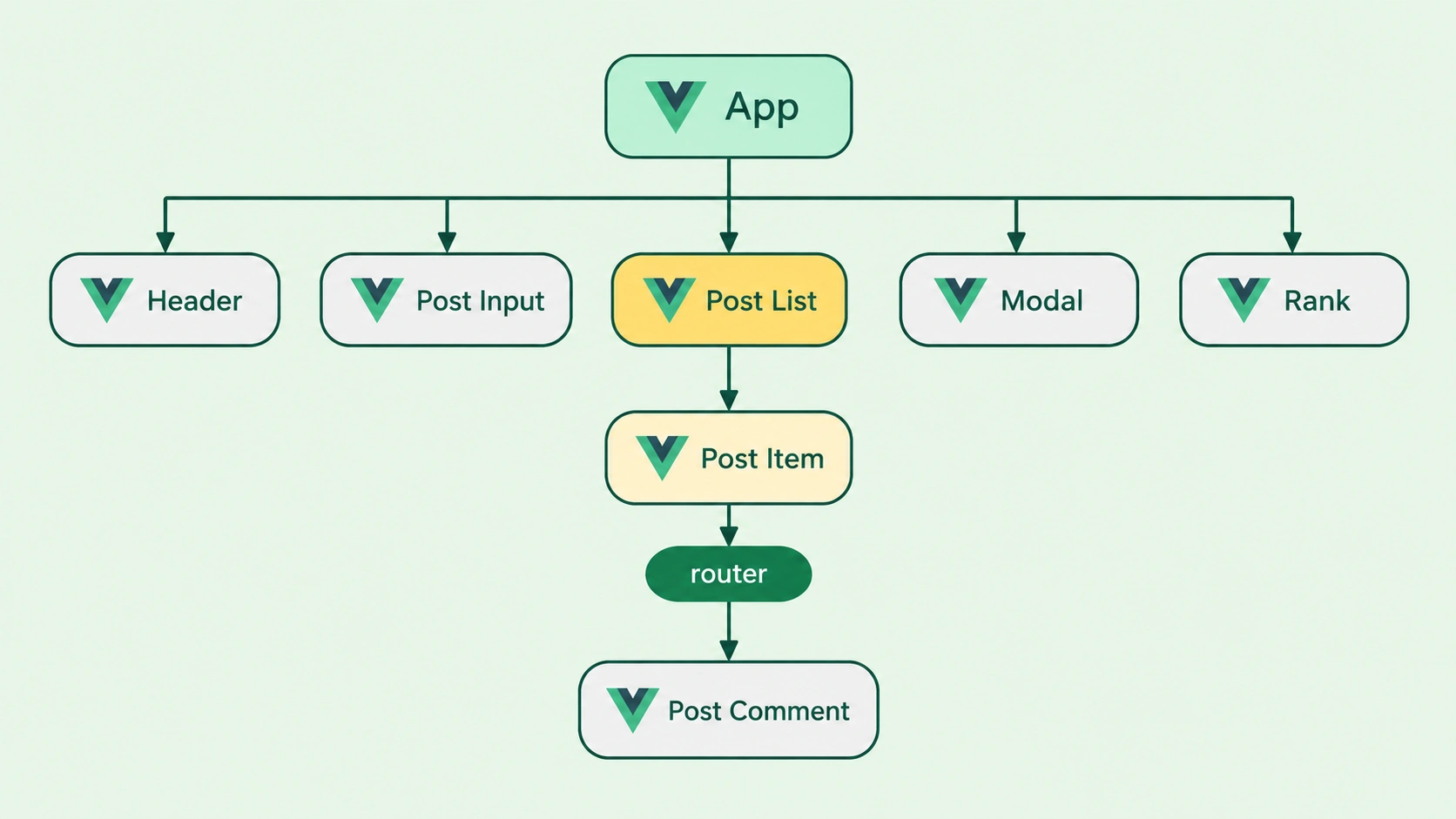
Applications are built from single-file components, self-contained units of template, logic, and styling reused across a product.
<!-- ProductCard.vue -->
<template>
  <div class="card">{{ title }}</div>
</template>

<script setup>
defineProps(['title'])
</script>
A pricing card built once can appear on the homepage, checkout, and admin dashboard without three implementations drifting apart.
Directives and Template Syntax
Built-in directives extend a standard HTML element directly inside the template, so logic lives next to the markup it affects.
<ul>
  <li v-for="item in items" :key="item.id">
    {{ item.name }}
  </li>
</ul>
v-bind, v-on, v-if, and v-for cover most day-to-day needs, while {{ }} handles text interpolation for anything dynamic.
Virtual DOM and Rendering Performance
Rather than updating the real DOM on every change, which is expensive, Vue's rendering system diffs a virtual copy of the page against the current tree first.
// Vue patches only what changed
const visible = ref(true)
// Toggling `visible` re-renders
// just the affected element
It then applies only the minimum updates needed, keeping interfaces responsive as an application grows.
Vue and the Web Components Standard
Vue components are not locked inside Vue applications. Single-file components compile down to standards-based Web Components, registering as Custom Elements backed by the Shadow DOM and the Web Components Spec that browsers implement natively.
The Vue.js Ecosystem
Vue's official ecosystem handles the two things every real application eventually needs: Moving between views and sharing state, both maintained by the core team rather than a fragmented pool of third-party options.
Vue Router for Frontend Navigation
Vue Router handles navigation in any multi-view single-page application, mapping URLs to components and managing browser history:
- Dynamic routes with URL parameters for detail pages and user-specific views.
- Nested routes that mirror a product's navigation structure.
- Route guards that check authentication before a page renders.
For teams weighing whether to hand-roll navigation logic, Router removes an entire layer of custom code that would otherwise need maintaining.
Vuex / Pinia for State Management
Pinia has replaced Vuex as the recommended state library for Vue 3:
- A simpler API with far less boilerplate than Vuex ever needed.
- Full TypeScript support built in, not bolted on.
- One source of truth for state shared across components.
For any application where more than two or three components need the same data, Pinia is the difference between a maintainable codebase and manually passed props.
A few more names round out the ecosystem: Vue Core is the reactivity and runtime engine everything builds on; Vue Loader compiles .vue files in the build pipeline; Vue Devtools, paired with VS Code's Vue extension, gives component-tree inspection; Vue Native extends the model to mobile; Vue Mastery offers a Vue js course; and Vue 2, the prior version, still runs in production codebases.
Getting Started with Vue.js Development
Getting a Vue.js project running is the easy part: Most teams have a working scaffold in under ten minutes. What determines whether that project stays maintainable is what happens in the weeks after.
Setting Up Your First Vue.js Project
A team we advised ran create-vue, had a working Vue.js scaffold in under ten minutes, then spent three weeks arguing over Options API versus Composition API. Nobody had made the call upfront.
Unlike a generic Vue js tutorial that walks through a hello-world example and stops, setting up a real project involves decisions upfront:
- Scaffold with create-vue, built on Vite, choosing TypeScript, Router, and Pinia as opt-in installs.
- Set up VS Code with the official Vue extension and the Vue Devtools browser extension.
- Decide, in writing, whether the team standardises on Composition API or Options API before the second component gets built.
Common Pitfalls Teams Hit Early On
What comes after that scaffold is where most teams stumble:
- Mixing Options API and Composition API inconsistently, the biggest source of onboarding friction.
- Skipping TypeScript at the start because "we'll add it later," which rarely happens once the codebase has grown.
- Underusing Vue Router and Pinia until state pain forces a rushed retrofit.
The counterintuitive pitfall is the API mixing issue, not the framework choice. TypeScript overtook JavaScript as GitHub's most-used language in 2025, growing 66% year over year to 2.6 million monthly contributors, per GitHub's Octoverse report, a sign that skipping TypeScript setup is a bigger long-term risk than most teams assume.
A Note on Security
Vue auto-escapes text interpolation by default, closing off the most common template-injection route into a page. A frontend framework is not a security service on its own: Protecting against online attacks such as SQL command injection is a backend job, and a security solution at that layer covers the gap.
How BNXT.ai Helps You Ship Vue.js Frontends Faster
Most teams do not need generic Vue.js development services to write Vue components. They need help getting Vue js development right from day one, avoiding the drift where inconsistent patterns turn a fast codebase into a slow one. BuildNexTech's platform standardises scaffolding, integration, and observability, so front-end web development teams spend time on product logic instead of rebuilding setup decisions.
The differentiators: An AI-native architecture, a low-code integration layer for connecting existing services, and no vendor lock-in on the stack a team chooses.
What a BuildNexTech Vue.js Implementation Looks Like
- Week 1: Assess the codebase, flag inconsistent patterns, and agree on conventions.
- Week 2: Integrate the new scaffolding with your backend, authentication, and AI-driven services.
- Week 3 onward: Ship on the new structure, with observability tracking real usage.
Who This Is For
This fits engineering teams adopting Vue.js alongside AI-driven backend services, especially where the setup has already drifted, and nobody has had the bandwidth to fix it, whether that's an in-house front-end web development team or a Vue js development company brought in to help. The signs: onboarding takes longer than it should, and small features ship slower than the codebase suggests they should.
.webp)
Conclusion
The reason for which Vue.js ends up on the shortlists of practically every frontend is that it addresses a genuine need: To provide a maintainable user interface in a way that doesn't require a lot of learning or making a choice regarding a certain type of architecture.
Does Vue.js fit into the scope of your next project? The answer to this question depends on what your main priority is: Either achieving speed to first feature or going with the largest ecosystem. Speed usually wins in the former case.
People Also Ask

Is Vue.js free to use commercially?
Yes. Vue.js is released under the MIT licence, a permissive open-source licence that allows free commercial, personal, and modified use with no licensing fees or usage restrictions.
What is the real difference between Vue 2 and Vue 3?
Vue 3 introduced the Composition API, better TypeScript support, and Vite-based tooling. Vue 2 reached end of life in December 2023, so new projects should default to Vue 3.
Does Vue.js support server-side rendering?
Yes. Vue.js supports server-side rendering, and most teams use Nuxt, the official meta-framework, to handle SSR, routing, and static generation without manual configuration.
How well does Vue.js handle older or less common browsers?
Vue.js targets modern evergreen browsers by default. Supporting older browsers like Internet Explorer needs extra polyfills and build configuration that most current projects skip entirely.
Does Vue.js come with built-in testing tools?
No. Vue.js does not ship a built-in test runner. Most teams pair it with Vitest for unit tests and Cypress or Playwright for end-to-end testing.


.webp)
.webp)
.webp)

.webp)
.webp)



