

A finance operations team came to us with an invoice agent that impressed in demos but stumbled in production. It applied purchase-order rules to credit notes, quoted wrong approval limits, and looped on messy scanned PDFs. Everything lived in one giant prompt, so nobody could tell which part was failing or why.
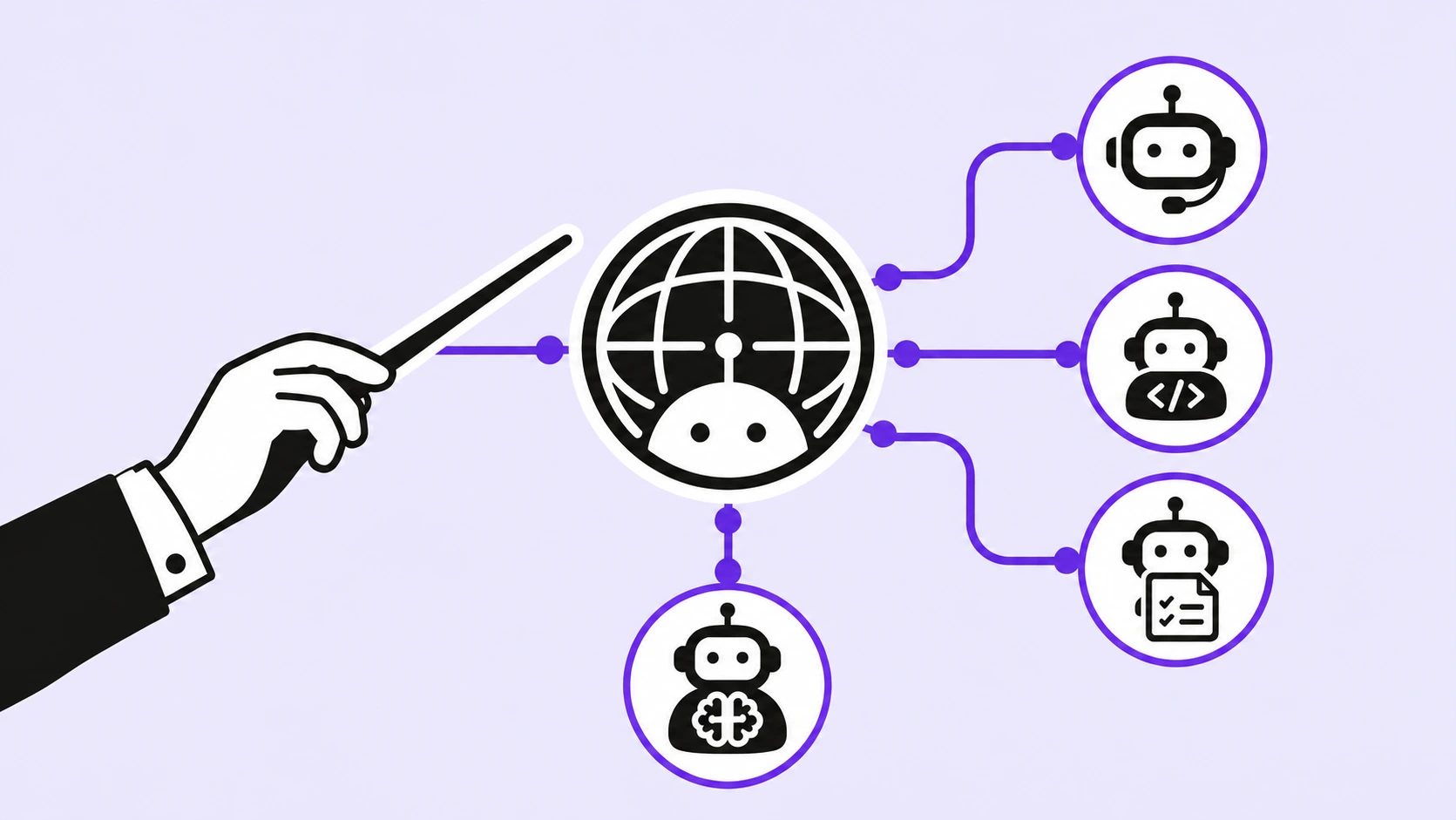
We replaced the coordinator with a thin orchestrator: Plain code that routes each invoice, while small specialist agents extract, validate, and approve. Rules now load only when needed, failures trace to a single step, and reviewers see only the runs the system flags. Here is how the architecture works, and where it fits.
What Is a Thin Orchestrator in AI Agents?
A thin orchestrator is an AI architecture pattern where the central coordinator does no domain reasoning. It works as a lightweight, deterministic traffic controller written as ordinary code, not a large language model (LLM) planning each step.
Take the request "process invoice 4411". The orchestrator never reads the invoice. It sees only metadata, such as document type, vendor, and amount, and uses it to pick the next step and the right specialist, while small subagents with clean, focused context windows do everything else. It owns three things:
- Workflow state: Where each job is and what comes next.
- Retries: What happens when a step fails.
- Routing: Which isolated subagent handles each step.
Why Heavyweight Orchestrators Break AI Agents
The opposite approach is tempting: Put the rules, tools, examples, and exceptions in one prompt. One brain, total control. It feels safe, right up until it isn't, which is why monolithic software gave way to services: A system that does everything in one place cannot be changed safely.
- Context bloat: Every new rule adds tokens and dilutes the instructions that matter.
- Brittle prompts: Fixing a refund workflow quietly breaks onboarding, and nobody notices until a customer does.
- Tool confusion: Give an AI agent forty tools, and it picks the wrong ones or invents arguments.
- Impossible debugging: You cannot tell whether routing, knowledge, or execution failed.
- Slow, costly runs: You pay for the whole prompt on every call.
Our Thin Orchestrator Architecture
To make agentic development reliable in production, we separated control flow from reasoning. The router owns the sequence, specialists own the decisions, and knowledge files own the domain rules, loaded only when a step needs them.
How Our Orchestrator Routes Work
Our orchestrator runs on deterministic code, not open-ended prompts. It tracks job state, checks every input and output against a strict schema, and follows the same fixed path every time.
- Classify intent: Map the request to a workflow template.
- Check duplicates: Has this exact job already run?
- Gather fields: Collect missing inputs before any model runs.
- Auto-fill: Infer what metadata already tells you.
- Reliability gate: A hard rule in code; failure stops the run.
- Delegate: Hand one step to one specialist.
- Handle the result: Validate, log, then advance or retry.
Only step 6 involves a model. The loop below is the protocol in code: Every output is validated against a schema, a failed attempt retries with the errors attached, and anything still failing goes to a person instead of looping.
def process(request):
    template = classify(request)                        # 1. intent -> workflow template
    job = Job.start(template, request.metadata)
    if job.is_duplicate():                              # 2. has this exact job already run?
        return job.close("duplicate")
    job.collect(template.required_fields)               # 3. ask for anything missing
    job.autofill_from_metadata()                        # 4. infer what is already known

    for step in template.steps:
        if not step.gate(job):                          # 5. hard rule in code, no LLM
            return job.escalate(step, "gate failed")
        rules = knowledge.load(job.metadata, step)      # only the files this step needs
        for attempt in range(step.max_retries + 1):
            output = step.agent.run(rules, job.inputs_for(step))   # 6. the only LLM call
            errors = step.schema.validate(output)
            if not errors:
                job.record(step, output)                # 7. log, then advance
                break
            job.note_errors(step, errors)               # errors go into the next attempt
        else:
            return job.escalate(step, "schema failed after retries")
    return job.complete()
Retries are bounded and scoped to one step, so a bad result never spreads. Every transition is logged for audit.
How Our Subagents Are Scoped
Instead of a few broad generalists, we build tightly scoped subagents. Each owns a single task, such as extracting line items, validating a tax ID, or drafting an approval summary, and gets only what that step needs:
- Only the tools required for that step.
- A short, unambiguous system prompt.
- A fixed output schema the router can check.
- Zero visibility into unrelated steps.
agent: extraction
tools: [read_pdf, ocr]               # nothing else
prompt: prompts/extraction.md        # one task, short
can_see: [file, metadata]            # no approval limits, no ERP data
output_schema:
  vendor: string
  invoice_no: string
  amount: number
  line_items: [{ description: string, qty: number, price: number }]
This contract shows the extraction agent. A fixed schema lets the router judge a result without understanding it, and limited visibility means the agent cannot be confused by approval limits it never sees. If one subagent fails, the router retries or escalates that step alone. Hand-offs between agents can follow the A2A protocol.
How We Load Knowledge at Runtime
Even a scoped subagent gets overwhelmed if you preload every policy and edge case. Instead, a small manifest maps task metadata to the files a step needs, and the orchestrator injects only those at runtime. The config below is illustrative.
knowledge:
  - match: { doc_type: invoice, region: DE }
    load: [vat_germany.md, invoice_core_rules.md]
  - match: { doc_type: invoice, amount_over: 10000 }
    load: [approval_thresholds_high.md]
max_tokens_per_step: 6000   # a step that needs more rules gets split, not stuffed
Because the manifest matches on metadata the router already holds, loading rules costs no extra model call, and each step starts with only the rules it must follow. The cap is the useful part: It turns a growing prompt into a visible error you fix by splitting the step. Files live in version control, so an update reaches the next run without touching the orchestrator or any other agent's prompt, and every change has an author and a history.
Workflow Templates in Our Agentic AI Workflows
Because subagents are modular, we snap them together into reusable workflow templates. A template is a state machine: It lists each step, the gate that must pass before it runs, and what happens on failure, so teams never rebuild routing for a new use case.
workflow: invoice_processing
steps:
  - { name: extract,  agent: extraction, gate: not_duplicate }
  - { name: validate, agent: validation, gate: po_match,     on_fail: human_review }
  - { name: approve,  agent: approval,   gate: within_limit, on_fail: human_review }
Each gate is an ordinary function, so reliability checks are testable against real past invoices, with no model call.
def not_duplicate(job):
    return not db.seen(job.metadata["file_hash"])

def po_match(job):
    po = erp.find_po(job.fields["po_number"])
    return po is not None and abs(po.amount - job.fields["amount"]) <= po.tolerance

def within_limit(job):
    return job.fields["amount"] <= approvals.limit_for(job.fields["cost_centre"])
The same extraction and validation agents can appear in an expense-claim template, with different gates. Customer onboarding or compliance auditing become new templates, not new agents. Our guide to coordinating multiple agents covers wiring.
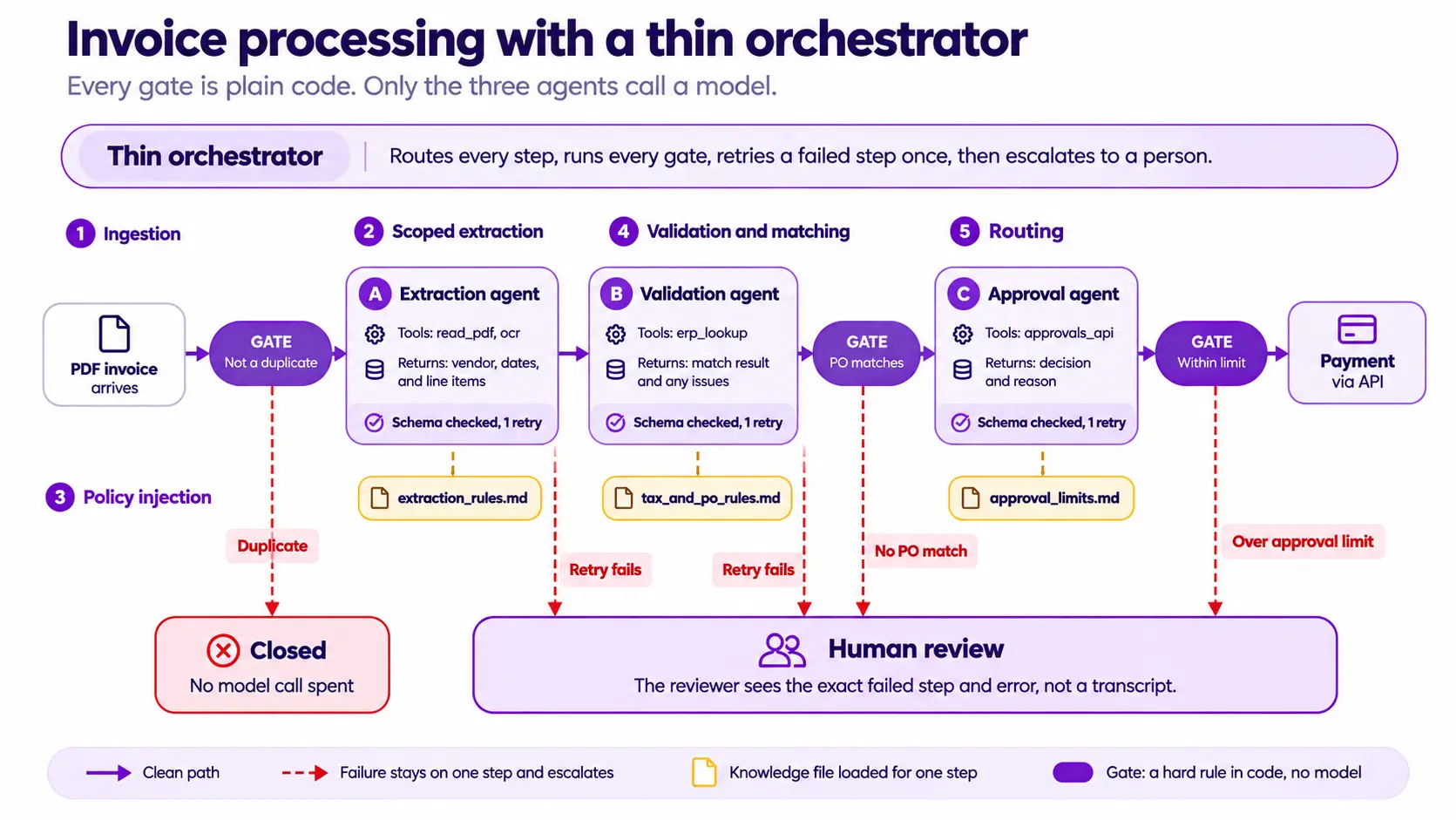
Agentic AI Example: Invoice Processing With a Thin Orchestrator
Consider an automated accounts payable workflow, shown as an illustration.
- Ingestion: A PDF invoice arrives. The orchestrator creates a job, classifies it, and rejects duplicates by file hash in code.
- Scoped extraction: The extraction agent returns vendor, dates, and line items in a fixed schema. It never sees approval limits or ERP data.
- Policy injection: The orchestrator loads the tax rules and approval thresholds for the vendor's region and amount.
- Validation and matching: The validation agent compares the data with the purchase order and loaded rules. No match stops the run at the gate.
- Routing: A clean match goes to payment through an API. Anything else goes to a reviewer with the error highlighted.
No model holds the whole process in its head. A duplicate dies at step 1, a missing purchase order at the gate, and a garbled extraction fails its schema check, gets one retry, then escalates, so you read one step's log, not a transcript.
Thin Orchestrator vs Heavyweight Orchestrator vs Single Agent
In AI workflow automation, the thin orchestrator is easiest to judge next to the two patterns teams usually try first. The table shows where each one breaks and where it holds.
How BuildNexTech Helps You Build AI Agents With a Thin Orchestrator
Building orchestration, schema checks, and context loading from scratch takes months of plumbing before one business feature ships. BuildNexTech helps engineering and operations teams adopt this architecture without that plumbing, using deterministic routing and isolated specialist agents. At handover, your team owns the templates, subagents, and knowledge files and updates them without us, so nothing is locked behind a vendor.
Teams choose us over a custom build or legacy automation for three reasons: AI-native architecture, a low-code agent builder, and no model lock-in, so each specialist can run on the model that suits it. Our AI automation services cover the wider build around the orchestrator.
What a BuildNexTech Thin Orchestrator Implementation Looks Like
When you deploy agents on BuildNexTech, you focus on defining your business logic. Our platform handles the orchestration layer through four capabilities:
- Visual and code-first workflow templates: Multi-step state machines with retry logic, human-in-the-loop checkpoints, and deterministic branching.
- Isolated subagent studio: Build, test, and version each subagent without regressions elsewhere.
- Dynamic context injection: Knowledge bases and policy rules that load at runtime by task attributes.
- Step-level observability: Inputs, outputs, token use, and latency at every node, so debugging takes minutes, not days.
Conclusion
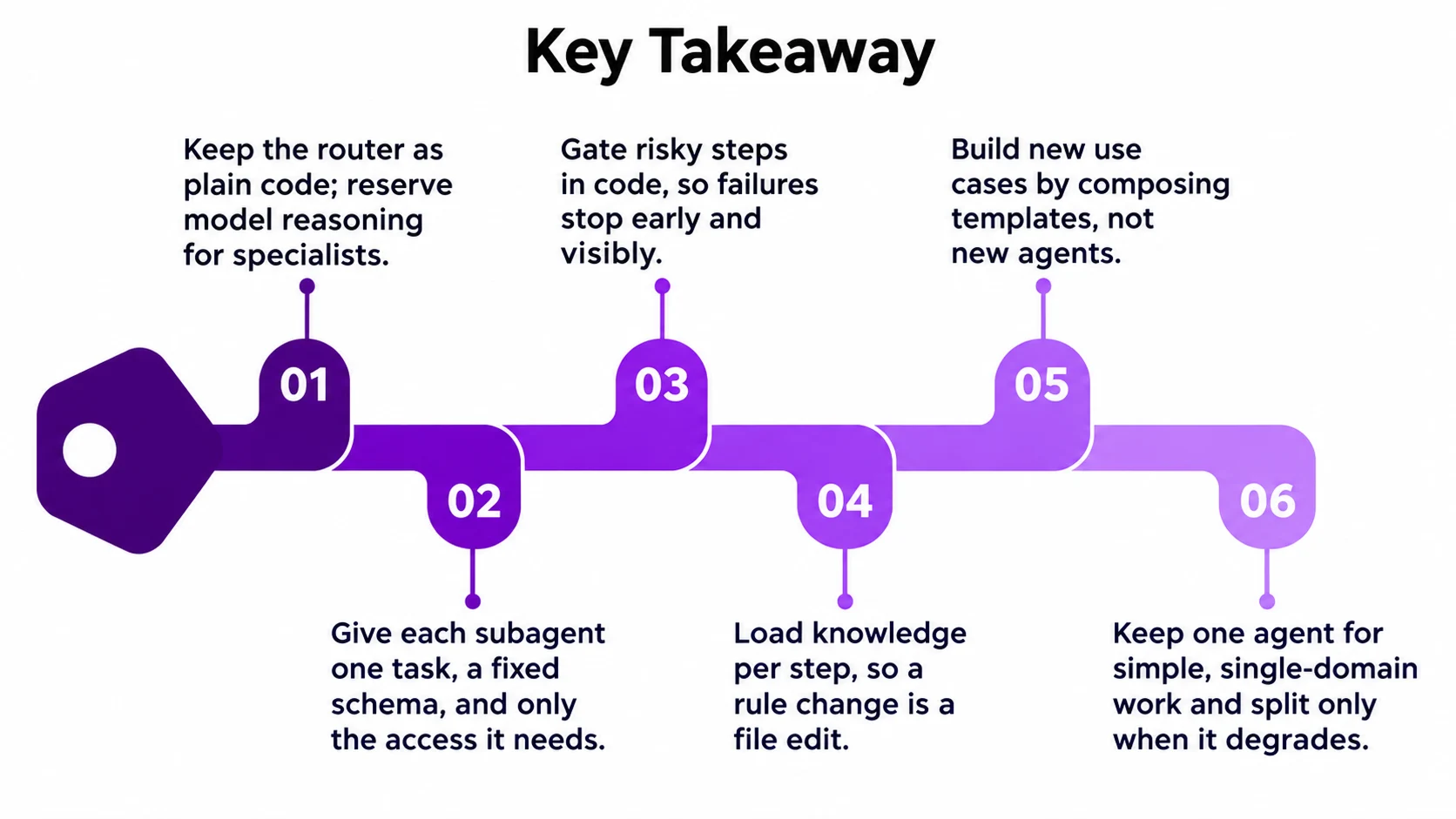
Reliable AI agents do not come from bigger context windows or cleverer master prompts. They come from disciplined software architecture: Plain code for routing and state, narrow subagents for reasoning, and the right knowledge loaded at the right moment, one step at a time.
The payoff is a system you can debug, audit, and change safely, which turns a fragile prototype into a dependable production system. Keep the thin orchestrator thin, let the specialists think, and add new workflows by composing templates rather than rewriting prompts.
People Also Ask

How many specialist agents are right for one workflow?
Give each domain whose rules change its own agent, such as extraction or approval. If two agents always change together, merge them. If one prompt keeps growing, split it.
How do you migrate an existing single agent to a thin orchestrator?
List the steps your agent already performs and move sequencing and checks into code first. Then split domain rules into separate agents and knowledge files, one workflow at a time.
Which language models suit different specialists?
Match model strength to step difficulty. Each specialist runs in its own context, so simple extraction may use a smaller, cheaper model while harder reasoning uses a stronger one.
Which metrics matter in production?
Track success rate, retries, escalations, latency, and token use for each step, not the whole run. Per-step numbers show exactly which specialist or gate needs attention.
Who owns the knowledge files, engineers or business teams?
Business teams usually own the rules, and engineers own the router. Keep files in version control with a review step, so policy changes stay fast without breaking the workflow.