


TLDR: Most enterprise teams that "outgrow" FlutterFlow did not outgrow the platform. They outgrew their MVP-era architecture decisions. Those are fixable without a rebuild or a feature freeze.
Twelve months ago, a US retail company with 400 locations had a problem.
Their FlutterFlow app was working. Then they added three new modules. The backend slowed under load. A new developer spent his first week just trying to navigate the project. Their engineering lead said, "We need to rebuild this in full Flutter."
We disagreed, and the numbers backed us up. Three architecture decisions made during a six-week minimum viable product sprint were the problem, and all three were fixable without touching the user-facing product. No rebuild, no feature freeze. Within six weeks, developer onboarding dropped from four days to half a day.
Across 150+ client engagements in 30+ industries, this is the conversation we have most often, and the playbook below is exactly how we resolve it.
Enterprise FlutterFlow Deployments Stop Scaling (and What Is Actually Breaking)
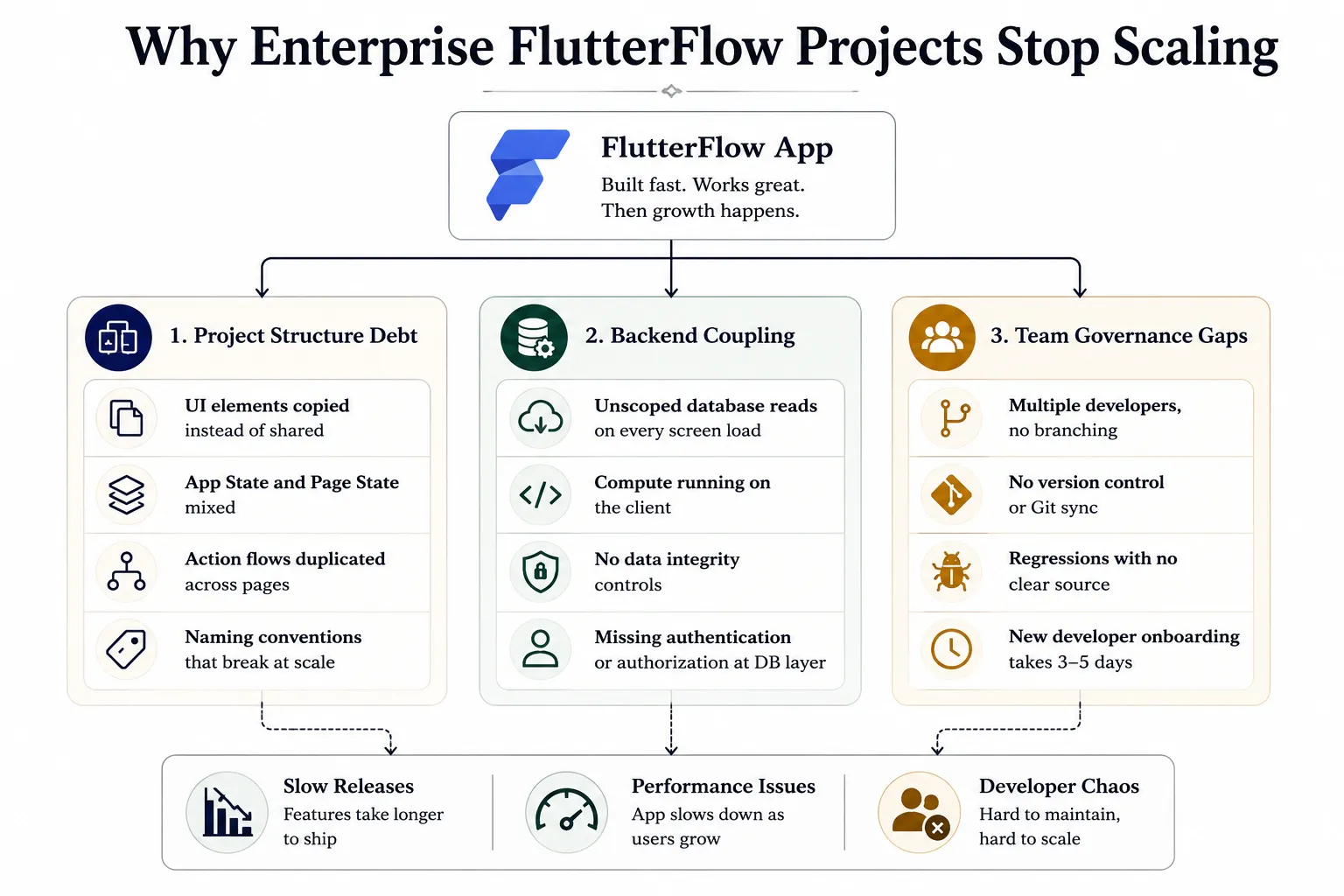
FlutterFlow is a visual development platform and no-code platform built on the Flutter framework, with a drag-and-drop interface that generates 100% exportable Dart code. What is low-code development? It is where the platform handles the boilerplate, so teams focus on business logic. The visual builder is not the ceiling. What breaks at enterprise scale is almost always one of three things:
Each failure mode is independent of the others, which means each one is fixable on its own timeline. Knowing which one is breaking your team tells you exactly where to start.
The Project Has Grown Faster Than Its Structure
Think of it like a growing office with no filing system. At three people, everyone knows where everything is. At thirty, nobody does.
In FlutterFlow, this looks like:
- Screens were copied and modified instead of being built from shared components.
- App State and Page State are bleeding into each other.
- Action flows are duplicated across pages instead of being abstracted into shared logic.
- Naming conventions that made sense early and are meaningless now.
Every new feature takes longer to ship because changes that should be isolated are touching everything, and new developers cannot navigate without a guided tour. This is not a low-code tool failure. It is the result of building a minimum viable product fast without building for growth at the same time.
The Backend Was Built for Launch, Not for Load
When you first build a FlutterFlow app, it is tempting to read entire database collections on every screen load. At a small user base, it is invisible. At 50,000 users, it becomes catastrophic.
Common backend mistakes:
- Full Firestore collection reads with no pagination or query scoping.
- Supabase tables without row-level security.
- Compute-heavy operations run inside FlutterFlow action flows on the client device.
- No user authentication or data integrity controls at the database layer.
Enterprise mobile app development at scale requires backend infrastructure to carry the load, not the client device. None of these fixes require leaving FlutterFlow; they require fixing the backend layer that sits behind it.
The Team Has Outgrown a Single-Developer Workflow
A FlutterFlow project built by one person, then handed to a team of ten, is a recipe for chaos.
What it looks like:
- Multiple developers, one project, no branching.
- No GitHub version control sync.
- Regressions with no clear source.
- Onboarding a new developer takes three to five days.
This is a governance failure, not a platform failure, and it is entirely solvable without migrating away from FlutterFlow. The Business and Enterprise plans already include branching, real-time collaboration, and role-based permissions. Most teams we audit are simply not using them.
Fixing the Project Structure Without Stopping Feature Delivery
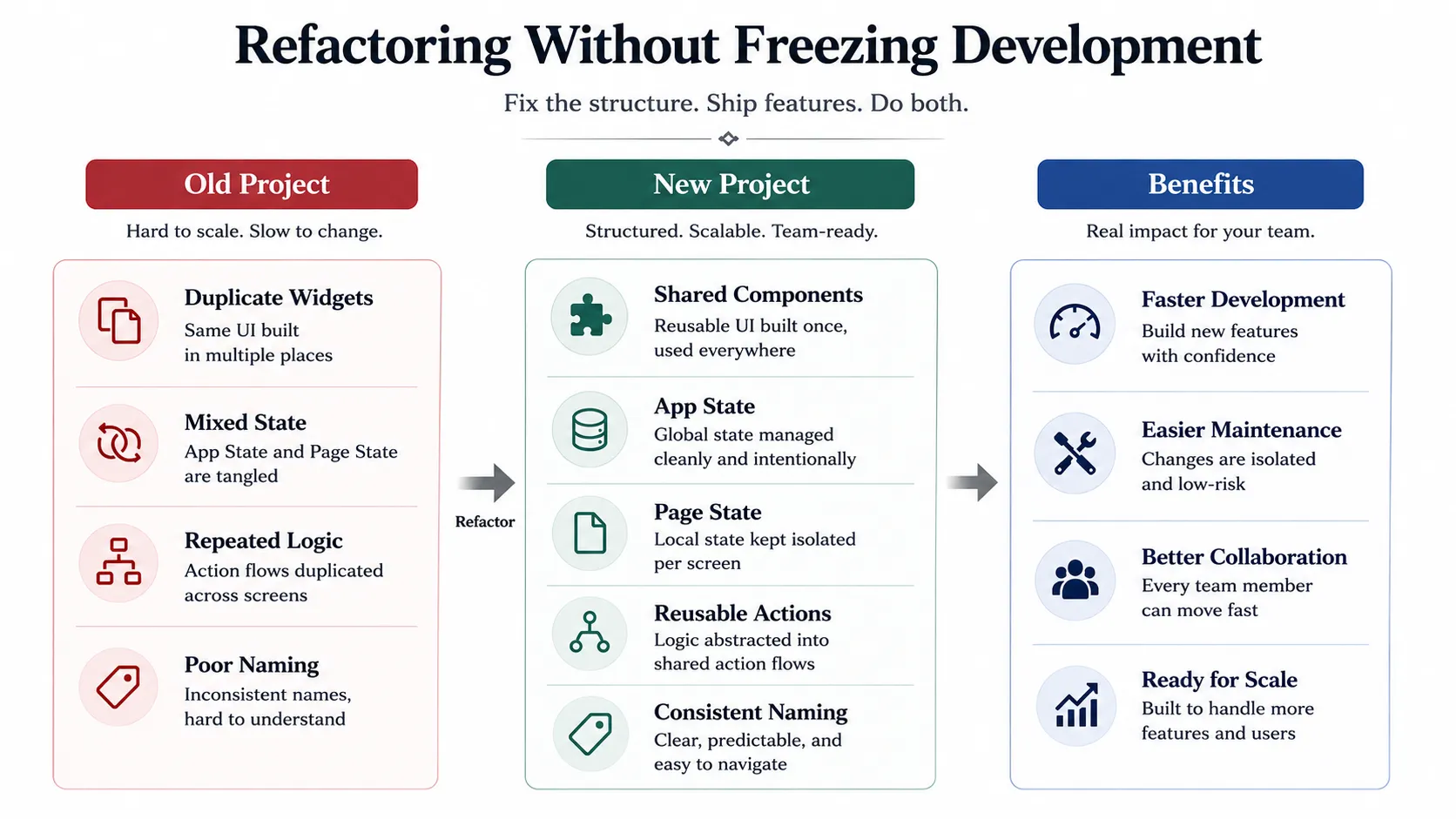
The first objection from every engineering lead: "We cannot freeze features for a three-month refactor." Fair. Low-code application development refactoring ships incrementally. The visual layer and the logic layer in FlutterFlow are more separable than in a traditional Flutter rewrite. You fix it one extraction at a time.
Extract and Standardise the Component Library First
The highest-leverage starting point is always the component library, because every widget you extract immediately benefits every screen it appears on and every screen built after it.
Steps:
- Audit for repeated UI elements: buttons, cards, form fields, navigation bars.
- Extract each into a shared component with defined input parameters.
- Enforce a rule: no new screen gets a one-off widget if a shared component already covers it.
- Apply consistent naming across pages, components, variables, and action flows.
With consistent naming applied across pages, components, variables, and action flows, the project shifts from a solo-developer surface into a proper low-code development platform that a cross-functional team can navigate without a tour. That is what a mature low-code app development platform looks like in practice.
Separate App State From Page State Before Touching the Backend
- App State holds data that the whole app needs: the logged-in user's profile, permissions, and global settings.
- Page State holds data that only one screen needs: a search query, a selected item, a form value.
When these are mixed, the database receives broad, unscoped reads on every screen load, making data modeling unpredictable and data integrity impossible to enforce.
Refactoring sequence:
- Map every App State variable.
- Identify which are truly global versus page-scoped.
- Migrate page-scoped variables one screen at a time.
- Test each screen before moving to the next.
Decoupling the Backend So the App Can Handle Enterprise Load
Clean structure and correct state scoping set the foundation, and once those are in place, the backend becomes the next constraint. App modernization means separating concerns so the FlutterFlow visual layer is no longer tightly coupled to the raw data layer. That is what legacy app modernization services deliver.
Moving Compute Off the Client and Into Edge Functions
Here is a rule that changes everything: heavy work does not belong on the user's device, and moving it off the client is often the fastest path to measurable improvement. AI services, report generation, multi-step validation chains, and bulk data processing should all move from FlutterFlow action flows into Supabase Edge Functions or Firebase Cloud Functions, which is the standard mobile backend-as-a-service architecture and where real performance tuning happens.
How it works:
- FlutterFlow makes an API call to an endpoint.
- The endpoint runs the compute in the backend infrastructure.
- The result is returned structured and ready to render in the app.
- AI App Development features, AI-driven workflows, and AI Limits are managed at the service layer.
Connecting FlutterFlow to Legacy Enterprise Systems via API Abstraction
Almost every enterprise app development services engagement includes this: critical business data already lives in SAP, Salesforce, an on-premise SQL database, or a SOAP-based internal system.
The API abstraction pattern:
- A thin microservice layer acts as the API connector between FlutterFlow and the legacy system.
- FlutterFlow makes clean RESTful backend calls to that microservice.
- The microservice handles protocol translation to whatever the legacy system requires.
- FlutterFlow never talks directly to SAP. It talks to an endpoint, and the endpoint handles the rest.
API keys, API connections, and deep integrations with Salesforce, OKTA, or Stripe are all managed at the service layer, not inside the FlutterFlow project. FairPrice Group used this pattern to connect FlutterFlow to SAP and OKTA, delivered in four months with one developer, and achieved a tenfold increase in app engagement.
Building the Team Governance Layer That Makes Enterprise FlutterFlow Sustainable
Teams that successfully fix project structure and backend often stall again six months later because they have not solved the team coordination problem. A well-structured FlutterFlow project with a properly decoupled backend still creates friction when ten developers are working in it without a governance model.
Branching, Version Control, and CI/CD for Multi-Developer FlutterFlow Projects
FlutterFlow's Business and Enterprise plans include branching inside the builder:
- One branch per sprint feature, merged to main after QA and Automated Tests sign-off.
- Generated Flutter code syncs to GitHub on every merge, enabling CI/CD pipeline workflows.
- Role-based editor permissions separate who can modify action flows from who can modify UI layouts.
- Product designers iterate on screens; developers own the custom code layer.
Together, these controls are how a no-code automation platform speed coexists with enterprise engineering discipline, giving every team member a clear lane without the fear of breaking something they did not build.
Extending FlutterFlow With AI Without Fragmenting the Codebase
One rule keeps AI manageable at enterprise scale: inference never runs inside FlutterFlow action flows. It belongs in edge functions, where AI services handle the interaction and return a clean result. That is how teams manage AI Limits without code sprawl and what a no-code AI platform architecture looks like in production.
The most common AI use cases in enterprise FlutterFlow deployments:
- Intelligent in-app search via an embedding service.
- AI-driven workflows that cut manual data entry.
- Role-based dashboards with persistent memory.
FlutterFlow AI scaffolds baseline UI layouts; developers extend with custom Dart and ship AI features in days.
How BuildNexTech Scales FlutterFlow Enterprise Apps Without a Rebuild
Every BuildNexTech engagement starts with a technical audit: project structure, backend schema, state model, custom code inventory, and team workflow, all reviewed before we recommend a single change.
The engagement unfolds across four layers, each delivered incrementally with features shipping throughout:
- Component library standardisation and state boundary correction (unlocks team velocity).
- Backend decoupling and edge function implementation (resolves performance at scale).
- API abstraction layer for legacy system integration (delivers app modernization services connectivity for Flutter app development services engagements).
- Governance model implementation (branching, GitHub sync, role-based permissions).
The result is a modular, version-controlled, backend-scalable project governed for a multi-developer organisation, with no rebuild and no feature freeze, typically within two to six weeks. Whether you are an app development agency, a mobile app development agency, a web app development agency, or an enterprise mobile app development company, this is what fixing it in place looks like.
The Architecture Decision That Actually Matters
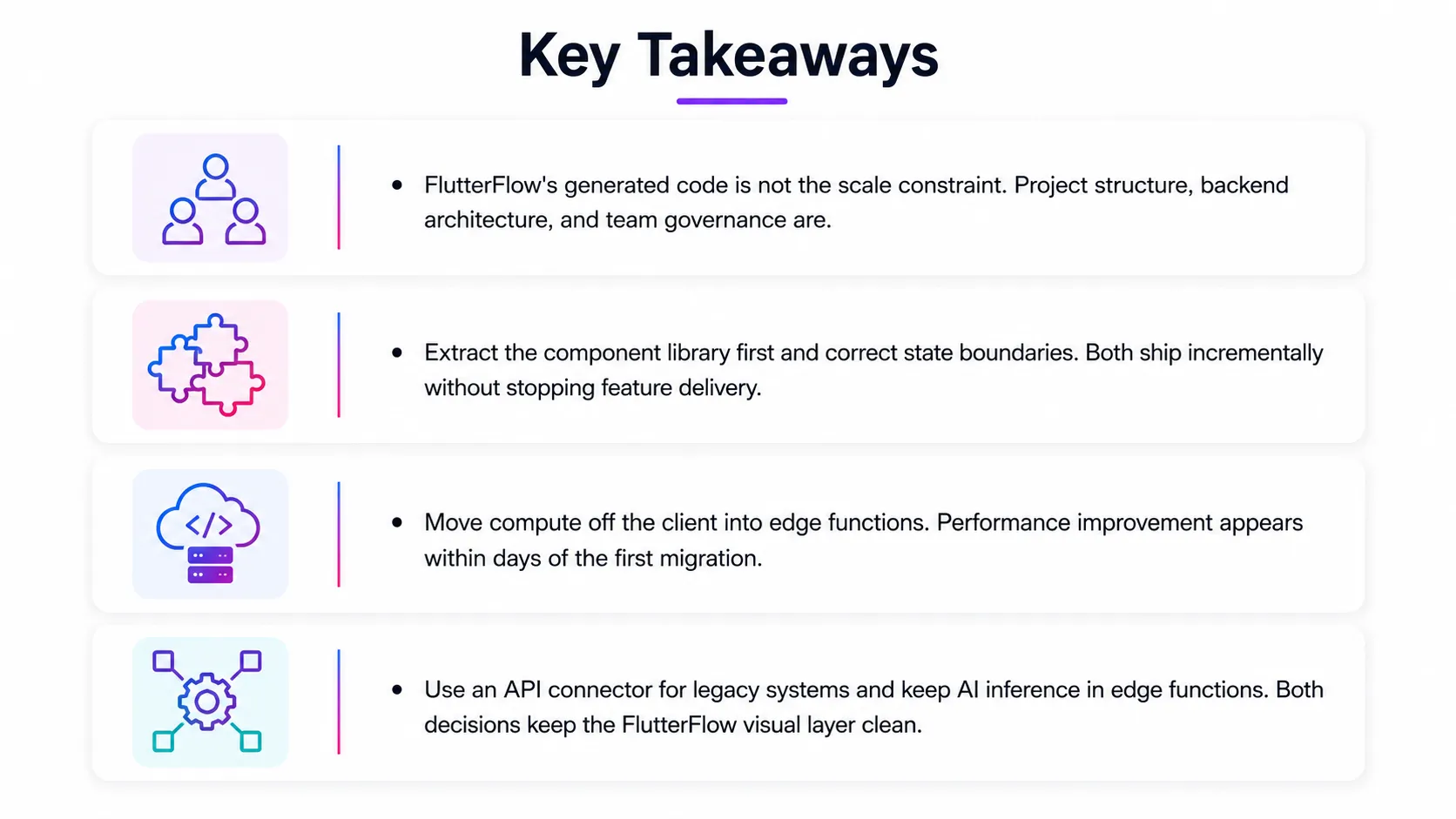
The rebuild instinct is understandable, but the sequence matters. Structure correction makes the backend work faster, backend decoupling makes governance simpler, and governance makes every future sprint cheaper. Skipping any layer is what causes teams to rebuild, hit the same problems twelve months later, and spend more the second time around.
FlutterFlow is a serious enterprise low-code platform. The organisations shipping reliably on it treat architecture as an ongoing practice. Whether you are publishing mobile and web apps to the App Store, Play Store, or Google Play, or deploying Progressive Web Apps and No-code Apps internally, the question is always the same: is the architecture set up to carry what comes next? For most teams, it just needs fixing.
People Also Ask

Can FlutterFlow handle 100,000+ users without performance issues?
Yes. FlutterFlow imposes no user limit. Scalability depends on backend architecture: Firestore query scoping, Supabase row-level security, and compute in edge functions carry enterprise production load reliably.
Does adding custom Dart code break FlutterFlow's visual editor?
No. FlutterFlow's custom actions, widgets, and functions are sandboxed extensions that persist cleanly through code generation without overriding the visual builder or creating merge conflicts.
Can FlutterFlow integrate with SAP, Salesforce, or internal legacy systems?
Yes. A thin microservice REST layer acts as an API connector between FlutterFlow and any legacy system. FlutterFlow calls the endpoint; the microservice handles all protocol translation.
How long does it take to refactor a FlutterFlow project for enterprise scale?
Component and state work: one to two weeks. Backend decoupling: two to three weeks. Each legacy API integration adds one to two weeks. Total: two to six weeks.
When does it actually make sense to migrate from FlutterFlow to full Flutter?
When the product needs native OS integrations beyond FlutterFlow's custom widget layer, or when a 15-plus developer team is measurably faster in raw Dart than the visual builder.


.webp)
.webp)
.webp)

.webp)
.webp)



